
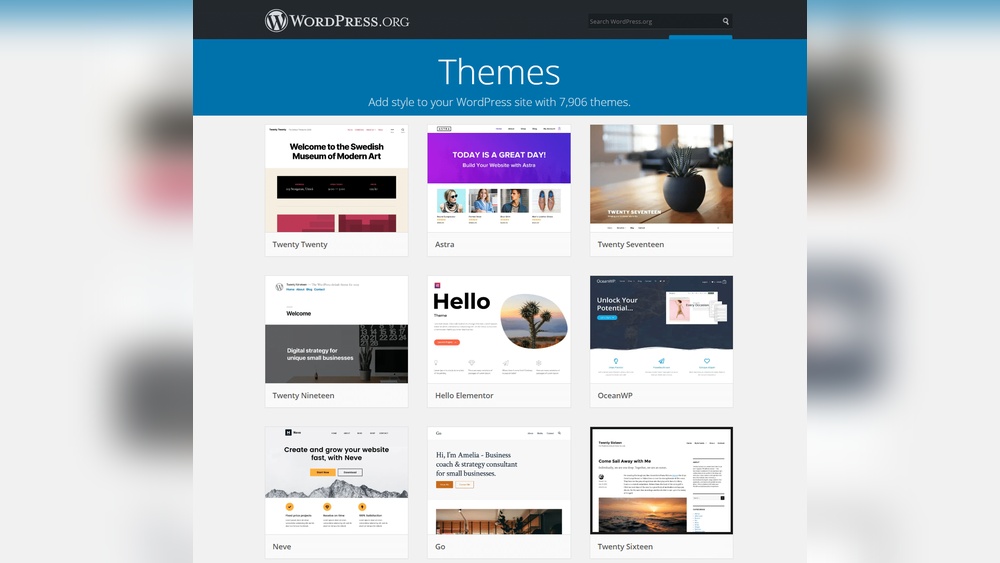
Are you curious about what makes your WordPress site look the way it does? The answer lies in something called a WordPress theme.
But what exactly is a theme, and why does it matter for your website? Understanding this simple yet powerful tool can change the way you build and customize your online presence. Keep reading, and you’ll discover how choosing the right theme can make your site not only look great but also work better for you.
Choosing The Right WordPress Theme
Choosing the right WordPress theme is key to building a successful website. It affects how your site looks and functions. The right theme helps your visitors find information easily. It also supports your content and brand. Pick a theme that fits your needs and goals. Consider your website type, design preference, and features.
Free Vs Premium Themes
Free themes are a good start for simple websites. They cost nothing and are easy to find. Many free themes offer basic designs and features. Premium themes come with more options and support. They often include advanced customization and regular updates. Choose free themes for small projects or testing ideas. Pick premium themes for professional sites or more control.
Key Features To Look For
Look for themes that are mobile-friendly. Responsive design ensures your site works on all devices. Check if the theme supports popular plugins. Good themes load fast and do not slow your site. They should offer easy customization without coding. A clean, simple layout helps visitors focus on content. Strong security features keep your site safe.
Theme Compatibility And Updates
Make sure the theme works with the latest WordPress version. Regular updates fix bugs and improve security. Themes updated often reduce risks of problems. Check if the theme supports your hosting environment. Compatibility with browsers is also important. Themes that are not updated can cause errors. Always choose themes that get regular maintenance.

Credit: wpengine.com
Installing And Activating Themes
Installing and activating a WordPress theme is the first step to change your site’s look. It gives your website a new style and layout. This process is simple and does not need coding skills. You can do it using the WordPress dashboard or by uploading files manually. Both ways allow you to quickly switch themes and refresh your site’s appearance.
Using The WordPress Theme Directory
The WordPress Theme Directory holds thousands of free themes. To use it, go to your WordPress dashboard and click “Appearance” then “Themes.” Click “Add New” to browse themes. You can search by features, popularity, or latest releases. When you find a theme you like, click “Install.” After installation, click “Activate” to apply the theme to your site. This method is fast and secure.
Uploading A Theme Manually
Sometimes, you may have a theme outside the WordPress Directory. You can upload it manually. First, download the theme as a .zip file from a trusted source. Go to “Appearance” then “Themes” in your dashboard. Click “Add New” and then “Upload Theme.” Choose the .zip file and click “Install Now.” After installation, click “Activate” to enable the theme. This method works well for premium or custom themes.
Switching Between Themes Safely
Switching themes can affect your website’s look and functions. Before changing, back up your site data. Use a staging site to test new themes safely. This helps prevent errors on your live site. After activating a new theme, check all pages for issues. Adjust your settings and widgets to fit the new theme’s design. This keeps your site running smoothly and looking good.
Customizing Your Theme
Customizing your WordPress theme lets you create a website that fits your style and needs. You can change colors, fonts, layouts, and more. This helps your site look unique and match your brand or personal taste.
WordPress offers simple tools to make these changes. You don’t need to know coding. Small tweaks can make a big difference in how your site looks and works.
Using The WordPress Customizer
The WordPress Customizer is a tool to adjust your site’s appearance. It shows a live preview of your changes. You can change site title, colors, background, and fonts. This helps you see updates before saving them. It is easy to use and very helpful for beginners.
Adding Widgets And Menus
Widgets add extra features to your site. You can place them in sidebars or footers. Common widgets include search bars, recent posts, and social links. Menus help visitors find pages on your site. You can create custom menus and add links to them. Both widgets and menus improve site navigation and user experience.
Editing Theme Settings For Branding
Most themes have settings to fit your brand style. You can change logos, colors, and fonts here. Upload your logo to make your site look professional. Use colors that match your brand identity. Simple adjustments make your site consistent and trustworthy to visitors.

Credit: webkul.com
Enhancing Design With Page Builders
Page builders help improve your WordPress theme’s design easily. They let you create pages without coding skills. You can drag and drop elements to build your site. This makes designing faster and more flexible.
Page builders also offer many tools and templates. These tools help you customize your website look. You can see changes live as you design. This way, your site looks exactly how you want it.
Popular Page Builder Plugins
Several page builder plugins work well with WordPress. Elementor is one of the most popular choices. It has many design options and templates. Beaver Builder is another option that is easy to use. Divi Builder offers a visual editor with many features. These plugins help you build pages without coding.
Drag-and-drop Design Tips
Drag-and-drop tools let you add content blocks quickly. Start with a simple layout to avoid clutter. Use columns and rows to organize content clearly. Keep important information at the top of the page. Use images and buttons to guide visitors’ attention. Always preview your design on different devices.
Creating Responsive Layouts
Responsive layouts adjust to fit any screen size. Use page builders that support mobile-friendly design. Test your pages on phones and tablets often. Avoid large images that slow down loading times. Use flexible grids that resize with the screen. Responsive design improves user experience and SEO.
Optimizing Theme Performance
Optimizing theme performance is key to a fast, smooth WordPress site. A well-optimized theme improves user experience and helps your site rank better in search engines. Focus on speed, mobile use, and SEO to get the best results. Each part plays a role in how visitors interact with your content.
Improving Site Speed
Site speed affects how long visitors stay on your site. Use themes with clean, lightweight code. Avoid themes with too many scripts or heavy images. Compress images and use caching plugins to load pages faster. Fast sites reduce bounce rates and increase visitor engagement.
Mobile Optimization
Most users browse on phones or tablets. A theme must adapt to different screen sizes. Responsive design ensures your site looks good on all devices. Check that buttons and menus work well on small screens. Mobile-friendly sites keep visitors longer and improve search rankings.
Seo Best Practices For Themes
Search engines read your site through the theme’s code. Use themes with clean HTML and proper heading structure. Themes should support SEO plugins for easier optimization. Fast loading, mobile-friendly, and well-coded themes rank higher. Good SEO themes help your content reach more people.

Credit: wordpress.org
Troubleshooting Common Theme Issues
Troubleshooting common theme issues helps keep your WordPress site running smoothly. Themes can cause layout glitches, slow loading, or broken features. Knowing how to fix these problems saves time and stress. This section covers simple fixes for layout problems, plugin conflicts, and data backup.
Fixing Layout Problems
Layout problems often happen after theme updates or custom changes. Start by clearing your browser cache. Next, check if the theme settings are correct. Resetting to default theme options can fix many issues. Make sure your images and content fit inside the set width. Use a responsive design checker to see how your site looks on different devices.
Resolving Plugin Conflicts
Plugins sometimes clash with themes, causing errors or crashes. Deactivate all plugins and see if the issue disappears. Activate each plugin one by one to find the cause. Update all plugins and your theme to the latest versions. Use plugins from trusted sources only. Avoid running too many plugins at once to keep your site stable.
Backup And Restore Procedures
Backing up your site protects you from data loss during fixes. Use a reliable backup plugin to save your files and database. Store backups in a safe, remote location. Before making major changes, create a fresh backup. If something goes wrong, restore your site from the backup quickly. Regular backups give peace of mind and safety.
Exploring Theme Marketplaces
Theme marketplaces offer a wide range of WordPress themes. These platforms help users find designs that fit different needs and styles. They act as a one-stop shop for theme browsing, buying, and downloading.
Exploring these marketplaces can save time and help find quality themes. They often include filters and categories to narrow down choices. This makes theme selection easier and more efficient.
Top Theme Providers
Some marketplaces feature themes from well-known providers. These providers update their themes regularly and ensure compatibility with WordPress updates. Popular names include ThemeForest, Elegant Themes, and StudioPress. Choosing themes from trusted providers can reduce technical issues.
Evaluating Theme Ratings And Reviews
Ratings and reviews give insight into theme quality and user experience. Look for themes with high ratings and many reviews. Read comments to learn about common problems or benefits. This feedback helps choose reliable themes that suit your site’s needs.
Licensing And Support Options
Understand the theme’s license before purchase or download. Some themes allow use on multiple sites; others limit usage. Support services vary; some offer 24/7 help, others only email support. Choose themes with clear licensing and good support to avoid future issues.
Frequently Asked Questions
What Is A WordPress Theme?
A WordPress theme controls your website’s design and layout. It defines colors, fonts, and page structure. Themes enhance user experience and site functionality without coding.
How Do WordPress Themes Affect Website Performance?
Themes impact loading speed, responsiveness, and SEO. A well-coded theme improves user engagement and search rankings. Poor themes can slow your site and hurt visibility.
Can I Customize A WordPress Theme Easily?
Yes, most WordPress themes offer customization options. You can change colors, fonts, and layouts via the WordPress Customizer. Some themes support drag-and-drop builders for easier design changes.
Are Free WordPress Themes Safe To Use?
Free themes are generally safe if downloaded from trusted sources like WordPress. org. Always check reviews and update regularly to avoid security risks and compatibility issues.
Conclusion
WordPress themes control how your website looks and feels. They help you change colors, fonts, and layout without coding. Choosing the right theme makes your site easy to use and attractive. Themes also affect your site’s speed and performance. Many free and paid themes fit different needs.
Explore themes to find one that suits your style and goals. A good theme makes building your website simple and fun. Start with a theme that matches your content and audience. This way, your site will stand out and work well.


