
Are you looking to establish your online presence but feel overwhelmed by the technicalities involved? You’re not alone.
Many people struggle with the first step: choosing and utilizing a domain name effectively. This is where Namecheap comes into play. Imagine having a domain that not only represents your brand but also stands out in the crowded online space.
With Namecheap, you can achieve just that. This platform simplifies the process, making it accessible and straightforward for everyone. You’ll discover exactly how to use Namecheap to your advantage, from purchasing your domain to managing it seamlessly. You’ll learn tips and tricks that can save you time and help you avoid common pitfalls. By the end, you’ll have the confidence to take control of your online identity, ensuring it aligns with your vision and goals. Let’s dive in, and unlock the potential of your domain with Namecheap today!
Choosing The Right Domain Name
Choosing the right domain name is a crucial step in establishing your online presence. It’s more than just a web address; it’s your brand identity and first impression. A memorable and meaningful domain can set you apart from the competition and drive traffic to your site. But how do you pick the perfect name? Let’s dive into some practical tips and tools that will guide you on this path.
Tips For Selecting A Domain
Think about your audience. What words will resonate with them? A domain that’s easy to remember can boost your visibility and credibility.
Keep it short and sweet. Avoid long and complex names that can be easily misspelled or forgotten.
Use keywords wisely. Incorporating relevant keywords can improve your site’s ranking in search results. But balance is key; don’t overstuff your domain.
Consider your brand. Reflect your business identity and values in your domain name. It’s a chance to showcase who you are and what you do.
Check for trademark issues. Ensure your domain doesn’t infringe on any existing trademarks to avoid legal troubles.
Checking Domain Availability
Visit Namecheap’s website to verify if your desired domain name is available. They offer a user-friendly search tool that shows instant results.
If your first choice is taken, consider variations or alternative extensions like .net, .org, or .co. Sometimes, a creative twist can lead to a unique and catchy domain.
Think outside the box. How can you stand out in a crowded digital space? A distinctive domain name can be your ticket to capturing attention.
Reserve your domain quickly. Popular names can be snapped up fast, so act promptly once you’ve found the right fit.
Choosing a domain name is an exciting journey filled with possibilities. It’s your chance to make a mark in the online world. What’s the story your domain will tell about you? Make it count.
Credit: www.namecheap.com
Creating A Namecheap Account
Creating a Namecheap account helps you manage domains effortlessly. Start by visiting the Namecheap website and signing up with your email. Explore domain options, purchase, and manage them from your dashboard with ease.
Creating a Namecheap account is your first step to owning a domain. It’s simple and quick. A Namecheap account lets you manage your domains easily. Let’s guide you through setting up your account. Follow these steps to start your online journey.Account Registration Steps
Visit Namecheap’s website. Look for the “Sign Up” button at the top. Click on it. Fill in your details like name and email. Choose a strong password. Confirm your email address. Your account is now ready. Easy, right?Secure Your Account
Security is crucial for your account. Start by enabling two-factor authentication (2FA). It adds an extra layer of security. Go to account settings. Find the security options. Follow prompts to set up 2FA. Use a trusted device for this. Update your password regularly. Avoid using simple passwords. Keep your account safe.Purchasing A Domain On Namecheap
Purchasing a domain on Namecheap is straightforward. It offers a user-friendly interface that simplifies the domain buying process. Namecheap is known for its affordable pricing and reliable service. This makes it a popular choice for many individuals and businesses. Understanding how to purchase a domain is essential for establishing an online presence. Let’s dive into the specifics of buying a domain on Namecheap.
Domain Purchase Process
First, visit Namecheap’s website. Use the search bar to find available domain names. Enter your desired domain name and click the search button. Namecheap will show you if the domain is available. If it is, you can proceed to purchase it. If not, it will suggest similar options. Once you’ve chosen a domain, add it to your cart. Review the cart to ensure all details are correct. Click ‘Checkout’ to proceed. Create an account or log in. Follow the prompts to complete your purchase. You’ll receive confirmation via email. Your domain is now registered and ready for use.
Understanding Domain Pricing
Domain pricing varies based on several factors. The extension (.com, .net, .org) affects the price. Popular extensions usually cost more. Unique or premium domains can also have higher prices. Namecheap often offers discounts and promotions. This can reduce the overall cost. It’s important to renew domains annually. Namecheap provides competitive renewal rates. Always check for additional fees before finalizing your purchase. This ensures transparency and avoids unexpected charges. Namecheap’s pricing structure is clear and customer-friendly.
Credit: help.mailgun.com
Domain Management Tools
Managing your domains effectively is essential for a seamless online presence. Namecheap provides a range of domain management tools. These tools help users control their domains easily. From DNS settings to domain transfers, everything is simple. Let’s explore these tools further.
Using The Domain Dashboard
The domain dashboard is user-friendly. It shows all your domains in one place. You can view important details like expiration dates. You can also renew domains with just a few clicks. The dashboard helps keep everything organized. It’s easy to navigate and understand.
Dns Settings Overview
DNS settings are crucial for domain functionality. Namecheap offers an intuitive DNS management section. You can update nameservers and DNS records easily. A few clicks, and your settings are changed. This ensures your website runs smoothly. Managing DNS settings is straightforward here.
Setting Up Domain Hosting
Setting up domain hosting is crucial for launching your website. Namecheap offers seamless domain management and hosting services. This guide helps you set up your domain hosting with Namecheap. Dive into these steps to create your perfect online presence.
Selecting A Hosting Plan
Choose a hosting plan that fits your needs. Namecheap provides various options. Shared hosting is budget-friendly. For more resources, consider VPS hosting. Dedicated hosting offers maximum control. Each plan has unique features. Compare them before deciding.
Connecting Domain To Hosting
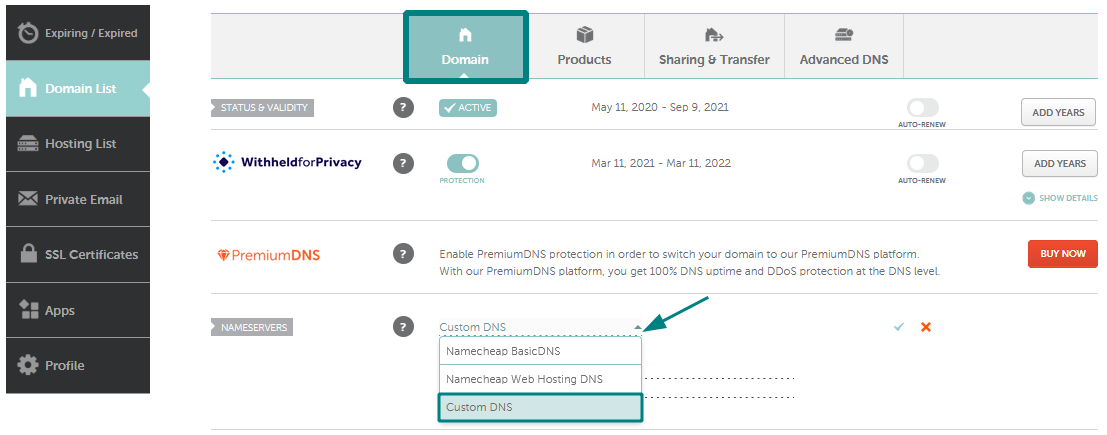
Link your domain to your hosting account. Log into Namecheap’s dashboard. Find your domain in the list. Click ‘Manage’ next to your domain name. Navigate to ‘Nameservers’ section. Select ‘Custom DNS’ from the dropdown. Enter your hosting server names. Save changes to complete the setup.
Check your connection status. It may take a few hours. Once connected, your website is ready. Test the connection by visiting your domain. Your site should now display properly.
Email Setup With Namecheap
Email setup with Namecheap is a straightforward process. It allows users to create professional email addresses associated with their domain. This adds credibility and organization to your communication efforts. Namecheap provides a user-friendly interface for managing email settings. You can easily create custom email addresses and forward emails to other accounts.
Creating Custom Email Addresses
Start by logging into your Namecheap account. Access the domain list and select the domain you want to use. Navigate to the ‘Email’ section. Here, you can set up a new custom email address. Choose a name that fits your business or personal needs. Fill in the required details and save your changes. Your new email address is now ready for use.
Email Forwarding Options
Email forwarding is a useful feature. It allows you to receive emails sent to your domain at another email address. Go to the ‘Email Forwarding’ section in your account. Enter the email address to forward messages to. You can add multiple forwarding addresses if needed. This ensures you never miss important communications. Keep your inbox organized and efficient.
Enhancing Domain Security
Enhancing domain security is crucial for protecting your online presence. This ensures your website remains safe from potential threats. Namecheap offers several features to bolster your domain’s security. These include domain privacy protection and SSL certificates.
Enabling Domain Privacy Protection
Domain privacy protection keeps your personal details private. It hides your contact information from the public WHOIS database. This reduces spam and prevents identity theft. Namecheap offers this service to safeguard your personal information. Enable it to protect your identity and maintain privacy.
Implementing Ssl Certificates
SSL certificates encrypt data between your website and visitors. This ensures sensitive information remains secure. Browsers show a padlock icon when a site uses SSL. This boosts trust and credibility for your website. Namecheap provides affordable SSL certificates. These enhance security and improve search engine rankings.
Credit: www.youtube.com
Troubleshooting Common Issues
Troubleshooting common issues with your Namecheap domain can be challenging. Many users face difficulties while setting up their domains. Understanding these challenges is key to resolving them. This guide will help you address frequent issues efficiently.
Resolving Dns Errors
DNS errors can disrupt your website’s accessibility. First, check your DNS settings. Ensure they match the records provided by your hosting provider. Incorrect settings often cause DNS errors. Use Namecheap’s DNS check tool for assistance. This tool helps identify and fix issues quickly. If problems persist, clear your browser cache. This action can help load the updated DNS settings. Lastly, wait a few hours for DNS changes to propagate. Sometimes, it takes time for changes to take effect globally.
Contacting Namecheap Support
If issues remain unresolved, reach out to Namecheap support. Their team offers 24/7 assistance. Log in to your Namecheap account. Navigate to the “Support” section. Here, you can submit a ticket detailing your issue. Provide as much information as possible. This helps the support team understand your problem better. Alternatively, use their live chat feature. It’s quick and connects you to a representative instantly. Namecheap’s support is known for being responsive and helpful. Don’t hesitate to contact them if needed.
Frequently Asked Questions
What Are The Disadvantages Of Namecheap?
Namecheap’s customer support can be slow. Their hosting plans sometimes lack advanced features. Prices can increase on renewal. Limited data center locations may affect website speed. Their domain management interface can be confusing for beginners.
How To Manage A Domain In Namecheap?
Log into Namecheap account, go to “Domain List”, select your domain. Use options to manage DNS, renewals, privacy settings, or transfer.
How Long Does It Take For A Namecheap Domain To Work?
A Namecheap domain typically becomes active within 24 to 48 hours after purchase. DNS propagation affects the time, which can vary. Check your DNS settings and ensure they’re correctly configured to speed up the process. Patience is key, as changes can sometimes take longer.
How Do I Connect My Domain To My Website?
To connect your domain, access your hosting provider’s DNS settings. Update the A record to point to your website’s IP address. Verify the connection by checking the domain’s propagation status. Consult your hosting provider for specific instructions, as processes may vary.
Conclusion
Using Namecheap for your domain needs is straightforward. Their interface is user-friendly. You can easily search and register your desired domain. Need to transfer a domain? Simple and hassle-free with Namecheap. Their customer support is reliable and ready to assist.
Managing DNS settings? It’s intuitive and quick. Remember to explore their extra features, like hosting and email services. Secure your online presence with confidence. Namecheap offers affordable pricing. Ideal for beginners and small businesses. Start your online journey today. Choose Namecheap for ease and reliability.
Your domain is just a click away.


