
Creating your own website might seem like a daunting task, but with Namecheap, it’s more straightforward than you think. Whether you’re launching a blog, starting an online store, or creating a portfolio, Namecheap provides the tools you need.
Imagine having your own corner of the internet, where you control everything from the design to the content. Sounds exciting, right? By the end of this guide, you’ll have the confidence and knowledge to set up a website that reflects your unique vision.
Stick with us, and discover how easy it is to transform your ideas into a digital reality with Namecheap. Your website awaits—let’s get started!
Choosing The Right Domain
Creating a website on Namecheap starts with choosing the right domain. The domain name is crucial. It defines your online identity and affects your site’s success. A good domain name is memorable and relevant. It helps users find your website easily. Careful consideration in choosing a domain is important.
Importance Of Domain Name
Your domain name is your brand’s face online. It represents your business or personal identity. A strong domain name builds trust and credibility. It attracts visitors and encourages them to stay. It should be easy to spell and pronounce. Avoid complex words or unusual spellings. Keep it short and simple for maximum impact.
Checking Domain Availability
Once you have a domain name in mind, check its availability. Namecheap offers a simple tool for this purpose. Enter your desired name and see if it’s taken. If unavailable, consider variations or alternatives. Choose a unique name that stands out. Ensure it aligns with your business goals.
Registering Your Domain
After finding an available domain, register it promptly. This secures your chosen name. Namecheap’s registration process is straightforward. Follow the steps to complete your purchase. Provide accurate information during registration. This ensures proper ownership and management.
Registering your domain early prevents others from claiming it. Protect your brand and establish your online presence. Make your domain a cornerstone of your website strategy.
Setting Up Hosting
Create a website on Namecheap by setting up hosting easily. Choose a plan, register a domain, and follow instructions. Enjoy seamless website creation with Namecheap’s user-friendly interface.
Creating a website on Namecheap is a straightforward process that can set the stage for your online success. One of the critical steps is setting up hosting, which ensures your website is accessible to visitors worldwide. Hosting is like renting space on the internet for your website, and selecting the right plan can make all the difference in your site’s performance and reliability. Let’s dive into the essentials of setting up hosting on Namecheap.Types Of Hosting Plans
Namecheap offers various hosting plans tailored to different needs. Whether you’re starting a blog, launching an online store, or building a portfolio, there’s a plan for you. The primary hosting types include Shared Hosting, VPS Hosting, Dedicated Servers, and Managed WordPress Hosting. Shared Hosting is ideal for beginners and small websites. It’s affordable and easy to manage. VPS Hosting is for those who need more power and control. It offers dedicated resources, which means your site won’t be affected by others. Dedicated Servers are best for large websites with high traffic. They provide maximum control and performance. Managed WordPress Hosting is perfect if you’re using WordPress, as it comes optimized for speed and security.Selecting The Best Hosting Plan
Choosing the right hosting plan depends on your website’s needs and your budget. Ask yourself how much traffic you expect. If you’re just starting, a shared hosting plan might be sufficient. Consider the resources you need, like storage and bandwidth. If you plan to grow quickly or need specific software, look into VPS or Dedicated Servers. Managed WordPress Hosting can be a great choice if you want a hassle-free WordPress experience. Look at the features included in each plan. Do they offer free SSL certificates, backups, or customer support? These extras can save you time and money.Configuring Hosting Settings
Once you’ve selected your hosting plan, it’s time to configure your settings. Start by setting up your domain. Namecheap makes this easy with an intuitive dashboard. Link your domain to your hosting plan to ensure visitors find your site. Next, set up your email accounts if needed. Most plans include email hosting, which can give your business a professional touch. Configure your website’s security settings. This might include setting up an SSL certificate to keep your visitors’ data safe. Finally, optimize your hosting settings for performance. Enable caching and choose the nearest server location to your target audience. This can significantly boost your site’s loading speed. Have you ever struggled to choose the right hosting plan? Or maybe you’ve had a surprising experience with website speed? Share your thoughts in the comments below and let’s learn from each other!Installing WordPress
Begin by selecting Namecheap as your domain and hosting provider. Use their platform to quickly install WordPress. This user-friendly setup helps you create a functional and appealing website with minimal effort.
Creating a website on Namecheap is straightforward, but installing WordPress is where the magic begins. WordPress is not just a platform; it’s the key to bringing your website vision to life. Whether you’re crafting a blog, launching an online store, or creating a portfolio, WordPress offers flexibility and power. As you dive into the installation process, you’ll realize just how simple it can be. Let’s break down the steps to get WordPress up and running seamlessly on your Namecheap hosting. ###Accessing The Control Panel
To begin, log in to your Namecheap account. Navigate to your dashboard and locate the domain you wish to use. Click on the “Manage” button next to it. Once there, find the “Hosting” section and click on “Go to cPanel.” The control panel is your website’s command center. Here, you can manage files, databases, and much more. Take a moment to explore the options. Familiarizing yourself with cPanel will empower you to make future tweaks effortlessly. ###One-click WordPress Installation
Namecheap simplifies the WordPress installation with a one-click installer. In the cPanel, look for the “Softaculous Apps Installer” under the Software section. Select WordPress from the list. Click “Install,” and fill out the necessary details like your site name and admin credentials. In a matter of seconds, your WordPress site will be live. You might even feel like a tech wizard as you watch the progress bar zip along. ###Securing Your WordPress Site
Security is crucial for any website. Start by setting strong passwords for your admin account and database. Consider installing security plugins such as Wordfence or Sucuri. These tools offer firewall protection and malware scanning. Regular updates are vital. Keep WordPress and its plugins updated to shield your site from vulnerabilities. Are you ready to take your website’s security seriously? A few simple steps can make a huge difference.
Credit: www.youtube.com
Choosing A Theme
Picking the right theme is crucial for building a website on Namecheap. Select a theme that matches your brand’s style and is easy to navigate. A user-friendly design keeps visitors engaged and makes your site look professional.
Choosing the right theme for your website is like selecting the perfect outfit for a big event. It sets the tone, makes a lasting impression, and should reflect your personality or brand. On Namecheap, you’ll find plenty of options to suit your style and purpose. Whether you’re looking for a free theme or a premium one, there’s something for everyone. Let’s dive into some practical ways to make your website stand out with the perfect theme.Exploring Free Themes
Free themes are a great starting point, especially if you’re on a budget. Namecheap offers a range of visually appealing free themes that cater to different niches. They’re perfect for experimenting and learning the ropes without financial commitment. You can browse through the free themes by logging into your Namecheap account and accessing the website builder. Look for themes that align with your website’s purpose. Are you creating a blog, a portfolio, or an online store? There’s a free theme for each. While free themes offer basic functionalities, they can be customized to give your site a unique touch. Add your logo, change colors, and adjust the layout to match your style.Purchasing Premium Themes
Premium themes can elevate your website with advanced features and professional designs. They often come with dedicated support and regular updates, ensuring your site stays fresh and secure. This is a worthy investment if you’re serious about growing your online presence. When considering a premium theme, think about what additional features you need. Do you require e-commerce capabilities, advanced SEO settings, or a responsive design? Premium themes often provide these features, making it easier for you to focus on content. Purchasing a premium theme on Namecheap is straightforward. Simply search for themes that fit your needs, read reviews, and check out demos. Make sure it aligns with your brand and is compatible with your website builder.Customizing Theme Settings
Customizing your theme is where you can really make your website shine. Start by personalizing the header and footer with your brand colors and logo. This simple step can immediately set your site apart from others using the same theme. Adjust the typography to improve readability and match your brand’s voice. Choose fonts that are easy to read and pair well together. Remember, consistency is key in web design. Widgets and plugins can enhance functionality without cluttering your website. Consider what features are necessary and avoid overloading your site with unnecessary elements. Ask yourself, “What do my visitors need most?” and tailor your theme settings accordingly. By making thoughtful choices, you can create a visually appealing and user-friendly website that leaves a lasting impression.Adding Essential Plugins
Adding essential plugins to your Namecheap website boosts its functionality. Plugins offer features that improve user experience and site management. They are vital for performance, security, and usability. Choosing the right plugins ensures your site runs smoothly and efficiently.
Must-have Plugins
Some plugins are essential for every website. Security plugins protect your site from threats. SEO plugins help your site rank better on search engines. Backup plugins ensure your data stays safe. These are crucial for maintaining your site’s health.
Enhancing Site Functionality
Plugins can add various features to your site. E-commerce plugins let you sell products online. Social media plugins help share content easily. Contact form plugins allow visitors to reach you directly. Enhance your site with these useful tools.
Managing Plugin Settings
Proper management of plugin settings is important. It ensures your site runs efficiently. Regularly update plugins to keep them secure. Configure settings to suit your website’s needs. This keeps your site user-friendly and fast.
Creating Content
Creating a website on Namecheap is straightforward. Start by registering a domain and selecting a hosting plan. Use Namecheap’s website builder to design and customize your site easily.
Creating content is key to building a successful website on Namecheap. Content attracts visitors and keeps them engaged. It helps convey your message and establish your brand. Let’s explore how to create content effectively.Writing Engaging Blog Posts
Start with a catchy headline. It should grab attention immediately. Use simple language and keep sentences short. Break your content into small paragraphs. This makes it easy to read. Use bullet points or lists where possible. They help convey information clearly. Ask questions to engage readers. Share personal stories to connect with your audience. End with a call to action. Encourage comments or shares.Optimizing Content For Seo
SEO helps your content reach more people. Use keywords naturally in your text. Focus on one main keyword per post. Include it in the title and subheadings. Use it in the first paragraph too. Add synonyms or related terms throughout. Ensure your content is relevant and informative. Use meta descriptions to summarize your post. Keep them under 160 characters. Use alt tags for images. This helps search engines understand them.Incorporating Multimedia Elements
Multimedia enhances your content’s appeal. Use images to break up text. They make your page visually appealing. Include infographics to explain complex ideas. They simplify information for readers. Add videos to demonstrate processes. They engage users more than text alone. Use audio clips for interviews or podcasts. Ensure all media is high quality. This reflects well on your brand.Testing And Launching
Testing and launching your website on Namecheap is a crucial step. It ensures everything functions smoothly before it goes live. This phase involves previewing your site, checking for errors, and finally making it live. Each step is vital for a successful launch.
Previewing Your Site
Begin by previewing your site. This helps you see how it appears to visitors. Use Namecheap’s preview tools to check layout and design. Ensure all images and text display correctly. Navigation should be easy and intuitive. Ensure links direct to the correct pages. This prevents confusion for future visitors.
Checking For Errors
Next, check for errors on your website. Broken links can frustrate users. Test every link on your site. Ensure they lead to the correct content. Look for spelling and grammar mistakes. These can reduce your site’s credibility. Check for any missing images or videos. Verify that forms and buttons work properly. Test your site on different browsers. This ensures compatibility and a consistent user experience.
Making The Site Live
After confirming everything is correct, it’s time to make the site live. Go to your Namecheap dashboard. Follow the steps to publish your site. Ensure your domain is correctly linked. Check your site’s visibility on search engines. This ensures potential visitors can find you. Monitor the site for a few days. This helps catch any unexpected issues early. Regular maintenance keeps your website running smoothly.
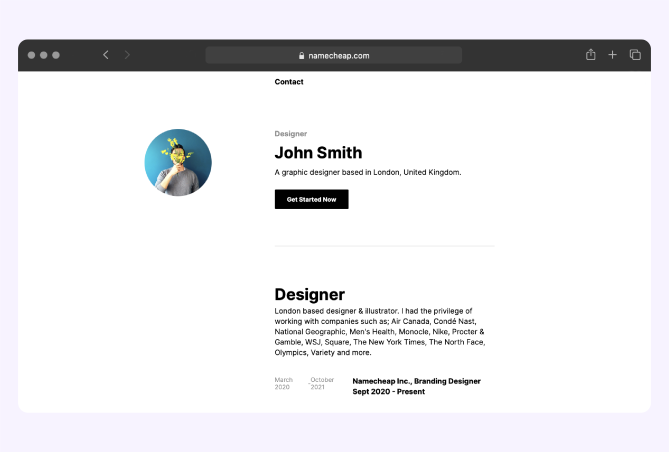
Credit: www.namecheap.com
Maintaining Your Website
Creating your website on Namecheap is just the beginning. Once it’s up and running, maintaining it is crucial to ensure it stays secure, fast, and appealing to your visitors. Imagine this: you’ve built a beautiful website, but without regular maintenance, it could turn into a cluttered mess or become vulnerable to cyber threats. So, how can you keep your site in top shape?
Regular Backups
Backing up your website regularly is like having insurance for your digital space. You never know when a sudden glitch or cyber attack might hit. Losing your hard work is daunting, but with backups, you can restore your site effortlessly.
Consider using Namecheap’s backup tools or third-party services like UpdraftPlus. Schedule backups weekly or monthly depending on how often you update your site. This small step can save you from a big headache down the road.
Updating Plugins And Themes
Think of plugins and themes as the clothes your website wears. Just as fashion trends change, so do software updates. Keeping these elements current ensures your site functions smoothly and remains secure.
Check for updates regularly in your Namecheap dashboard. Outdated plugins can slow your site or leave it vulnerable to hackers. If you notice a plugin no longer supported, consider switching to an alternative that receives regular updates.
Monitoring Site Performance
Your website’s speed and responsiveness can make or break user experience. Slow sites frustrate visitors, leading them to click away. Monitoring performance helps you spot issues early and keep your site running smoothly.
Use tools like Google Analytics or Pingdom to track site speed. If you notice a dip in performance, it might be time to optimize images or review hosting plans. Remember, a fast site keeps visitors happy and engaged.
Maintaining your website on Namecheap is not just a technical task; it’s an opportunity to ensure your online presence remains vibrant and secure. Do you have a maintenance routine in place? If not, it’s time to start!
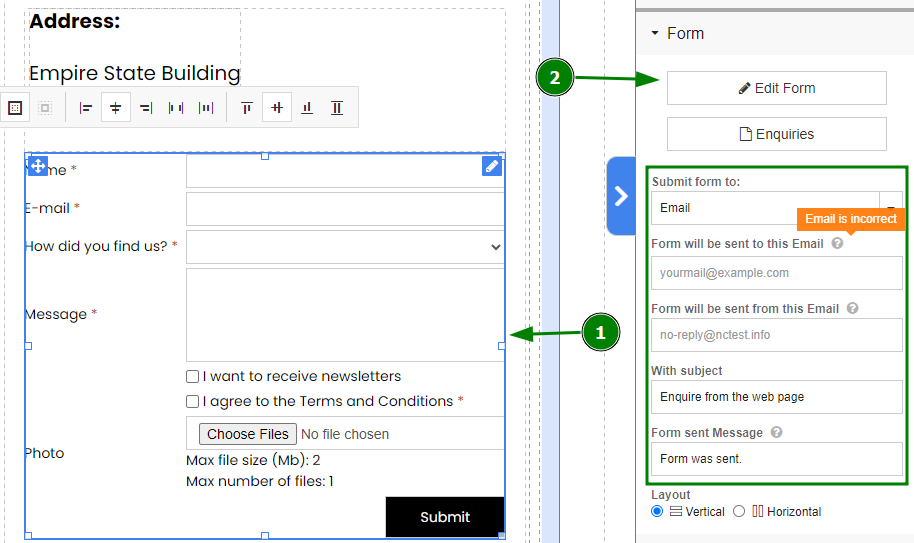
Credit: www.namecheap.com
Frequently Asked Questions
Can I Create A Website With Namecheap?
Yes, you can create a website with Namecheap. They offer domain registration, hosting services, and easy-to-use website builders. Their platform supports WordPress and other CMS options, making website creation straightforward. Additionally, they provide customer support and tutorials for assistance.
Is Namecheap A Good Website Builder?
Namecheap offers a user-friendly website builder suitable for beginners. It provides customizable templates and affordable pricing. Advanced features may be limited compared to other builders. Ideal for those seeking simplicity and cost-effectiveness. It’s a reliable choice for basic website needs, making it a good option for small businesses or personal sites.
How Do I Create A Website With A Domain Name?
Choose a domain name provider and register your desired name. Select a web hosting service. Install a website builder or CMS like WordPress. Customize your website design and content. Publish your site by connecting it to your domain. Ensure regular updates and maintenance for optimal performance.
How To Make A Website Secure On Namecheap?
Secure your website on Namecheap by installing an SSL certificate. Regularly update software and plugins. Use strong passwords and enable two-factor authentication. Conduct regular backups and monitor for suspicious activity. Implement a firewall for added protection.
Conclusion
Creating a website on Namecheap is straightforward and rewarding. Easy steps guide you from start to finish. Choose a domain, select hosting, and customize your site. User-friendly tools make the process simple. Even beginners can build a professional-looking website. Enjoy the freedom to express your ideas online.
Support is available if you need help. Building your site is a valuable skill. With Namecheap, you gain confidence in managing your digital space. Explore, learn, and grow your online presence. Start today and watch your website thrive. Keep it updated to engage visitors effectively.


