
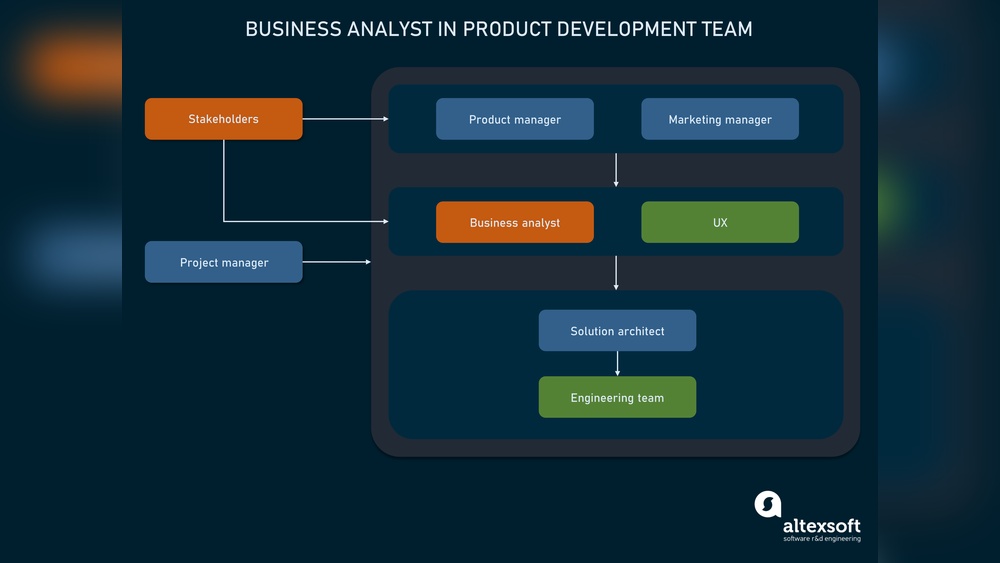
Are you wondering which software tools can make your work as a business analyst easier and more effective? Choosing the right software can transform how you gather data, communicate insights, and solve problems.
You’ll discover the essential programs that top business analysts rely on every day. By the end, you’ll know exactly what tools to use to boost your productivity and deliver outstanding results. Keep reading—your next game-changing software might be just a few lines away.
Essential Tools For Business Analysts
Business analysts rely on different software tools to do their jobs well. These tools help them gather, analyze, and share information. Choosing the right software boosts productivity and improves project outcomes.
Each tool serves a specific purpose. Some focus on managing requirements, others on analyzing data. Many tools also help with visualizing ideas and teamwork.
Requirements Management Software
Requirements management tools help business analysts track project needs. They organize requirements and changes clearly. These tools reduce mistakes and keep the team on the same page. Examples include Jama Connect and IBM DOORS.
Data Analysis Tools
Data analysis software helps examine business data. Analysts find trends, patterns, and insights. Easy-to-use tools like Microsoft Excel and Tableau help create reports. They support better decision-making based on facts.
Modeling And Diagramming Software
Modeling software helps draw process flows and diagrams. These visuals explain complex ideas simply. Tools like Microsoft Visio and Lucidchart are popular choices. They make it easier to plan and share concepts.
Collaboration Platforms
Collaboration tools connect team members and stakeholders. They allow sharing documents, messages, and updates. Platforms like Microsoft Teams and Slack support real-time communication. This keeps everyone informed and involved.
Project Management Tools
Project management software tracks tasks, deadlines, and progress. Business analysts use tools like Jira and Trello to manage work. These systems improve organization and help meet project goals on time.
Popular Requirements Management Tools
Requirements management tools help business analysts track project needs clearly. They organize, update, and share requirements with teams. These tools keep projects on track and avoid confusion. Using the right software improves communication and saves time.
Jira
JIRA is popular for tracking project tasks and issues. It helps teams follow progress and manage changes. Business analysts use JIRA to write and track requirements. It supports agile methods and allows easy collaboration.
Confluence
Confluence works well with JIRA for documentation and teamwork. It stores project details in one place. Business analysts create, share, and update requirement documents here. It keeps information organized and accessible for all team members.
Ibm Rational Doors
IBM Rational DOORS is strong in managing complex requirements. It helps track changes and maintain version control. Business analysts use it for large projects needing detailed documentation. This tool ensures clear and thorough requirement management.
Top Data Analysis Software
Data analysis software helps business analysts turn raw data into clear insights. These tools make it easier to spot trends and make decisions based on facts. Choosing the right software can improve your work and save time.
Here are some top data analysis tools that many business analysts use every day.
Microsoft Excel
Microsoft Excel is a popular tool for data analysis. It offers many features like formulas, charts, and pivot tables. These help analyze data quickly and create reports. Excel is easy to learn and widely used in many industries. It works well for small to medium data sets.
Tableau
Tableau is a powerful software for data visualization. It helps create interactive charts and dashboards. Business analysts use Tableau to explore data and share insights with teams. The software connects to many data sources and updates reports automatically. It is good for handling large data sets.
Power Bi
Power BI by Microsoft is another popular data analysis tool. It allows users to build detailed reports and dashboards. Power BI integrates well with other Microsoft products like Excel and Azure. It supports real-time data updates and collaboration. This tool is suitable for businesses of all sizes.

Credit: www.youtube.com
Best Modeling And Diagramming Tools
Modeling and diagramming tools help business analysts visualize ideas clearly. They create charts, workflows, and diagrams to explain complex data simply. These tools improve communication and support better decision-making in projects.
Choosing the right software makes analysis easier and faster. The following are popular tools trusted by many business analysts worldwide.
Microsoft Visio
Microsoft Visio is a well-known diagramming tool. It offers many templates and shapes for different diagrams. Business analysts use it to create flowcharts, org charts, and network diagrams. Visio works well with other Microsoft Office apps. It is easy to share and collaborate on diagrams using Visio.
Lucidchart
Lucidchart is a cloud-based diagramming software. It lets users build diagrams online from anywhere. The tool supports real-time collaboration with teams. Lucidchart has many templates for business process models and data flows. Its simple drag-and-drop interface helps beginners and experts alike.
Balsamiq
Balsamiq focuses on wireframing and interface design. It helps business analysts sketch user interfaces quickly. The tool looks like a rough drawing, which encourages feedback and changes. Balsamiq is useful for planning websites or app layouts before development. It keeps designs simple and easy to understand.
Collaboration And Communication Platforms
Collaboration and communication platforms help business analysts work well with teams. These tools make sharing ideas simple and keep projects on track. Clear communication avoids mistakes and saves time. Business analysts use these platforms daily to connect with stakeholders and team members.
Slack
Slack is a popular chat tool for teams. It offers channels for different topics. Business analysts use it to ask quick questions and share updates. Files and links can be shared easily. Slack integrates with many other tools. This helps keep all project information in one place.
Microsoft Teams
Microsoft Teams combines chat, video calls, and file sharing. Business analysts use it to hold meetings with remote teams. It works well with Microsoft Office apps. Teams allow real-time collaboration on documents. This platform helps keep conversations and files organized. It is a reliable tool for teamwork.
Trello
Trello uses boards, lists, and cards to manage tasks. Business analysts track project progress visually. Cards can show tasks, deadlines, and notes. Teams update cards to keep everyone informed. Trello is easy to use and flexible. It helps business analysts plan and manage projects clearly.
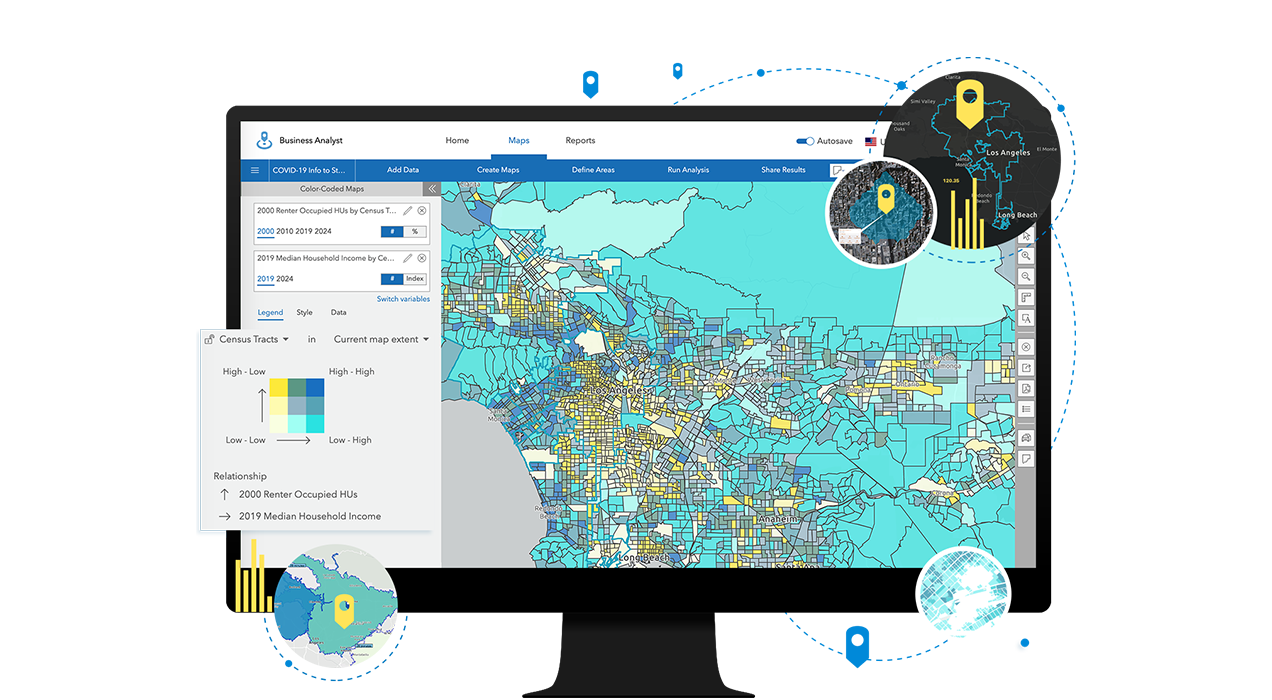
Credit: www.esri.com
Project Management Solutions
Project management solutions help business analysts organize tasks and track progress. These tools simplify teamwork and improve communication. They keep projects on schedule and ensure goals are met. Business analysts rely on these platforms to manage deadlines and resources efficiently.
Asana
Asana lets teams create and assign tasks easily. It offers clear timelines and project views. Business analysts use Asana to track project stages and updates. The interface is simple and user-friendly. It helps keep everyone on the same page.
Monday.com
Monday.com provides visual project boards for easy tracking. It supports automation to reduce manual work. Business analysts can customize workflows to fit project needs. The platform shows real-time progress and deadlines. It boosts team collaboration and task management.
Wrike
Wrike offers tools for planning, tracking, and reporting projects. It integrates with many other business apps. Business analysts benefit from its flexible project templates. Wrike helps identify risks and manage resources well. The platform supports teamwork across different departments.
Choosing The Right Tools
Choosing the right tools is key for a business analyst. The tools must fit the tasks and help solve problems fast. Not every software suits every business. Picking the right one saves time and effort. It also improves the quality of work.
Assessing Business Needs
Start by understanding what the business needs. What problems need solving? What data must be collected? The tool should support these tasks. It should also help make decisions easier. Clear goals guide the choice of software.
Integration Capabilities
Check if the software works well with other systems. Many businesses use multiple tools. Software that connects smoothly saves time. It avoids errors caused by manual data entry. Integration is important for efficient workflows.
Ease Of Use
The tool must be simple to learn and use. Complex software slows down work. Easy-to-use tools help teams adopt them quickly. Good user interfaces reduce mistakes. Training time should be minimal.
Cost Considerations
Look at the price of the software carefully. Consider the budget available for tools. Sometimes cheaper tools lack needed features. Expensive ones may offer more value. Balance cost with the benefits provided.

Credit: www.youtube.com
Future Trends In Business Analysis Software
The future of business analysis software is bright and full of potential. New technologies are changing how analysts work. These tools help make decisions faster and more accurate. They also improve teamwork and data handling. Understanding these trends prepares analysts for upcoming challenges and opportunities.
Ai-powered Tools
Artificial intelligence is becoming common in analysis tools. AI helps by finding patterns in data quickly. It can predict outcomes based on past information. This saves time and reduces errors. AI tools also assist in creating reports and visualizations. They make complex data easy to understand for everyone.
Cloud-based Solutions
Cloud software allows access from anywhere at any time. This means teams can work together without being in the same place. Cloud tools store large amounts of data securely. They also update automatically with new features. This flexibility supports remote work and fast project changes.
Automation And Workflow Enhancements
Automation reduces repetitive tasks for business analysts. It speeds up data collection and report generation. Automated workflows help keep projects on track. They send alerts for deadlines and changes. This ensures nothing is missed and work flows smoothly.
Frequently Asked Questions
What Software Tools Do Business Analysts Commonly Use?
Business analysts commonly use tools like Microsoft Excel, JIRA, Tableau, and Microsoft Visio. These tools help in data analysis, project management, visualization, and documentation, improving decision-making and collaboration.
Which Software Is Best For Business Process Modeling?
Microsoft Visio and Lucidchart are top software for business process modeling. They allow easy creation of flowcharts and diagrams to visualize and optimize processes effectively.
How Do Business Analysts Use Data Visualization Tools?
Business analysts use tools like Tableau and Power BI to transform raw data into visual insights. These visuals help stakeholders understand trends and make informed decisions quickly.
Are There Specific Project Management Tools For Business Analysts?
Yes, JIRA and Trello are popular project management tools for business analysts. They assist in tracking tasks, managing workflows, and ensuring smooth project execution.
Conclusion
Business analysts use many tools to help their work. These softwares make it easier to collect and study data. They also help in creating reports and charts. Choosing the right software depends on the project needs. Learning these tools improves efficiency and accuracy.
Businesses benefit when analysts work with good software. The right tools help solve problems faster. Keep exploring new software to stay updated and effective.


