
Are you curious about where your website actually lives? Knowing who hosts your domain is key to managing your site smoothly and avoiding surprises.
Whether you’re troubleshooting issues, planning a move, or just want to understand your online presence better, finding out your domain host is easier than you think. You’ll discover simple, step-by-step ways to check who your domain is hosted by—no tech jargon, no confusion.
Keep reading, and you’ll gain the clarity and control you need over your website’s home.

Credit: support.intermedia.com
Why Knowing Your Domain Host Matters
Knowing who hosts your domain is important for many reasons. It helps you manage your website better. You can make changes to your site quickly. Also, it keeps your website safe and running well.
If you do not know your domain host, you might face delays. You may not fix issues fast. This can affect your visitors and business.
Understanding Your Website’s Support Options
Your domain host provides support for technical problems. Knowing your host helps you contact support easily. You get help faster when you know where to turn.
Managing Domain Settings Efficiently
You control domain settings through your host. These include DNS records and renewals. Knowing your host means you can update these settings anytime.
Protecting Your Website From Security Risks
Your host offers security features like SSL certificates. You can keep your site safe from hackers. Knowing your host helps you use these protections well.
Ensuring Website Uptime And Performance
Your domain host affects how fast your website loads. They also keep your site online. Knowing your host helps you choose better plans if needed.
Quick Ways To Identify Your Domain Host
Finding out who hosts your domain is easier than you think. Knowing your domain host helps manage your website better. You can check your domain host quickly with a few simple tools and steps. These methods give you clear information without any confusion.
Use Whois Lookup Tools
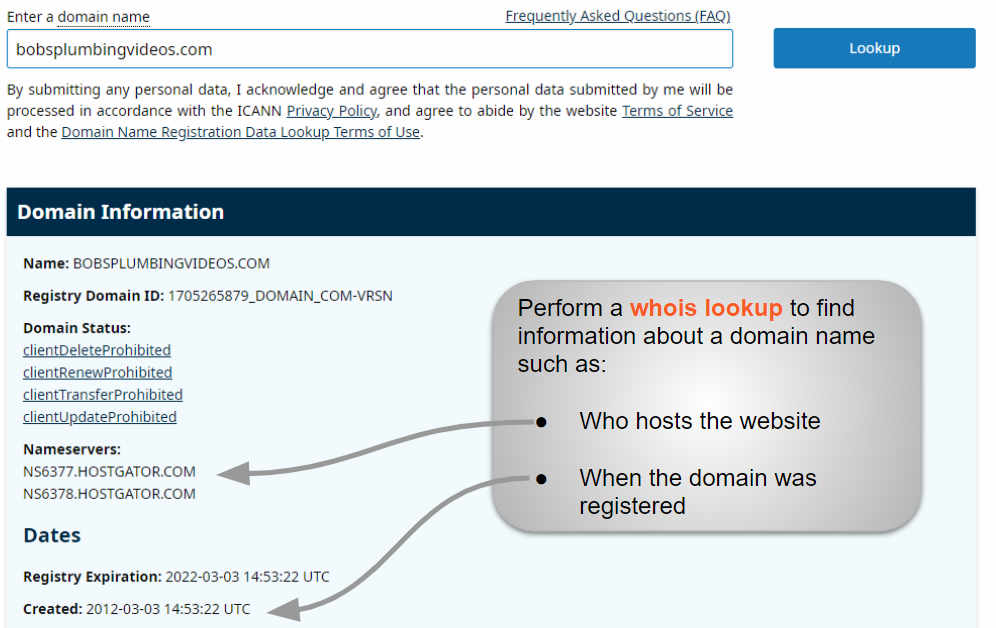
WHOIS tools provide details about domain ownership and hosting. Enter your domain name in a WHOIS search box. The results show the registrar and often the hosting company. This method is fast and free. Popular WHOIS websites include whois.net and ICANN WHOIS.
Check Dns Records
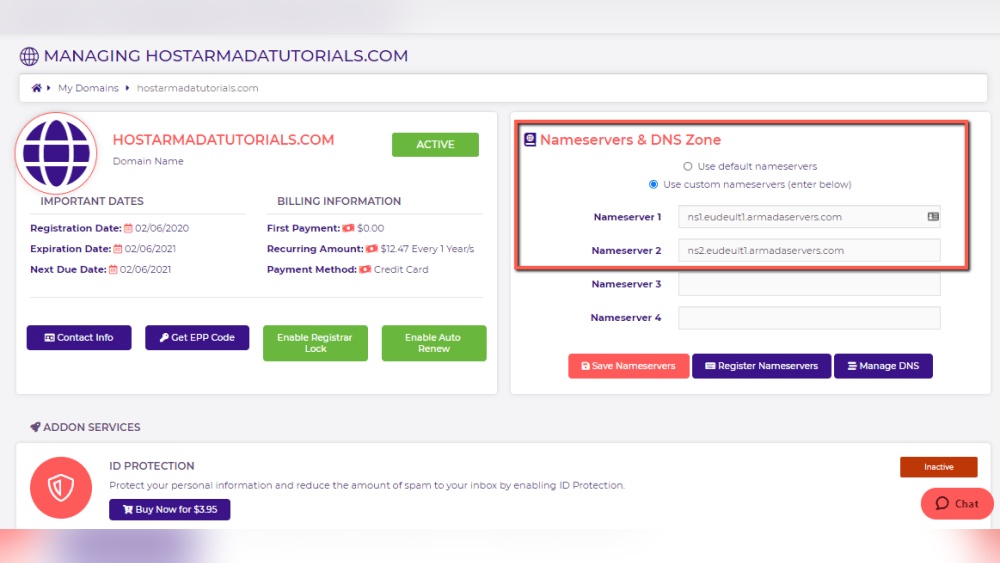
DNS records link your domain to its server. Use online DNS checkers to view these records. Look for “A” records that show the IP address of your host. Nameservers listed also hint at the hosting provider. This method helps confirm where your domain points.
Look Up Hosting Provider Via Ip Address
Each hosting provider uses unique IP ranges. Take the IP address from DNS records and use an IP lookup tool. This tool reveals the company that owns the IP address. It gives a clear idea about your hosting provider. Tools like ARIN or IPinfo are useful for this task.
Step-by-step Guide To Whois Lookup
Knowing who hosts your domain helps you manage your website better. A WHOIS lookup provides this information quickly and easily. This guide shows how to use a WHOIS service step-by-step. Follow these instructions to find your domain host without hassle.
Choosing A Reliable Whois Service
Start by selecting a trustworthy WHOIS service. Pick sites that are well-known and secure. Some popular options include ICANN WHOIS, Whois.net, and DomainTools. These services offer accurate and updated domain details. Avoid lesser-known sites to reduce errors and risks.
Interpreting Whois Information
After entering your domain, you will see many details. Look for the “Registrar” or “Sponsoring Registrar” field. This shows the company where your domain is registered. The “Name Server” section often reveals the hosting provider. Check the “Registrant Contact” for owner details. Understanding these parts helps identify your host clearly.

Credit: support.intermedia.com
Using Dns Records To Trace Hosting
Using DNS records helps find the company hosting your domain. These records store important information about your website’s location on the internet. By checking them, you can trace your hosting provider easily.
DNS records guide your browser to the right server. They include details like nameservers and IP addresses. Understanding these can show where your domain is hosted.
Accessing Dns Records
Start by visiting a DNS lookup tool online. Enter your domain name and run the search. The tool will display various DNS records linked to your domain.
Look for records such as NS (nameservers) and A records. These are key to identifying your hosting provider. You can also use command-line tools like “nslookup” or “dig” for this.
Understanding Nameservers And A Records
Nameservers control where your domain points on the internet. They often show the hosting company’s name or service. For example, names like “ns1.bluehost.com” hint at Bluehost hosting.
A records link your domain to an IP address. This IP belongs to the server hosting your site. You can use the IP to find the hosting provider through IP lookup services.
Checking both nameservers and A records gives a clear view. Together, they reveal the company hosting your domain.
Identifying Hosting Provider From Ip Address
Identifying the hosting provider from your website’s IP address is a simple way to find out where your domain is hosted. Every website has a unique IP address that points to its server. This address holds clues about the hosting company managing your site.
By checking the IP address, you can learn the company responsible for your website’s hosting. This process requires just a few easy steps and free online tools. It helps you understand your website’s backend and manage your hosting more effectively.
Finding Your Website’s Ip Address
Start by finding your website’s IP address. You can do this using your computer’s command prompt or terminal. Type ping yourwebsite.com and press enter. The IP address will appear in the results.
Another way is to use online tools. Websites like “WhatIsMyIPAddress” or “DNS Checker” can show your site’s IP quickly. Just enter your domain name and get the IP address immediately.
Using Ip Lookup Tools
After getting the IP address, use IP lookup tools to find the hosting provider. These tools show details about the IP, including the company owning it. Some popular tools include ARIN, IPinfo, and HostAdvice.
Enter your IP address in these tools. They provide the hosting company’s name, location, and contact info. This information helps you identify who hosts your domain without confusion.
Troubleshooting When Information Is Hidden
Sometimes, finding out who hosts a domain is tricky. The domain owner may hide details on purpose. This makes it hard to see the hosting company. You need to know some ways to solve this problem. Understanding how to check hidden information helps you find the host fast.
Private Registrations And Their Impact
Many domain owners use private registration services. These services hide their personal details from public records. This keeps their name, address, and contact info secret. Privacy is good for security but blocks host info. Whois databases will show the service’s info, not the host’s.
Because of this, normal domain checks may fail. The domain registrar and hosting company may look the same. This confuses people trying to find the real host. Knowing this helps you avoid wrong guesses and wasted time.
Alternative Methods To Discover Host
Use tools that check the domain’s IP address. This can show the hosting server’s location. You can also use traceroute tools to track the path to the server. Sometimes, the hosting company’s name appears in the server details.
Check the website’s DNS records for clues. Nameservers can reveal the hosting provider. Look for hosting names in MX or A records. Use online services specialized in uncovering host info. They combine many data points for better results.
Try searching the website’s source code. Hosting providers sometimes leave signatures or comments. This small detail can help identify the host. Use multiple methods to get the most accurate information.
Tips For Managing Your Domain And Hosting
Managing your domain and hosting well helps keep your website safe and working. It also saves money and avoids surprises. Simple actions can protect your online presence and keep your site online.
Keeping Contact Info Updated
Always keep your contact details current with your domain registrar. Email, phone number, and address must be correct. This helps you get important notifications on time. It also prevents loss of domain control if you need to recover it.
Check your contact info every few months. Update it right away if anything changes. This small step avoids big problems later.
Regularly Reviewing Hosting Details
Review your hosting plan and settings often. Make sure your hosting provider meets your website’s needs. Check bandwidth, storage, and uptime guarantees. Confirm your billing cycle and renewal dates.
Look for any unexpected charges or changes in service. Keep track of login information and backup options. Regular checks help avoid downtime and keep your website fast.
Credit: www.boldgrid.com
Frequently Asked Questions
How Can I Find My Domain Hosting Provider?
You can find your domain hosting provider by using WHOIS lookup tools. These tools show registration details and hosting information linked to your domain.
What Information Does Whois Provide About Domain Hosting?
WHOIS provides registrant contact, domain registrar, and sometimes hosting details. It helps identify where and with whom your domain is registered.
Can I Check Domain Hosting With Online Tools?
Yes, online tools like Whois. net or ICANN WHOIS let you check domain hosting. They provide quick access to domain registration and hosting data.
Is Domain Registrar The Same As Hosting Provider?
Not always. A domain registrar registers your domain name, but hosting providers store your website files and serve them online.
Conclusion
Finding out who hosts your domain helps manage your website better. You can use online tools that show hosting details quickly. Knowing your host helps with support and website changes. Keep your domain info safe and updated. This simple check saves time and avoids confusion later.
Take a moment to verify your hosting provider today. It makes handling your website easier and clearer.


