
Have you ever wondered how your website actually appears online when someone types your domain name? The answer lies in how your domain is hosted.
Understanding how hosts manage your domain is key to making your website fast, reliable, and secure. You’ll discover exactly what happens behind the scenes and why choosing the right host can make all the difference for your online presence. Keep reading, and you’ll gain the knowledge to take control of your domain like a pro.
Credit: www.boldgrid.com
Choosing The Right Host
Choosing the right host is a key step for any website owner. The hosting service affects your site’s speed, security, and uptime. Picking the best option depends on your needs and budget. Understanding different hosting types helps you make a smart choice.
Shared Vs Dedicated Hosting
Shared hosting means your website shares a server with others. It is cheaper but can be slower. Traffic from other sites may affect your speed. Dedicated hosting gives you a whole server. It is faster and more secure but costs more. Choose shared for small sites and dedicated for large ones.
Cloud Hosting Benefits
Cloud hosting uses many servers to host your site. It offers better uptime and speed. Your site stays online even if one server fails. It can easily handle traffic spikes. Cloud hosting is flexible and grows with your needs. It often costs less than dedicated hosting.
Factors To Consider
Look at your website’s size and expected visitors. Check the host’s reliability and uptime guarantees. Think about customer support availability. Consider security features like backups and SSL certificates. Review pricing plans and renewal fees. Make sure the host offers easy site management tools.
Setting Up Your Domain
Setting up your domain is the first step to getting your website online. It involves several clear steps that help your site appear on the internet. Understanding these steps ensures your domain works properly with your hosting service.
Domain Registration Process
Start by choosing a unique domain name. It should reflect your brand or topic. Use a domain registrar to check if the name is available. Registrars are companies that sell domain names. Once you find a name, register it by providing your contact details. Pay the registration fee to secure the domain for a set period, usually one year. You can renew it later to keep your domain active.
Dns Configuration Basics
DNS stands for Domain Name System. It links your domain name to your website’s address. You need to set up DNS records to guide visitors to your site. Common records include A, CNAME, and MX records. The A record points to your website’s server IP. CNAME helps with subdomains. MX records manage email services linked to your domain. Proper DNS setup ensures your domain works smoothly.
Connecting Domain To Host
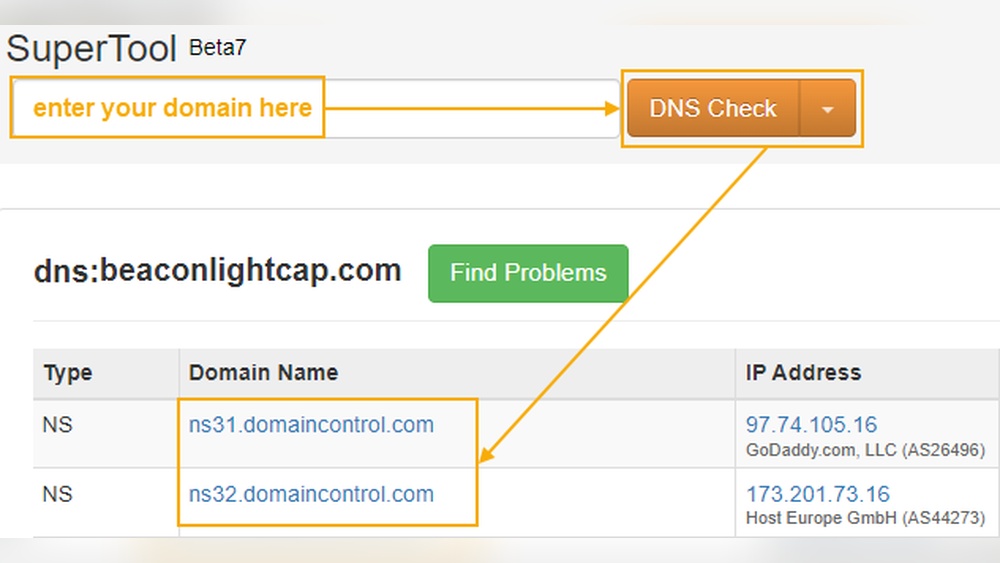
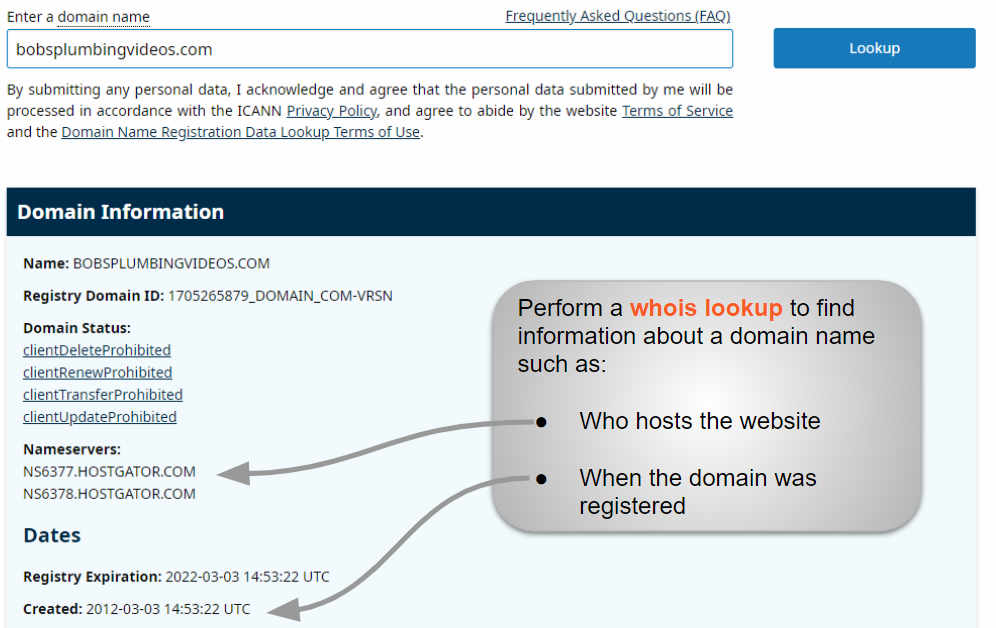
After DNS setup, connect your domain to your web host. Your hosting provider gives you nameservers. Nameservers tell the internet where your site lives. Update your domain’s nameservers with the host’s details. This step links your domain to your hosting account. It may take a few hours to propagate worldwide. Once done, your website will be accessible using your domain name.
Ensuring Reliable Hosting
Reliable hosting is the foundation of any successful website. Hosting providers must deliver consistent service to keep websites running smoothly. Without reliable hosting, websites can face downtime, slow speeds, and security risks. Hosting your domain with a dependable company ensures your site stays accessible and safe.
Reliable hosting means good uptime, strong security, and helpful support. Let’s explore these key factors.
Uptime And Performance Metrics
Uptime shows how often a website stays online without interruption. Hosting services with 99.9% uptime or higher keep your site visible to visitors. Fast loading speeds also matter. Hosting providers monitor servers to prevent slowdowns and crashes. Good performance keeps visitors happy and improves search engine rankings.
Backup And Security Measures
Backing up data regularly protects your site from loss or damage. Reliable hosts create automatic backups daily or weekly. They also use firewalls, SSL certificates, and malware scans to block threats. Strong security stops hackers and protects visitor information. Hosting your domain with good security builds trust with your audience.
Customer Support Importance
Fast and helpful customer support solves hosting problems quickly. Quality hosts offer 24/7 support via chat, email, or phone. Support teams help with technical issues and answer questions. Reliable support reduces downtime and keeps your website running smoothly. It also gives peace of mind when managing your domain.
Optimizing Your Hosting Experience
Optimizing your hosting experience is essential to keep your website fast and reliable. A good hosting service offers tools and features that improve performance. It also adapts to your needs as your site grows. Regular checks help avoid downtime and keep everything running smoothly.
Speed Enhancements
Fast websites keep visitors happy. Hosting providers often use solid-state drives (SSDs) for quicker data access. Content delivery networks (CDNs) spread your site’s content worldwide. This reduces loading time for visitors far from the server. Caching stores copies of pages to serve them faster. These speed enhancements help your site load in seconds.
Scalability Options
As your site grows, so do your hosting needs. Choose a host that allows easy upgrades. Start with shared hosting and switch to VPS or dedicated servers if needed. Cloud hosting offers flexible resources that adjust automatically. This way, your site stays stable during traffic spikes. Scalability ensures your hosting grows with your business.
Monitoring And Maintenance
Regular monitoring helps catch problems early. Hosting services often provide tools to track uptime and server health. Automatic backups protect your data from loss. Maintenance tasks include software updates and security patches. Keeping your hosting environment updated prevents attacks and errors. Good monitoring and maintenance keep your site safe and online.
Common Hosting Challenges
Hosting a domain involves many tasks. Some challenges are common for all website owners. Knowing these challenges helps in managing a website better.
Downtime Causes
Downtime happens when a website is not accessible. It can be caused by server problems or network issues. Power failures or hardware breakdowns also lead to downtime. Sometimes, software updates cause short downtime. Even small downtime can hurt website visitors and business.
Security Risks
Websites face many security risks. Hackers try to steal data or damage sites. Malware and viruses can infect a website quickly. Poor passwords and outdated software increase risks. Strong protection and regular updates reduce these threats.
Handling Traffic Spikes
Traffic spikes happen when many users visit at once. This can slow down or crash the site. Events, sales, or viral content cause spikes. Hosting must handle sudden increases smoothly. Using scalable resources helps manage high traffic.

Credit: www.paubox.com

Credit: hostarmada.com
Frequently Asked Questions
What Does It Mean To Host My Domain?
Hosting your domain means storing your website’s files on a server. This server makes your site accessible online. It links your domain name to the website content. Without hosting, your domain name won’t display any website.
How Do I Choose The Best Host For My Domain?
Choose a host with reliable uptime, fast speed, and good support. Consider your website’s size and traffic needs. Compare pricing and features like security and backups. Read user reviews for real experience insights.
Can I Host My Domain For Free?
Yes, some services offer free domain hosting. However, free hosts may limit features and speed. They often display ads on your site. For professional use, paid hosting is more reliable and flexible.
How Does Domain Hosting Affect Seo?
Hosting speed and uptime impact SEO rankings. A slow or frequently down server can hurt your site’s visibility. Choose a host with strong performance to boost SEO. Reliable hosting ensures better user experience and search rankings.
Conclusion
Hosting your domain lets your website live on the internet. It connects your site to servers that store your files. This makes your content easy to find and visit. Choosing the right host keeps your site fast and safe. Understanding how domain hosting works helps you manage your website better.
Now, you can make informed decisions about your online presence. Simple steps lead to a strong, accessible website. Your domain hosting matters for success.


