
Have you ever wondered who is behind a website or where it’s actually hosted? Finding out who hosts a domain can reveal important details, whether you’re checking the credibility of a site, troubleshooting issues, or just satisfying your curiosity.
But the process doesn’t have to be confusing or technical. You’ll learn simple, step-by-step methods to discover the hosting provider of any domain. By the end, you’ll have the confidence to uncover this information quickly and easily every time. Ready to become a domain detective?
Let’s dive in.
Check Domain Registrar Information
Checking the domain registrar information helps find who hosts a domain. This step reveals important details about the domain’s ownership and management. It provides clues about the hosting provider behind the website.
Domain registrar data is publicly available and easy to access. It includes the company that registered the domain and sometimes the hosting service.
Use Whois Lookup Tools
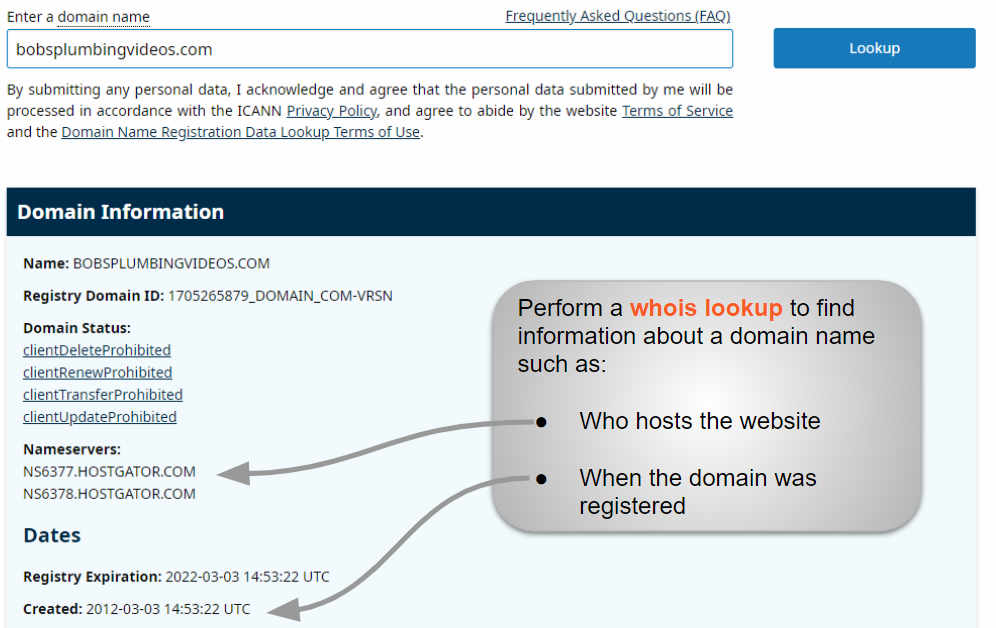
WHOIS tools show domain registration details clearly. Enter the domain name in a WHOIS search box. Wait a moment for the report to appear.
The report shows the domain owner, registration date, and registrar name. Some WHOIS tools also list hosting information directly.
Identify Registrar Details
The registrar is the company that registers the domain name. Look for the registrar’s name and contact info in the WHOIS report. This information is usually near the top.
Knowing the registrar helps you trace the domain’s origin. It also guides you to official support if needed.
Locate Hosting Provider
Sometimes, the hosting provider’s name appears in the WHOIS data. If not, use the registrar info to find clues. Check the nameservers listed in the report.
Nameservers often point to the hosting company. You can search these nameservers online to identify the host.
Analyze Dns Records
Analyzing DNS records is a key step to find out who hosts a domain. DNS records store important details about a website’s online address. These records show where a domain points and who manages its services. Understanding these records helps identify the hosting provider behind a domain.
DNS records include various types, but some are more useful to check hosting information. These records reveal the domain’s server details and name servers. By examining them, you get clues about the domain’s host.
Check A And Ns Records
A records link a domain to an IP address. The IP address points to the server hosting the website. You can trace this IP to find the hosting provider. NS records indicate the name servers for the domain. These servers manage DNS settings and often belong to the hosting company. Checking NS records can reveal the company responsible for hosting the domain.
Use Online Dns Tools
Online DNS tools make it easy to analyze DNS records. These tools show A, NS, and other record types quickly. You only need to enter the domain name, and the tool fetches DNS data. Using these tools saves time and gives clear hosting information. Many tools are free and user-friendly, ideal for beginners.
Use Hosting Checker Websites
Use hosting checker websites to find out who hosts a domain. These tools scan the domain and show the hosting provider’s details quickly. They are free and easy to use for anyone. Just enter the domain name, and the tool does the rest. This method saves time and avoids technical hassle.
Popular Hosting Checker Tools
Several reliable hosting checker websites exist. Examples include WhoIsHostingThis, HostAdvice, and Site24x7. These tools work well for most domains. They provide clear information about the hosting company. Some tools also show server location and IP address.
Interpreting Results
Results usually display the hosting company name and IP address. Sometimes, they include server location and DNS details. If the tool shows a reseller or CDN, check for the original host. Use the information to contact or learn about the host. Keep in mind, results may vary by tool and domain type.
Credit: www.boldgrid.com
Examine Website Ip Address
Examining a website’s IP address is a simple step to find who hosts a domain. Every website has an IP address that points to its server. This address helps identify the hosting provider behind the site.
By checking the IP address, you get clues about the server location and the company managing it. This method is quick and does not require special tools. It is useful for beginners who want to dig deeper into web hosting details.
Ping The Domain
Pinging a domain sends a small data packet to the website’s server. This action reveals the server’s IP address. To ping, open the command prompt or terminal on your computer.
Type ping example.com and press enter. Replace example.com with the domain you want to check. The response shows the IP address linked to the domain.
Trace Ip To Hosting Provider
After finding the IP address, trace it to discover the hosting provider. Use online tools like IP lookup or WHOIS services. These tools show details about the IP owner and hosting company.
Enter the IP address into the tool, and it returns hosting information. This step helps identify the company hosting the website server. Knowing this can assist in troubleshooting or research tasks.
Look For Website Technology
Understanding the technology behind a website helps reveal its hosting details. Websites use specific tools, platforms, and plugins. These elements can give clues about who hosts the domain. Exploring the website technology is a smart step in your search.
Identify Cms And Plugins
The content management system (CMS) controls how a website works. Common CMS options include WordPress, Joomla, and Drupal. Each CMS has unique features and default plugins.
Check the website’s source code or use online tools to spot the CMS. Plugins also offer hints. Some plugins only run on certain hosts or servers. Noticing these can narrow down hosting providers.
Find Hosting Clues From Technology Stack
The technology stack includes the server, programming language, and frameworks. For example, websites using PHP and Apache may suggest shared hosting. Sites built with Node.js might point to a specific host.
Look for server headers or IP addresses that link to hosting companies. Tools like builtwith.com or wappalyzer.com reveal these details. This info guides you to the domain’s host.
Contact Domain Owner
Contacting the domain owner is a direct way to learn about a domain’s hosting details. The owner holds key information and can clarify hosting questions quickly. Knowing how to reach the owner helps solve many domain-related issues.
Use Contact Information From Whois
The WHOIS database stores public information about domain owners. It often shows the owner’s email, phone number, or address. Visit a WHOIS lookup site and enter the domain name. Find the contact info listed under the registrant section. Use this data to send a clear, polite message. Ask about the hosting provider or any hosting details. Keep your request simple and respectful to get a reply.
Request Hosting Details
After you get in touch, ask specific questions about hosting. For example, request the hosting company name or server details. Explain why you need this info. The owner may share the hosting provider or direct you to the right contact. If the owner does not respond, try alternative contacts or check the site’s support page. Clear communication increases the chance of success in finding hosting data.
Consider Privacy And Proxy Services
When trying to find who hosts a domain, privacy and proxy services can make the search tricky. Many website owners use these services to keep their information secret. These tools hide the real host details from public view. Understanding how privacy services work helps in getting around them.
How Privacy Services Hide Hosting
Privacy services replace the real contact details with fake ones. This stops anyone from seeing the domain owner’s true identity. Proxy services act as middlemen between users and the website. They show proxy info instead of the actual hosting data. This protects the owner from spam and unwanted contact.
Because of this, tools like WHOIS show proxy details only. The real host name and address stay hidden. This makes it hard to find who is behind the domain.
Workarounds To Reveal Host
Some methods can reveal the true host despite privacy services. One way is to use reverse IP lookup tools. They show other sites on the same server, which can give clues.
Checking DNS records can also help. Records like A, MX, or NS sometimes reveal host info. Using online hosting checker tools can provide more details too.
Searching for the domain’s IP address in web archives may show past data. Sometimes older records don’t use privacy protection. This can reveal the host name and address.

Credit: support.intermedia.com
Credit: www.greengeeks.com
Frequently Asked Questions
How Can I Identify The Host Of A Domain?
Use online tools like WHOIS lookup or hosting checker websites to find the domain host. These tools provide details about the hosting provider, IP address, and server location quickly and accurately.
What Info Do I Need To Find A Domain Host?
You only need the domain name to find its host. Enter the domain into a reliable WHOIS or hosting lookup tool to get hosting details and related information.
Can I Find Domain Host Without Whois?
Yes, you can use DNS records and hosting checker tools as alternatives. These tools analyze server IP and related data to identify the hosting provider without relying on WHOIS.
Why Is Knowing Domain Host Important?
Knowing the host helps with troubleshooting, security checks, and managing your website. It also assists in verifying the legitimacy of a website and planning migrations or upgrades.
Conclusion
Finding who hosts a domain is easier than it seems. Use tools like WHOIS or hosting checker websites to get quick answers. Knowing the host helps with website issues or buying decisions. Always double-check the info for accuracy. Practice these steps to gain confidence in your search.
This simple skill can save time and effort. Keep exploring and stay curious about how websites work.


