
Have you ever wondered if the hosts file, a tool often used on personal computers, can be effective on a web server? You might have heard of its ability to reroute traffic or block unwanted domains on your local machine.
But does it serve the same purpose in the vast world of web servers? Understanding this can empower you to manage your online presence more effectively, control traffic, and even troubleshoot issues with precision. Imagine having the power to redirect requests, test new domains, or block malicious sites directly from your server.
Intrigued? Stay with us as we delve into the mechanics and possibilities of using a hosts file on a web server. You’re about to uncover insights that could transform how you think about server management and security.
Hosts File Basics
The hosts file is a simple text file. It maps hostnames to IP addresses. Computers use it to find websites. This file can override DNS settings. It helps test websites before they go live. You can block websites using the hosts file. The file is on your computer. Not on the web server. Each computer has its own hosts file.
Developers use hosts files to test websites. They see how a site looks before it goes live. It can block ads by pointing them to a fake IP address. Users can block unwanted sites. This file helps control internet access. It is great for local development work. Useful for network troubleshooting. The hosts file is simple yet powerful.
Web Server Configuration
The hosts file is a simple text file. It maps hostnames to IP addresses. This file is often used in personal computers. It helps in bypassing the DNS. On a web server, its role is less important. Web servers rely on DNS systems more. Yet, hosts files can still direct traffic. They can block unwanted domains.
DNS resolution converts domain names to IP addresses. This is like an address book for the internet. A hosts file can change how this works. It can speed up lookups. Sometimes, it overrides DNS settings. This helps in testing websites. Or blocking harmful sites. Its effect is more local than global.
Advantages Of Using Hosts File
The hosts file gives more control over web traffic. You decide where requests go. This helps in blocking unwanted sites. It can also redirect traffic to a different server. Changes are quick and easy. No need for complex configurations.
The hosts file can be used for security purposes. It helps in blocking malicious websites. This prevents unwanted access. It can also protect sensitive data from leaking. Simple changes make a big difference in security. It keeps servers safer with minimal effort.
Limitations And Challenges
Hosts file can work on small networks. But scalability becomes a problem. A hosts file is not ideal for big networks. Each server needs its own file. This makes updates hard. Every time a change is needed, each server must update its file. This takes time. Errors can happen. This is why large networks avoid using it.
Managing hosts files is tricky. Many servers mean many files. Keeping them in sync is hard. Updates must be correct. One wrong entry can cause problems. This can make troubleshooting difficult. It takes extra time to find mistakes. For web servers, using DNS is often better. DNS is more efficient for big networks.
Alternatives To Hosts File
Hosts files might not be suitable for web servers due to complexity and scalability issues. DNS services offer a more dynamic solution for managing domain name resolutions efficiently. Consider virtual hosts as a robust alternative for handling multiple domain requests on a single server.
Dns Management Tools
DNS Management Tools help control domain names. They are more efficient than hosts files. These tools can handle many domains at once. They make things easier. Webmasters use them often. They are great for big websites. They offer real-time updates. They also provide security features. Hosts files do not have these. DNS tools are the modern choice. They save time and reduce errors. They are easy to learn. Even for beginners.
Load Balancers
Load balancers help distribute traffic. They keep servers from overloading. This makes websites faster. Load balancers are essential for busy sites. They improve performance. They also increase reliability. Websites stay up even during high traffic. Load balancers manage resources efficiently. They work well with DNS tools. Together, they offer a complete solution. Servers run smoothly. Users have a better experience. Everyone wins.
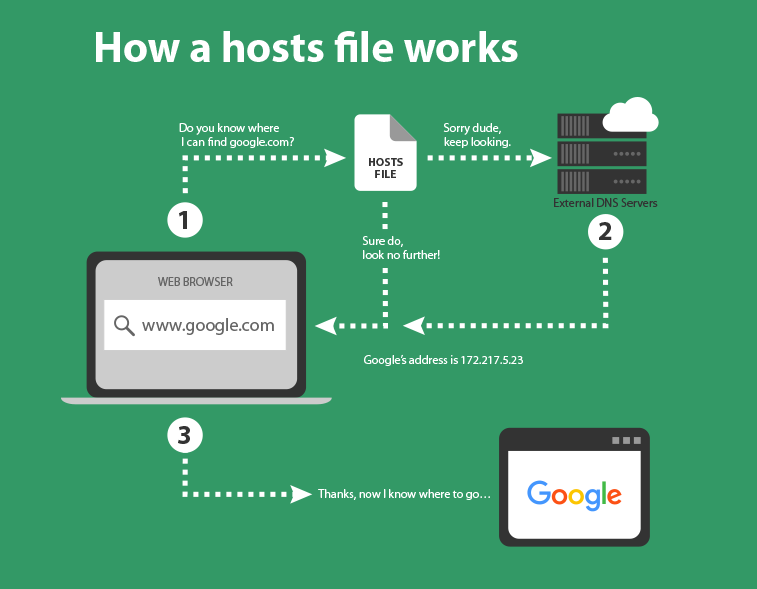
Credit: www.freshjones.com
Practical Applications
Developers use the hosts file to test websites. They direct a domain name to a local IP. This helps in checking changes before going live. It’s a safe way to experiment. Errors do not affect the real website. Changes are only on the local machine.
The hosts file can block unwanted websites. By pointing a domain to 127.0.0.1, access is stopped. This is useful for blocking ads and malicious sites. It helps in creating a safer browsing environment. Parents use it to block sites for kids.
Best Practices
A hosts file can help control traffic. It maps hostnames to IP addresses. This helps in testing and development. Ensure the file is configured correctly. Mistakes can cause errors. Always double-check entries. Each line needs a proper format. Use spaces between IP and hostname. Keep the file neat and organized.
Keep the hosts file updated regularly. Old entries might cause problems. Check for changes in IP addresses. Remove unused entries to avoid confusion. Regular checks ensure smooth operation. Backup the file before making changes. This helps in restoring if needed. An updated hosts file is crucial for web servers. It keeps everything running well.
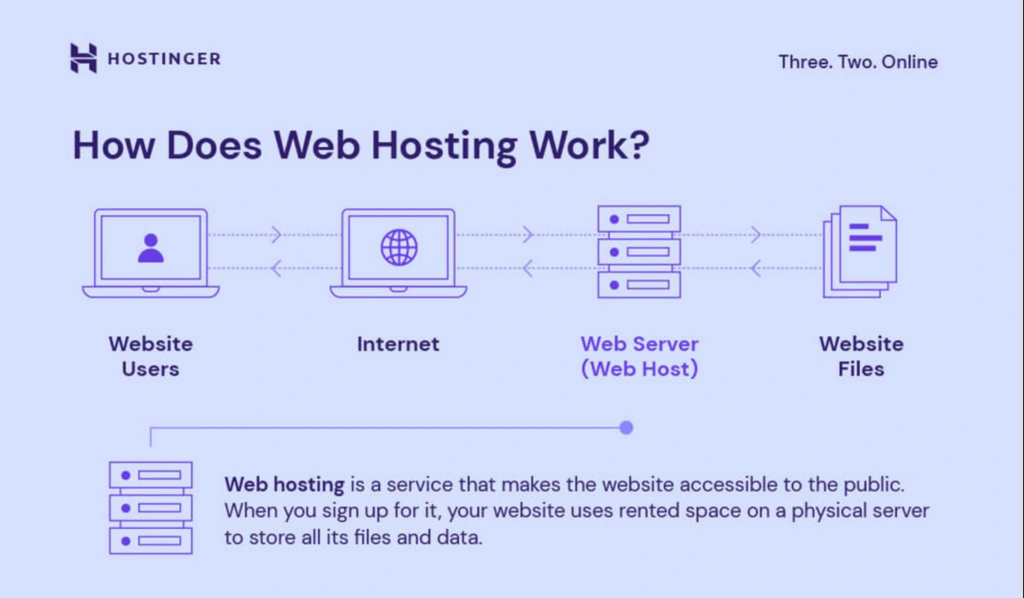
Credit: www.hostinger.com
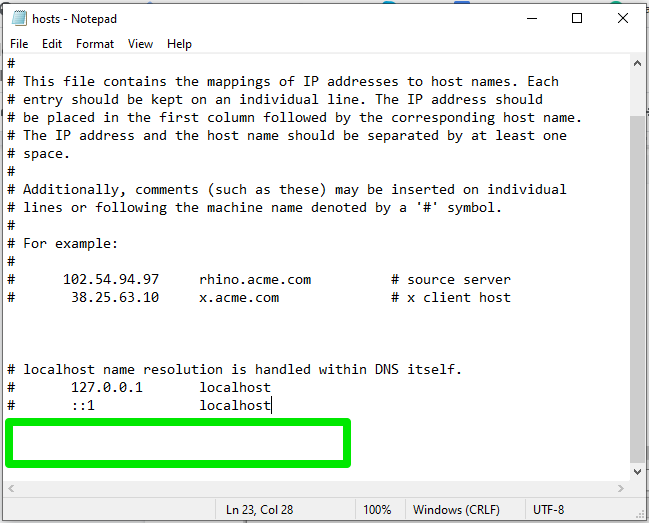
Credit: www.scalahosting.com
Frequently Asked Questions
What Is The Purpose Of A Hosts File?
A hosts file maps domain names to IP addresses. It helps direct your computer to the correct server. You can use it to block websites, speed up browsing, or test websites before going live. It’s a text file located on your computer, customizable by system administrators or users.
Do You Need A Server To Host Website Files?
Yes, hosting website files requires a server. Servers store, manage, and deliver your website content online. Choose between shared, VPS, or dedicated servers based on your needs. Hosting providers offer server space and management services, ensuring your website is accessible to users anytime.
Efficient server hosting enhances website performance and reliability.
Where Is Host File On Server?
The host file on a server is usually located in “/etc/hosts” for Unix/Linux systems and “C:WindowsSystem32driversetchosts” for Windows servers. It maps IP addresses to hostnames, aiding in network management and troubleshooting. Make sure to edit the host file with administrative permissions for changes to take effect.
What Is The Host File For Url?
A host file maps domain names to IP addresses on your computer. It helps in faster URL resolution. By editing the host file, you can redirect URLs to specific IPs, useful for testing website changes or blocking unwanted sites.
Conclusion
Understanding the hosts file on a web server is crucial. It plays a key role in managing domains and IP addresses. Adjusting the hosts file can aid in testing and problem-solving. Remember, changes here only affect local configurations. They don’t impact global DNS settings.
Always back up files before making edits. This ensures you can restore previous settings if needed. For complex server setups, consult with a tech expert. Proper use of a hosts file enhances server management. Stay informed, practice, and keep learning.
This knowledge can boost your web server’s functionality effectively.


