
Imagine having complete control over your web applications. You decide where they are hosted, how they operate, and who has access.
This is the essence of self-hosting in Web API. It’s like having your very own digital fortress, where you hold all the keys and make all the rules. You might be wondering why self-hosting is gaining traction and what it means for you.
The answer is simple: self-hosting gives you unparalleled flexibility, security, and independence. You no longer have to rely on third-party services that may compromise your data or limit your capabilities. Instead, you can tailor your hosting environment to suit your exact needs. Understanding self-hosting in Web API is crucial if you’re looking to enhance your web application’s performance and security. By the end of this article, you’ll have a clear grasp of what self-hosting entails, its benefits, and how you can get started. So, if you’re ready to take control and unlock the full potential of your web applications, read on.
Self-hosting Basics
Self-hosting means running your web application on your own server. It is not on a third-party server. You control the environment and settings. This gives more freedom to developers. They can customize the server as needed. Self-hosting allows full access to the server.
Self-hosting provides better security. Your data stays private. You can set your own rules for safety. It also offers more control. You decide how the server runs. Self-hosting can be cost-effective in the long run. You save money by not paying monthly fees. Customization is another benefit. You tailor the server to fit your needs.
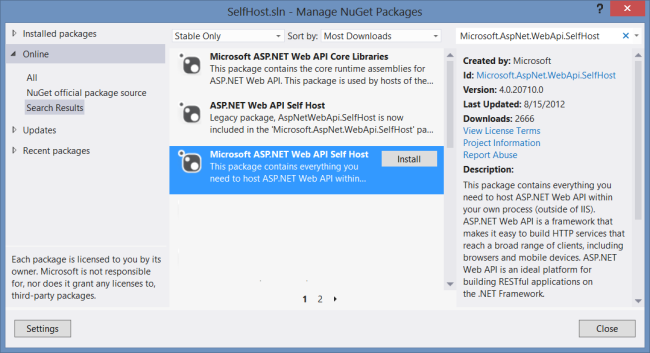
Credit: learn.microsoft.com
Technical Requirements
Self-hosting a Web API requires a computer. It doesn’t need to be fancy. A regular PC can do the job. An Intel i3 processor with 4GB RAM is enough. Make sure to have a good internet connection. Fast internet helps in quick data transfer. Install a stable operating system. Windows or Linux are popular choices. Use a web server like IIS or Apache. These are important for hosting. Also, have a database set up. MySQL or SQL Server are good options. They help to store data securely.
Set up a static IP address. This allows others to find your server easily. Configure the firewall to allow web traffic. This is crucial for safety. Open ports 80 and 443 for HTTP and HTTPS. These ports are standard for web traffic. Use a domain name to make your API accessible. A domain name looks professional. Configure a DNS to point to your server. This helps in directing traffic correctly. Make sure to regularly update your software. This keeps your system secure and efficient.
Setting Up A Self-hosted Web Api
Begin by selecting a suitable server. Linux and Windows are popular choices. Download the necessary software. Ensure it supports your API’s language. Set up a database if needed. MySQL or PostgreSQL are common options. Configure the server settings. Pay attention to port numbers and firewall settings. Test your API after setup. Make sure everything works smoothly.
Security is crucial for self-hosted APIs. Use strong passwords for all accounts. Encrypt data to protect it. Install a firewall to block unauthorized access. Regularly update your software. This protects against new threats. Consider using SSL certificates. They encrypt data between the server and users. Monitor your server for unusual activity. This helps catch problems early.
Challenges And Solutions
Self-hosting can cause server overload. This happens with too many requests. It may slow down the system. Another issue is security risks. Hackers may target the server. Bugs in the code can also cause problems. Compatibility issues might arise. Not all software works well together. Handling these problems is vital.
Use a load balancer to manage traffic. This helps with server overload. Regularly update the software. This keeps security strong. Scan the server for malware. Fix any bugs as soon as they appear. Ensure all software is compatible. Test it often. Monitoring tools can help spot issues early. These steps make self-hosting smoother.
Comparing Self-hosting With Cloud Hosting
Self-hosting in Web API involves managing servers yourself, offering greater control over resources and customization. This option suits developers seeking tailored setups but requires technical expertise and maintenance. Compare with cloud hosting, which provides scalability and reduced management burdens, making it ideal for those prioritizing simplicity.
Performance Differences
Self-hosting can be faster than cloud hosting. It uses local resources. Cloud hosting relies on distant servers. This can cause lag. Self-hosting is best for low latency needs. Speed is crucial for some apps. Cloud hosting can be slower. Performance depends on server location. Self-hosting gives control over speed. Adjust settings as needed. Cloud is less flexible in this way.
Cost Analysis
Self-hosting can be cheaper in the long run. Initial setup costs are high. Cloud hosting has monthly fees. Costs add up over time. Self-hosting needs hardware and maintenance. Cloud hosting includes support and upgrades. Choose based on budget. Self-hosting suits those with tech skills. Cloud hosting is easier for beginners. Consider your needs and resources.
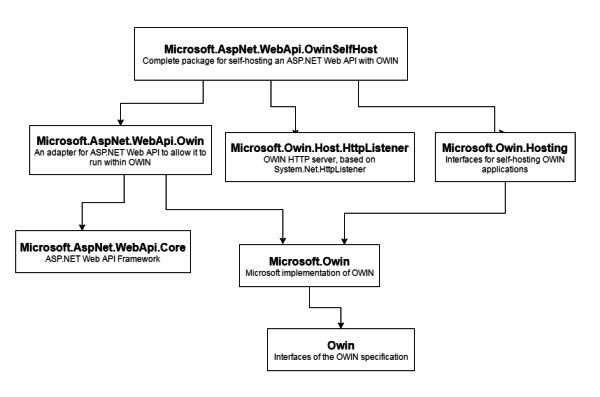
Credit: www.uship.com
Popular Tools For Self-hosting
Self-hosting a Web API can be done using various software tools. These tools help manage server resources and network traffic. Some popular choices include Apache, NGINX, and IIS. Apache is known for its flexibility and open-source nature. NGINX is praised for its high performance and ease of use. IIS is a solid choice for Windows environments.
The community support for these tools is vast and very helpful. Forums and discussion boards are filled with experts. They share tips and solve problems. Apache has an active user base with plenty of resources. NGINX users enjoy a strong community with tutorials and guides. IIS support comes with Microsoft’s backing, offering robust help. Engaging with communities can make self-hosting easier.
Future Of Self-hosting
Self-hosting in Web API allows users to run applications on their own servers. This offers greater control and privacy. It can reduce dependency on third-party hosting services. As technology advances, more businesses are exploring self-hosting to tailor their web services.
It’s an important step for customized web solutions.
Emerging Trends
Self-hosting is getting more popular. Many developers want more control. They find self-hosting offers flexibility and freedom. No need to rely on big companies. Costs can be lower too. Developers can pick their own tools. This trend is likely to grow.
Potential Developments
Technology is always changing. New tools will make self-hosting easier. Security features will improve. This will protect user data better. More people will use self-hosting. Developers will share more ideas. This will make it even more popular. The future looks bright for self-hosting.

Credit: www.youtube.com
Frequently Asked Questions
What Does Self Hosting Mean?
Self-hosting means managing your own server or hosting environment. You control software, updates, and security. This offers more customization and flexibility compared to third-party hosting services. It requires technical expertise and can be more costly than shared hosting options.
What Is Web Api Hosting?
Web API hosting enables APIs to run on servers, allowing applications to communicate over the internet. It ensures seamless integration, scalability, and security for data exchange between software systems. Hosting services manage infrastructure, providing reliable access, maintenance, and performance optimization for efficient API operations.
How To Create A Self-hosted Web Api?
To create a self-hosted Web API, choose a programming language and framework like Node. js or Django. Set up your server environment and write API endpoints. Implement authentication and connect to a database. Test thoroughly and deploy on a hosting service like AWS or DigitalOcean for accessibility.
What Does Hosting Yourself Mean?
Hosting yourself means managing your own server and website. You control server setup, security, and maintenance. This approach offers flexibility and customization but requires technical expertise. It’s suitable for those comfortable with technology and server management.
Conclusion
Self-hosting in Web API offers flexibility and control. It empowers developers to customize server environments. This approach can improve performance and reliability. It reduces dependency on third-party hosting services. Choosing self-hosting means managing configurations and updates yourself. For some, it may require technical skills.
But the benefits can outweigh the challenges. Self-hosting can enhance security and privacy. It allows tailored solutions to unique needs. Explore options and decide what’s right for your project. Self-hosting might be the key to achieving your web API goals.


