Are you looking to establish your online presence but unsure where to start? Buying a domain is your first step, and Namecheap makes it easy.
Imagine having a unique web address that represents you or your business—it’s your digital identity. With Namecheap, you gain access to affordable domains and a hassle-free buying process. But why Namecheap? Because it’s trusted by millions and offers unmatched value.
In this guide, you’ll learn how simple it is to secure your domain. Ready to dive into the world of online ownership? Stick around, and you’ll be equipped to make informed decisions that empower your web journey.
Credit: www.namecheap.com
Choosing The Right Domain Name
Discover how to buy a domain on Namecheap with ease. Choose a name that reflects your brand. Follow simple steps to secure your perfect domain.
Choosing the right domain name is crucial for establishing your online identity. It’s more than just a web address; it’s your brand’s first impression. Your domain name should be memorable, relevant, and reflective of your business or personal brand. Let’s dive into some practical tips to guide you in selecting the perfect domain name. ###1. Keep It Simple
A simple domain name is easy to remember and type. Avoid complicated words or confusing spellings. Think of it as your online handshake—straightforward and friendly. For instance, if you’re a photographer, something like “JanePhotos.com” is direct and easy to recall. ###2. Make It Relevant
Your domain name should reflect what you do or offer. Consider including keywords related to your niche. This not only helps with search engine optimization but also informs visitors about your site’s content. If you’re a baker, integrating “bakery” or “cakes” in your domain can be a smart move. ###3. Choose The Right Extension
Extensions like .com, .net, and .org matter. While .com is the most popular, you might want to consider other extensions if they’re more suited to your field. For example, a nonprofit might opt for a .org to emphasize its mission. Are you considering alternatives beyond .com? ###4. Avoid Numbers And Hyphens
Numbers and hyphens can complicate your domain name. They are often misunderstood and can lead to errors when people try to find your site. Stick to letters for clarity and ease. Imagine telling someone your domain name over the phone—would they easily get it right? ###5. Check Availability
Before you settle on a name, ensure it’s available. Namecheap offers a handy search tool to check domain availability. You’ll want to secure your desired name before someone else does. Have you tried searching for your dream domain yet? ###6. Think Long-term
Your domain name should stand the test of time. Avoid trends or fads that may fade away. Picture your business a decade from now—will your domain name still resonate? Make sure it’s versatile enough to grow with your brand. ###7. Test For Pronunciation
Say your domain name out loud. Is it easy to pronounce? This can influence how easily people remember and talk about your site. A smooth, pronounceable name has the potential to become a household term. Can you say it five times without stumbling? Choosing the right domain name on Namecheap is a significant step towards building your online presence. By following these guidelines, you can create a name that truly represents your brand and is easy for your audience to find and remember. So, what domain name ideas are you considering for your next big project?
Credit: www.youtube.com
Navigating Namecheap’s Platform
Explore Namecheap’s platform to buy a domain effortlessly. Search for your desired name, add to cart, and proceed to checkout. Finalize your purchase with easy payment options.
Navigating Namecheap’s platform can initially feel overwhelming, especially if you’re new to purchasing domains. But don’t worry, the process is user-friendly and straightforward. With a few clicks and a little guidance, you’ll have your domain ready in no time.Accessing The Namecheap Website
Start by visiting Namecheap’s official website. The homepage is clean and well-organized, with a search bar prominently displayed. This is where you’ll type in your desired domain name to check its availability. Have you ever found yourself lost on a cluttered website? Fortunately, Namecheap’s layout is designed to keep you on track.Searching For Your Domain
Enter your desired domain name in the search bar and hit enter. If your preferred domain is available, you’ll see a green checkmark and an add-to-cart button. If it’s taken, Namecheap provides alternative suggestions. This feature saves you time and helps you discover creative domain name options.Understanding Domain Extensions
You’ll notice a variety of domain extensions like .com, .net, and .org. Each serves different purposes and can affect your website’s image. A .com is ideal for businesses, while .org often suits non-profits. Choose an extension that aligns with your site’s purpose.Adding Domains To Your Cart
Once you’ve found an available domain, click the add-to-cart button. This action is similar to online shopping and easy to manage. You can continue searching for more domains or proceed to checkout. It’s always good to have a few backup options in your cart.Reviewing Your Cart
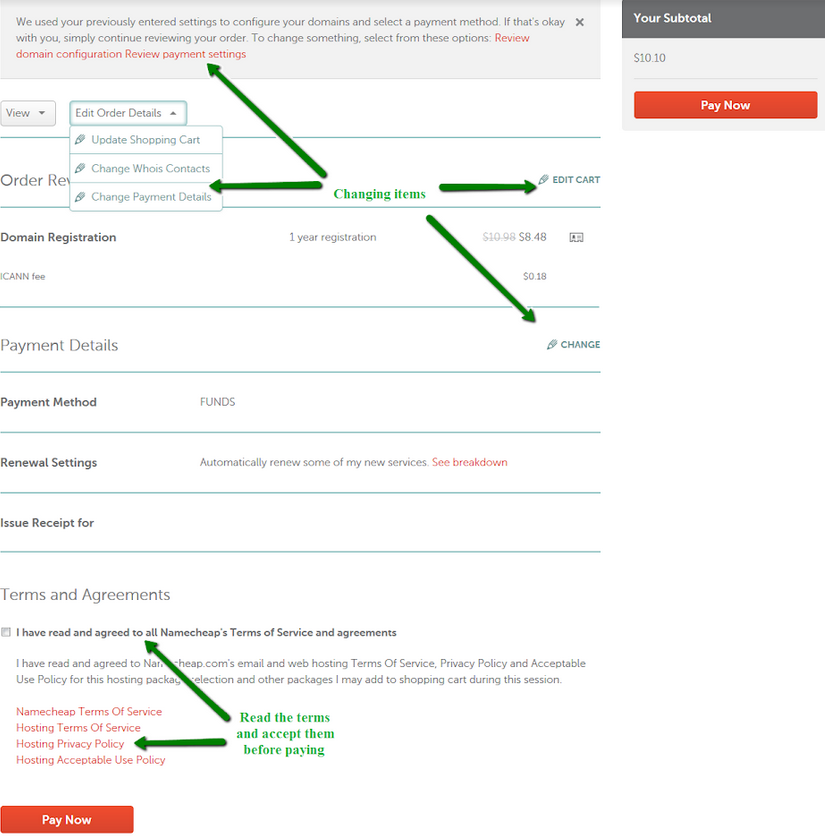
Head over to your cart to review your selections. Here, you’ll see the domains you’ve chosen and any additional services like privacy protection. Take a moment to ensure everything looks right before continuing. Have you ever accidentally ordered the wrong item online? Double-checking helps avoid such mishaps.Checking Out
Click the checkout button to finalize your purchase. You’ll need to create a Namecheap account or log in if you already have one. After entering your payment details, your domain will be registered. It’s as simple as that! Navigating Namecheap’s platform doesn’t have to be daunting. With these steps, you’ll master the process and have your domain ready for your next big project.Completing The Purchase Process
Buying a domain on Namecheap involves selecting your desired domain name, adding it to your cart, and checking out securely. Users can easily navigate the website to finalize their purchase, ensuring they acquire their domain quickly and effortlessly.
Completing the purchase process on Namecheap is a straightforward task, yet it holds significant importance. This is where your choice of domain becomes official, securing your online identity. But how do you ensure the process goes smoothly, and what should you watch out for? ###Review Your Cart
Before you finalize your purchase, double-check the items in your cart. It’s easy to overlook details like domain extensions, which can impact your site’s identity. You wouldn’t want to accidentally purchase a “.net” when you intended to buy a “.com”. ###Apply Any Available Coupons
Namecheap often provides discounts and promotional codes. Take a moment to search for any available coupons. Saving a few dollars on your domain purchase can free up budget for other essentials, such as hosting or site design. Have you ever snagged a deal that made you feel like a savvy shopper? ###Choose Your Payment Method
Namecheap offers various payment methods, including credit cards, PayPal, and Bitcoin. Select the method that suits you best. PayPal might be your go-to for its ease of use, or perhaps you prefer the security of using cryptocurrency. What payment method gives you peace of mind? ###Check Domain Privacy Options
Consider adding domain privacy protection. This feature shields your personal information from public access. Without it, anyone can see your contact details. If privacy matters to you, opting for this feature is a smart move. ###Finalize Your Purchase
Once you’re satisfied with your selections, click the “Confirm Order” button. This is the moment your domain becomes yours. Feel that rush of excitement as you see your domain name officially registered—it’s a small step with big implications for your online presence. ###Receive Confirmation
After completing your purchase, Namecheap will send you a confirmation email. This email serves as proof of your domain ownership. Keep it safe, as it contains essential details about your registration. Have you ever lost an important email, only to realize its value later? ###Reflect On Your Purchase
Now that you’ve secured your domain, think about your next steps. How will you utilize this new online space? Consider your goals and plan how your domain will serve them. What’s your vision for your website, and how will it help you achieve it?
Credit: www.youtube.com
Frequently Asked Questions
How To Purchase A Domain On Namecheap?
Visit Namecheap’s website. Use the search bar to find your desired domain. Add it to your cart. Proceed to checkout, create an account, and complete the payment. Your domain will be registered.
Should I Buy Domain From Namecheap?
Yes, buying a domain from Namecheap is a good choice. They offer competitive pricing, reliable services, and excellent customer support. Namecheap also provides free WHOIS privacy protection. Many users find their user-friendly interface convenient for managing domains. It’s a trustworthy option for both beginners and experienced users.
How Do I Permanently Buy A Domain Name?
You can’t permanently buy a domain name. You can register it for a specified period, usually 1-10 years, and renew it indefinitely. Choose a reliable registrar for domain registration.
What Are The Disadvantages Of Namecheap?
Namecheap’s disadvantages include limited customer support options and slower response times. Their hosting plans can lack advanced features. Some users report occasional uptime issues. Renewal prices may be higher than initial costs. Their website builder is basic compared to competitors.
Conclusion
Buying a domain on Namecheap is simple and affordable. Follow the steps carefully to ensure a smooth process. First, search for your desired domain name. Choose one that fits your brand. Next, add it to your cart and proceed to checkout.
Finally, complete your purchase securely. It’s that easy! Namecheap offers great support and competitive prices. Your online journey starts with a perfect domain name. Enjoy building your website with confidence. You now have the tools to succeed online. Happy domain shopping!