
Are you puzzled because you can’t find the web hosting tab on GoDaddy? You’re not alone, and you’re definitely in the right place.
Imagine seamlessly navigating your GoDaddy account, only to find that what you need is nowhere in sight. Frustrating, right? But don’t worry—this guide is here to solve that mystery for you. We’ll uncover why the web hosting tab might be missing and how you can effortlessly locate it.
Whether you’re a newbie or a seasoned GoDaddy user, this article will clear up your confusion and make your experience smoother. Stick around, because the solution might be simpler than you think!

Credit: www.godaddy.com
Common Reasons For Missing Web Hosting Tab
Account Type Restrictions can hide some features. Some accounts are simple. They only show basic options. A Web Hosting Tab may not appear for these accounts. Users with Advanced Accounts might see more options.
Service Plan Limitations affect what you see. Basic plans might lack certain features. Higher-tier plans unlock more options. It can be confusing without knowing your plan details.
Recent Changes in User Interface can cause confusion. GoDaddy updates its site often. These updates might change where tabs are. Users might need to explore the new layout. This can help find the missing tab.

Credit: www.godaddy.com
Navigating Godaddy’s Dashboard
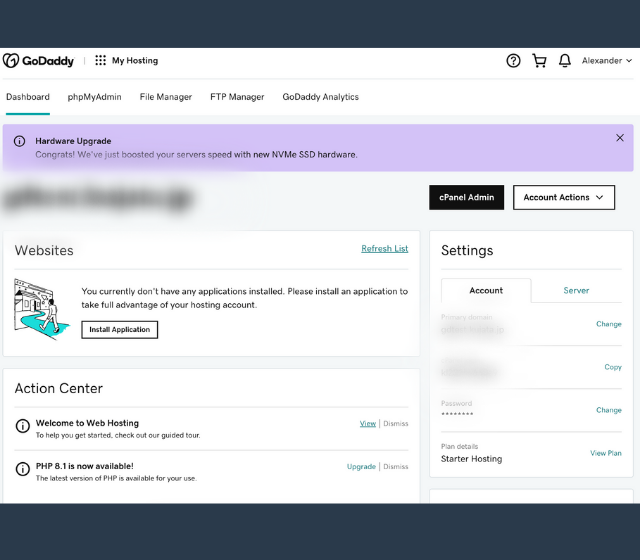
The dashboard can seem confusing. Icons and tabs are everywhere. Each serves a purpose. The Web Hosting tab might not be visible. It depends on your account type. Some accounts don’t have it by default. Check for any services you have. Ensure you have web hosting added.
Account settings hold many options. Look for settings related to products. There might be a way to enable the tab. GoDaddy often updates its features. Keep an eye out for changes. Ask for support if unsure.
Use the search bar. Type “web hosting” to find options. The bar helps locate features quickly. It’s easy and saves time. If you can’t find what you need, help is always available.
Contacting Godaddy Support
Godaddy offers various ways to get help. You can call their support number. You can chat online with their team. Email support is also available. Each channel helps with different issues. Choose the one that suits your needs best.
Before reaching out, gather important account details. This includes your username and customer number. Write down your questions clearly. This helps support understand your issues faster. Be ready to explain your problem step by step. Clear information speeds up solutions.
Account problems can be tricky. Godaddy support can help fix them. Sometimes, passwords need resetting. Other times, payment issues arise. Follow instructions given by support. Often, issues are solved quickly. Stay calm and patient during the process.
Alternative Solutions For Web Hosting
Some people use third-party hosting services for their websites. These services provide many options for different needs. They offer plans that are easy to use. Users can pick what suits them best. Many of these services are user-friendly. They help people manage their websites without much trouble. This makes them a good choice for beginners.
Understanding your website needs is important. Do you need lots of storage? Or maybe fast loading times? Different hosting services offer different features. Make a list of what you need. Compare this with what the services provide. This helps you find the best option.
Moving your website to a new host can be easy. Many services help you with this process. They may offer tools to transfer your data. This ensures your website stays online. It is like moving to a new house. You take your belongings with you. Just make sure you have a backup. This keeps your website safe.
Credit: www.godaddy.com
Frequently Asked Questions
Where Can I Find Web Hosting On Godaddy?
Visit GoDaddy’s website and click “Hosting” in the top menu. Browse options for Web Hosting services there.
How Do I Add Hosting To My Godaddy Domain?
Log in to your GoDaddy account. Go to “My Products” and select your domain. Choose “Add Hosting” and follow the instructions. Pick your hosting plan, then complete the purchase. Your hosting will be linked to your domain. Contact GoDaddy support for any assistance needed.
Does My Godaddy Domain Come With Hosting?
A GoDaddy domain does not include hosting by default. You need to purchase hosting separately. Consider GoDaddy’s hosting plans for website needs.
How To Check Hosting On Godaddy?
Log in to your GoDaddy account. Go to “My Products. ” Find “Web Hosting” under your products list. Click “Manage” next to the hosting plan to view details.
Conclusion
Finding the web hosting tab on GoDaddy can be confusing. Some users notice it’s missing. Others find it under different categories. Understanding this helps manage your hosting needs better. Check the top menu or explore the account settings. Sometimes, updates or changes cause confusion.
Contact support if you need more help. They assist with navigation issues. Remember, GoDaddy frequently updates their platform. So, staying informed is key. Explore, ask questions, and find solutions. This ensures smooth hosting experiences. Always check for changes and updates regularly.
This keeps you informed and ready to adapt.


