Are you looking to transfer your domain from GoDaddy to Namecheap but feel overwhelmed by the process? You’re not alone.
Many website owners seek a better deal or improved service by making this switch. The good news is, transferring a domain is easier than you might think. By following a few straightforward steps, you can ensure a seamless transition without any hiccups.
Imagine the peace of mind knowing your domain is in a place that meets your needs perfectly. We’ll guide you through each step of the transfer process, ensuring you have all the information you need to make the move with confidence. Stick with us and discover how simple it can be to take control of your domain’s future.

Credit: www.youtube.com
Preparing Your Domain For Transfer
Transferring a domain from GoDaddy to Namecheap might seem like a daunting task, but with a bit of preparation, you can navigate it smoothly. Before you start the transfer process, you need to ensure your domain is ready. This involves a couple of key steps like unlocking your domain and obtaining an authorization code. These steps are crucial and skipping them could cause delays. Let’s dive into each step to make your transfer as seamless as possible.
Unlocking The Domain
First, you need to unlock your domain at GoDaddy. A locked domain cannot be transferred, so this step is essential. Log into your GoDaddy account and go to your domain settings. Look for the section labeled ‘Domain Lock’. If it’s enabled, click to disable it. This simple action allows your domain to be transferred.
Remember, unlocking your domain doesn’t make it vulnerable. It’s just a temporary change to facilitate the transfer. Have you ever tried unlocking something only to forget where the key is? Fortunately, with GoDaddy, you don’t need to worry about losing access. Just ensure you secure your account with a strong password.
Obtaining Authorization Code
Next, you’ll need an authorization code, often referred to as an EPP code. This code acts like a ticket, granting permission for your domain transfer. Navigate to your domain management area in GoDaddy and find the option to request your authorization code. GoDaddy will usually send this code to your registered email address.
Double-check your email settings to ensure you receive this crucial piece of information. Have you ever waited for an important email only to find it buried in spam? Keep an eye on your inbox and spam folder to avoid missing this code. Without it, your transfer won’t proceed.
With these steps completed, your domain is prepped for transfer. It’s like packing your bags for a trip; if you forget your passport (or in this case, your authorization code), you can’t board the plane. So, ensure you’re thorough and ready for the next steps in transferring your domain to Namecheap!

Credit: blogaid.net
Initiating Transfer Process On Namecheap
Transferring your domain from GoDaddy to Namecheap is a straightforward process. First, you need to initiate the transfer on Namecheap’s platform. This involves a few key steps. Namecheap has made the process user-friendly and efficient.
Entering Domain Details
Log in to your Namecheap account. Navigate to the domain transfer section. Enter the domain name you want to transfer. Ensure the domain is unlocked at GoDaddy. You should have the authorization code handy. This code is crucial for the transfer.
Completing Purchase And Verification
After entering the domain details, proceed to purchase the transfer. Namecheap may offer some discounts during checkout. Enter your payment details and confirm the purchase. Once purchased, wait for an email from Namecheap. This email contains instructions for verification. Follow these instructions carefully. This step ensures the transfer goes smoothly.
Finalizing Domain Transfer
Transferring a domain from GoDaddy to Namecheap involves a few key steps. Begin by unlocking your domain on GoDaddy. Obtain the transfer authorization code. Then, initiate the transfer on Namecheap by entering the code. Follow the prompts to finalize the process.
Transferring your domain from GoDaddy to Namecheap can seem like a daunting task, but finalizing the domain transfer is actually straightforward if you follow the steps carefully. Once you’ve initiated the transfer, there are a few key actions to ensure everything transitions smoothly. This stage is all about confirming, checking, and ensuring your domain is ready to take flight.Confirming Transfer Email
You’ll receive an email from Namecheap asking you to confirm the transfer. This is a crucial step and missing it can stall the entire process. Open the email and follow the instructions to confirm your transfer request. Keep an eye on your inbox, including the spam folder, to ensure you don’t miss it. Clicking the confirmation link provided will signal that you’re ready to proceed.Checking Domain Status
Once you’ve confirmed, head over to your Namecheap account to check the status of your domain transfer. This is where patience pays off, as transfers can take a few days to complete. Log into your dashboard and look for updates on the domain transfer. You might see terms like “Pending” or “In Progress.” While waiting, consider the benefits awaiting you at Namecheap, such as their user-friendly interface and competitive pricing. In my experience, the anticipation of watching the status change can be exciting. Have you considered how the new platform might enhance your domain management experience? Finalizing the domain transfer doesn’t have to be a headache if you stay on top of these steps. Are you ready to see your domain flourish in its new home?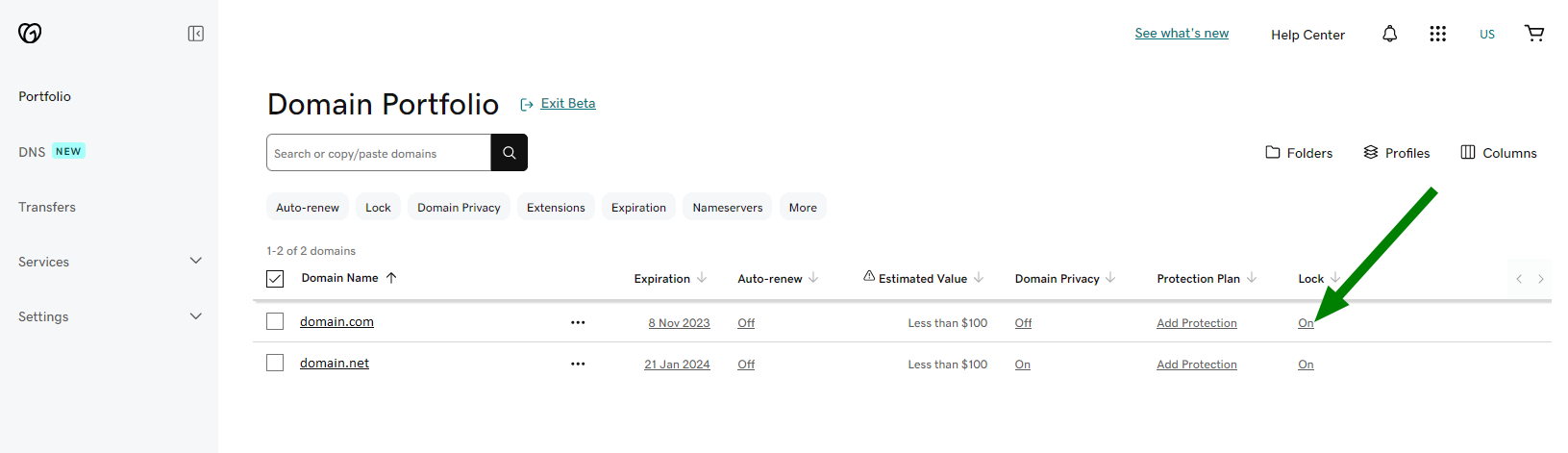
Credit: www.namecheap.com
Frequently Asked Questions
Can You Transfer A Domain From Godaddy To Namecheap?
Yes, you can transfer a domain from GoDaddy to Namecheap. Unlock the domain at GoDaddy first. Obtain the authorization code. Initiate the transfer at Namecheap using the code. Follow their instructions to complete the transfer process. Ensure your domain is eligible for transfer according to ICANN rules.
Can I Transfer My Domain Name From Godaddy To Another Host?
Yes, you can transfer your domain from GoDaddy to another host. Unlock your domain, get an authorization code, and initiate the transfer with your new host. Ensure your domain is more than 60 days old and not in a locked status.
Follow your new host’s instructions for a successful transfer.
How Do I Move My Domain To Namecheap?
To transfer your domain to Namecheap, unlock it at your current registrar. Obtain the authorization code. Initiate the transfer on Namecheap’s website. Enter the authorization code when prompted. Complete the transfer by approving emails from both registrars.
Is Godaddy Domain Transferable?
Yes, GoDaddy domains are transferable. You can transfer your domain to another registrar. Ensure your domain is unlocked and obtain the authorization code from GoDaddy. Follow the new registrar’s transfer process for a successful transfer. Always check domain transfer policies for specific requirements.
Conclusion
Transferring a domain from GoDaddy to Namecheap is straightforward. Follow each step carefully. This ensures a smooth transfer process. First, unlock your domain at GoDaddy. Next, get your authorization code. Then, initiate the transfer at Namecheap. Enter the code and confirm the transfer.
Be patient; it may take a few days. Your domain will soon be with Namecheap. Enjoy managing your domain on a new platform. If you face issues, both platforms offer support. Remember, a successful transfer brings peace of mind. Happy managing!