
Imagine you’re running a website, and you want it to be the best it can be. You need a reliable database to store and manage all the information efficiently.
But what if the tool you’re using is actually holding you back? If you’re using Access for your database web hosting, this might be the case. You’ll discover why Access can be a bad choice for web hosting and how it could be impacting your site’s performance and reliability.
By understanding the limitations and pitfalls of Access, you’ll be better equipped to make informed decisions for your website’s future. Don’t let outdated technology slow you down; instead, explore better options that can empower your online presence and help you achieve your goals. Keep reading to uncover the truth about Access and find out what you can do to improve your database web hosting.
Limitations Of Access
Access struggles with database web hosting due to limited scalability and security features. Its performance slows significantly with large datasets, affecting user experience. The lack of advanced tools makes it unsuitable for complex web applications.
Scalability Issues
Access struggles with scaling up for large databases. It works fine for small tasks. Big projects face problems. Access can’t handle many users at once. It slows down with more data. Scaling Access means more resources. Costs rise quickly. Other databases scale better. They support many users easily. Access is not suitable for large businesses. It lacks flexibility. Big data needs strong systems. Access fails to provide this.
Performance Bottlenecks
Access can be slow with many users. It has limited power. Queries take longer with more data. Complex tasks slow Access down. It cannot handle heavy loads. Access struggles with high traffic. Other databases perform better. They manage tasks efficiently. Access is not made for web hosting. It causes delays. Users face frustration due to slow speeds. Performance issues are common. Access needs more power for big tasks.
Security Concerns
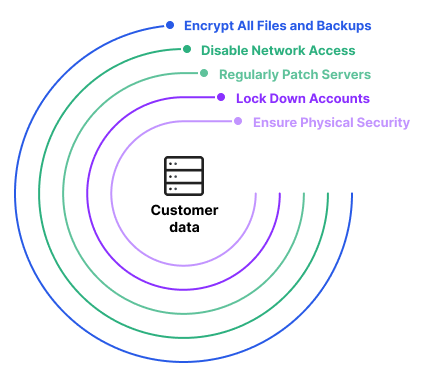
Access databases often have weak security features. This makes them easy targets for hackers. They lack proper encryption and protection. Sensitive data can be stolen or changed. Hackers can easily break into these databases. This leads to data loss and breaches. A strong database should protect user data well. Access databases fail here. They put data at risk. Users need better security for their information.
Access databases struggle with user control. Too many users can change data. This causes confusion and errors. Proper control is missing. Important data should be safe. Access databases allow anyone to edit. This is not good for businesses. They need strict control. Only trusted people should have access. Access databases fail to offer this. Better solutions have more control.
Compatibility Problems
Access databases often face integration challenges with web hosting. Many web hosts use different database systems. They prefer MySQL or PostgreSQL. Access does not mix well with them. This leads to data sharing problems. Developers face headaches due to these issues. They spend extra time fixing them.
Access works mainly on Windows. This causes cross-platform issues for users. Other systems like Linux have trouble using Access. It limits who can use the database. Businesses lose flexibility. They cannot easily switch platforms. They are tied to Windows environments. This restricts growth and options.
Credit: www.imperva.com
Maintenance Challenges
Troubleshooting with Access can be very hard. Issues often need expert skills. Many users find errors without clear solutions. This can stop important tasks. Errors might come from data conflicts or software bugs. Fixing these can take a lot of time. Users may feel lost without help. This frustration leads to delays. Teams often need to call in specialists. This adds to costs and time.
Upgrading Access databases can be a huge task. New versions may not support old files. This means data can be at risk. Compatibility issues are common. Users might face problems with software updates. Data loss is a real threat. Businesses need to plan upgrades carefully. This often requires extra resources and time. Users might need to learn new features. This can slow down work.
Alternatives To Access
Access often struggles with large data volumes, leading to slow performance and reliability issues. It lacks robust security features, making it unsuitable for web hosting. Consider alternatives like MySQL or PostgreSQL for better scalability and security.
Robust Database Solutions
Access is not the best choice for web hosting. Other databases work better. MySQL is one popular choice. It is fast and reliable. PostgreSQL offers advanced features. It handles complex queries well. For big data, Oracle is a strong option. It provides excellent performance. These databases are more secure than Access.
Cloud-based Options
Cloud services are a great choice today. Amazon Web Services (AWS) offers databases like RDS. It is easy to use and scales well. Google Cloud Platform has Cloud SQL. It is fast and integrates with other Google tools. Microsoft Azure provides SQL Database. It offers high availability. Cloud databases reduce hardware costs. They also improve data security.
Credit: www.awardspace.com
Case Studies
Many businesses have seen their databases crash with Access. One company lost all their customer data. This happened during a busy sales day. They had to shut down their website. Customers were unhappy. Another firm experienced slowdowns. Their website took minutes to load. This hurt their sales too. These issues show the risks of Access.
Some companies switched from Access to better options. They chose systems like MySQL. After the change, their websites ran smoother. Customers had a better time shopping online. Sales numbers improved. These companies found more stable solutions. Their databases became more reliable and fast. Such transitions helped their business grow.

Credit: blog.clickstudios.com.au
Frequently Asked Questions
Why Are Access Databases Bad?
Access databases lack scalability and struggle with large data volumes. They offer limited user access and security features. They can become unstable and prone to corruption with complex queries. Access databases are not suitable for web-based applications, limiting integration capabilities with modern systems.
They are ideal only for small-scale projects.
What Are The Disadvantages Of Microsoft Access Database?
Microsoft Access has limited scalability, making it unsuitable for large databases. It lacks advanced security features and multi-user support can be problematic. Performance issues arise with complex queries. Compatibility with other systems is limited. It’s primarily designed for small to medium-sized applications.
Can You Host An Access Database?
Yes, you can host an Access database on a Windows server with Remote Desktop or a third-party hosting service. Make sure the hosting provider supports Access databases and offers necessary configurations for smooth operation. This ensures your database remains accessible and functional for your needs.
Can An Access Database Be Used Online?
Yes, you can use an Access database online by integrating it with web services or converting it to a cloud-based solution. Use tools like SharePoint or Access Services for better online functionality. Consider converting to SQL Server for enhanced online performance and scalability.
Conclusion
Access databases have clear drawbacks for web hosting. They struggle with scalability. Performance issues often arise under heavy traffic. Security features are limited compared to other databases. Compatibility problems can also occur, causing disruptions. These factors make Access less ideal for web environments.
More robust databases offer better support. They handle larger workloads efficiently. Choosing a dependable database ensures smoother operations. It also reduces risks associated with data handling. Consider alternatives for a reliable hosting experience. Make informed decisions to avoid future complications.
Prioritize stability and security in database choices. Your web applications deserve the best foundation.


