
Imagine having complete control over your web hosting environment, where you can customize settings, install software, and optimize performance to suit your exact needs. This is the power of root access in web hosting.
Whether you’re managing a website for your business or running a personal blog, understanding root access can transform the way you interact with your server. But what exactly does it mean to have root access? And how can it benefit you?
By the end of this article, you’ll not only grasp the concept of root access, but you’ll also be equipped with the knowledge to decide if it’s the right choice for your web hosting needs. Dive in, and discover the freedom and control that comes with unlocking root access.
Understanding Root Access
Root access gives full control over your server. It allows you to install software, change settings, and manage files. Web hosting often comes with limited access. Root access lets you do more.
It’s like being the boss of your computer. You can fix problems or make changes. Not everyone needs this level of control. Basic users might find it confusing. Advanced users find it helpful.
With root access, you can customize your web server. You can make it work the way you want. Security is important. Be careful with the changes you make. Mistakes can break things.
Role Of Root Access In Web Hosting
Root access means having the highest level of control over a server. It lets users change any setting they want. This is like having the keys to a car. You can drive it anywhere. No limits. It is important for developers. They need to install special software. Root access gives them that power.
Many web hosting services offer root access. It is often found in VPS or dedicated hosting plans. These plans are more powerful than shared hosting. They give you more freedom and options. You can make the server work just for you. This is good for businesses with special needs.
Be careful with root access. Mistakes can break the server. It is like driving a car too fast. Things can go wrong. Always know what changes you are making. This keeps your website safe.
Benefits Of Root Access
Root access gives you full control over the server. You can change any setting. You can manage all files. No need to ask for help. You are the boss!
With root access, you can install custom software easily. No need to wait for others. Choose any program you like. Install it yourself. Enjoy the freedom!
Root access allows better security options. You can set strict rules. Protect your data with strong passwords. Keep bad guys away. Feel safe and secure!

Credit: www.knownhost.com
Risks Of Root Access
Root access allows deep changes. Mistakes can happen easily. These mistakes might cause serious problems. Servers might stop working. Important settings can be changed by accident. This can make the server slow or unstable.
Root access opens many doors. Hackers might find these doors. They can enter and cause harm. Sensitive data can be stolen. It is important to guard these doors. Always use strong passwords. Regularly check for security updates.
Root access can delete data. Important files might be lost. This can happen quickly. Recovery is often hard or impossible. Always back up your files. Keep backups safe and separate. Data is precious. Protect it well.
Root Access In Different Hosting Types
Shared hosting has its limits. Users share a server with many others. Root access is not available here. This keeps the server safe. Changes by one user can harm others. Hosting companies control server settings. They keep everything running smoothly. Users can only adjust minor settings.
VPS hosting is different. It offers more control. Each user gets a virtual server. Users can have root access. They can change settings. This gives more flexibility. Users can install software. They can tweak server settings. It is like having a mini dedicated server. Yet, it’s still shared on a larger machine.
Dedicated servers are special. They offer full control. Users get the whole server. Root access is easy here. Change any setting. Install any software. It’s all yours. No sharing with others. High security and control. Perfect for big businesses. They need powerful servers. Dedicated servers deliver this.
Credit: contabo.com
How To Obtain Root Access
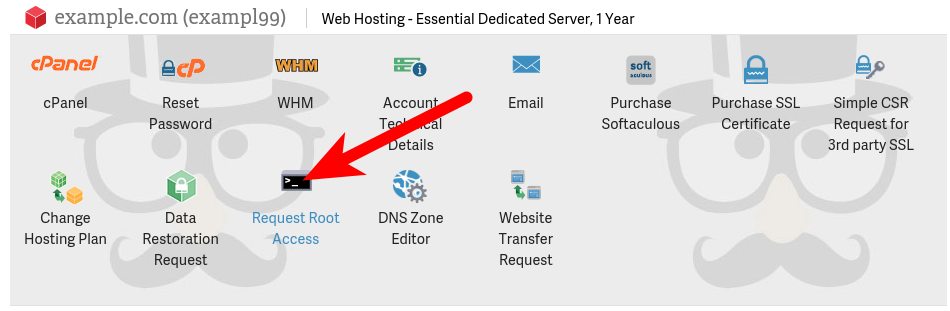
You can ask your hosting provider for root access. Contact their support team. They will guide you. Some providers may charge a fee. Others might not allow it at all. Always check their terms and conditions first. Root access gives you full control. But it also comes with risks. Make sure you know what you are doing. Backup your data before changes. This ensures your information is safe.
Control panels make managing your server easy. Tools like cPanel or Plesk are popular. They offer a user-friendly interface. You can manage files, databases, and more. To get root access, find the right section. Look for settings or configurations. Enable root access from there. Always follow the instructions. If unsure, ask your provider for help. It keeps your server secure.
Best Practices For Managing Root Access
Use strong passwords. Change them often. Enable two-factor authentication. This adds an extra layer. Limit root access to trusted users. Use firewalls to block unwanted traffic. Regularly update your software. This patches security holes. Keep an eye on security news. Stay informed about threats.
Create backups often. Store them securely. Keep them offsite if possible. This helps in case of data loss. Test your backups regularly. Make sure they work. Automate backup processes. This reduces human errors. Schedule backups during off-peak hours. This avoids slowing down your server.
Use monitoring tools to track activity. Check logs for unusual patterns. Set up alerts for suspicious events. Review access logs daily. Make sure only authorized users have access. Analyze traffic patterns. Look for anything out of the ordinary. Regularly audit server configurations. Ensure settings are optimal and secure.
Credit: www.inmotionhosting.com
When Root Access Is Not Necessary
Not every website needs root access. Many websites work well without it. Basic sites like blogs or small business pages are examples. Shared hosting plans often don’t provide root access. This is fine for most users. They focus more on creating content and not on server settings.
Managed hosting also skips root access. Hosts handle updates and security. Users don’t need to worry about technical details. This is ideal for those new to hosting. It saves time and prevents mistakes. Always consider your needs before seeking root access.
Frequently Asked Questions
What Is Root Access In Hosting?
Root access in hosting grants full control over the server environment. It allows users to install software, configure settings, and manage all server resources. This level of access is crucial for advanced customization and complete server management. Ideal for experienced users seeking flexibility and control.
What Is Meant By Root Access?
Root access allows complete control over a computer system or server. Users can modify system files, install software, and change settings. It is commonly used in Linux and Unix systems for administrative tasks, offering full permissions to manage and configure the system efficiently.
What Does It Mean To Gain Root Access?
Gaining root access means obtaining full administrative control over a system. This allows users to modify system files, install software, and manage settings. Root access is often used for troubleshooting, customization, or advanced configuration tasks. It requires caution as it can impact system security and stability.
What Does Full Root Access Mean?
Full root access grants complete control over a server’s operating system. Users can modify settings, install software, and manage files. This level of access is ideal for advanced users needing extensive customization and management capabilities. With full root access, users can optimize server performance and security to meet specific needs.
Conclusion
Root access in web hosting offers powerful control. It’s crucial for advanced users. With root access, you manage server settings directly. This means better customization and flexibility. But, it requires technical skills. Beginners might find it challenging. Always ensure security measures are in place.
This prevents unauthorized access and potential threats. Choosing root access depends on your hosting needs. Evaluate your technical comfort level. If unsure, seek expert advice. Understanding your needs helps make informed decisions. Root access can be a valuable tool. It empowers those ready to handle it.


