
Have you ever wondered what goes on behind the scenes when you visit a website? The answer lies in the world of web servers, and understanding what the host of a web server computer does is key to unlocking the mystery.
Imagine having a personal assistant who ensures everything runs smoothly whenever you open your favorite website. That’s essentially the role of a web server host. You’ll discover the vital responsibilities of a web server host and how they impact your online experience.
By the end, you’ll have a clear picture of the unseen but essential work happening every time you click on a link. Dive in and uncover the secrets of seamless browsing that you might have taken for granted.
Web Server Basics
A web server helps show websites online. It stores all the files and data. When you click on a website, the server sends data to your computer. This data makes the website appear. Web servers handle many requests at once. They keep websites running smoothly.
There are different types of web servers. Apache is popular and free. It works with many websites. Nginx is fast and handles high traffic well. IIS is from Microsoft and works with Windows. Each server has its own features. Choosing the right one is important for speed and security.
Web Server Hosting
Shared hosting is like sharing a room with others. Many websites use the same server. It’s cost-effective for beginners. Perfect for small websites. The server’s resources are shared. Like memory and processing power. If one website gets busy, others might slow down. It’s great for learning. But not ideal for heavy traffic sites.
Dedicated hosting gives you a whole server. Just for your website. No sharing with others. It’s more expensive. But more powerful. You get full control. Choose your settings. Perfect for big websites. Or those with high traffic. Security is better too. It’s like having your own house. Not sharing with anyone.
Cloud hosting uses many servers. Not just one. If one server fails, others help. It’s flexible. Easy to grow. Add more space as needed. Pay for what you use. Like a virtual network. Websites stay online even with heavy traffic. It’s reliable. Perfect for growing businesses. It adapts to needs quickly.
Server Configuration
Choosing the right operating system is crucial for a web server. Popular choices include Linux and Windows. Linux is free and open-source. It’s often used by developers. Windows offers a familiar interface. It’s preferred by many businesses. Each system has its advantages and disadvantages. Consider your needs before making a choice.
The web server needs strong hardware. A fast CPU ensures quick processing. Enough RAM is needed for smooth operations. Hard drive space is important for storing data. SSDs can improve speed. Network cards affect data transfer rates. Choose wisely for better performance.
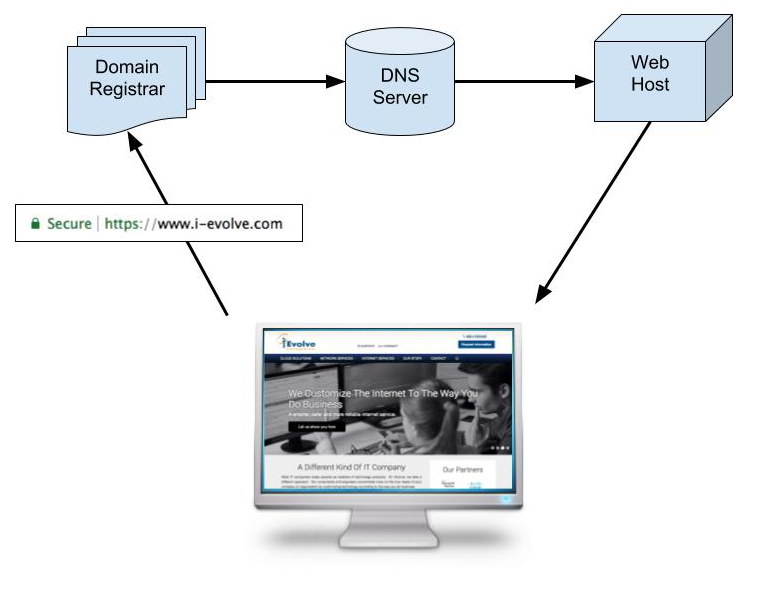
Credit: www.i-evolve.com
Managing Web Traffic
Load balancing keeps websites running smoothly. It divides web traffic evenly. This helps servers from getting too busy. Load balancers watch traffic flow. They send requests to the best server. This keeps the site fast and safe. If one server fails, others can help. This stops the site from going offline. Load balancing is like a traffic cop. It keeps things moving without jams.
Traffic monitoring tools check how many visitors a site has. They show which pages get the most visits. These tools help find slow pages. Web hosts can fix problems quickly. This keeps visitors happy. Tools also watch for bad traffic. Like hackers or bots. They keep the site safe and working well. These tools are important for a healthy website.
Security Protocols
Firewalls protect computers from hackers. They block unwanted traffic. A host sets up firewalls to keep data safe. Firewalls create a barrier. This barrier keeps bad users out. It monitors data coming in and out. A strong firewall is very important. It helps prevent attacks. Hosts update firewalls regularly. Updates fix any weak spots. Keeping up with these updates is crucial.
SSL Certificates encrypt data between the server and users. This makes information private. It keeps it safe from prying eyes. SSL certificates show a website is secure. Visitors trust sites with SSL. The host installs these certificates. They must renew them every year. A valid SSL certificate is vital. It assures users their data is safe. Without SSL, data may be exposed.

Credit: www.ewebguru.com
Backup And Recovery
A web server host must keep data safe. They use data backup strategies to do this. Backups save copies of important files. This helps if something goes wrong. There are many ways to back up data. Some use cloud storage. Others use external hard drives. Cloud storage keeps data online. Hard drives keep it offline. Both ways keep data safe.
Disaster recovery plans help when things go bad. Like if a server crashes. The host needs a plan. This plan shows how to fix things. It helps get the server working again. Recovery plans are like a map. They guide the host step by step. This makes sure data is safe. And everything runs smoothly again.
Performance Optimization
Caching helps a web server work faster. It stores data in a temporary place. This way, it doesn’t have to fetch data all the time. This reduces load time for users. Caching also lowers the server’s workload. It can make websites work smoothly and quickly. Popular caching methods include browser caching and server-side caching. Each method helps in different ways. Choosing the right caching method is important. It keeps both users and servers happy.
Databases need care to work well. Optimization makes them faster and more efficient. Removing duplicate data can help. It saves space and speeds up queries. Indexing is also crucial. It makes searching for data quicker. Regular maintenance tasks are necessary. This includes checking for errors and fixing them. Keeping the database organized is key. It ensures a smooth performance for the server. Optimized databases improve user experience.
Troubleshooting Issues
Many server errors can slow down a website. 404 errors are very common. They happen when a page is not found. 500 errors are also frequent. These are server problems. They can stop the website from working. Connection errors can occur too. They are due to network issues. Fixing these errors is key. It helps in making websites run smoothly.
Debugging tools help find problems. They give logs that show errors. Logs tell what went wrong. Tools like Chrome DevTools are helpful. They show errors in code. There are tools for checking server health. These tools are important. They help maintain websites. Good tools make fixing problems easier.
Future Trends
The host of a web server computer stores, processes, and delivers web pages to users. It manages data requests efficiently, ensuring smooth online interactions. This role is crucial for maintaining website performance and accessibility.
Advancements In Web Hosting
The world of web hosting changes fast. New tools make it better. Cloud hosting grows popular. It offers more space and speed.
Managed hosting helps people. Experts handle the tough parts. This makes things easier. Green hosting is important now. It saves energy and helps the planet.
More people want fast websites. Hosting companies work hard on this. They use new methods. Everyone wants a quick website.
Emerging Technologies
New tech changes hosting. AI and machine learning are important. They help servers run better.
Blockchain is also new. It keeps data safe. Many people like this idea. It makes hosting more secure. Edge computing is growing. It brings data closer to users. This makes websites faster.
5G technology changes things too. It offers faster speeds. Hosting companies prepare for this. Everyone wants quicker internet.

Credit: en.wikipedia.org
Frequently Asked Questions
What Does A Web Server Host?
A web server hosts websites, applications, files, and databases. It stores and serves content to users online. It ensures website accessibility, security, and efficient data management. Web servers facilitate communication between users and the hosted content, providing a seamless online experience.
What Is The Role Of A Web Host?
A web host provides storage, security, and support for websites. They ensure websites remain accessible online. Web hosts manage servers and offer various hosting plans. They handle technical aspects, allowing users to focus on content. Reliable hosting improves website performance and user experience.
What Is The Function Of A Host In A Computer?
A host in a computer connects devices to a network, facilitating data exchange and communication. It manages IP addresses and acts as a central point for network resources, ensuring efficient connectivity. Hosts are vital for accessing internet services and supporting applications in a networked environment.
Do I Really Need A Host For My Website?
Yes, a host is essential for your website. It provides storage, security, and accessibility online. Without hosting, your site can’t be viewed on the internet. Reliable hosting ensures faster load times, better performance, and improved user experience, which is crucial for SEO.
Conclusion
A web server host manages crucial tasks efficiently. They ensure your website runs smoothly. This includes handling traffic, storing data, and maintaining security. Their role is essential for a seamless online presence. Without them, websites could face downtime or security issues.
Understanding their responsibilities helps appreciate their importance. Choosing a reliable host is key for website success. It ensures fast load times and a secure environment. A good host keeps your site accessible and protected. Always prioritize quality when selecting a web server host.
This decision impacts your website’s performance and reliability.


