
Have you ever wondered what makes your favorite websites accessible anytime you need them? The answer lies in something called a “web hosting environment.”
Understanding this concept is crucial whether you’re launching a new website or simply curious about how the internet works. When you know what a web hosting environment is, you empower yourself to make smarter choices for your online presence. Imagine having the ability to ensure your site runs smoothly, loads quickly, and stays secure.
Doesn’t that sound appealing? Dive into this article to unravel the mysteries of web hosting environments and discover how they play a pivotal role in your digital experience.
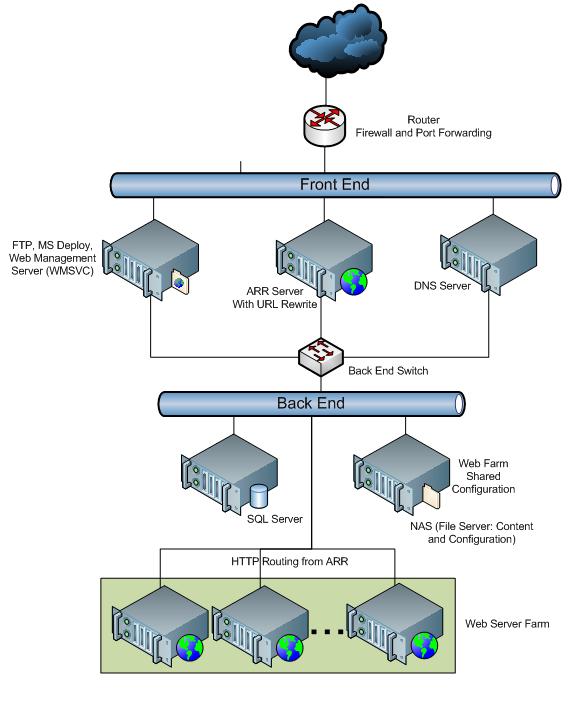
Credit: learn.microsoft.com
Basics Of Web Hosting
Web hosting is like renting a space for your website. It keeps your website online. The main purpose is to store your website files. These files are kept on a server. A server is like a special computer. It works all the time. Without it, your website can’t be seen by others. Hosting helps users find your site. They type your site name into their browser. The server sends your site to their screen. This makes your site live and accessible.
There are different types of hosting. Shared hosting is the most basic. Many websites share one server. It’s like sharing a room with friends. VPS hosting is next. You have your own space but still share the server. Dedicated hosting gives a whole server to you. It’s like having your own house. Cloud hosting uses many servers together. It’s very flexible. Choose based on your needs and budget.
Components Of A Hosting Environment
A web hosting environment consists of servers, networks, and software that store websites. It includes hardware like computers and storage devices. Operating systems, security measures, and management tools also play crucial roles.
Servers And Hardware
Servers are the heart of a hosting environment. They store and manage data. Hardware includes CPUs, RAM, and storage devices. These help in processing and saving data. A fast server means a better website experience. More RAM helps handle many users at once. Storage devices keep all your website files safe.
Software And Applications
Software makes servers run smoothly. It includes operating systems like Linux or Windows. Applications like control panels help manage websites easily. They allow users to change settings without knowing much about technology. Security software protects websites from attacks. It’s important to keep software updated. This ensures a safe and reliable hosting environment.
Types Of Web Hosting
Shared hosting is like sharing a big house with others. Many websites use the same server. This helps keep costs low. It is great for small websites. But it can be slow at busy times. The server resources are shared. Security is basic here. It is not ideal for big websites.
VPS hosting gives you a private space. You share a server but have your own resources. It is more secure than shared hosting. It suits medium-sized websites. You have more control here. It costs more than shared hosting.
Dedicated hosting means you have your own server. No sharing with others. It is very secure and fast. Best for large websites. You have full control of the server. It costs a lot more than VPS or shared hosting.
Cloud hosting uses many servers. Your website can use resources from all these servers. This makes it very flexible. It is good for growing websites. It handles traffic spikes well. Costs vary based on usage.

Credit: medium.com
Choosing The Right Hosting
First, list what you need. Do you want a personal blog? Or a business website? Personal blogs need less power. Business sites need more. They need speed and security. Understand what you need. This helps in making a choice.
Money matters. Some hosting plans are cheap. Others are costly. Cheaper plans may have limits. Costly plans might offer more features. Always compare prices. Look for the best value. Don’t spend more than you need. Think about long-term costs too.
Websites grow over time. They need more space and power. Scalability means your host can grow with you. Flexible plans are important. They adjust as you grow. Choose a host with room to expand. This helps your site stay strong.
Security In Web Hosting
Hackers aim to steal data. Viruses can damage files. Malware infects websites. Phishing tricks users to reveal secrets. DDoS attacks flood servers with traffic. Spam clogs emails. Each threat harms web security.
Use strong passwords for safety. Firewalls block harmful traffic. SSL certificates encrypt data. Regular backups save important files. Antivirus software detects viruses. Software updates fix vulnerabilities. Each measure protects websites from threats.

Credit: evolving-digital.com
Performance Optimization
Speed is very important for websites. A fast website makes users happy. Happy users stay longer. They visit more pages. They might buy things. A slow site can make users leave. They get bored waiting. They might not come back. So, speed is key.
Good resource management helps sites run well. It uses servers smartly. This keeps sites fast. Bad management can make sites slow. It can also cause errors. This frustrates users. Good management prevents this. It helps the site stay reliable.
Future Trends In Hosting
Exploring future trends, the web hosting environment is set to become more flexible and scalable. It includes servers, networks, and data centers. These components work together to store and manage websites efficiently. Advances will focus on sustainability and enhanced security.
Green Hosting
Green hosting focuses on saving the planet. Hosting companies use renewable energy. This reduces the carbon footprint. Servers are powered by solar and wind energy. This helps the environment. Green hosting is eco-friendly. More businesses choose green hosting. It is important for a sustainable future.
Ai And Automation
AI helps in web hosting. It can manage servers automatically. AI fixes problems fast. This saves time and money. Automation makes tasks easy. Updates happen without human help. AI predicts what users need. Hosting becomes smarter. AI learns from past actions. It improves hosting quality. Many companies use AI now. It is a growing trend.
Frequently Asked Questions
What Is Web Hosting Environment?
A web hosting environment is a server space where websites reside. It provides resources for storage, security, and accessibility. Hosting environments can be shared, dedicated, or cloud-based, affecting performance and scalability. Choosing the right hosting impacts site speed, uptime, and user experience.
What Is Web Hosting And An Example?
Web hosting stores website files on servers, making them accessible online. An example is Bluehost, which offers reliable hosting services.
What Are The 3 Types Of Web Hosting?
The three types of web hosting are shared hosting, VPS hosting, and dedicated hosting. Shared hosting is affordable and suitable for beginners. VPS hosting offers more control and resources. Dedicated hosting provides maximum performance and security. Choose based on your website’s needs and budget for optimal results.
What Is A Host Environment?
A host environment provides the necessary platform and resources for executing programs. It includes hardware, software, and network capabilities. Web browsers and operating systems are common examples. This environment ensures compatibility and functionality for applications. Understanding the host environment is crucial for developers to optimize performance.
Conclusion
Understanding web hosting environments is crucial for online success. Choosing the right one impacts your website’s performance. Speed, security, and reliability depend on it. Match your needs with the hosting type. Consider your budget and technical skills. Shared hosting suits beginners.
VPS offers more control. Dedicated hosting provides exclusive resources. Cloud hosting scales with traffic. Each option has unique benefits. Make informed decisions for a smooth online journey. Your website’s health depends on a suitable hosting choice. Now, you’re ready to explore hosting options confidently.
Happy hosting!


