
Are you ready to boost your website’s security with an SSL certificate but unsure where to start? You’re not alone.
Many website owners find themselves puzzled when it comes to installing an SSL certificate, especially when it comes to choosing the right folder. This seemingly simple task can become a bit of a headache if you don’t know where to look.
But don’t worry—understanding where to install your SSL certificate doesn’t have to be complicated. We’ll guide you through the process, ensuring you know exactly which folder your SSL certificate should call home. Stick with us, and by the end, you’ll have the confidence to enhance your site’s security seamlessly. Ready to dive in? Let’s unravel the mystery together!
Basics Of Ssl Certificates
SSL certificates keep online data safe. They make sure that information stays private. Websites with SSL certificates show a padlock icon. This icon means the site is secure. SSL certificates are important for trust. They protect users’ personal details like passwords. Web hosting needs SSL certificates to function properly. Without them, websites might be unsafe.
SSL certificates work by encrypting data. Encryption turns data into secret code. Only the right server can read this code. This makes it hard for bad people to steal information. Installing SSL certificates on web hosting is simple. Follow the host’s guide. Usually, they go in the main folder. Check hosting instructions for details.
Types Of Ssl Certificates
SSL certificates come in different types. Each type serves a unique purpose. The first type is Domain Validation or DV. It’s the simplest and fastest option. DV checks if you own the domain. Next, we have Organization Validation or OV. It verifies your organization details. OV is more secure than DV.
Another type is Extended Validation or EV. This gives the highest level of trust. EV shows your company name in the browser bar. Finally, there are Wildcard certificates. These cover all subdomains. A single Wildcard SSL can protect many subdomains.
Choosing the right type depends on your needs. Small sites often use DV. Larger businesses might prefer EV. Always ensure your choice aligns with your goals.
Importance Of Ssl In Web Hosting
SSL certificates protect data on websites. They keep information safe from hackers. Every website needs SSL for security. SSL stands for Secure Socket Layer. It creates a safe link between a web server and a browser. This link protects usernames, passwords, and credit card details. Without SSL, data can be stolen easily. Visitors trust websites with SSL. A site with SSL shows a padlock in the browser. This means the site is safe. Google also likes sites with SSL. It ranks them higher in search results. Better rank means more visitors.
Web hosting companies offer SSL certificates. They are often installed in a special folder. This folder keeps the SSL files organized. It makes sure the SSL works right. The folder is often called SSL or certificates. Check with your web host for the exact folder name. Installing SSL is easy. It’s important for all websites.
Credit: www.thesslstore.com
Common Locations For Ssl Installation
SSL certificates are often installed in specific folders. The Apache server usually requires SSL files in the /etc/ssl/ directory. This directory holds important keys and certificates. For the Nginx server, files are often stored in /etc/nginx/ssl/. This path helps keep things organized.
Windows servers might use a different folder. The common location is C:Program FilesApache GroupApache2confssl.crt. Each server type needs its own location. It’s important to check your server’s documentation. This ensures you place files in the correct folder. Proper placement keeps your site secure.
Web Server-specific Directories
Apache servers store SSL files in a specific directory. This folder is often named /etc/ssl/. Inside this folder, look for certs and private subfolders. Certs hold your certificate files. Private keeps your private keys safe. Always check your server’s configuration file. It might have custom paths. Double-check before adding files.
Nginx uses a similar structure. SSL files often go in /etc/nginx/ssl/. This folder holds your certificate and key files. The nginx.conf file helps set the path. Look for ssl_certificate and ssl_certificate_key lines. They show where to put your files. Keep your paths consistent for easy management.
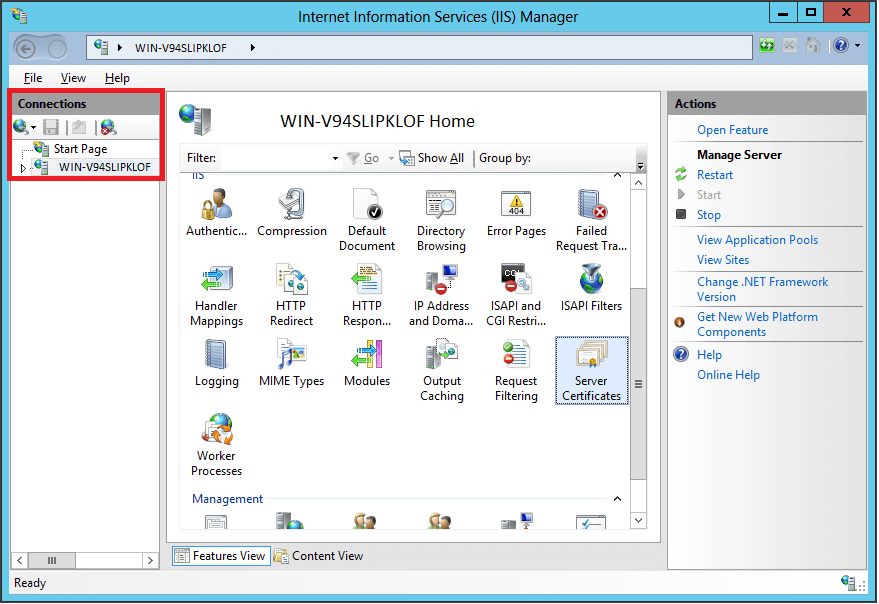
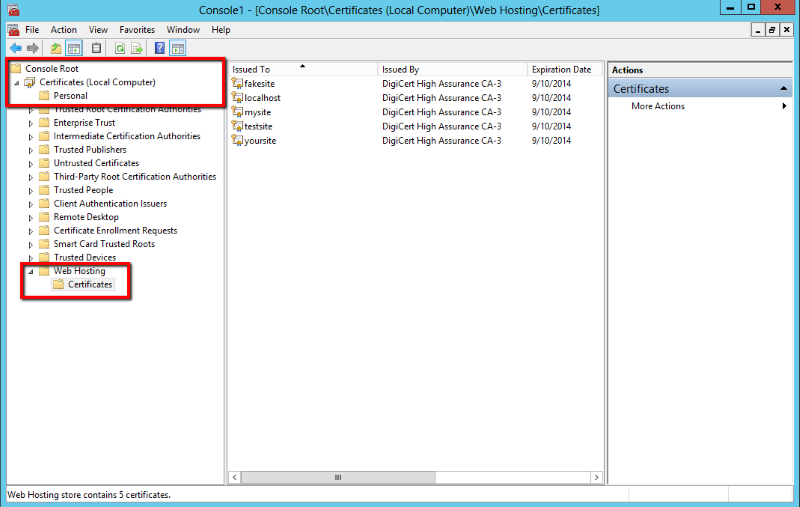
Microsoft IIS stores SSL certificates in the Windows certificate store. Use the IIS Manager to import certificates. Files are not stored like Apache or Nginx. They are managed through MMC (Microsoft Management Console). This keeps them secure and easy to access. Certificates are often named My or WebHosting. Check paths before importing.

Credit: www.sectigo.com
Accessing Your Hosting File System
cPanel is a tool to manage your website files. First, log into your cPanel account. Find the “File Manager” icon and click it. This opens your file system. Look for the folder named “public_html”. This is where you add your SSL certificate files. Make sure to upload the files correctly. Ask for help if needed. cPanel makes it easy to manage your files. Follow each step carefully.
FTP stands for File Transfer Protocol. It helps you move files to your server. Start by downloading an FTP client like FileZilla. Open the client and connect to your server. Use your username and password for access. Navigate to the “public_html” folder. This is where you place your SSL certificate files. Drag and drop the files into this folder. Double-check your files are in the right spot. If unsure, ask someone for help. FTP is great for file transfers.
Steps For Ssl Certificate Installation
Start by creating a CSR. It is a small file. It holds important information. Your name, address, and website details are included. Use your server software. Open the tool. Enter your details carefully. Save the generated CSR file. You need this file for the next steps. Remember, it is important. Keep it safe.
First, locate the SSL certificate file. It is usually sent to you. Open your hosting control panel. Find the SSL section. Click the install button. Upload the certificate file. Ensure all details match. Follow instructions carefully. Complete the setup. Your website is now secure. Enjoy safe browsing.
Troubleshooting Installation Issues
Common Errors can cause problems during SSL installation. Sometimes the certificate file is not in the right folder. The certificate should be in the SSL folder on the server. If the certificate is in the wrong place, the website won’t be secure. This can make users feel unsafe. Another issue is using the wrong certificate type. Always check the certificate type matches the server. This ensures it works well. Check for typos in the certificate name. A tiny mistake can cause big issues. Make sure the server settings are correct. Wrong settings can lead to errors.
Verifying SSL Installation is important. Use online tools to check the installation. These tools tell you if the SSL is working right. They show if the certificate is trusted. It’s important to test on different browsers. Each browser might show different results. Always check the SSL is up to date. An old certificate might not be trusted. Regular checks help keep your website safe. Always fix any errors quickly.
Security Best Practices
Keeping your website safe is very important. SSL certificates help secure your site. They protect data from hackers. Install SSL in the right folder. This makes your site safe. Always check if your SSL is up-to-date. Regular updates fix security holes. Use strong passwords for your accounts. Change them often. Don’t share your passwords with others. Keep your software updated too. This helps in stopping new threats.
Back up your data often. This keeps it safe if something goes wrong. Use firewalls to block bad traffic. Firewalls keep unwanted users away. Always monitor your website. Look for unusual activity. Act fast if you see anything odd. Security is important. Keep learning and stay safe.
Credit: knowledge.digicert.com
Frequently Asked Questions
Where Do I Install My Ssl Certificate?
Install your SSL certificate on your web server. Common platforms include Apache, Nginx, or Microsoft IIS. Access your server’s control panel, upload the certificate files, and configure settings to enable HTTPS. Consult your hosting provider’s documentation for specific instructions related to your server type.
Where Should An Ssl Certificate Be Stored?
Store your SSL certificate securely on your server. Ensure it is in a protected directory, inaccessible to unauthorized users. Regularly back up the certificate to prevent data loss. Use strong passwords and encryption for added security. Keep it updated to maintain website integrity and user trust.
Where Is My Ssl Certificate Hosted?
Your SSL certificate is hosted on the server where your website is hosted. It ensures encrypted data transfer between your website and users. Contact your hosting provider for specific details about your SSL certificate management.
Is Ssl Installed On Domain Or Hosting?
SSL is installed on the server hosting your domain. It secures data transmitted between your website and users. Ensure your hosting provider supports SSL certificates for better security. Integrate SSL to boost SEO rankings and user trust. Implement it for all pages, especially those handling sensitive information.
Conclusion
Installing an SSL certificate can be simple. First, find the right folder. It’s usually under “SSL” or “security. ” Check your hosting provider’s instructions. They help you locate the correct directory. Use your control panel for easy access. Upload the certificate files.
Ensure they’re properly configured. This keeps your website secure. Your visitors will trust your site more. Always test the certificate after installation. This confirms it works properly. Protect your data and enhance user experience. SSL is vital for online security today.
Stay informed. Keep your site safe and professional.


