
Are you ready to unlock the secrets of SharePoint 2013? Understanding Host Web and App Web is essential for anyone looking to master this powerful platform.
If you’ve ever wondered how SharePoint apps function or how they fit into your web environment, you’re in the right place. This article will guide you through the intricacies of Host Web and App Web, helping you grasp their roles and significance in SharePoint 2013.
Imagine effortlessly managing your SharePoint applications, optimizing their performance, and ensuring seamless integration. That’s exactly what you’ll achieve by understanding these concepts. You’re about to discover how Host Web acts as a container and interface for your apps, and how App Web operates independently to enhance functionality. This knowledge can transform your approach to SharePoint, making your projects more efficient and effective. Stay with us as we dive deeper into Host Web and App Web, unraveling their mysteries and showing you how to leverage them for maximum advantage. By the end of this article, you’ll have a clear picture and practical insights to apply in your SharePoint environment. Let’s get started!
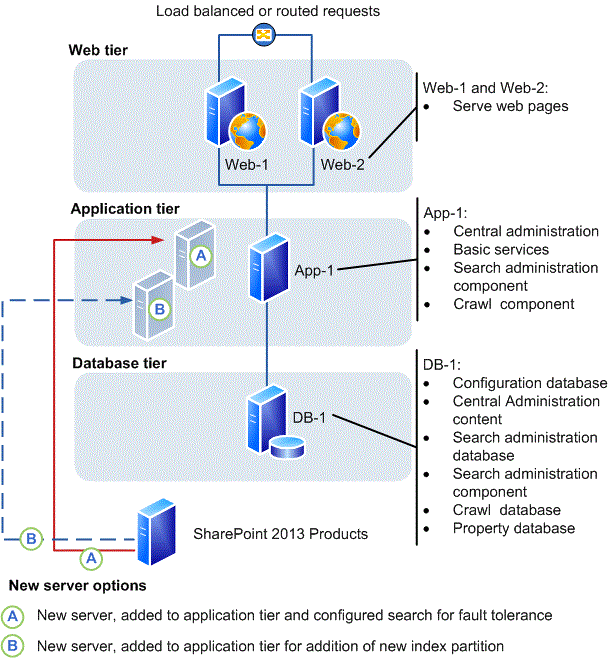
Credit: learn.microsoft.com
Host Web Basics
A Host Web is a site in SharePoint. It holds the app web. Users go to the host web to use apps. It serves as the main area. Apps connect to it. Host web links users with their apps.
Host webs are central to SharePoint apps. They store important data and files. The design is simple. Users find it easy to navigate. Changes to the host web affect apps.
Host web plays a vital role in SharePoint architecture. It houses app webs. Helps manage user access. It’s a bridge for communication. Links apps with users in the system.
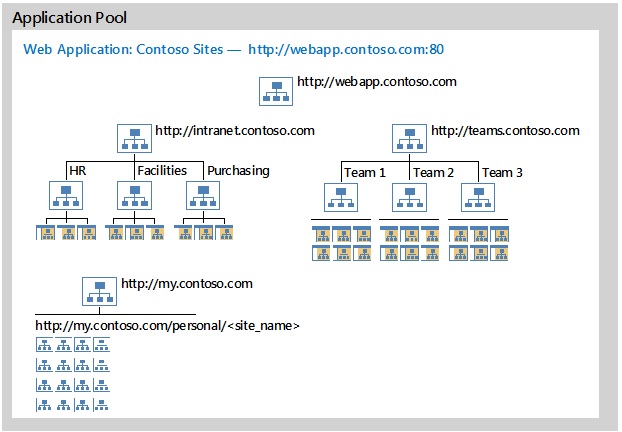
Credit: learn.microsoft.com
App Web Essentials
App Web is a special website. It is made for SharePoint apps. It helps run apps smoothly. Each app has its own App Web. This keeps data safe and separate. App Webs do not share data with other apps.
App Webs have unique features. They offer isolation from the Host Web. This makes them secure. Apps can store their own data. They can also have custom pages. Such features keep the app independent.
App Webs can interact with Host Webs. They use special permissions for this. Host Web provides the main content. App Web adds extra functionality. Together, they enhance the user experience.
Comparing Host Web And App Web
Host Web is the main SharePoint site. It holds the app’s content. It is the place where users interact. App Web is a separate site. It stores app’s data and code. They are linked but serve different purposes. Host Web is for users. App Web is for developers. The architecture differs in how they store and manage data.
Host Web is ideal for user interaction. Users access content here. App Web is best for storing app code. It is not visible to users. Developers use App Web for testing. Host Web is for end-user experience. App Web supports app functionality. Each has unique scenarios.
Host Web offers easy user access. It keeps things simple. App Web provides security. It hides important data from users. Host Web is limited in customization. App Web allows more flexibility. Yet, it requires technical skills. Each has benefits and drawbacks.
Developing Solutions With Host And App Web
Use clear code and keep it simple. This helps in easy maintenance. Always test your app on different devices. Testing ensures it works well. Plan before you start coding. It saves time.
Avoid using complex code. It is hard to fix. Do not ignore security. Always keep your app safe. Skipping tests can cause problems later. Always test your app well.
Use SharePoint Designer for easy setup. Visual Studio helps in writing and testing code. JavaScript is useful for adding features. HTML and CSS make your app look good. Choose the right tools for your needs.
Security Considerations
SharePoint 2013 features Host Web and App Web to support app deployment. Host Web holds primary content, while App Web contains app-specific elements. Understanding security considerations is crucial for safe app interaction and data protection.
Access Controls
Access controls keep data safe. They allow only authorized users. It is important to set strong passwords. Use them to protect your information. Always update them regularly. This helps in preventing unauthorized access.
Permissions Management
Assign permissions carefully. Only give access to those who need it. Limit permissions to important data. This reduces the risk of data leaks. Regularly review permissions. Make sure they are up-to-date.
Data Protection Strategies
Protect data with encryption. Encryption keeps information secret. Always back up your data. Use secure storage methods. This ensures data safety during system failures. Regular checks on data integrity are vital.
Future Trends
SharePoint is always changing. New features are added each year. These features make SharePoint more user-friendly. People can work with SharePoint easily. SharePoint helps teams collaborate well. Changes are often made to improve security. Better security means safer data. Teams can trust SharePoint with their information.
Developers use SharePoint to build apps. These apps help in business tasks. Changes in SharePoint affect how apps are made. Simple tools make developing apps easier. Developers can focus on creativity. They spend less time on complex coding. This helps in building efficient apps.
SharePoint might have more cloud features soon. Cloud features help in storing data online. SharePoint may also become more mobile-friendly. This will help people use it on smartphones. More AI tools might be added. AI can help in analyzing data. These changes can make SharePoint better for all users.

Credit: sergeluca.wordpress.com
Frequently Asked Questions
What Is The Difference Between Sharepoint-hosted And Provider Hosted Apps?
SharePoint-hosted apps run entirely within SharePoint, using client-side technologies. Provider-hosted apps can use external servers and technologies, offering more flexibility.
What Is The Difference Between Web Front End Server And Application Server In Sharepoint?
A web front end server in SharePoint handles user requests and renders web pages. It manages HTTP traffic. An application server executes backend processes like indexing, search, and running services. Each has distinct roles, crucial for efficient SharePoint operation, ensuring optimal user interaction and system performance.
What Is A Web Application In Sharepoint?
A web application in SharePoint is a site collection container. It provides a URL and authentication method, allowing users to access SharePoint sites. It organizes data, facilitates collaboration, and supports business processes, offering flexibility in managing various site collections within SharePoint.
How To Host A Website In Sharepoint?
To host a website in SharePoint, create a site collection using the SharePoint admin center. Customize pages and upload content. Ensure public access settings are correct. Use SharePoint Designer for advanced customizations if needed. Always check permissions and security settings for user access.
Conclusion
Understanding Host Web and App Web in SharePoint 2013 is crucial. These concepts help organize and manage apps. Host Web holds the app’s installation. App Web contains its content and logic. This separation enhances security and flexibility. Developers can create apps with specific permissions.
Users benefit from a seamless experience. SharePoint 2013 brings efficiency and ease. Navigating these elements boosts productivity. Stay informed about updates and best practices. Dive deeper into SharePoint to unlock its full potential. Simplified management and improved functionality await. Make the most of your SharePoint environment.


