
Choosing the right web hosting solution can feel overwhelming, especially with the myriad of options available on AWS. But what if you had a clear guide to help you navigate these choices?
Imagine knowing exactly which AWS service aligns perfectly with your website’s needs. This is where understanding AWS for web hosting becomes crucial for you. You see, the right hosting service doesn’t just support your website—it supercharges it. It can boost speed, ensure reliability, and scale seamlessly as your site grows.
But with AWS offering so many services, how do you decide which one is best for you? In this guide, you’ll discover the top AWS options for web hosting, tailored specifically to meet your unique needs. Whether you’re a startup with a small site or a large business with complex requirements, there’s a perfect match waiting for you. Stick with us as we unravel the AWS web hosting landscape, giving you the insights you need to make an informed decision. Your website deserves the best, and we’re here to help you find it.
Credit: creately.com
Aws Web Hosting Options
AWS does not offer traditional shared hosting. But you can share resources using EC2 instances. This is a good option for small websites. Costs are low, and you pay only for what you use. Amazon Lightsail can also be used. It provides a simpler platform for shared hosting needs. You get easy management with Lightsail.
Dedicated hosting gives you a full server. You have complete control. Amazon EC2 offers this option. You can choose the size and type of server. This is great for large websites. You get better performance. But it can cost more.
AWS is great for cloud hosting. Use Amazon S3 for storage. Elastic Beanstalk helps with deployment. You can scale your website easily. This is good for growing sites. It helps handle traffic spikes. Cost depends on usage. But you get flexibility and scalability.

Credit: aws.amazon.com
Amazon Ec2
Amazon EC2 lets you set up virtual servers. These servers are called instances. You choose the size and power of each instance. It is easy to scale up or down. EC2 offers flexibility. You select different types of instances for different tasks. Start small and grow as needed. EC2 provides various operating systems choices. You can use Linux, Windows, or others. This helps match your project needs.
EC2 uses pay-as-you-go pricing. You pay only for what you use. There are different pricing models. Choose from On-Demand, Reserved, or Spot instances. On-Demand is flexible but costs more. Reserved is cheaper but requires commitment. Spot instances are cheapest but can be interrupted. This allows cost control.
EC2 provides automatic scaling. It adjusts resources based on demand. This ensures good performance. Your site stays fast even with many visitors. EC2 can handle heavy loads easily. It offers high availability across regions. This means fewer downtimes. Your website remains accessible always. EC2’s performance and reliability support growth.
Amazon Lightsail
Amazon Lightsail offers simple and quick setup. It includes pre-configured templates for apps. Users get access to scalable resources. Lightsail provides a private and secure networking option. It includes a reliable backup feature. Users can manage databases easily.
Lightsail is user-friendly for beginners. Its interface is simple and clear. Users can deploy websites quickly. Management is straightforward with easy controls. No deep tech knowledge is needed. It offers easy navigation for all users.
Lightsail is perfect for small businesses. It suits personal projects and blogs. It works well for simple websites. Developers use it for testing environments. Students use it for learning purposes. It is ideal for low-traffic sites.
Amazon S3 For Static Websites
Amazon S3 is great for hosting static content. It stores files like HTML, CSS, and images. You can make your website load fast and smooth. With S3, your content is always available. No need for a traditional server. Just upload your files and set permissions. Your site is now live!
Amazon S3 works well with other AWS services. Use it with CloudFront for faster delivery. Connect with AWS Lambda for custom logic. These tools make your website even better. They help in improving performance and security. AWS gives many options to improve your site.
S3 offers many benefits for hosting. It is cost-effective and scalable. You pay only for what you use. But there are some limitations too. S3 is not for dynamic websites. It cannot run server-side scripts. Choose wisely based on your needs.
Aws Elastic Beanstalk
AWS Elastic Beanstalk manages your web app infrastructure. You upload code, and it handles everything. It automates server setup, load balancing, and scaling. This saves time and reduces errors. You focus on building apps, not managing servers.
Elastic Beanstalk supports many platforms. Popular ones include Java, Python, and Ruby. You can also use Node.js and PHP. This variety gives flexibility. Choose the best language for your project.
Deployment is easy. Upload your application code through the console. Elastic Beanstalk deploys it on the servers. It also configures networking and scaling. This makes the process simple and fast. Your app goes live quickly.
Aws Amplify For Frontend Hosting
AWS Amplify helps you build and deploy web apps easily. It offers many tools for developers. You can use it to create static and dynamic websites. The process is fast and simple. Code changes are updated automatically. This saves a lot of time. Developers can focus more on creating features.
AWS Amplify works well with backend services. It connects to databases and APIs. This makes your app more powerful. You can add user authentication quickly. It also helps in storing user data. Real-time updates keep the app current. Users enjoy a better experience.
Developers find AWS Amplify very helpful. It reduces the workload. Automatic scaling handles traffic changes. It also provides security features. Cost is based on usage, making it affordable. Using AWS Amplify, developers can build apps faster. It supports many frameworks and libraries.
Cost Considerations
Amazon Web Services offers many options for web hosting. Some services cost more than others. EC2 is flexible but can be expensive. Lightsail is more affordable and easier to use. S3 is good for hosting static websites. It is cheaper than EC2.
AWS Lightsail is a good choice for tight budgets. It provides a simple interface. Pricing is clear and predictable. Elastic Beanstalk is also cost-effective. It manages resources automatically. AWS Free Tier lets you try services without paying.
The AWS Free Tier offers free usage for new users. You can use EC2 for 12 months. S3 gives you free storage space. RDS provides free database management. These benefits help you learn and test AWS services.
Security Features
AWS offers strong data protection measures. Your data stays safe with encryption. This means it is hard for bad people to read it. Data is safe both when it travels and when it rests. AWS uses firewalls to keep threats out. Firewalls act as barriers. They keep your data secure from attacks.
AWS has many compliance certifications. These show AWS follows strict rules. They include ISO 27001 and SOC 1/2/3. These are important for trust. Customers know their data is in good hands. AWS often updates its certifications. This helps keep up with new security standards.
AWS provides tools for monitoring your data. These tools watch your data all the time. They send alerts for any strange activities. Alerts help you act fast. You can fix problems quickly. This keeps your data secure and safe from harm.
Performance Optimization
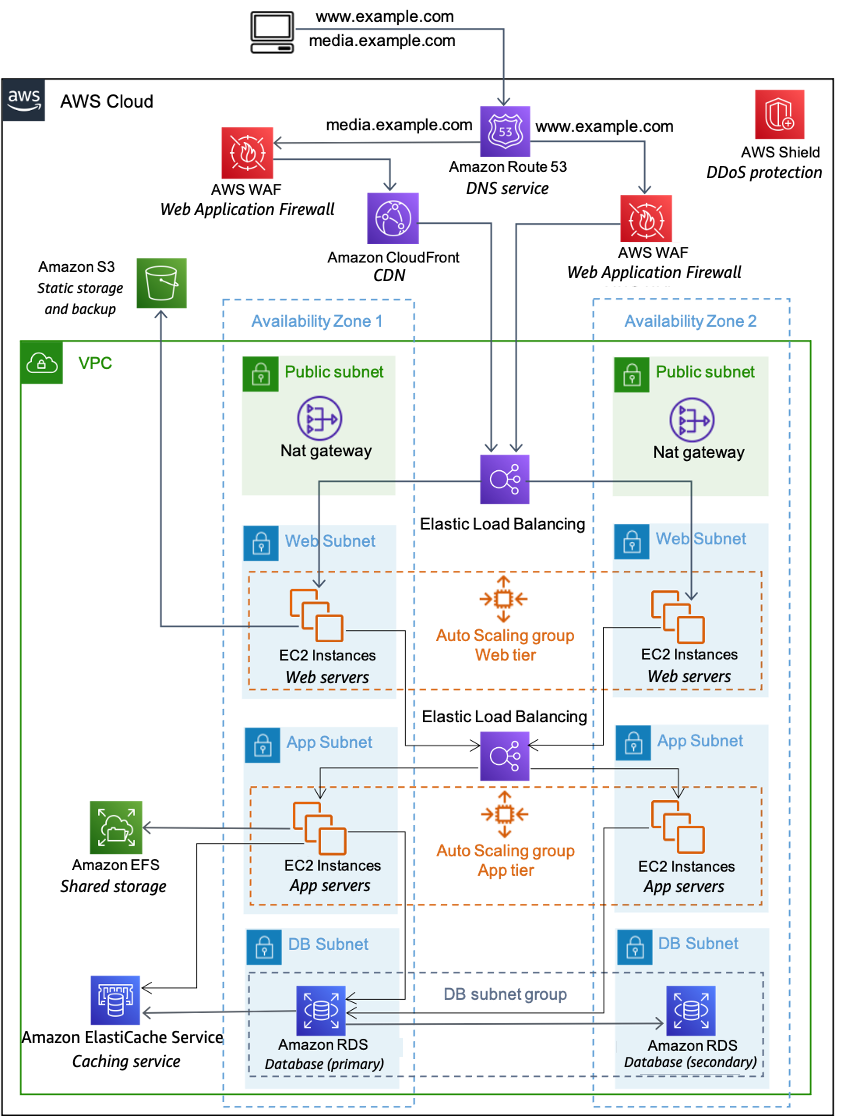
Load balancing helps spread traffic across multiple servers. This keeps the website running smoothly. AWS offers Elastic Load Balancing for this purpose. It adjusts the traffic based on the server load. This way, no single server gets too busy. The service is also scalable. It grows with your website needs. This keeps performance high and user experience good.
Caching stores data temporarily for quick access. It reduces server load and speeds up content delivery. AWS CloudFront offers caching services. It delivers content from locations near users. This saves time and improves website speed. Faster websites keep visitors happy. It also reduces the server’s work. This boosts overall performance.
Monitoring tools track the health of web servers. AWS CloudWatch is a popular choice. It watches server performance in real-time. Alerts are sent for any issues. This helps fix problems quickly. Monitoring keeps the website reliable. It ensures users have a smooth experience.
Credit: docs.aws.amazon.com
Frequently Asked Questions
What Aws Service To Host A Website?
Amazon Web Services (AWS) provides several options for hosting websites, including Amazon S3, EC2, and Lightsail. Amazon S3 is ideal for static websites. For dynamic sites, EC2 offers customizable server configurations. Lightsail provides a simplified experience for small websites or applications.
Choose based on your website’s needs and technical expertise.
Should I Use Aws To Host My Website?
AWS offers reliable, scalable hosting with global reach. It’s ideal for websites needing flexibility and robust security. Consider AWS for its cost-effectiveness, performance, and extensive features. Evaluate your specific needs to determine if AWS suits your website.
Which Aws Service Will Be Used To Host Web Application?
AWS Elastic Beanstalk is ideal for hosting web applications. It supports various languages and frameworks. You can also consider Amazon EC2 for more control and customization. Both services offer scalability and reliability, making them suitable for various application needs.
Can You Host A Website On Aws S3?
Yes, AWS S3 can host static websites. Store HTML, CSS, and JavaScript files in an S3 bucket. Configure the bucket for public access. Enable website hosting in the bucket settings. Use AWS Route 53 for domain management. This setup is cost-effective and scalable for static content hosting.
Conclusion
AWS offers a variety of options for web hosting. Each service caters to different needs. EC2 is great for flexibility and control. S3 provides scalable storage solutions. Lightsail simplifies hosting for beginners. Choose based on your project’s requirements and budget.
Consider support and scalability too. AWS makes hosting efficient and reliable. Explore each option to match your goals. Keep your audience and growth potential in mind. Your web hosting choice impacts your site’s performance. Make an informed decision for long-term success.
AWS has a solution for every hosting need.


