
Imagine having a powerful tool at your fingertips that can significantly enhance your website’s visibility and performance. If you’re using Yahoo Web Hosting, you already have a secret weapon in your arsenal: the robots.txt file.
But what exactly is this mysterious file, and how can it transform your online presence? By the end of this article, you’ll not only understand the crucial role of robots. txt but also how to leverage it to your advantage.
If you’re eager to ensure your site gets the attention it deserves, keep reading. Unlock the potential of your website with just a few strategic tweaks.

Credit: brightdata.com
Yahoo Web Hosting Overview
Yahoo Web Hosting offers many features for websites. It provides easy-to-use tools for building sites. You can get a free domain name with their plans. They also offer unlimited storage for your website data. 24/7 customer support is available for any help. The hosting service is secure and keeps your data safe. Yahoo Web Hosting is a good choice for small businesses.
Users can enjoy easy website management. You can update your site without problems. Affordable pricing makes it friendly for all budgets. Fast loading speeds ensure visitors stay longer. User-friendly interface helps beginners to start quickly. Yahoo Web Hosting also provides reliable uptime, keeping your site live most of the time. These benefits make Yahoo Web Hosting a trustworthy option for anyone.
Role Of Robots.txt
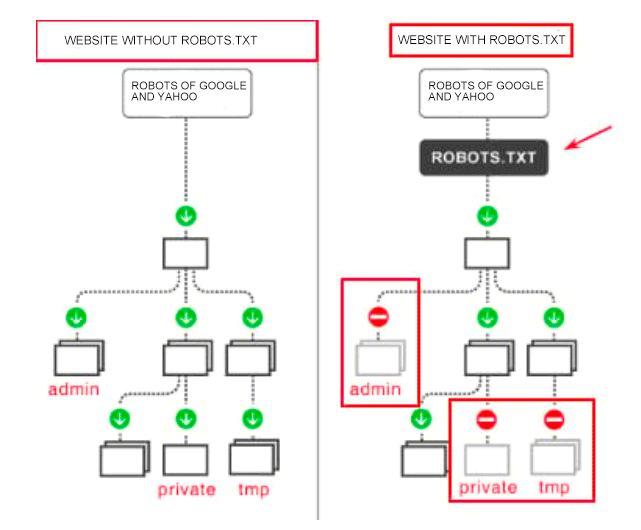
Robots.txt is a small text file. It tells search engines what to do. It sits in the website’s root folder. Its job is to guide search engines. Some pages are private. Some are public. Robots.txt helps manage this. It says which pages are okay to visit. It also says which pages to skip.
Webmasters use robots.txt to control web traffic. It helps keep servers happy. Without it, websites can slow down. Search engines like Google and Yahoo read this file first. They decide where to go next. Some pages are sensitive. Robots.txt keeps them hidden. It helps keep private data safe.
Search engines follow rules in robots.txt. This helps them index sites well. A well-set file can boost site health. It makes sure search engines find the best pages. But mistakes can hurt a site. Blocking too much can hide good content. Search engines then miss it. So, it’s vital to set rules carefully.
Creating Robots.txt In Yahoo Web Hosting
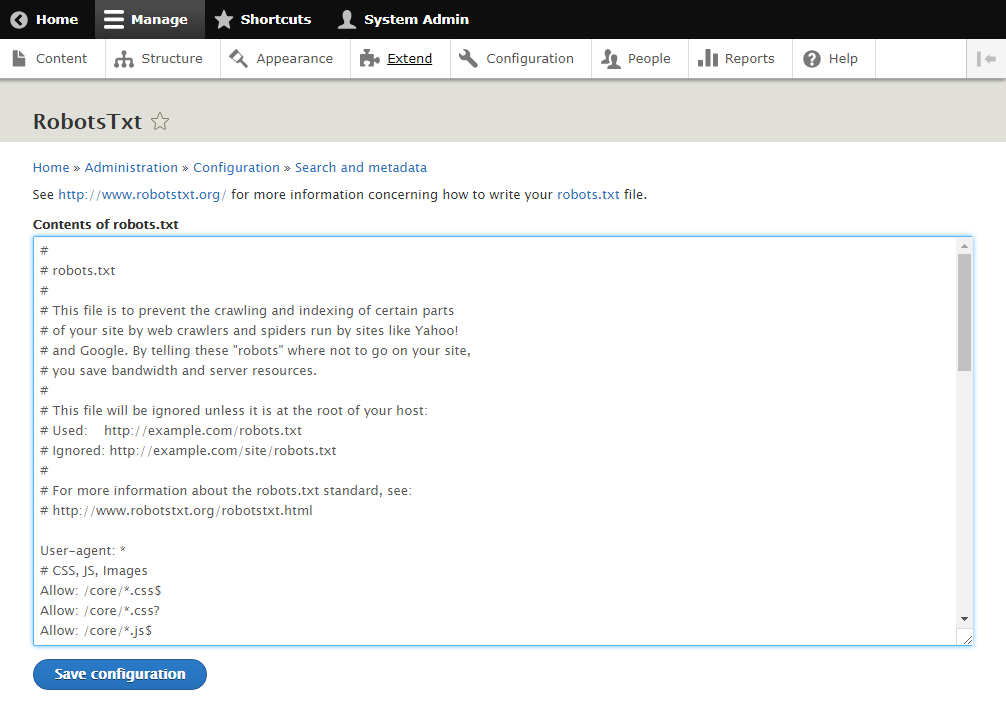
To start, login to your Yahoo Web Hosting account. Find the “File Manager” in the control panel. Look for your website’s main folder. Click on it. Now, create a new file. Name it robots.txt. This is important. Write rules inside this file. Use simple text format. Allow or disallow pages. Save the file when done. Check if the file appears in the folder. This means it is working. Test your robots.txt file. Use online tools. Ensure search engines follow your rules. This keeps your site safe.
Avoid typos in the file. They can cause issues. Do not block important pages. This affects site visibility. Forgetting to save changes is common. Always double-check. Make sure the file is in the correct folder. Wrong location means it won’t work. Be careful with file names. Robots.txt must be exact. Check spelling and format. Use simple rules. Complicated rules confuse search engines. Keep the file updated. Regular changes help maintain control.
Credit: serpstat.com
Optimizing Robots.txt
Writing a robots.txt file is simple. But it needs care. This file tells search engines what to do. Allow important pages. Block private or duplicate pages. Keep the file in your website’s main folder. Use simple commands. Check the file often. Make sure it works well. Avoid spelling mistakes. A small error can block the whole site. Always test the file. Use online tools to check it. They help find errors.
Many tools help optimize the robots.txt file. Google Search Console is one. It checks how Google reads your file. Screaming Frog is another tool. It finds errors quickly. Use these tools often. They keep your file clean. Also, Yoast SEO helps. It offers simple tips. These tools make the job easy. They save time and effort.
Troubleshooting Issues
Yahoo Web Hosting’s robots. txt file helps manage search engine indexing. It guides crawlers, deciding which parts of your website are accessible. Properly configuring this file can optimize visibility and prevent unwanted content from appearing in search results.
Common Errors
Problems often arise with the Yahoo Web Hosting robots.txt file. One frequent issue is incorrect syntax. This can block search engines. Another error is missing files. This causes search engines to ignore parts of the site.
Solutions And Tips
Check for typos in your robots.txt file. Use online tools to validate it. Ensure all files are present. Missing files can lead to poor indexing. Regular updates keep your site optimized. Always test after changes.
Credit: www.drupal.org
Future Of Robots.txt In Web Hosting
Robots.txt files guide search engines. They tell them where to go. New trends change how these files work. AI tools may help create smarter rules. Automated updates could keep them fresh. This will make sites more visible. Everyone wants better search results. Voice search is growing fast. These files must adapt. Mobile-first indexing is another trend. Sites need to be ready for it. More focus is on privacy. Robots.txt must protect data. Web hosting companies are noticing these shifts. They may offer new tools soon. This will help web owners.
Robots.txt files might change a lot. Simpler formats could appear. This will help users. New rules may come in. They could make sites faster. Better security options might be added. This will protect important data. Hosting providers may offer new features. They could include smart updates. Web owners will find this useful. More control over site visibility is key. Dynamic files might be the next step. This makes sites adapt quickly. Everyone needs to watch these changes.
Frequently Asked Questions
What Does The Robots.txt File Do?
The robots. txt file guides search engine crawlers on which pages to index or avoid. It helps manage website visibility and control access. By directing bots, it optimizes search engine ranking and prevents overloading of server resources.
What Does “blocked” By Robots.txt Mean?
“Blocked” by robots. txt means a website’s file restricts search engines from accessing certain pages. This control helps manage what content gets indexed. Robots. txt is crucial for SEO, as it guides search engine crawlers. Proper usage ensures important pages are visible while limiting access to others.
Is A Robots.txt Necessary?
Robots. txt is essential for controlling search engine access to your site. It guides crawlers, preventing unwanted indexing. It enhances SEO by directing bots to key pages, boosting visibility. Ensure accurate configuration for effective management. Without it, crawlers may access sensitive areas, impacting security and SEO performance.
How Do I Access A Website In Robot Txt?
Access the website’s robots. txt by adding “/robots. txt” after the domain name in your browser’s address bar.
Conclusion
Understanding Yahoo Web Hosting’s robots. txt is crucial for your website. This simple file guides search engine bots. It tells them which pages to crawl. Or not. This control helps manage your site’s visibility. Protects sensitive data. Improves SEO efforts effectively.
Always review and update your robots. txt file regularly. Keep up with your website’s changes. Ensure your directives align with your SEO goals. A well-managed robots. txt can enhance site performance. Boosts search engine indexing. By optimizing this file, you ensure a smoother user experience.
And better search engine rankings. Aim for clarity and precision in your robots. txt file.


