
Imagine having the power to effortlessly manage your website’s essential features all in one place. That’s precisely what a control panel in web hosting offers you.
Whether you’re setting up email accounts, monitoring server performance, or tweaking your site’s security settings, a control panel simplifies these tasks, making web hosting more accessible and efficient. But what exactly is a control panel, and why is it so crucial for your online presence?
We’ll dive into the core functionalities, benefits, and types of control panels available, giving you the tools to make informed decisions that could transform your website’s management. Stick around to unlock the secrets of optimizing your web hosting experience like never before!

Credit: www.webhostface.com
Definition Of Control Panel
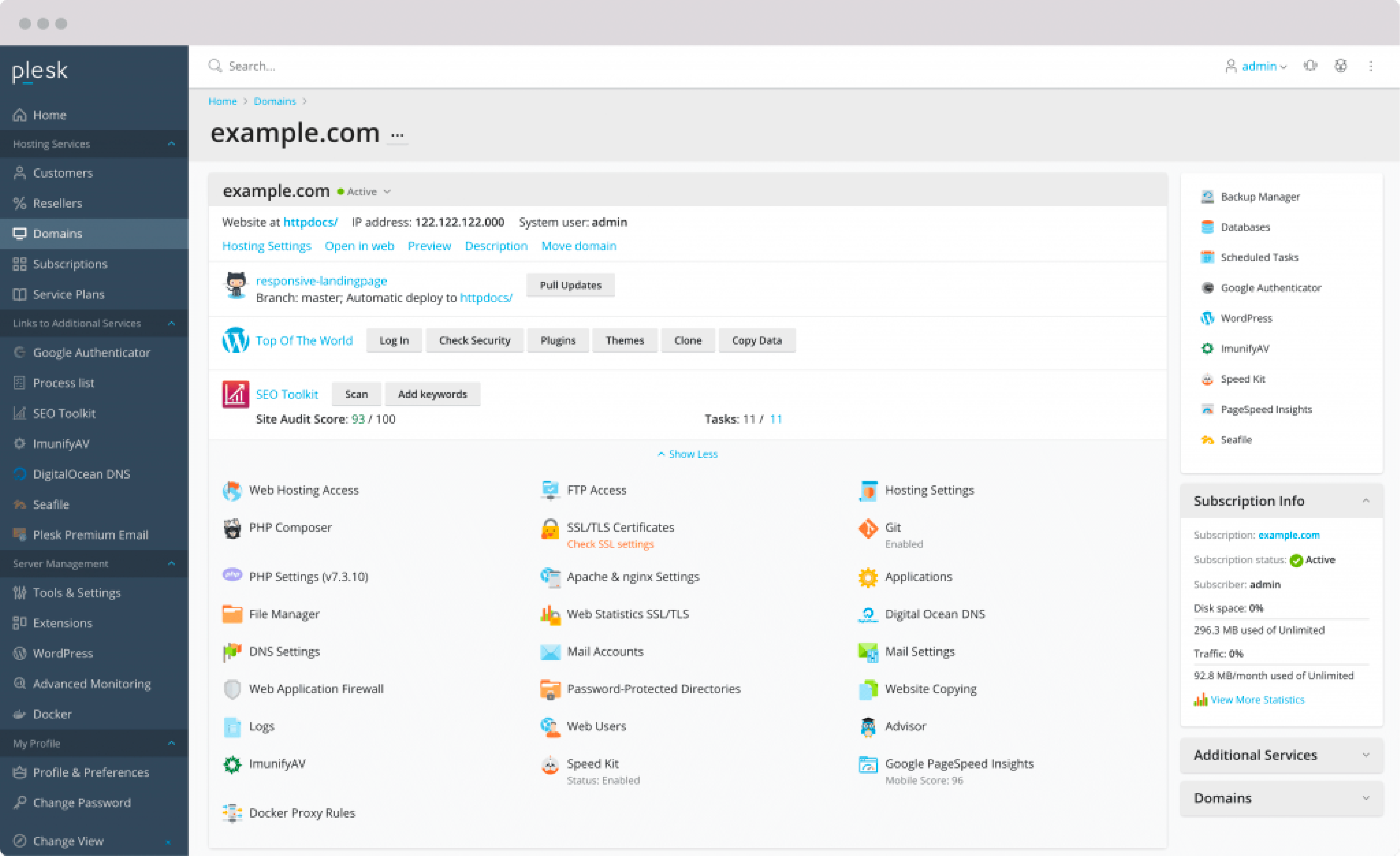
A Control Panel helps manage your website easily. It is like a dashboard for web hosting. You can see and change settings here.
Most control panels have icons. These icons help you find what you need. Want to add a new email? Click the email icon. Need to change passwords? Find the password icon.
Control panels are simple to use. They save time and make tasks easy. With a few clicks, you do many things. No special skills needed.
Popular control panels are cPanel and Plesk. They are trusted by many website owners. Everyone can use them, even beginners.
Importance In Web Hosting
A control panel is like a remote control for your website. It helps you manage files, emails, and databases. With it, you can add or remove features easily. Even beginners find it simple to use. This makes website management faster and more efficient.
Many web hosting providers offer different control panels. The popular ones are cPanel and Plesk. These panels have user-friendly interfaces. This means you spend less time learning and more time creating.
A good control panel saves time and effort. It keeps everything organized. It also helps in monitoring website performance. This ensures your site runs smoothly.
Common Features
Control panels in web hosting offer user-friendly interfaces to manage websites. Key features include file management, email account setup, and domain management. Users can also handle security settings and monitor website statistics easily.
Domain Management
Domain management allows you to control your website’s address. You can buy new domains or transfer existing ones. It also lets you set up subdomains. Subdomains help in organizing content easily.
Email Account Configuration
Email account configuration helps you set up email addresses. You can create custom emails like info@yourdomain.com. It allows managing email storage and spam filters. This feature is important for business communication.
File Management
File management is crucial for uploading website files. You can easily move or delete files. It shows how much space files use. This feature helps in keeping your site organized and neat.
Database Administration
Database administration lets you manage data easily. You can create or delete databases. It helps in storing information like user details. This ensures your website runs smoothly and stores data safely.
Security Settings
Security settings protect your website from threats. You can set up firewalls to block unwanted traffic. It allows changing passwords regularly. Security settings keep your data and site safe.
Popular Control Panels
cPanel is a well-known control panel. It is easy to use. Users can manage files and emails. It supports backup and security tools. Many hosting companies use cPanel. It has a friendly interface.
Plesk is another popular choice. It supports both Linux and Windows. Plesk offers great flexibility. Users can manage websites and databases. It has a simple layout. Many businesses prefer using Plesk.
DirectAdmin is a lightweight control panel. It is easy to install. DirectAdmin is affordable. It offers essential features. Users can manage domains and emails. It is a good choice for beginners.
Webmin is a free control panel. It works on Linux. Webmin is open-source. It offers many features. Users can manage system settings. Developers often use Webmin for advanced tasks.
Choosing The Right Control Panel
Ease of Use is important. Choose a control panel that’s simple to understand. Look for clear menus. Users should find settings without getting lost. The best panels have helpful guides and tips.
Functionality matters a lot. Ensure the control panel offers needed features. It should manage files easily. Email setup must be straightforward. Check for database support. Good panels offer security tools. Backup options are a bonus.
Compatibility is key. Control panels should work with different servers. Check if it supports various operating systems. Ensure it runs smoothly on Linux or Windows. Compatibility affects performance.
Pricing is a factor. Some panels are free. Others require payment. Compare features with cost. Decide what’s worth spending on. Some paid panels offer extra features. Budget matters too.
Advantages
Control panels are easy to use. They have a simple design. Users can find things quickly. No need to be a tech expert. Just click and go. Icons help you understand tasks. Menus are clear and simple. Navigation is fast and easy.
Control panels save you time. Tasks can be done in a few clicks. No need to repeat actions. Backup, update, and manage in seconds. Automation means less work for you. Focus on other things. Let the control panel handle the rest.
Control panels keep your site safe. They have security tools. Firewalls protect your data. SSL certificates keep info private. Passwords are strong and safe. You can relax. Your website is in good hands.
Potential Drawbacks
Some web hosting control panels might overwhelm beginners due to their complex interfaces. Limited customization options can restrict advanced users seeking tailored solutions. Additionally, security vulnerabilities may arise if not regularly updated and monitored.
Learning Curve
Understanding a control panel can take time. New users might find it confusing. Features and options can be overwhelming. Practice helps, but patience is necessary. Tutorials can assist in learning. Not all control panels are the same. Differences add to the challenge. Learning is ongoing. Updates bring new changes. Adaptability is needed.
Resource Usage
Control panels use server resources. They can slow down your site. Memory and CPU usage increase. Performance might be affected. High resource use can cause issues. Monitoring is important. Balancing performance is crucial. Efficient panels are better. Choose wisely to save resources.
Cost Considerations
Control panels can be expensive. Some have monthly fees. Others charge yearly. Budgeting is important. Free options exist but have limits. Paid versions offer more features. Consider what you need. Value for money is key. Compare costs before buying. Invest wisely in the best panel.
Credit: www.cloudpanel.io
Future Trends
Control panels will work more with cloud services. This helps in saving data easily. Users can access their files from anywhere. Cloud services provide more storage space. This is a big advantage for users. It makes sharing data quick and easy.
Automation helps in making tasks faster. Control panels will have more automation features. This means less work for users. Routine tasks will be done automatically. Users will have more time for other activities. Automation makes web hosting easier.
Control panels will be more user-friendly. Simple designs will make them easy to use. Users will find information quickly. New features will make navigation smooth. This improves the overall experience. Users will enjoy using these updated control panels.

Credit: en.wikipedia.org
Frequently Asked Questions
What Is The Control Panel In A Website?
A website control panel is a user-friendly interface for managing site settings, content, and features efficiently. It allows easy access to hosting functions, domain management, email configurations, and security settings. Popular control panels include cPanel and Plesk, providing essential tools for website administration and optimization.
What Is An Hosting Control Panel?
A hosting control panel is a web-based interface for managing server settings, domains, and hosting accounts. It simplifies tasks like email setup, file management, and software installations. Popular control panels include cPanel and Plesk, offering user-friendly tools for efficient server administration.
What Is The Control Panel In A Server?
A server control panel is a web-based interface for managing server settings and applications. It simplifies tasks like website management, database configuration, and email account setup. Popular control panels include cPanel and Plesk. They provide user-friendly tools for efficient server administration.
What Is The Purpose Of A Control Panel?
A control panel allows users to manage and configure settings of software, systems, or web hosting environments efficiently. It simplifies tasks like monitoring performance, setting permissions, and managing resources. Control panels provide user-friendly interfaces, enhancing usability and accessibility for both technical and non-technical users.
Conclusion
A control panel simplifies web hosting tasks. It helps manage websites easily. Users can install applications, monitor performance, and secure data. This tool saves time and reduces technical stress. Beginners find it especially helpful in managing their sites. Choosing the right control panel is important.
It must fit your needs and budget. Always consider user-friendliness and support options. A well-chosen control panel enhances your web hosting experience. It makes managing online presence smooth and efficient. Embrace this tool for effective website management. Your hosting journey becomes more manageable and stress-free.


