
Are you curious about what web server S3 hosting is and how it can benefit you? You’re in the right place.
In a digital world where speed, reliability, and scalability are paramount, choosing the right hosting solution is crucial. Imagine a service that not only optimizes your website’s performance but also scales effortlessly with your growing needs. Enter S3 hosting, a powerful tool that could transform your online presence.
Stick around, and you’ll discover how this hosting option can enhance your website’s efficiency, security, and overall user experience. Get ready to unlock the secrets to a more robust and responsive web presence!

Credit: aws.amazon.com
Benefits Of S3 Hosting
S3 hosting grows easily with your needs. It adjusts to the size of your business. You can store more files as you expand. No need to worry about space. It provides flexible options for storage. You can choose what fits best for you. Change settings as needed without any hassle.
S3 hosting is affordable for everyone. You pay only for what you use. No extra fees or hidden costs. This means saving money for your business. It’s a smart choice for budget-conscious users. You can manage expenses easily with clear pricing.
S3 hosting is strong and dependable. It keeps your files safe and secure. Files are stored in multiple places. This means less risk of losing data. You can trust it to keep your information intact. It works well even if one server fails. Your data stays accessible all the time.
Credit: www.scaler.com
Setting Up S3 Hosting
Begin by logging into your AWS Management Console. Find the S3 service and click on it. Click “Create Bucket” to start. Choose a unique name for your bucket. Select a region close to your users. After that, click “Create” to finish. Your S3 bucket is ready to use.
Open your newly created bucket. Go to the “Permissions” tab. Add rules to control access to your files. You can allow public access or limit it. Use policies to manage who can view or edit files. Always check settings for security.
Navigate to your bucket’s main page. Click “Upload” to add files. Choose files from your computer. You can upload images, documents, or videos. Ensure files are properly named for easy access. After uploading, check if files display correctly.
S3 Hosting Features
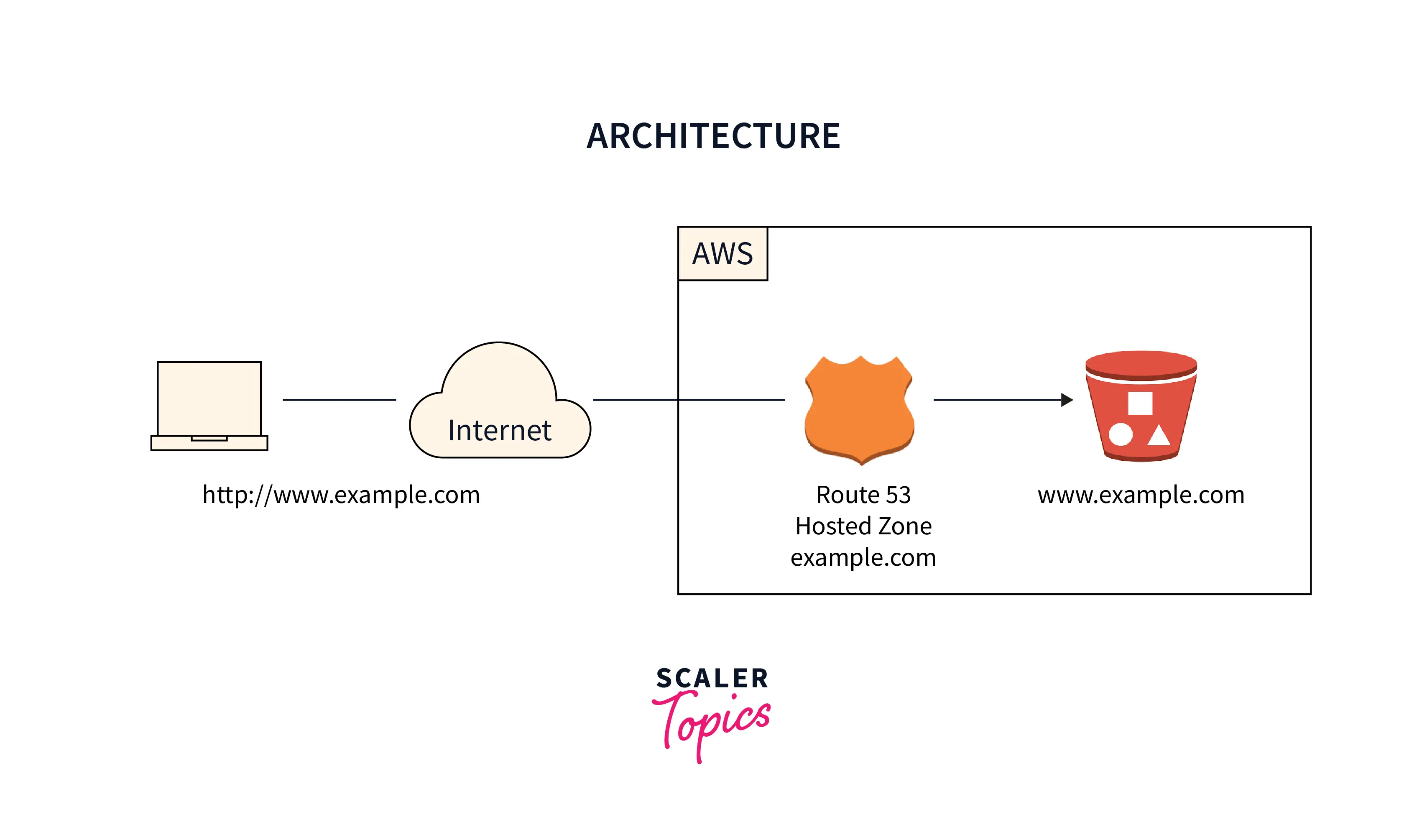
S3 can host static websites without hassle. These sites have no dynamic content. They are easy to manage. Files like HTML, CSS, and JavaScript are stored in S3. Users access them over the web. Cost-effective for simple sites. Reliable and scalable. Ideal for simple projects.
Versioning helps keep track of file changes. You can restore previous versions if needed. Lifecycle Management automates file cleanup. You set rules for moving files to lower-cost storage. This saves money and keeps your space organized.
Data is copied across multiple regions. This ensures high availability. Users access data quickly from anywhere. Important for global reach. Protects against data loss. Provides backup in different locations. Helps maintain performance.
Security Best Practices
Only allow users who really need access. This keeps data safe. Use strong passwords and change them often. Limit the number of people who can see important files. This helps stop unauthorized access. Always check who has access and update permissions. This ensures only trusted people are allowed.
Encryption protects information from bad people. Use SSL/TLS to keep data safe during transfer. It stops others from reading private messages. Encrypt data that is stored. This keeps it safe if someone steals it. Choose strong encryption methods for the best protection.
Watch what happens on the server. This helps find problems early. Use logs to see who did what and when. Logs show if someone tries to break in. Look at logs often to catch issues quickly. With good monitoring, the server stays safe.
Integrating S3 With Other Aws Services
S3 hosting works as a web server to store and retrieve data seamlessly. Easily integrates with other AWS services, enhancing functionality. Offers scalable, reliable, and secure storage solutions for various applications.
Cloudfront For Content Delivery
CloudFront helps deliver content quickly. It caches data near users. This speeds up access to your files. CloudFront works well with S3. It pulls files from S3 and serves them fast. This makes websites load faster. It’s great for media files and large documents. Using CloudFront reduces latency. It improves user experience.
Lambda For Serverless Applications
Lambda allows running code without servers. It works on events. Lambda can access files in S3. This makes processing data easy. No need to manage servers. It scales automatically. It’s cost-effective because you pay only for usage. Lambda supports many programming languages. It’s flexible for developers. Combining Lambda with S3 is powerful.
Rds For Database Management
RDS provides managed databases. It works well with S3 for backups. You can store database snapshots in S3. This keeps data safe. RDS is reliable and secure. It supports different database engines. You can easily restore data from S3. RDS helps manage database tasks. It frees up time for other work.
Common Use Cases
S3 is great for storing large media files. Photos, videos, and music can be kept safely. It is easy to get them when needed. Many websites use S3 for this purpose. It helps in delivering content fast. Users enjoy the quick access to media.
Important files need a safe home. S3 offers a reliable backup solution. Documents and records can be saved here. It keeps them safe for a long time. Old data can be stored too. This is called archiving. Businesses use S3 to protect their data.
Big data needs a big space. S3 is perfect for this. It stores data from many sources. Companies analyze this data. They learn important things. S3 helps in managing the huge data easily. It is a trusted tool for big data projects.
Troubleshooting S3 Hosting
Many errors in S3 hosting are simple to fix. 404 errors happen when files are missing. Check if your files are in the right place. For 403 errors, permissions might be wrong. Ensure your files are publicly accessible. Double-check your bucket policy. It should allow public access.
Make your site faster with a few steps. Use gzip to compress files. Smaller files load quicker. Utilize CDN to deliver files faster worldwide. Cache your content to reduce load times. Smaller image sizes help too. Always choose the right format for your images.
Permissions can be tricky. Always verify your bucket policies. Ensure they allow the right actions. Use the IAM console to check permissions. Sometimes, permission issues arise from IAM roles. Double-check these roles for correct settings. Always test changes in a safe environment first.
Credit: doc.sticky-pi.com
Frequently Asked Questions
Is S3 A Web Server?
Amazon S3 is not a web server. It is a cloud storage service. S3 stores and retrieves data efficiently. It can host static websites, but it lacks dynamic content capabilities typical of web servers. For web hosting, combine S3 with other AWS services like EC2 or CloudFront.
What Is An S3 Server?
An S3 server refers to Amazon’s Simple Storage Service. It offers scalable, high-speed cloud storage for data backup, retrieval, and archiving. Users store and retrieve any amount of data from anywhere, ensuring security and availability. Its pay-as-you-go model makes it cost-effective and flexible for businesses.
How Do I Enable Website Hosting On Aws S3?
To enable website hosting on AWS S3, create an S3 bucket. Upload your website files. Configure the bucket for public access. Enable static website hosting in the bucket settings. Specify an index document and error document. Save changes. Access your website via the bucket’s endpoint URL.
Can Amazon S3 Be Used For Dynamic Web Hosting?
Amazon S3 is not suitable for dynamic web hosting. It only supports static websites. For dynamic content, use AWS services like EC2 or Elastic Beanstalk. S3 excels in storing and serving static files like HTML, CSS, and JavaScript. It integrates well with AWS for scalable static website hosting.
Conclusion
Choosing the right web server for S3 hosting is crucial. It impacts speed and reliability. Always consider your needs and budget. Different servers offer various features. Some prioritize speed. Others focus on security. Compare options before deciding. Remember, a good server enhances user experience.
It can help your site run smoothly. Make sure your choice aligns with your goals. A thoughtful decision today leads to fewer issues tomorrow. Keep your site efficient and user-friendly. Happy hosting!


