
Have you ever wondered how websites are managed behind the scenes? Imagine having a tool that lets you effortlessly control your website’s settings, files, and features all in one place.
That’s exactly what web hosting control panels do. Whether you’re launching your first website or managing multiple sites, understanding these control panels can be a game-changer. They simplify complex tasks, making website management as easy as clicking a few buttons.
Imagine the convenience of updating your site, managing your domains, or setting up email accounts without needing to be a tech expert. Web hosting control panels put you in control, offering a user-friendly interface that saves time and reduces frustration. Dive into this article to discover how these panels work, why they’re essential for your online presence, and how they can make your life easier. You’ll learn everything you need to know to harness their power and take your website management to the next level.
Web Hosting Control Panel Basics
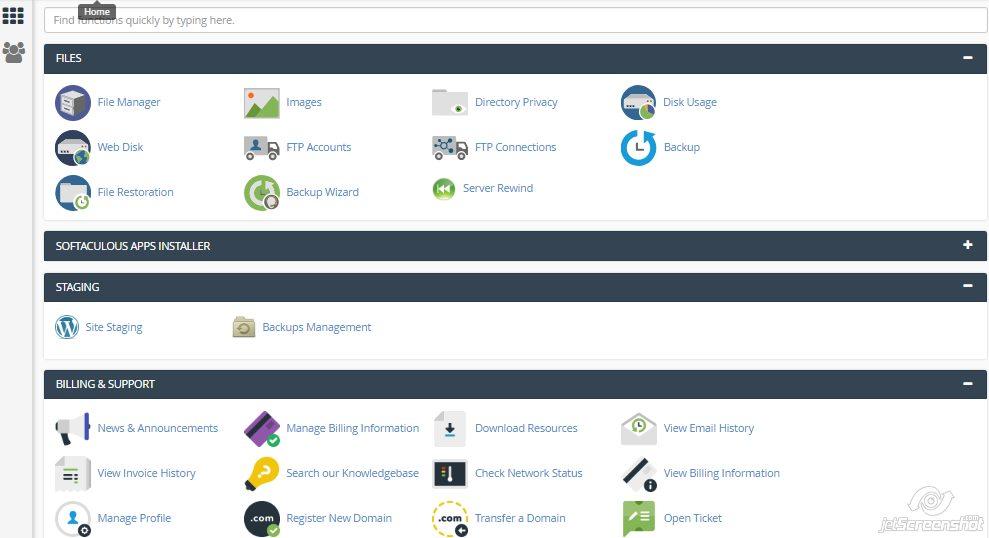
A web hosting control panel helps you manage your website. It is a simple tool. Many people use it. You can control your website files. You can also manage emails and databases. It is like a dashboard for your site.
Most panels have a user-friendly interface. You can click and manage things easily. Popular control panels include cPanel and Plesk. They make hosting tasks easy. You don’t need to be a tech expert. Just follow the steps, and you’re good to go.

Credit: www.webhostface.com
Popular Control Panel Options
cPanel Features: cPanel is user-friendly. It helps manage websites easily. You can create email accounts quickly. It offers file management tools. Backing up data is simple. Security tools keep sites safe. cPanel supports various apps. Users can install WordPress fast. It provides statistics for site monitoring.
Plesk Advantages: Plesk works well with Windows servers. It supports Linux too. You can manage multiple sites. Its interface is simple to use. Plesk offers strong security features. Users can add SSL certificates easily. It supports Docker and Git. Plesk provides great customer support. It offers automatic updates for convenience.
DirectAdmin Usage: DirectAdmin is lightweight. It runs fast on servers. It supports three access levels: Admin, Reseller, and User. DirectAdmin offers custom error pages. You can manage DNS settings easily. It provides email management tools. Backup and restore features are available. DirectAdmin is affordable and reliable.
Key Features And Tools
Control panels help with domain management. You can add new domains easily. It is simple to change domain settings. Managing subdomains is also possible. You can set up redirects as well. This helps keep your site organized.
Setting up emails is easy with control panels. Create new email accounts in minutes. Change passwords without trouble. Set up auto-responders if needed. Ensure emails are safe with spam filters. All email tasks in one place.
Manage your files with ease. Upload and download files quickly. Organize them in folders. You can also edit files directly. Backup your files for safety. Keeping files in order is simple here.
Control panels make databases easy to handle. Create new databases fast. Manage user access with clicks. Backup databases for security. Run queries directly. Keep data safe and organized. Everything you need for data management.
Ensure site safety with control panels. Set up firewalls easily. Use SSL for secure connections. Monitor security logs often. Block unwanted traffic. Keep your site protected always.
Benefits Of Using Control Panels
Control panels make web hosting easy. They are simple to use. Even beginners can manage websites. No tech skills are needed. This saves time and effort.
They help with time efficiency. Quick actions save hours. One click can update a site. This means less waiting. More time to focus on other tasks.
Interfaces are often user-friendly. Clear menus guide users. Icons show what to do next. It is like a map for your website. Navigation is simple and fast.
Choosing The Right Control Panel
Each control panel must work with your server’s operating system. Some panels are for Linux, while others support Windows. Check if your hosting provider allows the panel you like. Also, think about the software you need. Some panels may not support all software.
Control panels can be free or paid. Free panels often have fewer features. Paid panels might offer more support and updates. Decide how much you want to spend. Sometimes, a one-time fee is available. Other times, there is a monthly charge.
Good panels come with strong support. Check if there is a user forum or help center. Documentation helps you solve problems quickly. Make sure guides are easy to read. This will help you when you get stuck.
Credit: www.hostinger.com
Future Trends In Control Panels
Automation helps in doing tasks faster. It saves time and energy. With AI, control panels become smarter. They can predict problems before they happen. This helps in keeping websites safe. AI can also make suggestions to improve website performance. These tools make life easier for website owners.
Cloud-based control panels are the future. They help you access your website from anywhere. No need to be at the office. The cloud offers more storage space. It is also secure. This means your data is safe. More and more companies are moving to the cloud. It is the next big thing in web hosting.

Credit: en.wikipedia.org
Frequently Asked Questions
What Is An Hosting Control Panel?
A hosting control panel is a web-based interface. It helps manage server functions, websites, domains, and emails efficiently. Popular panels include cPanel and Plesk, offering tools for file management, database administration, and security settings. They simplify hosting management for users, enhancing website performance and maintenance.
What Is The Control Panel In A Website?
A website control panel is a user-friendly interface for managing website settings, files, and databases efficiently. It simplifies tasks like domain management, email configuration, and security settings. Popular control panels include cPanel, Plesk, and DirectAdmin. These tools enhance website management, making it accessible even for non-technical users.
How Do I Open Hosting Control Panel?
Log in to your web hosting account. Locate the hosting control panel option, often labeled as “cPanel” or “Dashboard. ” Click to access and manage your hosting settings and features easily. Always use your credentials to ensure security and access all available tools and options.
What Is The Difference Between Cpanel And Control Web Panel?
CPanel is a popular, paid web hosting control panel offering extensive features and support. Control Web Panel (CWP) is free, open-source, and caters to users seeking budget-friendly options. Both manage server resources, but cPanel is more user-friendly, while CWP requires technical knowledge.
Conclusion
Web hosting control panels simplify website management. They offer user-friendly interfaces. With these tools, managing files and databases becomes straightforward. You can easily monitor server performance. Control panels save time and effort for website owners. They provide essential features for efficient hosting management.
Choosing the right control panel enhances your hosting experience. It ensures smooth website operations. Understanding their functionality empowers users. It aids in making informed decisions. Explore different options to find the best fit. Your website’s success depends on effective management.
Control panels play a crucial role in this journey.


