
Imagine you want to build your dream house. Before you start decorating, you need a piece of land and an address to call it home.
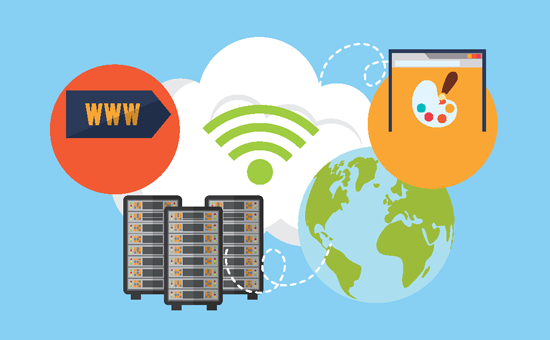
In the digital world, web hosting and domain are like that land and address. As someone new to creating a website, you might feel overwhelmed by these terms. But don’t worry, you’re not alone. Understanding web hosting and domains is the first step towards bringing your online presence to life.
This article will help clear up any confusion and show you how these elements work together to make your website accessible to the world. By the end, you’ll feel confident and ready to take the next steps in your online journey. So, let’s dive in and explore the foundation of your digital home!
Credit: www.wpbeginner.com
Web Hosting Basics
Types of Web Hosting help websites to live online. Each type has unique features. Shared hosting is like renting a room with others. It’s cheap but you share resources. Dedicated hosting means you get your own space. No sharing. It’s more secure and fast. Virtual Private Server (VPS) gives part of a bigger server. It’s like a small apartment. More control than shared hosting. Cloud hosting uses many servers together. It’s reliable and can handle big traffic. Choose wisely.
Shared Hosting Explained means you share server space with others. It’s the most affordable option. Good for small websites. Resources are limited. If one site gets busy, others slow down. Think of it as sharing a computer with friends. Easy to start. Great for beginners.
Dedicated Hosting Benefits include having your own server. No sharing with others. More control over settings. Increased security and speed. Best for big websites. Cost is higher. Worth it for sites with lots of visitors. You get complete power over your server.
Virtual Private Server Overview gives you a slice of a big server. More control than shared hosting. It’s like owning an apartment in a building. You can install software. Change settings to fit needs. More expensive than shared hosting. Good for growing websites. Offers good balance of control and cost.
Cloud Hosting Features use many servers. If one fails, others help. It’s like a team of computers working together. Reliable and flexible. Handles lots of visitors. Good for websites with changing needs. You pay only for what you use. It’s great for businesses with variable traffic.
Understanding Domains
A domain name is like your online address. People use it to find your website. It’s made of words and numbers. It ends with a dot, like .com or .org. Every website needs a unique domain name. Think of it as your website’s name tag.
Domain extensions are the letters after the dot. Common ones are .com, .net, and .org. They show what kind of site it is. For example, .com is for businesses. Country-specific extensions like .uk or .ca are also used.
Choose a name that’s easy to remember. Keep it short and clear. Avoid numbers and hyphens. Make sure it’s related to your website’s content. Check if it’s available before buying.
You need to register your domain with a registrar. This is a company that sells domain names. You pay a fee to own it for a year or more. Once registered, it’s yours to use.
Connecting Domains And Hosting
Web hosting stores your website files online, allowing people to visit them. A domain is your site’s address on the internet. Connecting domains and hosting makes your website accessible, letting users find and view your content easily.
Domain Name System (dns)
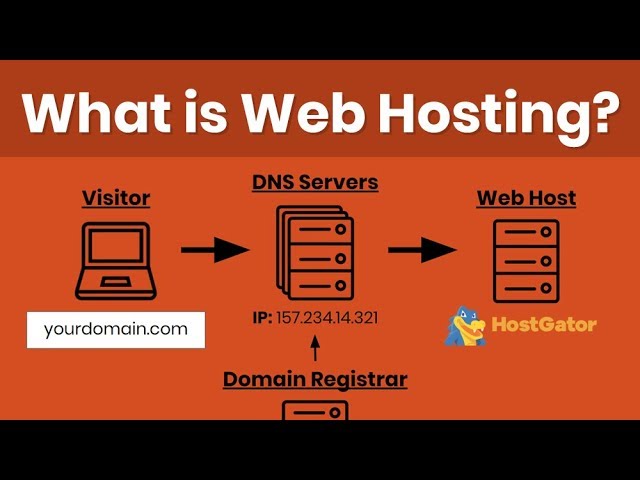
The Domain Name System (DNS) is like a phone book for the internet. It turns domain names into IP addresses. Every website has a unique IP address. DNS helps computers find websites easily. When you type a domain name, DNS finds the right IP address. This process happens quickly. Without DNS, browsing would be hard. Imagine remembering long numbers for every site!
Pointing Domain To Host
Pointing your domain to a host is simple. First, log into your domain account. Find the DNS settings. Enter your host’s IP address there. This tells the domain where to find your website. Changes may take time. Sometimes up to 48 hours. Be patient during this wait. Once done, your site is live!
Troubleshooting Connection Issues
Connection issues can occur. Check your DNS settings first. Ensure the IP address is correct. Test with different devices. Sometimes, a cache may need clearing. Restart your browser. Ask your host for help if problems persist. They might have solutions. Connection issues can be frustrating. But solving them is possible.
Credit: m.youtube.com
Selecting A Hosting Provider
First, know what your website needs. Small websites need less space. Big websites need more. Check if you want emails, databases, or special software. Consider your growth plans. Will your site get bigger soon? Think about traffic. More visitors need more power.
Look for reliable hosting. Check reviews from other users. Are they happy? Check the uptime guarantee. This shows how often your site is online. 24/7 support is important. You need help anytime. Compare features. Do they offer backups? Security is key. Ensure they have good protection against hackers.
Different providers have different pricing plans. Some are cheap, some are costly. Look for hidden fees. Sometimes, prices go up after a year. Check if they offer refunds. A money-back guarantee is good. Choose a plan that fits your budget. Don’t spend too much.
Security And Maintenance
Every website needs good security. Websites without security can be hacked. Hackers can steal information. Security protects your data. Good passwords are important. Firewalls keep bad people away. Always update your security tools. This keeps your website safe.
Backups save your website’s data. If something goes wrong, backups help. They restore lost data. Backups are like copies of your site. Make backups often. Store them safely. Use cloud storage for backups. This keeps them secure. Regular backups are very important.
Keep your site clean. Remove old files. Update plugins. Check for broken links. Test your site speed. Fix slow pages. Monitor your site often. Look for problems. Solve them quickly. Maintenance keeps your site healthy. A healthy site works better.
Credit: www.youtube.com
Future Trends In Hosting
Green hosting is about using less energy. It is good for our planet. Hosting companies use renewable energy. This helps save our Earth. Many people like this. They want to help the environment. Choosing green hosting is a smart choice. It makes our world a better place.
AI helps in hosting. It makes things easy. Computers can fix problems fast. Automation does tasks without humans. This saves time. It also reduces mistakes. Many companies use AI. They want better services. AI is the future of hosting.
Edge computing is a new trend. It brings data close to users. This makes services faster. Websites load quickly. It helps with big data. Businesses benefit a lot. They can serve users better. Edge computing changes the hosting game.
Frequently Asked Questions
What Is Web Hosting And Domain?
Web hosting provides storage for your website on the internet. A domain is your website’s unique address. Together, they enable online accessibility, allowing users to find and visit your site.
What Is Web Hosting For Beginners?
Web hosting provides space on the internet for your website. Hosts store your site’s files on servers. Visitors access your site via the server. Hosting services vary in cost, features, and support. Beginners can start with shared hosting for simplicity and affordability.
Choose a reliable host to ensure uptime and security.
Do I Need Web Hosting If I Have A Domain Name?
Yes, you need web hosting to make your domain functional and accessible online. Hosting stores your website files and manages traffic. A domain name alone won’t display your site to users. Web hosting is essential for website performance and security.
Choose reliable hosting for optimal results.
What Is An Example Of A Domain And Hosting?
A domain example is “example. com,” representing your website’s address online. Hosting refers to services like Bluehost or SiteGround that store your website’s data on servers, making it accessible on the internet. Both are essential for a functioning website, providing a unique address and a place to store site content.
Conclusion
Understanding web hosting and domain basics is essential for beginners. They form the backbone of your online presence. Web hosting stores your website files. A domain is your site’s name and address. These two work together to make your site accessible.
Choose wisely, as this impacts your site’s performance. Reliable hosting boosts load speed. A memorable domain enhances visibility. Start with these foundations to build a solid website. Knowledge here empowers your digital journey. With these insights, you’re ready to explore deeper web concepts.
Now, take the next step confidently.


