
Ever thought about hosting your own web server? It might sound daunting, but with the right tools, it’s completely within your reach.
Imagine having full control over your website, without relying on third-party platforms. You’ll gain valuable skills and enhance your digital presence. Plus, it’s incredibly rewarding to see your creation live on the internet. So, what do you need to get started?
You might be surprised at how simple it can be. We’ll break down the essentials for setting up a basic web server. Whether you’re a tech enthusiast or a beginner, you’ll find the guidance you need to turn your ideas into reality. Stick with us, and you’ll discover how empowering it is to host your own web server.
Choosing The Right Hardware
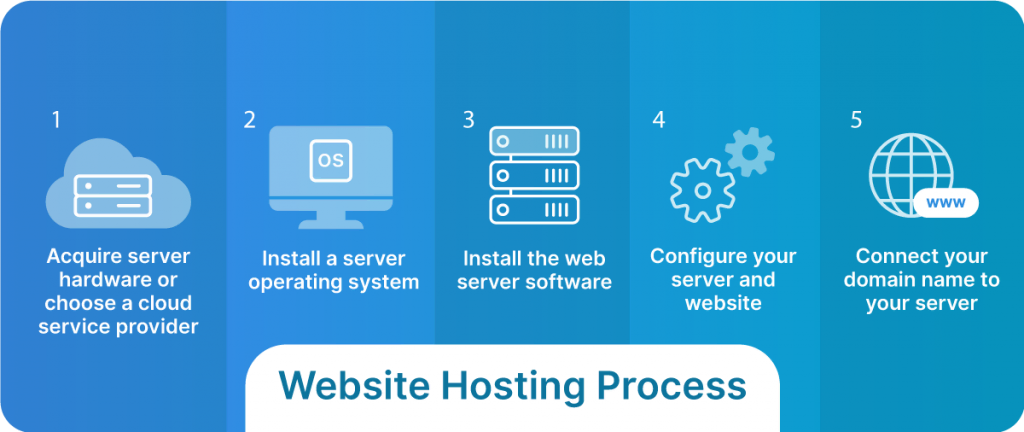
Hardware choice is important for your web server. Choose a fast processor. It helps the server run smoothly. More RAM means better performance. 8GB RAM is a good start for basic servers. Keep the network card in mind. A Gigabit network card makes data transfer quick. Cooling systems are vital. They prevent overheating. Without cooling, hardware might fail. Power supply must be reliable. It keeps the server running. Backup power is also smart. It saves data during outages.
Disk space matters for your web server. More space handles more data. SSD drives are faster than HDDs. They read and write data quickly. 500GB SSD is a good choice. It stores a lot of data. RAID setup can protect data. It saves copies of files. Backup storage is also crucial. It ensures data safety. Cloud storage is an option. It offers extra space online. External drives can expand storage. They are handy when space is low.
Credit: www.liquidweb.com
Selecting An Operating System
Choosing between Linux and Windows can be tough. Linux is free. It is also open-source. Many servers use Linux. It is very stable. But it can be hard to learn. Windows is easy to use. Many people know Windows. But it costs money. It is not as stable as Linux. Windows has good support. It works well with many apps. But it needs updates often. Linux can be more secure. But setting it up takes time.
Think about what you need. Linux is good for customization. Windows is good for ease of use. Choose what fits best for your server.
Installing Web Server Software
Apache is a popular web server. It serves web pages to users. Easy to set up and use. It works with many platforms. Free and open-source. Apache is a great choice for beginners. It supports dynamic content and modules. Many websites use Apache. Reliable and secure for hosting. Handles requests smoothly.
Nginx is a lightweight web server. Fast and efficient for high traffic. Known for speed and performance. Easy to configure. Supports static and dynamic content. Nginx is also open-source. Many companies prefer Nginx for its scalability. Ideal for handling multiple connections. It works well with other services.
IIS stands for Internet Information Services. Developed by Microsoft. Perfect for Windows servers. Easy to integrate with Microsoft products. User-friendly interface. Supports various web technologies. Secure and reliable. Many businesses use IIS. Ideal for Windows environments. Helps in hosting websites and applications.
Credit: www.youtube.com
Configuring Network Settings
First, assign a unique IP address to the server. This address helps other computers find your server. Use a static IP for stability. Dynamic IPs can change, causing issues. You can set this in your router settings. Check the manual for instructions. Ensure the IP is within your network range. Avoid conflicts with other devices.
Port forwarding is crucial for server access. It directs traffic to your server. Open the router settings for configuration. Find the port forwarding section. Enter the server’s IP address. Specify the port number, like 80 for web servers. Save the settings. Test to ensure proper configuration. This allows external access to your server.
Ensuring Security Measures
Setting up a basic web server requires careful attention to security measures. Protect sensitive data by using firewalls and secure passwords. Regularly update software to guard against vulnerabilities and ensure a safe online environment.
Firewall Setup
A firewall is like a shield for your web server. It blocks bad guys from entering. You can set up rules for what traffic is allowed. This keeps your server safe. Always update firewall settings. Old settings can have holes. Regular checks ensure everything is secure. Firewalls can be hardware or software. Choose one that fits your needs. Many people use software firewalls. They are easy to manage. Hardware firewalls are stronger. They need more setup. Both types protect your server from danger.
Ssl Certificates
SSL Certificates make your web server safe. They encrypt data. This means only the right people see it. SSL stops hackers from stealing information. Websites with SSL have a lock icon. People trust sites with SSL more. You need to buy an SSL certificate. Some are free, but paid ones are better. They offer more security. Install SSL on your server. This protects data like passwords and credit card numbers. Always keep your SSL updated. This ensures maximum security for your users.

Credit: www.hostinger.com
Managing Domain Name
Choosing a good domain name is vital. It is the address people type in their browser. A short and simple name is best. Many websites help in finding available domain names. After choosing, you need to register it. Companies like GoDaddy and Namecheap are popular. They help register and manage your domain. A small fee is needed for registration. This fee is usually paid yearly. Make sure to keep your contact details updated. It’s important to keep your domain active.
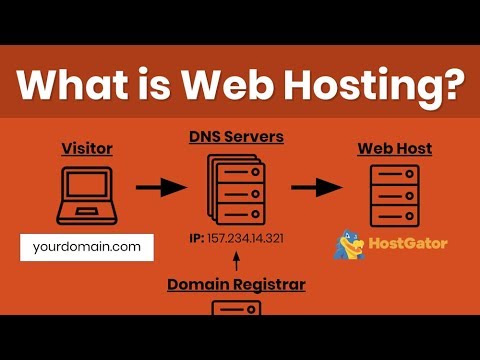
DNS stands for Domain Name System. It is like a phonebook for websites. It helps browsers find the server where your website lives. To set up DNS, use a DNS management tool. This tool is often provided by your domain registrar. Create records like A, CNAME, and MX. The A record points to your server’s IP address. CNAME helps with subdomains. MX records are for email services. Proper DNS settings make sure your site is reachable.
Testing And Deployment
Setting up a web server requires a computer with stable internet, server software, and security measures. Choose a hosting provider offering reliable uptime and support. Install necessary software to manage data and handle requests efficiently.
Server Testing
Testing is a key part of hosting a web server. First, ensure your server responds to requests. Check if your website loads correctly on different devices. This includes computers, tablets, and phones. Make sure all links work. No one likes broken links. Test if your site is fast. Slow sites can annoy visitors. Verify security settings. Protect user data from hackers. Use tools to test server performance. Free tools are available online. They help spot potential issues. Regular testing keeps your server running smoothly.
Go Live
After testing, it’s time to go live. Choose a reliable hosting provider. They store your website files. Make sure your domain name is easy to remember. People will type it to find your site. Check your website one last time. Ensure everything is in place. Finally, publish your website. Now, it is visible to everyone. Keep monitoring your site. Fix issues quickly if they arise. Regular updates keep your site fresh. A well-maintained site attracts more visitors. Enjoy your new online presence!
Monitoring And Maintenance
A basic web server needs regular monitoring and maintenance for smooth operation. Check server health to prevent downtime. Update software to ensure security and efficiency.
Performance Monitoring
Every web server needs performance monitoring. This helps catch problems early. Use tools like CPU and memory trackers. These tools show how much resources your server uses. Keep an eye on traffic spikes. Traffic spikes can slow down your server. Regular checks keep your server running smoothly.
Regular Updates
Updates are crucial for security and performance. Software updates fix bugs and holes. These updates make your server safer. Hardware updates can also help. New hardware makes servers faster. Set a schedule for updates. This keeps everything fresh and secure.
Frequently Asked Questions
How Do I Host A Simple Web Server?
Install a web server software like Apache or Nginx. Configure basic settings for your needs. Use a cloud provider or local machine to host. Ensure your firewall allows HTTP/HTTPS traffic. Test your server by accessing your IP or domain in a browser.
What Do You Need To Host Your Own Server?
To host your own server, you’ll need reliable hardware, a stable internet connection, and an operating system. Configure security protocols and software for server management. Ensure sufficient storage and backup solutions are in place. Regular maintenance and updates are crucial for optimal performance and security.
What Are The 3 Main Parts Needed To Set Up A Web Server?
To set up a web server, you need three main components: hardware, server software, and a network connection. Hardware provides the physical infrastructure. Server software, like Apache or Nginx, handles HTTP requests. A network connection ensures access to the internet, enabling users to reach your server.
What Do I Need To Host My Own Website?
To host your own website, you need a domain name, web hosting service, and site-building tools. Secure a reliable hosting provider and register your domain. Choose user-friendly software like WordPress for easy site management. Ensure your hosting plan includes adequate bandwidth and storage for optimal website performance.
Conclusion
Setting up a basic web server is simpler than it seems. Start with reliable hardware. Choose a solid operating system. Install server software next. Configure settings carefully. Secure your server with firewalls. Regular updates keep it safe. Test everything thoroughly.
Monitor server performance. Troubleshoot issues promptly. Grow your skills with practice. Hosting a web server opens many opportunities. It’s a valuable skill to learn. Take it step by step. Stay curious and patient. Your web server journey begins now. Keep exploring and learning.
It’s an exciting path to follow. Enjoy the process!


