
Are you feeling a bit lost with all the technical jargon in web hosting? You’re not alone.
Words like “requests” and “data out” can sound complicated, but understanding them is easier than you think—and it’s crucial for managing your website effectively. Imagine driving a car without knowing how to read the fuel gauge or speedometer. Confusing, right?
The same goes for running a website without grasping these key concepts. By the end of this article, you’ll see how these terms influence your site’s performance and user experience. Dive in, and let’s demystify what requests and data out really mean for you and your web hosting journey!
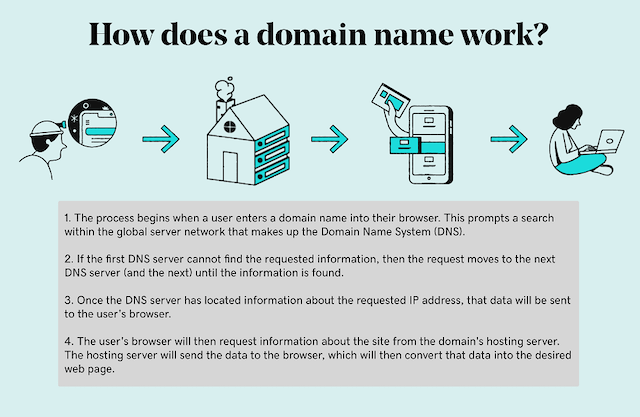
Credit: www.godaddy.com
Basics Of Web Hosting
Web hosting is like renting a spot on the internet. It holds your website files. These files include texts, pictures, and more. Web hosts provide the space. They keep your website running all the time. Without hosting, your site won’t be online. It’s like a home for your web pages.
There are different hosting types. Shared hosting is the most common. Many websites share one server. It’s cheap but slower. VPS hosting is more private. You get your own space on the server. Dedicated hosting is the best. You get the whole server to yourself. It’s fast and powerful.

Credit: developer.mozilla.org
Understanding Requests In Web Hosting
HTTP requests are how computers talk on the internet. They ask for web pages. Your browser sends these requests to servers. Servers reply with the information needed. This is how you see web pages. Each web page needs many requests. Images, text, and videos each have their own request.
- GET requests: Ask for data.
- POST requests: Send data to servers.
- PUT requests: Update information.
- DELETE requests: Remove data.
Requests affect how fast a website loads. Fewer requests make websites faster. Many requests slow websites down. Good web hosting manages requests well. It ensures quick responses. This keeps visitors happy. Fast websites get more visitors. Slow websites lose visitors.
Data Out In Web Hosting
Data out refers to the amount of information your server sends out. This includes files, images, and videos. Every time someone visits your site, data is sent from your server. It is an important part of web hosting.
Bandwidth is the maximum data your site can transfer. More data out means more bandwidth used. If bandwidth is low, your site may slow down. High data out can affect your site’s performance.
Keep an eye on your data out usage. Many hosts offer tools for this. Check regularly to avoid overuse. Overuse can lead to extra charges or a slow site. Monitoring helps keep your site running smoothly.

Credit: blog.coderco.io
Requests Vs Data Out
Requests are like questions. They ask for files or data. Data Out is the answer. It sends the files or data back. Requests come from users or browsers. Data Out goes back to them. Both are key in web hosting. They show how websites work. Requests are counted. So is Data Out. Both numbers matter for site speed. They also affect bandwidth. Hosting plans often list them.
Requests and Data Out work together. They help a site run smoothly. A request asks for a webpage. Data Out sends the page to the user. More requests mean more Data Out. This can slow down a site. Keeping requests low helps. It keeps sites fast and users happy.
High requests and Data Out can cost more. Hosting plans may charge extra. Plans have limits for each. Exceeding limits can be pricey. It’s smart to monitor them. Limit requests with good design. Keep Data Out low with small files. This saves money and keeps sites fast.
Optimizing Requests And Data Out
Fewer requests make websites faster. Combine images into one file. Use CSS sprites for icons. Merge JavaScript files. This reduces loading time. Use a Content Delivery Network (CDN). It helps serve files quickly. Limit plugins on your site. Each plugin adds extra requests. Keep your site simple.
Data out costs money. Compress images and files. Use Gzip compression for web pages. This reduces size. Send smaller files to users. Optimize images for web use. Choose the right format. For photos, use JPEG. For graphics, use PNG or SVG. Limit video streaming. Use lower resolutions.
Tools help track data usage. Google Analytics shows data out details. Pingdom tests page speed. It lists requests made. GTmetrix analyzes web performance. Use these tools often. They help find issues. Fix problems quickly. Keep your site fast and efficient.
Choosing The Right Hosting Plan
Picking the best hosting plan is important. Understanding your website needs is the first step. Some websites need more storage. Others need better speed. Look at how much data you will use. Requests are how often people click on your site. More requests mean more data. Choose a plan that fits both needs.
Hosting plans can be expensive. But cheap plans may lack speed. Find a balance between cost and how well your website works. If your site is slow, visitors might leave. Check if a plan offers good performance for its price. This will help keep your site fast and users happy.
Different providers offer various features. Check how they handle requests and data out. Some charge more for high data usage. Others offer free data up to a limit. Compare these features. Make sure the provider meets your website’s needs. Choosing the right one will save money and keep your site running smoothly.
Frequently Asked Questions
What Is A Request On A Website?
A request on a website is a user’s action to retrieve information or perform an action. This could be clicking a link, submitting a form, or loading a page. The server processes this request and responds with the desired content or action.
What Are The Four Types Of Requests?
The four types of requests are GET, POST, PUT, and DELETE. GET retrieves data, POST submits data, PUT updates data, and DELETE removes data from a server. These HTTP methods facilitate communication between clients and servers on the web. Understanding them is crucial for web development and API integration.
What Happens When A User Requests A Web Page?
A user’s web page request sends a URL to a server. The server retrieves and processes the data. It then sends the HTML content back to the user’s browser. The browser renders the page for viewing, displaying images, text, and other elements.
This process happens quickly, ensuring efficient user experiences.
What Happens When You Send A Web Request?
A web request initiates communication between your browser and server. The browser sends an HTTP request. The server processes it, retrieves data, and responds. The browser then displays the content. This process involves DNS lookup, connection establishment, request sending, and response receiving.
Conclusion
Understanding requests and data out is crucial in web hosting. They determine website performance and user experience. Requests refer to data sent to the server. Data out is the information sent back to users. Both impact your site’s speed and reliability.
Choosing the right hosting plan can help manage them effectively. It ensures smooth website functioning. Regular monitoring is essential too. It keeps your website optimized. Now you know the basics. Use this knowledge to enhance your website’s efficiency. Your visitors will notice the difference.
Happy hosting!


