
Are you ready to launch your website but unsure about what you need to get started? Hosting a website might seem like a daunting task, but it doesn’t have to be.
Imagine having your website live, attracting visitors, and showcasing your content effortlessly. Understanding the essentials of web hosting can make this vision a reality. You’re in the right place to uncover the key elements you need to host your website successfully.
With the right knowledge, you can make informed decisions that save you time and money, while ensuring your site is fast, secure, and reliable. Curious to know more? Keep reading to discover the simple steps and tools to get your website up and running smoothly.
Credit: www.godaddy.com
Domain Name Registration
A domain name is like your website’s address. It should be easy to remember. Pick words that are short and simple. Avoid using numbers or hyphens. People might forget them. Try using your brand name if possible. This helps others find you quickly. A good domain name can make your site popular. It sets the first impression. Think carefully before deciding.
To register a domain, you need a domain registrar. This is a company that sells domain names. Some popular ones are GoDaddy and Namecheap. First, check if your chosen name is available. If taken, you need to choose another. Registering a domain costs money. You pay yearly to keep it. Prices can vary. Some domains are cheaper than others. Always remember to renew your domain. If not, you might lose it.
Web Hosting Services
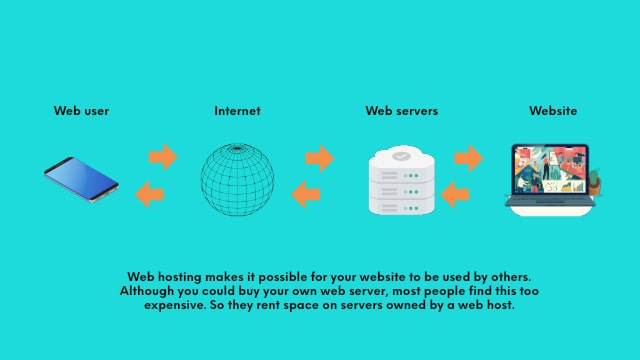
Web hosting services require a server to store your website’s files and a domain name for easy access. Reliable hosting ensures your site runs smoothly and remains accessible to visitors. Essential features include adequate storage, bandwidth, and support for security measures.
Shared Hosting
In shared hosting, many websites use one server. It is cheap but can be slow. Many people like it for small websites. Resources are shared among all users.
Dedicated Hosting
Dedicated hosting means one server for one website. It is fast and secure. This hosting is for big websites. It costs more but gives full control.
Cloud Hosting
Cloud hosting uses many servers to work together. It is flexible and can grow with your website. This type is good for changing needs. Many people choose it for its reliability.
Server Setup
Hosting a website needs a strong server. The server must have enough RAM and CPU power. This helps in managing website traffic. More traffic needs better hardware. Choose a server with high storage space. This ensures your website data is safe. Fast internet connection is a must. It helps load your site quickly.
Servers run on operating systems. Common options include Linux and Windows. Linux is popular for its stability. It is also cost-effective. Windows is user-friendly but can be costly. Choose based on your website needs.
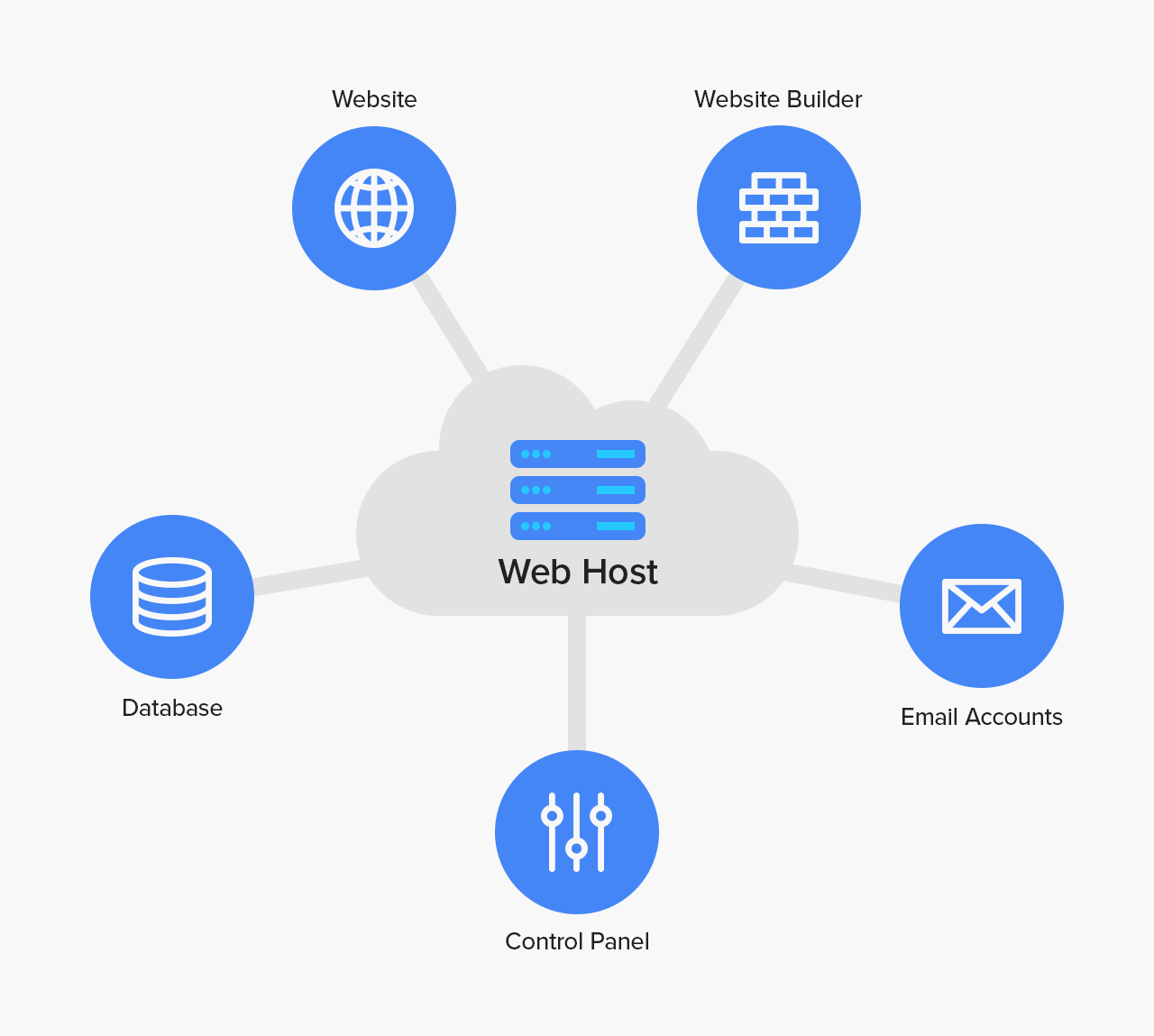
Control panels make server tasks easy. cPanel and Plesk are popular choices. They help manage domains, emails, and databases. Look for panels with easy navigation. Good panels save time and reduce complexity. They are crucial for website management.

Credit: www.hostinger.com
Website Design Tools
Content Management Systems (CMS) make website creation easy. They help manage text, pictures, and videos. Popular CMS options include WordPress, Joomla, and Drupal. Each offers templates for design. Templates save time. Choose one and start building. CMS tools let users add features. Examples include blogs and shopping carts. These tools are great for beginners and experts.
Website builders are simple and fast. They offer drag-and-drop features. No need for coding. Just click, drag, and drop. Platforms like Wix and Squarespace are popular. They offer ready-made templates. Customize them easily. Website builders are perfect for small businesses. They help you go online quickly.
Custom development offers full control. It requires coding knowledge. HTML, CSS, and JavaScript are common languages. Developers create unique designs. They build custom features. This option is best for large projects. It offers flexibility and personalization. Custom development is great for businesses with specific needs.
Security Measures
SSL Certificates keep your data safe. They encrypt data between the user and the server. This makes it hard for bad people to read it. Websites with SSL have a lock icon in the browser. This shows they are secure. Many users trust sites with SSL more. This can lead to more visitors. SSL is important for online security.
Firewalls act like guards for your website. They stop bad traffic from entering. This keeps your site safe from hackers. Firewalls can be hardware or software. They check all data coming in and out. Using a firewall is smart. It keeps your website protected.
Regular backups save copies of your website. If something breaks, you can restore it. Backups are like a safety net. They protect against data loss. Store backups in a safe place. Do them often. This way, your website is always ready for anything.
Performance Optimization
Caching is a smart way to speed up websites. It stores data for future use. This reduces the time needed to load pages. Browsers use cache to save images and files. Servers use cache to store web pages and data. This cuts down on loading times. Websites become quicker. Faster websites make users happy.
Large images can slow down a website. Making images smaller helps. Use formats like JPEG or PNG. They are smaller but still clear. Compress images without losing quality. This saves space. Faster loading makes users stay longer. They enjoy browsing more.
Databases store website data. Keeping them clean is key. Remove old data often. This helps them run smoothly. Indexing speeds up data searches. Use simple queries for quicker results. A well-managed database boosts website speed. Users enjoy a fast site.
Seo Essentials
Keywords are like the secret recipe. They help search engines find you. Use tools to find popular words related to your site. These words must be relevant. Check what your competitors use. Make a list of these words. Use them in your content. They must fit naturally. Don’t use too many. It can make your site look spammy.
On-page SEO helps search engines read your site. Use your keywords in titles. Put them in headings. Add them in paragraphs. Make sure your site is fast. Fast sites rank better. Images must be small. They should load quickly. Use alt text for images. This helps people who can’t see them. Your site must work well on phones.
Off-page SEO is about links. Links from other sites to yours are good. They must come from trusted sites. This makes your site look reliable. Share your site on social media. People will visit and share. This can help your site rank higher. Write guest posts for other blogs. Include links back to your site. This builds trust.
Legal Considerations
Privacy policies are important for websites. They tell users how data is used. Websites collect data like names and emails. Policies must explain this clearly. Users should know if their data is shared. Transparency builds trust. Protecting personal information is key. Clear policies make users feel safe. Every website needs a privacy policy. It is a legal requirement in many places.
Terms of Service are rules for website use. They guide user behavior. These rules prevent misuse. They tell users what they can and cannot do. Clear rules protect both users and site owners. They cover things like copyright and user rights. Terms should be easy to understand. This helps avoid confusion. Users should agree to these terms before using the site.
Compliance regulations are laws for websites. They ensure safety and fairness. Sites must follow these laws. This protects users and site owners. Regulations can differ by region. Websites must stay updated on these laws. Non-compliance can lead to fines. It’s important to follow rules strictly. This ensures smooth operation. Compliance builds trust with users.
Monitoring And Analytics
Tracking website traffic is important. Traffic analysis tools help with this. They show how many people visit your site. These tools can also tell where visitors come from. Understanding this data helps improve your site.
Knowing what users do on your site is key. User behavior tracking tools show this. They can track clicks and time spent on pages. This data helps make the site better. It’s all about making users happy.
Good site performance is a must. Performance metrics measure speed and uptime. Fast sites keep visitors happy. Uptime is important to keep sites running. Use metrics to find and fix problems. Keep your site running smoothly.
Credit: atlantiustechnologies.com
Frequently Asked Questions
What Is Required To Host A Website?
To host a website, secure a domain name and choose a web hosting provider. Set up hosting server space, configure DNS settings, and upload website files. Ensure reliable customer support and consider security features. Select a hosting plan based on your website’s requirements for performance and scalability.
What Does It Take To Host A Website?
To host a website, choose a domain name, select a hosting provider, and upload your site files. Ensure your hosting plan meets your site’s technical requirements for optimal performance and security. Regularly update and maintain your site to keep it running smoothly.
What Are The Three Things Needed To Host A Webpage?
To host a webpage, you need a domain name, a web hosting service, and website files. The domain name is your site’s address. Web hosting provides the server space. Website files include HTML, CSS, and images. These components work together to make your site accessible online.
Can I Host My Website By Myself?
Yes, you can host your website yourself. You’ll need a computer, internet connection, and server software. Ensure your system runs 24/7 for site accessibility. Consider security, backup, and maintenance responsibilities. Self-hosting can be complex and may require technical skills.
Conclusion
Starting a website requires some key elements. A reliable web host is essential. Choose one based on your needs and budget. A domain name helps users find your site easily. Don’t forget about security measures to protect your data. Regular updates keep your website running smoothly.
Consider customer support for any technical issues. With these essentials, you’re ready to launch your website. Explore, learn, and grow your online presence. It’s a journey worth taking. Enjoy the process and watch your website thrive.


