
Ever stumbled upon a website and wondered who’s powering it behind the scenes? You’re not alone.
Discovering what web host a website is using can offer valuable insights into its performance, reliability, and speed. Whether you’re a budding entrepreneur, a web enthusiast, or someone simply curious, knowing the secrets of web hosting can empower you to make informed decisions for your own online projects.
Picture this: unlocking a treasure trove of information that can guide your next steps in choosing the perfect host for your site. Stick around, because you’re about to uncover simple tricks and tools that will demystify the web hosting world, helping you achieve your online goals seamlessly.

Credit: www.hostinger.com
Identifying Web Hosting Providers
Several online tools help find a website’s host. Tools like WhoIsHostingThis and HostAdvice offer quick results. Enter the website URL to get hosting details. These tools often show server location and IP address. You can also see other websites on the same server.
Domain information provides hosting clues. Use WHOIS lookup to check domain details. It reveals the registrar and sometimes hosting provider. WHOIS data includes important dates and contact info. Look for the nameservers section, which may indicate the host.
Website source code might show hosting hints. Check the page source for comments or scripts. Sometimes, hosting brands leave marks in the code. Search for specific hosting-related keywords. Look in the HTML comments and JavaScript files for clues.
Credit: docs.aws.amazon.com
Popular Tools And Services
Whois tools show details about a website’s host. These tools reveal the domain owner’s name, contact, and server info. Useful for finding where a site is hosted. Easy for anyone to use. Websites like Whois.net and ICANN provide these services. You only need the website URL.
Hosting checkers are easy to use. Enter the website URL, and get results. They show the hosting provider and server location. Some popular ones are HostAdvice and Site24x7. These tools help identify a website’s hosting quickly. They are free and simple for everyone.
Browser extensions are handy. They help find a website’s host instantly. Extensions like Wappalyzer and BuiltWith are popular. They provide hosting and technology info. Install them on your browser. Use them to gather data while browsing.
Manual Methods
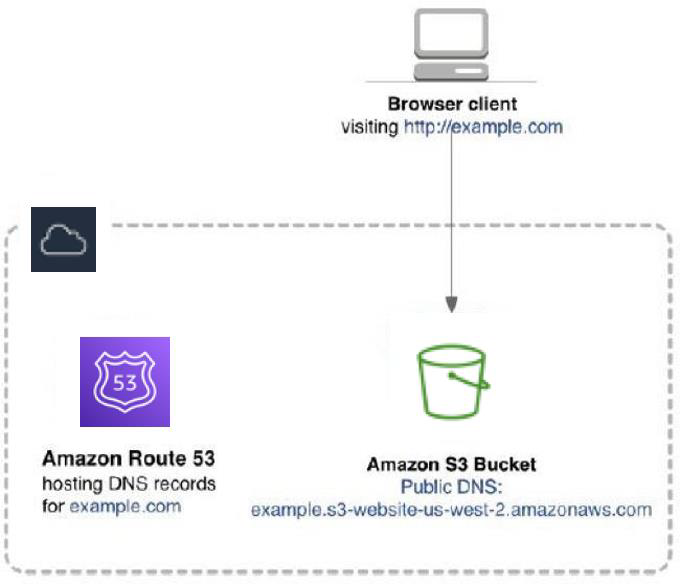
DNS records can tell a lot about a website. Use tools like Whois to check these records. They show details about the domain’s host. Look for names like GoDaddy or Namecheap. These are common hosts. Also, note the NS or name server records. They often reveal the hosting service.
An IP address can guide you to the host. Use tools like IP Checker. Enter the website’s URL. The tool will show the IP. Search this IP online. Often, it links to a hosting company. This method is simple and effective.
Server headers provide hosting clues. Use your browser’s Inspect Element feature. Go to the Network tab. Refresh the page and find the server header. It might mention names like Apache or nginx. These names hint at the host type. Understanding these headers can help a lot.
Common Challenges
Finding out a web host can be tricky. Websites often use privacy protections. These tools hide the host’s details. It keeps their information safe from prying eyes. Many website owners want to keep their data private. They use services like WHOIS protection. This makes it hard to see who hosts the site. Such privacy tools are common today. They protect both big and small sites.
Shared hosting can make it hard to find a website’s host. Many sites share one server. This means many sites have the same IP address. It can confuse those trying to find the host. Imagine a crowded room. Many voices blend together. That’s like shared hosting. Each site on the server shares resources. But it also shares the same digital space.
CDNs and proxies add extra layers. CDNs help websites load faster. They store copies of sites in many places. This can hide the true web host. Proxies act like middlemen. They route traffic through different servers. Both can change how a site looks online. This makes it hard to see the real host. They are useful but complicate host finding.
Advanced Techniques
Command line tools can reveal a website’s host. Tools like WHOIS provide domain details. This includes hosting information. Traceroute helps track data paths. It shows the server location. Ping tests speed and connectivity. These tools need basic commands. They help find host details quickly.
API services offer easy host detection. Services like IPinfo show host data. Host.io provides API for detailed info. RapidAPI connects multiple host services. These services are user-friendly. They require basic setup. API tools save time. They give quick host insights.
Checking multiple sources gives accurate host info. Use WHOIS and DNS records together. Compare results from API services. Verify with online databases. This ensures correct host data. Cross-referencing improves reliability. It avoids errors. Multiple checks are essential for accuracy.

Credit: www.crazyegg.com
Importance Of Knowing Hosting Provider
Knowing your hosting provider helps you understand your website’s security. Some hosts have better security measures. Others may have fewer. A good host protects against cyber threats. Bad hosts might leave your site vulnerable. Always choose a host with strong security features.
Different hosts offer different speed levels. Fast sites keep users happy. Slow sites make users leave. Hosting affects your website speed. Check your host’s performance records. A good host improves site speed and user experience.
Hosts provide support when things go wrong. Some offer 24/7 support. Others might not. Knowing the host helps in fixing issues fast. Good support means quicker problem-solving. This keeps your site running smoothly.
Frequently Asked Questions
How To Find Out What Web Hosting A Site Is Using?
Use online tools like “WhoIsHostingThis” or “Hosting Checker” to discover a site’s web host. Check the site’s DNS records or contact the site owner for direct information. Browser extensions like Wappalyzer can also help identify hosting providers.
How To Find Out What Platform A Website Is Hosted On?
Use online tools like BuiltWith or Wappalyzer to identify a website’s hosting platform. Inspect the site’s source code for hosting-related comments. Check the WHOIS database for hosting provider details. Browser extensions can also reveal hosting information quickly.
How Do I See What Server A Website Is Using?
Use online tools like “Netcraft” or “BuiltWith” to identify a website’s server. Inspect the HTTP response headers to find server details. Tools like “WhatRuns” browser extension can also help. Access “WHOIS” data for domain host information.
What Is The Host Name Of A Website?
The host name of a website is its domain name, like “example. com,” used to access it online.
Conclusion
Finding out what web host a website uses is easy. Use online tools to identify the hosting provider. Knowing the host helps in understanding website performance. It can also aid in competitor analysis. Good hosting ensures faster load times and better user experience.
This knowledge is valuable for website management and improvement. Stay informed to make smarter decisions for your site. Understanding web hosts can benefit your online strategy. So, explore and learn about different hosting options today. Your website’s success depends on smart choices.


