
Have you ever wondered what exactly a web host provides for your website? Understanding the role of a web host is crucial for anyone looking to establish a strong online presence.
Whether you’re launching a personal blog or a robust e-commerce site, the services and features your web host offers can make or break your website’s performance and reliability. Imagine having peace of mind knowing your site is in capable hands, loaded quickly by your visitors, and protected from potential threats.
This article will reveal the key services a web host provides and why they are essential for your website’s success. Get ready to discover how choosing the right web host can enhance your site’s capabilities and set you up for digital triumph.

Credit: www.godaddy.com
Web Hosting Basics
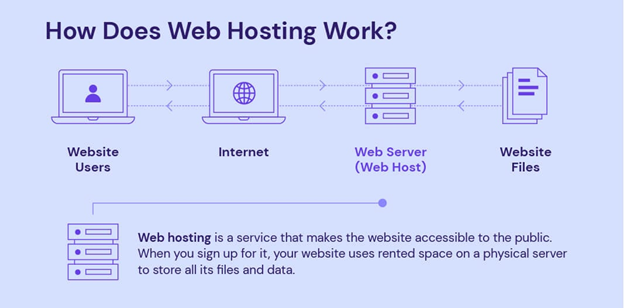
A web host gives a place for your website to live. It stores your site’s files and data. This helps people visit your site from anywhere.
Web hosting comes with different plans. Some are simple, others have more features. Basic plans are easy to use. They suit small websites well. Big sites may need advanced plans. They offer more space and support.
A good web host offers security features. These protect your site from hackers. They also provide backups to save your data. This is important if something goes wrong.
Hosts often have customer service. This helps if you have questions. It’s important to choose a host with good support. It makes your website journey smoother.
Types Of Web Hosting
Shared hosting is like living in an apartment. You share resources with others. It’s usually the cheapest option. Many websites use the same server. This can make websites slow at busy times. It’s good for small websites. Beginners often start here.
VPS stands for Virtual Private Server. It’s like owning a condo. You get more control than shared hosting. But, you still share the server with others. It costs more than shared hosting. It’s faster and more secure. Medium-sized websites often choose VPS.
Dedicated hosting is like owning a house. You have a whole server just for you. It’s the most expensive option. But it’s also the fastest and most secure. Big websites need dedicated hosting. You have full control of the server.
Cloud hosting is like living in many places at once. Your website uses many servers. This makes it very reliable. If one server fails, others take over. It’s flexible and can handle lots of visitors. Costs depend on usage. Great for growing websites.
Domain Registration
Web hosts help with domain registration. A domain is your website’s name. It is like your address on the internet. You need a domain to build a website.
Web hosts offer many domain options. You can pick a .com, .net, or .org. Each type has its own use. Web hosts make it easy to register domains. They take care of the technical stuff.
Some web hosts offer free domain registration. This is often for the first year. After that, you may need to pay yearly. Always check the details before you register.
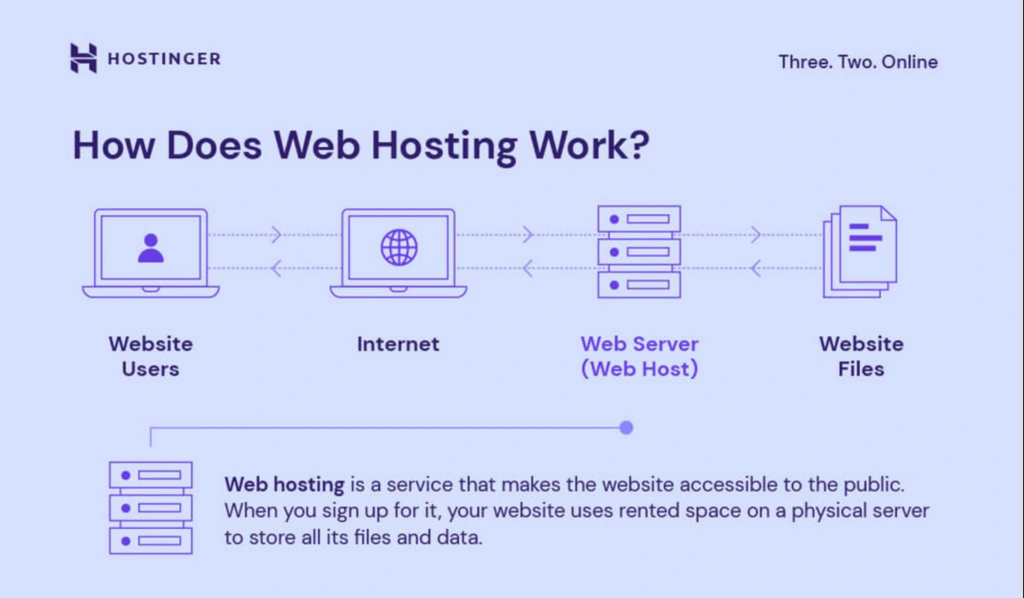
Credit: www.hostinger.com
Server Space And Resources
Storage capacity is the amount of data you can store. Web hosts offer different storage plans. Some plans have more space than others. Choose a plan that fits your needs.
Bandwidth allocation is like a road for your website. It lets data flow from your website to users. More bandwidth means faster access for users. Limited bandwidth can slow down your site. Choose wisely.
Scalability options help your website grow. Your site may need more space or speed. Web hosts offer plans to upgrade easily. Make sure your host can scale up when needed.
Security Features
SSL certificates keep data safe. They make sure information stays private. Websites need them to protect users. Browsing feels secure with SSL. Users trust sites with SSL. It stops hackers from stealing data. Passwords and credit card details stay safe.
Firewalls guard against harmful attacks. They block bad traffic. Firewalls keep your site safe. Hackers can’t get through easily. It’s like a wall for your website. Protects all important information. Keeps your website running smoothly.
DDoS protection stops large cyber attacks. It keeps websites online. Attackers can’t crash your site. DDoS protection is very important. It saves your site from downtime. Users can visit your site anytime. Always ready against threats.
Technical Support
24/7 Customer Service is very important. Problems can happen at any time. Web hosts offer support all day and night. This means help is always there. No need to wait for hours. Quick help makes users happy.
Troubleshooting Assistance helps fix problems fast. Experts find and solve issues. They know how to handle website troubles. This keeps sites running smoothly. No more worries about website errors.
Web hosts provide access to a Knowledge Base. This is like a library. It has many articles and guides. Users can learn and solve problems themselves. It’s easy to use and very helpful.
Email Hosting
Custom Email Addresses give a professional touch. They use your domain name. This makes emails look more credible. Businesses love custom emails. It helps in brand building too.
Spam Filtering keeps unwanted emails away. Spam can be annoying. It clutters your inbox. With good filtering, you get only important emails. This saves time and keeps your inbox clean.
Email Forwarding sends emails to another address. Useful for those with many email accounts. It helps in managing emails better. You won’t miss important emails. Easy to set up and use.
Credit: zeslecp.com
Website Builders
Drag-and-drop tools make website building easy. Users can move elements with a mouse. No coding skills are needed. This is great for beginners. It saves time and effort.
Templates are available in many styles. Users can choose a look they like. This helps in creating unique sites. Customization becomes simple and fast.
These tools offer flexibility. Users can add images, text, and buttons. All with a simple click. This makes websites look professional.
Website builders help in designing without stress. They are user-friendly. This is a key feature for many. It ensures ease of use.
Control Panel
The control panel has a simple user interface. It helps you manage your website. You can find tools easily. The layout is clean. Icons and labels guide you. All users can navigate it. The design is intuitive.
Managing your account is easy. You can update details quickly. Password changes are simple. Billing information is accessible. You can view usage stats. Manage multiple sites effortlessly. Support is at your fingertips.
Backup Solutions
Automated Backups save important data without needing to remember. Web hosts often offer this. They make sure data is kept safe. Data can get lost in many ways. Automated backups help prevent this. They run at regular times. Sometimes every day or every week. This keeps data fresh and updated. It’s like having a safety net for your website.
Restore Options bring lost data back. If something bad happens, this helps. Imagine accidentally deleting a file. Restore options save the day. Web hosts keep copies of data. Users can easily get back their lost files. It is simple and quick. These options reduce stress when things go wrong. Always good to have a backup plan.
Performance Monitoring
A web host promises that your site is always online. This is called uptime guarantee. Most hosts offer 99.9% uptime. It means your site is almost never down. This is important for visitors. They want to see your site anytime. Long downtime can hurt your site’s reputation. Trust is key. A good host keeps your site up and running.
Load speed is how fast your site opens. A fast site keeps visitors happy. Web hosts use special tools to make sites faster. They use CDNs and caching. CDNs send content from the nearest server. Caching saves copies of your site. This helps pages load quickly. Fast sites can help your site rank better on search engines. Speed is important.
Additional Add-ons
Many web hosts offer SEO tools to help websites rank better. These tools can check for keywords and show how well they work. They might give tips on how to make pages better. Some tools can check site speed and find issues. These features are useful for making a site visible online.
E-commerce features help sell products online. Web hosts often include shopping carts and payment options. Many offer secure connections for safe transactions. Some hosts provide templates for online stores. They might also have tools to track sales and customer data. These features make online selling easier.
Frequently Asked Questions
What Does A Web Host Provide?
A web host provides server space, bandwidth, and storage for websites. It ensures site accessibility online. Web hosts offer security, backups, and technical support. They enable email accounts and domain management. Web hosting includes shared, dedicated, or cloud hosting solutions.
Choose based on site needs and traffic volume.
What Are The Responsibilities Of A Web Host?
A web host stores websites on servers, ensuring fast and secure access. It manages server uptime, backups, and updates. Technical support, domain registration, and email hosting are also provided. Security measures protect against cyber threats. Reliable bandwidth and storage maintain website performance and availability.
What Are Three Things A Web Hosting Service Will Offer You?
A web hosting service offers domain registration, server space, and technical support. It ensures your website is online. Hosting plans vary, providing email accounts, security features, and bandwidth. Choose based on your site’s needs and traffic. Access reliable backups and updates to keep your site running smoothly.
Do I Really Need A Host For My Website?
Yes, a host is essential for your website. It stores your site’s files and makes it accessible online. A reliable host ensures your site loads quickly and is secure. Choose a hosting provider based on your website’s needs, budget, and technical requirements for optimal performance.
Conclusion
Choosing the right web host is crucial. It impacts your website’s performance. Speed, storage, and security are key factors. A good host offers reliable support. They ensure your site runs smoothly. Consider your needs before deciding. Compare different providers. Look for uptime guarantees.
Read reviews from other users. The right choice saves you time. It improves user experience. Helps grow your online presence. Take time to research. Make an informed decision. Your website’s success depends on it.


