
Imagine you’re about to launch your own website. You have your design, content, and everything ready to go.
But there’s one crucial element you need: a web host account. You might be wondering, what exactly is a web host account and why do you need one? This is where your website lives on the internet, and it’s essential for anyone wanting to establish an online presence.
Without it, your website can’t be accessed by others. Understanding web hosting is like unlocking the door to your digital storefront. By the end of this article, you’ll not only know what a web host account is, but you’ll also be equipped to choose the best option for your needs. Dive in to discover how the right web host account can be the backbone of your online success.

Credit: www.youtube.com
Web Hosting Basics
Web hosting is like renting space on the internet. It helps to store and show your website. There are two main types of web hosting: Shared and Dedicated. Shared hosting means sharing a server with others. It is cheaper but slower. Dedicated hosting means having your own server. It is faster but costs more.
Shared Vs. Dedicated Hosting
In shared hosting, many websites use one server. This makes it cost-effective. Websites may load slower due to sharing. Dedicated hosting gives a website its own server. This makes it faster. It costs more than shared hosting. You choose based on needs and budget.
Components Of A Web Host Account
A domain name is like your web address. It is what people type to visit your site. Managing your domain name means keeping track of its settings. This includes renewing it on time. If you forget, you might lose your domain. Tools are available to help manage it. They make the process easy and stress-free.
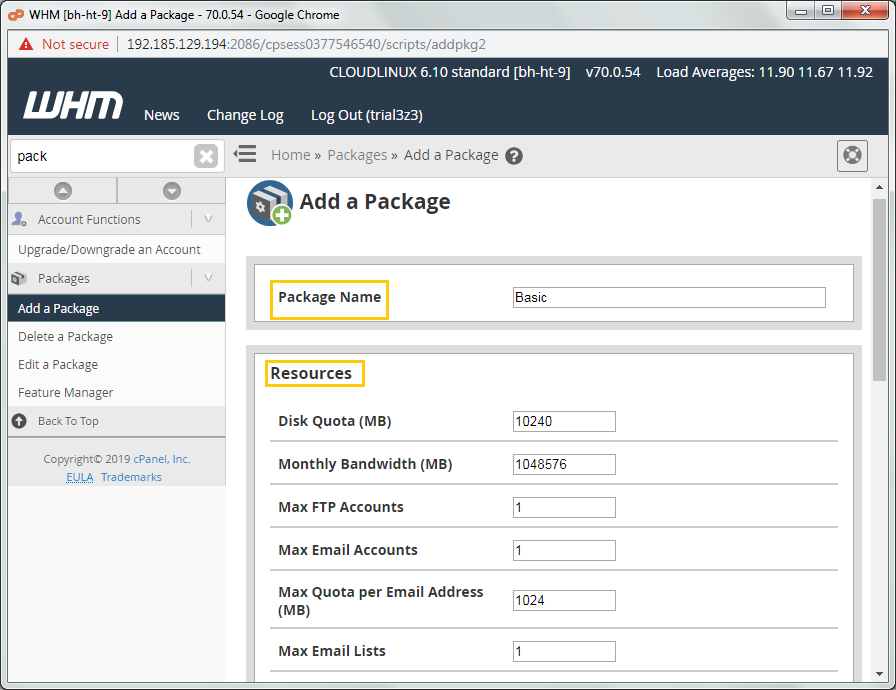
Server space is where your website data lives. You need enough space for all your files. More pages and images mean more space needed. Hosting plans offer different amounts of space. Choose one that fits your needs.
Bandwidth is like a road for your website. It affects how fast visitors can load your site. More visitors need more bandwidth. If you run out, your site might slow down. Some plans offer unlimited bandwidth. Check what your host provides.
A control panel helps manage your hosting account. It is user-friendly and includes many tools. You can set up emails, manage files, and install apps. These features make managing your site easier. Choose a host with a good control panel.
Choosing The Right Web Host
Start by listing what your site needs. Storage and speed are important. Will you need email accounts? Do you want easy-to-use tools? Write down your needs. Think about future growth.
Check how fast the host is. Fast hosts load sites quickly. Uptime is key. It shows how often your site stays online. Look for 99% uptime or higher. Read reviews. See what people say about the host.
Compare host prices. Some hosts are cheap but offer less. Others cost more but give more features. Look for hidden fees. Some plans have limits. See if the host offers a money-back guarantee.
Setting Up Your Web Host Account
Creating a web host account is easy. Start by visiting the host’s website. Find the sign-up button on the homepage. Click on it to begin. Fill in your personal details like name and email. Choose a username and password. Make sure to keep them safe. Some hosts may ask for payment details. Enter these if needed. You will receive a confirmation email. Click the link in the email. This completes your registration.
Next, you need to connect your domain. Log in to your host account. Look for the domain settings. Enter your domain name there. Now set up your hosting. Choose a hosting plan that fits your needs. Follow the instructions given. Your host might offer one-click installations for software. Use these to make setup easier. Once done, your website can go live. Check everything twice to ensure it’s correct.
Security And Maintenance
Data Protection Strategies are vital for a web host account. Protecting your data keeps your site safe. Use strong passwords. Limit access to important files. Encrypt sensitive information. This stops hackers from getting in.
Regular Backups are like having a safety net. They help when things go wrong. Always have a copy of your data. Store it in a safe place. This means you can restore your site quickly. Regular backups save you from losing everything.
Monitoring and Updates keep your site secure. Watch your site for unusual activity. Check for new threats often. Update software to fix problems. This keeps your site running well. Monitoring and updates protect your site from harm.
Common Challenges
Many face difficulties with web host accounts, like choosing the right plan or managing server downtime. Technical support can also be a challenge. Understanding these issues helps in making informed decisions.
Troubleshooting Connection Issues
Connection issues can happen at any time. They often leave users confused. Check the network cable first. It should be plugged in properly. If using Wi-Fi, ensure the router is on. Sometimes, the internet provider has issues. Contact them for help. Restarting the computer can also help. Clear the browser cache to fix loading problems. This can help load pages faster. Update all software regularly. This keeps the system running smoothly.
Handling Downtime
Downtime means your site is offline. This can frustrate users. Always have a backup plan. Use a reliable web host. They often guarantee 99% uptime. Check server status regularly. This helps spot issues early. Have a backup site ready. It can keep visitors happy. Inform users about downtime. They appreciate updates. Always work to reduce downtime. This keeps your site reliable.
Future Trends In Web Hosting
Cloud hosting is growing fast. It offers more flexibility and power. Servers work together like a team. They share resources. This makes hosting reliable and strong. Many websites trust cloud hosting now. It helps them stay online, even with lots of visitors. Security is better with cloud hosting. Data stays safe and protected. Hosting costs are lower. Companies save money. More people choose cloud hosting today.
Green hosting is good for the earth. It uses clean energy. Solar and wind power help run servers. This helps reduce pollution. Hosting companies care about the planet. They want to be eco-friendly. Some companies plant trees. Others use energy-saving tools. Green hosting helps protect nature. It is a smart choice for everyone. People want to help the environment. They pick green hosting for their websites.
Credit: www.resellerclub.com

Credit: www.metalink.net
Frequently Asked Questions
What Is A Web Hosting Account?
A web hosting account provides the space to store your website’s files on a server. It allows your site to be accessible on the internet. This account typically includes a domain name, email accounts, and various tools to manage your website efficiently.
What Is The Purpose Of A Web Host?
A web host stores website files and makes them accessible online. It provides server space, security, and support. Reliable web hosting ensures fast loading times and uptime, improving user experience and SEO. Choose a host that suits your website needs for optimal performance and growth.
What Is An Example Of A Web Host?
An example of a web host is Bluehost. It offers reliable hosting services for websites of all sizes. They provide features like domain registration, WordPress hosting, and 24/7 customer support. Bluehost is popular for its user-friendly interface and affordability.
How Do I Find My Web Host?
Check your email for hosting details or look at your website’s domain records. Use a WHOIS lookup tool to find hosting provider information. Contact your domain registrar for help if needed.
Conclusion
Choosing the right web host account is crucial. It impacts your site’s performance. Consider your website’s needs carefully. Look at storage, speed, and support. Compare different hosts and their features. A reliable host ensures smooth user experience. Technical support matters too.
Check reviews and ratings. They provide insights. Security features are essential. They protect your data and users. Budget is important. Find a host that fits your financial plan. Making an informed choice leads to success. Your website’s future depends on it.
Choose wisely and grow your online presence confidently.


