
Transferring web hosting can feel like a daunting task, especially if you’re not sure where to start. But what if moving your website to a new home could be as simple and stress-free as packing a suitcase for a weekend getaway?
You’re not alone if you’re contemplating this change; many website owners find themselves in the same boat, seeking better performance, more features, or improved customer service. In this guide, you’ll discover the essentials you need to successfully transfer your web hosting.
Imagine the peace of mind you’ll have knowing your website is in the right place, running smoothly and efficiently. Let’s dive in and unlock the secrets to a seamless hosting transition, so you can focus on what truly matters—growing your online presence.
Preparing For The Transfer
Gather essential information before transferring web hosting. Ensure you have backups, domain access, and updated DNS records. Check compatibility with the new host.
Backup Existing Data
Backup all your website files. This includes images, text, and databases. Use a reliable tool for this. You might want to save copies on your computer. Check that everything is copied correctly. You don’t want to lose any data.
Assess Hosting Requirements
Know what your website needs. Do you need more space? Or maybe better speed? Make a list. This helps in choosing the right host. Think about the future too. Your needs might grow.
Choose New Hosting Provider
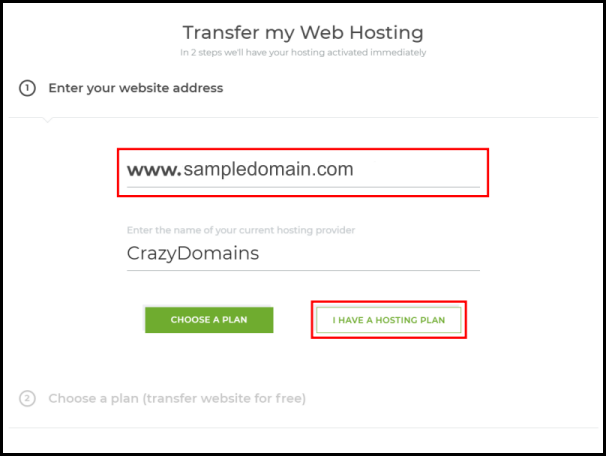
Look at different hosting options. Compare their prices and features. Read reviews to see what others say. Choose a provider that fits your needs. Make sure they offer good support. This can help when problems arise.
Credit: www.crazydomains.com
Domain Considerations
Always check if you own the domain. This is important before transferring. Use a domain lookup tool to see details. Check the registrar information. Make sure your name is listed. Contact support if needed. Without ownership, you cannot proceed.
DNS settings guide where your domain points. Update them when changing hosts. Log into your domain control panel. Find the DNS settings section. Enter the new host’s server details. Save changes. Wait for settings to update. This can take a few hours.
Start by unlocking your domain. Then, get an authorization code from your current registrar. This code is crucial for transfer. Next, initiate the transfer with your new host. Enter the code when prompted. Confirm the transfer through email. Patience is key. Transfers take a few days.
Migrating Website Files
Moving website files is crucial. First, download all files from the old host. Use FTP software like FileZilla or Cyberduck. Save files on your computer. Next, upload them to the new host. Check file permissions; they must match the old host. This ensures your site works. Images, scripts, and stylesheets are important. Keep them organized. Always back up files before transferring. This prevents loss. Follow steps carefully. Mistakes can break your website. Ask for help if unsure.
Databases hold your site’s data. Export it from the old host. Use tools like phpMyAdmin. Save the export file safely. Import it to the new host. Check database settings. They must match the old host. Update configuration files with new database info. This includes username, password, and host name. Errors can cause data loss. Be careful. Test your site after migration. Look for missing data. Fix problems quickly. This keeps your site running smoothly.
Credit: www.bitcatcha.com
Testing The New Setup
Check Website Functionality is very important. Open your website in a browser. Ensure every page loads correctly. Click on all links. Make sure they work. Test forms by submitting them. Check images. They should display properly. Also, verify downloads. They must function without errors. Checking these ensures a smooth experience for users.
Review Email Configuration is next on the list. Log into your email. Send a test email to a friend. Ask if they receive it. Reply to their email. Make sure you get their reply. Check spam folders. Ensure emails aren’t marked as spam. This ensures your emails work as they should.
Post-transfer Steps
Check your website’s speed and uptime. Slow pages can hurt your traffic. Use tools to see how your site is doing. Look at loading times. Note any errors or downtime. Fix issues quickly. Happy visitors mean more success.
Keep your site safe from hackers. Set strong passwords. Update software often. Check firewall settings. Look for strange activity. Protect sensitive data. Secure hosting is very important. Your users will trust you more.
Credit: www.hostinger.com
Frequently Asked Questions
How To Transfer Web Hosting From One Company To Another?
Backup your website files and databases. Choose a new hosting provider and sign up. Update domain DNS settings to point to the new host. Upload your files and restore databases on the new server. Test your website thoroughly to ensure everything functions correctly.
How To Transfer From One Host To Another?
To transfer hosts, first back up your website files and databases. Update DNS settings to point to the new host. Upload your files and databases to the new server. Test the site to ensure everything works smoothly. Finally, cancel the old hosting service after confirming a successful transfer.
How Do I Transfer A Website To A New Owner?
Transfer website ownership by updating domain registration details. Provide hosting and website credentials to the new owner. Ensure transfer of all associated accounts and services. Verify new owner has access to site management tools. Complete legal documentation to finalize the transfer.
How Do You Transfer Your Hosting Plan To A Different Server?
Transfer your hosting plan by backing up data, changing DNS settings, and migrating files to the new server. Ensure compatibility, test website functionality, and update domain configurations. Contact your hosting provider for guidance and support throughout the process.
Conclusion
Transferring web hosting is simpler than it seems. Start by researching host options. Choose one that fits your needs. Next, back up your website files. This step is crucial. After backups, update your domain settings. This redirects visitors smoothly. Test your website thoroughly.
Ensure everything works correctly. Don’t rush; take your time. Seek help if needed. Many hosts offer support. Finally, keep your login details safe. Protect your website’s security. With patience and care, your web hosting transfer will succeed. Your online presence remains strong and stable.
Enjoy your new hosting experience!


