
Imagine you’re about to launch your very own website. You’ve got the design ready, the content polished, and now you’re wondering how to get it live on the internet.
That’s where web hosting comes into play, and if you’re using IIS, you’re stepping into a powerful arena. IIS, short for Internet Information Services, is a flexible, secure, and manageable web server created by Microsoft. But what exactly does it mean to host your website on IIS?
This is crucial information if you want your site to perform at its best. Understanding web hosting in IIS can unlock a smoother, faster, and more reliable online presence for you. Get ready to dive into the essentials of IIS web hosting, and discover how you can make the most out of your website’s potential. Keep reading to ensure your site doesn’t just survive, but thrives in the digital world.
Web Hosting Basics
Web hosting is like renting a spot on the internet. It is where your website lives. The IIS stands for Internet Information Services. It helps your website show to others online. Web hosting gives your site a home. It stores all your files and pictures. Without it, your website can’t be seen. Think of IIS as a big helper for websites. It helps them work well. IIS makes sure your site is safe. It also keeps it running fast. So, web hosting in IIS is very important.
Role Of Iis In Web Hosting
IIS is a tool for hosting websites. It helps in managing web services. Many websites use IIS for hosting. It works on Windows servers. IIS supports many languages. It supports HTML, ASP.NET, and more. Users find it easy to use. It has a simple interface. The tool offers strong security. It keeps websites safe from threats.
IIS allows smooth website operations. It helps in handling web traffic. Websites stay fast with IIS. It offers many features. Features include custom error pages. It also has logging tools. These tools help track issues. IIS is reliable for hosting needs.
Setting Up Iis For Web Hosting
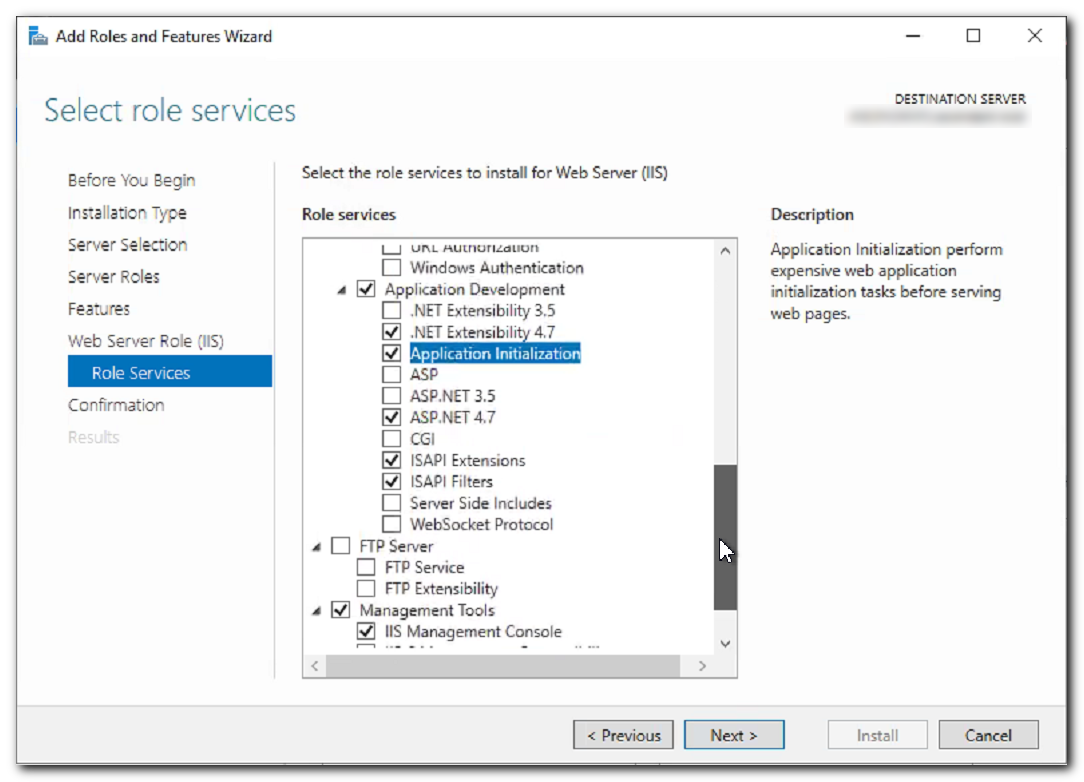
First, open the Control Panel. Find Programs and Features. Click on Turn Windows features on or off. A new box will open. Look for Internet Information Services. Check the box next to it. Click OK to start the installation. Wait for a few minutes. Once done, restart your computer. This step ensures IIS is ready to use. Now, IIS is installed on your computer.
Open IIS Manager from the start menu. Look for Sites on the left. Click on the Default Web Site. On the right, choose Bindings. Add a new binding for HTTP or HTTPS. Select the port number. Make sure it’s either 80 or 443. Next, click OK. Check if the site is working. Open a web browser. Type localhost in the address bar. If it loads, the settings are correct.
Types Of Hosting In Iis
Shared hosting means many websites on one server. Websites share resources like CPU and memory. This is a cheap option. Good for small websites and beginners. But it can be slow. If one site gets busy, others may suffer. Security can be a concern too. But it works for basic needs.
Dedicated hosting gives you a whole server. No sharing with others. This is for big websites with lots of traffic. It is expensive but very fast. You get full control over the server. You can set up security as you like. It’s a good choice for businesses.
Virtual hosting uses a virtual machine. It is like having your own server. But it’s still on a shared server. This is a middle option. It is cheaper than dedicated hosting. But has more features than shared hosting. You get some control but not full. It’s good for growing websites.
Managing Websites In Iis
IIS helps you make websites. First, open IIS Manager. Click on Sites to see options. Choose Add Website. Enter a name for your website. Select a folder for your files. Choose a port number. Click OK to create your site. Your website is now ready.
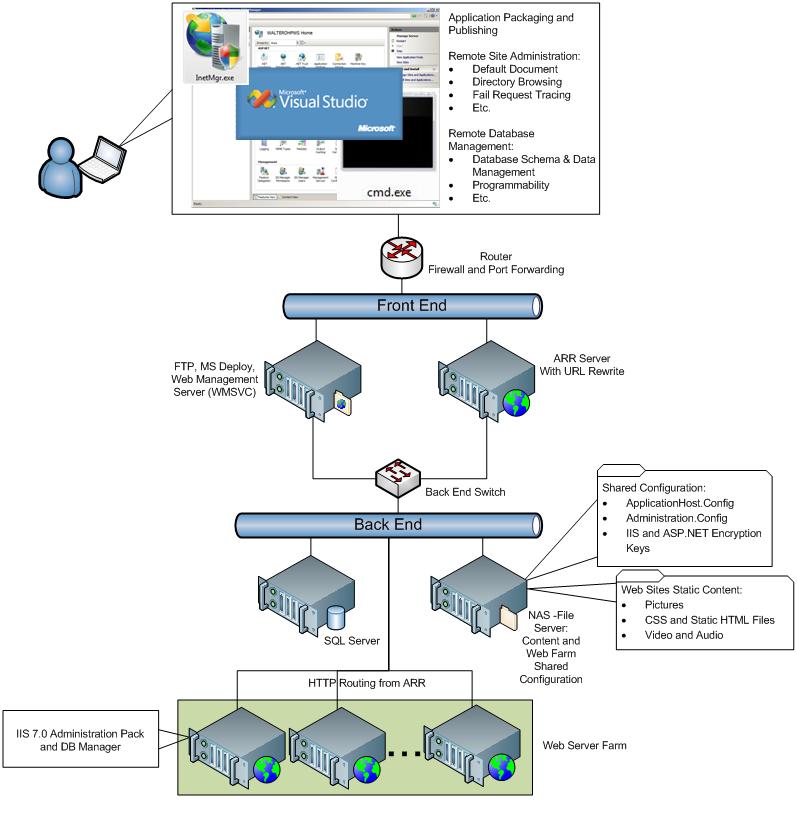
IIS can host many sites at once. Each site has a name and port. You can stop or start a site. Use IIS Manager to view all sites. Select a site to manage it. You can change settings anytime. This helps keep sites organized. IIS makes it easy to manage sites.
Credit: learn.microsoft.com
Security Features In Iis
IIS provides different ways to check user identity. These methods ensure that only the right people access data. Some common types are Basic, Digest, and Windows Authentication. Basic uses username and password. Digest is safer because it encrypts passwords. Windows is great for Windows users. Each method has its own strengths. Choose the best one for your needs.
SSL/TLS keeps your data safe and private. It encrypts the information sent over the internet. This prevents hackers from reading your data. Installing an SSL certificate is simple with IIS. Always use a strong, up-to-date certificate. Make sure it covers your entire site. This builds trust with users. They will feel safe visiting your site.
Performance Optimization In Iis
Caching helps make websites faster. It stores data temporarily. This reduces server load. Pages load quickly with caching. Users have a better experience. Output caching saves entire pages. Data caching saves specific data parts. Both help in speeding up websites.
Load balancing distributes traffic evenly. It uses multiple servers. This prevents any server from overload. Websites stay online even if one server fails. It improves reliability and speed. Users get faster access. Websites handle more visitors without slowing down.
Credit: pleasantsolutions.com
Troubleshooting Common Issues
Web hosting in IIS involves setting up and managing websites on Microsoft’s Internet Information Services platform. Troubleshooting common issues might include resolving server errors, connectivity problems, or configuration settings. Proper management ensures smooth operation and accessibility for users.
Error Logging
Error logging helps find problems in web hosting. IIS has a tool for this. It shows error codes and messages. These codes tell what went wrong. Use these logs to fix issues quickly. Always keep your logs updated. This helps track new problems. Easy to read logs save time. They also help in understanding errors better.
Common Configuration Errors
Sometimes, websites do not load. This can be due to configuration errors. A missing file can cause this. Wrong settings in IIS can also be a problem. Check your settings carefully. Ensure all paths are correct. Make sure permissions are set right. Incorrect permissions block access. Always double-check configurations. This prevents unexpected errors.
Future Trends In Iis Hosting
Integration with Cloud Services is becoming more common. IIS can now easily connect with cloud. This makes hosting faster and more flexible. Developers can use both IIS and cloud together. This helps in managing websites efficiently. Cloud services offer more storage and power. IIS uses these resources to improve website performance.
Advancements in Security are important for IIS hosting. New security tools are being used. These tools protect websites from hackers. Regular updates keep security strong. IIS ensures safe data transfer. Encryption is used to keep information private. Users feel safe when visiting secure websites.

Credit: www.youtube.com
Frequently Asked Questions
What Is Iis Web Hosting?
IIS web hosting uses Microsoft’s Internet Information Services to host websites on Windows servers. It supports ASP. NET applications and offers features like security and scalability. IIS is ideal for businesses using Windows-based technology, providing reliable performance and integration with other Microsoft products.
What Is Web Hosting Used For?
Web hosting stores websites on servers, allowing users to access them via the internet. It ensures your website remains online, loads quickly, and functions smoothly. Hosting providers offer various plans, including shared, VPS, and dedicated hosting, catering to different website needs and traffic levels.
What Is Window Web Hosting?
Window web hosting uses Windows servers to host websites. It supports ASP. NET, MS SQL, and other Windows-based technologies. Ideal for sites relying on Windows-specific applications, it offers ease of integration with Microsoft products and services. Suitable for businesses using Windows software for web development.
How Many Websites Can Iis Host?
IIS can host thousands of websites, limited by server resources and network configuration. Optimal setup ensures performance.
Conclusion
Web hosting in IIS offers efficient website management. It’s reliable and user-friendly. With IIS, hosting becomes straightforward. You can easily manage websites and applications. This platform supports various web technologies. It ensures your site runs smoothly. IIS is a great choice for businesses and developers.
It provides robust security features. Your data stays protected. By using IIS, you can enhance your web presence. It helps you reach more users online. So, explore IIS for your web hosting needs. Start building your online presence today.


