
Have you ever wondered how your web browser knows exactly which website to show you when you type in a URL? The answer lies in something called a “Web Site Host Header.”
This little-known yet crucial component plays a vital role in directing your web traffic to the right place, ensuring you land on the right page every time. Understanding what a Web Site Host Header is can unlock a clearer picture of how the internet functions seamlessly.
By the end of this article, you’ll not only know what a Web Site Host Header is but also why it matters to you, whether you’re a curious internet user or someone managing your own website. Dive in, and let’s uncover the hidden mechanisms that make your browsing experience smooth and efficient.

Credit: www.wallarm.com
Web Host Headers Defined
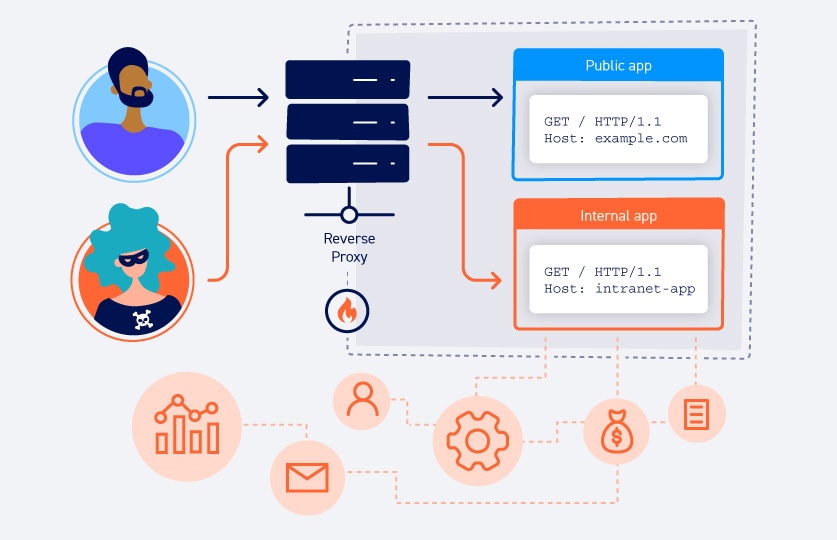
A web host header is part of a server’s request. It tells the server which website to show. Each website on a server has its own host header. This helps the server know which site to display. Without it, the server gets confused. Imagine a library with many books. The host header is like the book’s title. It helps find the right book. Web browsers use host headers to find websites. They are crucial for shared hosting. Many websites can live on one server. Host headers make it possible.
Credit: portswigger.net
Role In Http Requests
The host header tells the server which website you want. It is part of the HTTP request. Every website has a unique host header. This helps the server find the right site. Without the host header, servers may get confused.
Many websites share a single server. The host header helps the server know which site to show. This is called virtual hosting. It saves money and space. Host headers are important for web traffic and security. They help protect your personal information. Understanding how host headers work is key for safe browsing.
Components Of Host Headers
Domain name is like a home’s address on the internet. It tells web browsers where to find your site. Every domain name is unique. It starts with “www” and ends with “.com,” “.net,” or “.org.” These endings are called extensions. The domain name is important. It helps users find websites easily. It makes the web organized. Without a domain name, sites would be hard to find. It is the first part of a host header. It is essential for browsing the web.
Port number is a special number. It helps computers talk to each other. Think of it like a door. It lets data in and out. Most websites use port number 80. This is the common port for web traffic. Port numbers help keep data safe. They make sure it goes to the right place. Without port numbers, computers could get confused. They might send data to the wrong site. Port numbers are part of the host header. They are key to how the internet works.
Importance In Web Hosting
A host header tells your computer which website to load. It’s like asking for a specific book in a library. Without it, you might get the wrong site. Many websites use the same server. The host header helps them share it. It saves money and space. When you type a website address, the header guides it to the right spot. So, it’s very important for web hosting. It ensures your site shows up correctly. Visitors won’t see errors. They reach the right page every time. This keeps visitors happy and coming back.
Virtual Hosting And Host Headers
Virtual hosting lets one server host many websites. This magic happens with host headers. They tell the server which website to show. It’s like a mailman knowing the right house. Host headers are super important for websites. They help to save money and space. Servers can handle many websites. This makes them very useful. Imagine a big hotel with many rooms. Each room is like a different website. The host header tells the server which room to go to. This helps the server work smoothly. It keeps all websites running well.
Setting Up Host Headers
Web servers use host headers for identifying websites. They help servers manage multiple sites on one IP address. Many web servers support host headers.
Apache uses Virtual Hosts for this purpose. In the configuration file, define the ServerName and ServerAlias. This tells Apache which domain to serve.
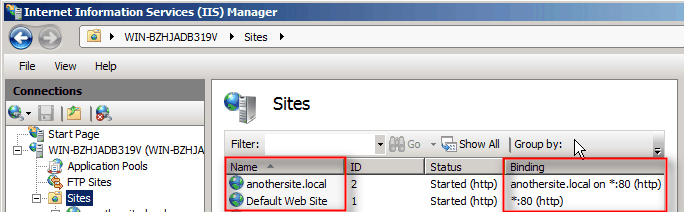
In IIS, use the Bindings option. Enter the host name for the site. This tells IIS which site to load for a request.
- Apache: Uses httpd.conf or apache2.conf files.
- IIS: Uses Bindings in site properties.
- Nginx: Uses server_name directive.
- cPanel: Simplifies the process with a friendly interface.
Common Issues And Troubleshooting
Misconfigurations can cause big problems with host headers. Sometimes, the settings are not correct. This can lead to website errors. For example, the server might not recognize the domain name. This happens when settings are mixed up. Such issues need quick fixing. Check your DNS records. Make sure they match the host header. Ensure the server’s IP is correct. This helps in avoiding downtime.
Conflicts occur when two sites use the same host header. This can make one site not load. Resolving these conflicts is crucial. Check which site uses the host header. Make sure each site has a unique header. Use different domain names for each site. This can help in preventing conflicts. Double-check all settings. This ensures each site works well.
Security Considerations
Understanding a web site host header is crucial for security. It identifies which website a browser requests from a server. Incorrect headers can lead to vulnerabilities, allowing attackers to spoof or redirect traffic. Safeguarding headers ensures proper routing and protects user data.
Header Manipulation Risks
Header manipulation can be a serious threat. Attackers can change headers to access sensitive data. This might lead to unauthorized access. Sensitive information can be exposed. Websites become vulnerable when headers are altered. Security measures must be strong. Ensure your headers are well-protected. Regular checks can prevent manipulation. Keep your server settings updated. Use tools to monitor header changes. Protecting headers is important for safety.
Best Practices
Implementing best practices is crucial. Secure headers with encryption. Regularly update server settings. Use HTTPS for added security. Monitor logs for suspicious activity. Validate header inputs carefully. Restrict header access to trusted sources. Employ security tools for protection. Regular audits can help find issues. Train staff on security protocols. A strong security foundation is key. Prioritize header safety in your strategy.
Future Of Host Headers
Web standards change often. This affects host headers. New rules come out. They help sites talk to each other better. Old ways may not work well now. Keeping up with changes is key. It ensures sites run smoothly.
New technologies bring big changes. Cloud computing is one example. It changes how we use host headers. Security is also a big part. Sites need to be safe. New tech helps keep bad guys out. It’s important for sites to adapt. This keeps them up-to-date and secure.
Credit: knowledge.digicert.com
Frequently Asked Questions
What Is An Example Of A Host Header?
A Host header example is “Host: www. example. com”. It specifies the domain name of the server requested.
Is A Host Header Mandatory?
Yes, a Host header is mandatory in HTTP/1. 1 requests. It specifies the target host’s domain name. Without it, servers may not correctly identify the intended website, leading to request errors. Always include the Host header for proper request routing and response.
What Does Invalid Host Header Mean?
An invalid Host header means the server received a request with an incorrect or unrecognized domain name. This often occurs due to misconfigured proxies or incorrect network settings, causing the server to reject the request. Ensure your server and proxy settings are properly configured to resolve this issue.
What Are Headers In Web?
Headers in web refer to HTML tags used to structure content. They range from H1 to H6, with H1 being the most important. Headers organize information hierarchically, enhance readability, and improve SEO by signaling key topics to search engines. They help users and search engines understand content better.
Conclusion
Understanding web site host headers is crucial for web management. They help direct traffic to the correct web site. Host headers ensure visitors land on the right page. They are essential for hosting multiple sites on one server. A key tool in web hosting.
Simple, yet powerful. They streamline server processes effectively. Knowing their function enhances web reliability. And improves user experience. Always check configurations for optimal performance. Host headers simplify server management. Grasping this concept aids in efficient site handling. A vital piece in the web hosting puzzle.
Keep learning to harness their full potential.


