
Are you ready to launch your own website but puzzled by the term “web hosting”? You’re not alone.
Web hosting can seem like a complex concept, yet it’s a fundamental piece of the online puzzle. Understanding web hosting is crucial to getting your site up and running smoothly. Imagine owning a beautiful car but not knowing how to drive it.
The same principle applies here; knowing about web hosting gives you the power to navigate the digital world effortlessly. We’re breaking down web hosting into simple, bite-sized pieces. You’ll discover what it is, why it matters, and how it impacts your online presence. Stick around, and by the end, you’ll have the confidence and knowledge to make informed decisions about your website’s future. Ready to dive in?
Credit: www.godaddy.com
Types Of Web Hosting
Shared Hosting is like sharing a room. You share resources with others. It is cheap and good for small websites. But the speed can be slow. If one site gets busy, others slow down too. Limited control over settings. Easy for beginners.
VPS Hosting means you get a part of a server. You have more control and better speed. It’s costlier than shared hosting. Suitable for medium websites. You get your own space. Less affected by others.
With Dedicated Hosting, you have a whole server. No sharing with others. High performance and very fast. Best for big websites with many visitors. It’s more expensive. You need to know how to manage servers.
Cloud Hosting uses many servers. If one fails, others take over. It is reliable and flexible. You pay for what you use. Great for growing sites. Scalable resources. Good for websites with changing traffic.
Managed Hosting offers support and maintenance. Experts handle the server for you. Less stress for you. It costs more than unmanaged hosting. Good for businesses. Focus on your content, not the tech.
Key Features To Consider
Websites need bandwidth to handle traffic. More visitors need more bandwidth. Storage keeps your files safe. Pictures, videos, and pages need storage. Choose a plan that fits your needs. Bigger sites need more space. Small sites need less.
Uptime is how long your site stays online. A good host keeps your site up 99% of the time. This means people can visit your site anytime. Reliable hosts make sure your site is always ready.
Security keeps your site safe from hackers. Look for features like SSL certificates. These keep data safe. Firewalls protect your site from attacks. A secure host keeps your information private.
Help is important when things go wrong. Good customer support answers questions fast. They help fix problems quickly. Look for 24/7 support. This means you can get help anytime.
Choosing The Right Web Hosting
Start by thinking about your website. Is it a blog or a store? Different types need different hosting plans. A small blog might need less. A big store needs more space. Knowing your website type helps in picking the right plan.
Think about how much you can spend. Some hosting plans are cheap. Others cost more. Cheap plans might have limits. Expensive plans offer more features. Balance your needs with your budget.
Websites grow over time. Choose a hosting plan that grows too. Plans should allow for more space if needed. This is called scalability. It’s important for future growth. Make sure your plan can handle more traffic.

Credit: www.hostinger.com
Setting Up Your Website
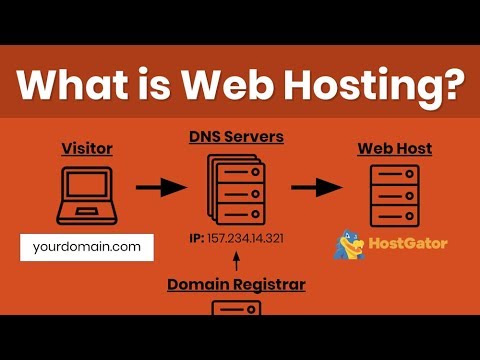
A domain name is your website’s address. Pick a name that is easy to remember. Use a domain registrar to buy your domain. Domains are like street addresses. They guide visitors to your site. Domain names usually end in .com, .net, or .org. Make sure your domain is unique. It should not match other websites.
Use FTP or a file manager to upload files. These tools help move your files from your computer to the server. The server stores your website files. Visitors see these files when they access your site. Organize your files in folders. This makes it easy to find them later. Always upload your index.html file. This is the homepage of your site.
Set up your email accounts through your hosting provider. Use a name that matches your domain. This makes your emails look professional. For example, use info@yourdomain.com. Check your hosting dashboard for email settings. Use these settings to connect your email client. This could be Outlook or Gmail. Set up filters to manage your emails better.
Common Challenges
Downtime is a major problem. Websites become unreachable. Visitors get frustrated. Sales can drop. It’s important to have reliable hosting. Scheduled maintenance can help. Invest in good servers. Ensure backup systems are ready.
Slow websites lose visitors fast. Search engines rank slow sites lower. Optimize images for speed. Choose hosts with fast servers. CDNs can help. Fast loading keeps users happy. Always check performance regularly.
Security is crucial. Hackers target weak sites. Data can be stolen. Use strong passwords. Update software often. Firewalls protect sites. SSL certificates keep data safe. Regular scans are important. Secure your website always.
Trends In Web Hosting
Many companies now focus on being eco-friendly. Green hosting uses less energy. It uses renewable energy sources like wind and solar. This helps save the planet. More people want to use green hosting for their websites. It is good for Earth and for the future.
Artificial Intelligence (AI) is helping web hosting. It makes things faster and smarter. AI tools can fix problems quickly. They also help in managing servers. This makes hosting more reliable. AI is becoming a big part of hosting services. It helps in giving better service to users.
Personalization is growing in web hosting. Hosting services offer custom options. Users can choose features they need. This helps in creating the perfect website. More choices mean better user experience. Personalization makes web hosting more user-friendly.
Credit: www.youtube.com
Frequently Asked Questions
What Is The Purpose Of Web Hosting?
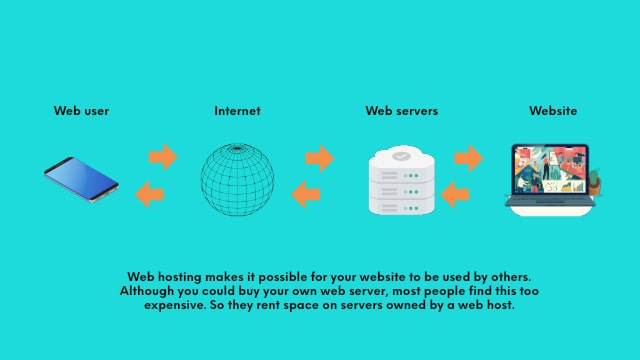
Web hosting provides space on a server to store and manage website data. It ensures websites are accessible online. Hosting services offer security, bandwidth, and technical support, making it essential for maintaining a functional website.
What Do You Need Web Hosting For?
Web hosting is essential for storing website files, making your site accessible online. It ensures reliable server space, domain management, and data security. Hosting services support website functionality and performance, allowing users to access your content smoothly. Choose a reliable host for better speed and uptime.
What Can I Do With Web Hosting?
Web hosting allows you to publish websites, manage domains, and create email accounts. It supports databases and custom applications, enabling online stores and blogs. You can manage data storage, enhance website security, and improve site performance with various hosting plans.
Start an online presence easily with web hosting services.
How Much Do I Pay To Host A Website?
Website hosting costs vary based on provider and plan, ranging from $3 to over $100 monthly. Shared hosting is cheaper, while dedicated hosting is pricier. Factors like bandwidth, storage, and additional features impact pricing. Compare options to find the best value for your needs.
Conclusion
Web hosting is your website’s home on the internet. It stores your site’s files and makes them accessible. Choosing the right plan is crucial. It affects your site’s speed and reliability. Consider your needs carefully. Shared hosting is budget-friendly. VPS offers more control.
Dedicated hosting provides maximum resources. Hosting impacts your site’s success. Reliable hosting ensures a smooth user experience. Keep your website secure and fast. Research thoroughly before deciding. Always prioritize customer support. Good hosting is a foundation for growth. Make informed choices for your online presence.


