
Are you ready to take your Python Flask web app from your local machine to the vast expanse of the internet? Hosting a web app might sound daunting at first, but with the right guidance, you can effortlessly make your application accessible to users worldwide.
Imagine the satisfaction of seeing your creation being used by people across the globe, solving problems, or bringing joy. In this blog post, you will discover exactly what you need to host a Python Flask web app successfully. From selecting the ideal hosting platform to ensuring your app runs smoothly and securely, every step is crucial for reaching your audience.
Stay tuned as we break down the process into simple, actionable steps that will empower you to share your work with the world.

Credit: realpython.com
Setting Up The Development Environment
Python is the key to start. Download it from the official website. Choose the correct version. Install it on your computer. Make sure Python is added to the system path. This helps in running it easily.
Virtual environments keep your projects clean. They help in managing dependencies. Install ‘venv’ using pip. Create a new environment in your project folder. Activate it to start using. Always work inside the environment.
Flask is a lightweight web framework. Install Flask using pip. It is easy and fast. Use the command pip install Flask. This will add Flask to your environment. Start building your web app with Flask.
Building The Flask Application
Start by making a new folder for your app. Inside, create a file named app.py. This file will hold your main code. Add a folder called templates for HTML files. Another folder, named static, is for CSS and images. This is the basic structure of your Flask app.
Routes are like roads for your app. They tell the app where to go. In app.py, use @app.route() to set these paths. Each route links to a function. The function tells what to show on the page. This helps in organizing your app’s pages.
Templates help in reusing HTML code. Save them in the templates folder. Use the render_template() function to display them. This makes the app more efficient. It also keeps the code neat and tidy.
Database Integration
Picking the right database is key for any web app. Options include SQL and NoSQL. SQL databases like MySQL and PostgreSQL are popular. NoSQL options like MongoDB can handle large data sets. Think about your app’s needs before choosing.
Use the Flask-SQLAlchemy extension for easy connection. It helps link your Flask app to the database. This tool makes managing data simple and efficient. Just add your database details in the configuration file.
Perform CRUD operations to manage data. CRUD stands for Create, Read, Update, and Delete. Use SQLAlchemy commands to perform these tasks. This way, data is safe and organized. Always test your operations before going live.
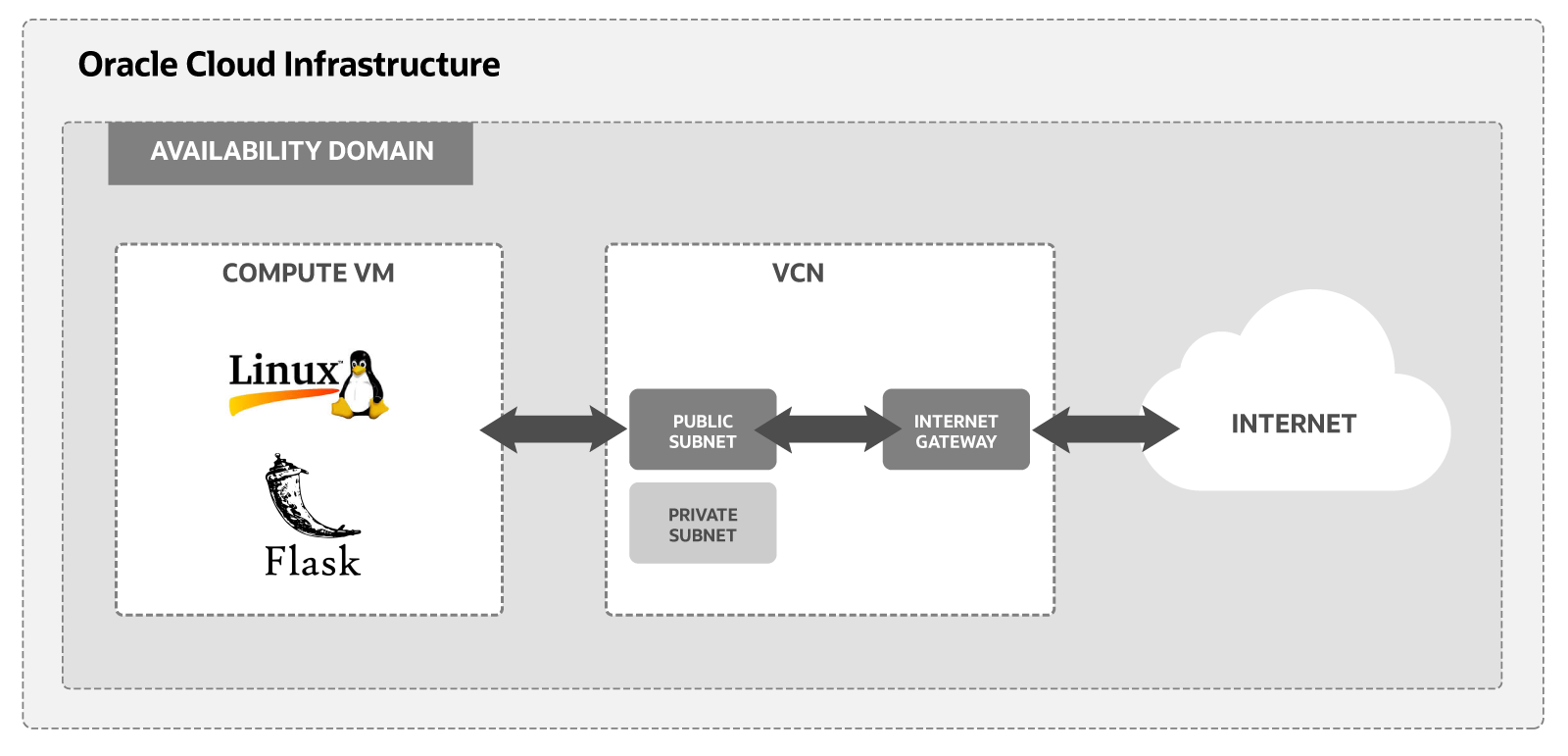
Credit: docs.oracle.com
Deployment Options
Picking a hosting provider is important. Cost and features matter. Choose a provider that offers good support. Ensure they have strong security. Check if they support Python applications. Some popular providers are AWS, Google Cloud, and DigitalOcean. Each has its own advantages.
Setting up a Virtual Private Server (VPS) can be tricky. You’ll need to install software on your own. This includes Python, Flask, and a database. A VPS gives you more control over the server. But, you need to know some technical stuff. It can be a good choice for those who want to learn.
Platform-as-a-Service (PaaS) makes hosting easier. They handle the heavy lifting for you. Services like Heroku and Azure are popular. You just need to push your code. They take care of the rest. It’s simple and fast. But, you might pay more for convenience.
Configuring The Server
WSGI is a key part of hosting Flask apps. It lets Python talk to the web server. Install a WSGI server like Gunicorn or uWSGI. They help your app run smoothly. Configure the WSGI server to point to your Flask app. This setup ensures your app can handle web requests.
A web server is essential. Nginx or Apache are popular choices. They manage traffic to your app. Set up the server to forward requests to the WSGI server. Use reverse proxy settings for this. It helps keep your app secure. Adjust server settings to match your needs. Security and performance matter.
Environment variables store important data. They keep passwords safe. Use a .env file to manage them. Flask reads these settings automatically. Secure your environment file from unauthorized access. Change variables without changing code. This makes your app flexible and secure.

Credit: behainguyen.wordpress.com
Implementing Security Measures
HTTPS keeps data safe. It uses encryption. This means no one can read the data. It is important for security. SSL certificates help in this process. They make sure data is private. Always use HTTPS for your web app. It protects user information.
User authentication checks who you are. It keeps accounts safe. Use strong passwords. Two-factor authentication adds extra security. This means two steps to log in. It makes it hard for bad people to break in. Keep user data safe with good security.
Web apps can have vulnerabilities. These are weak spots. Hackers look for them. SQL injection is one example. It can steal data. Cross-site scripting is another. It can harm users. Use good coding practices. This stops many attacks.
Optimizing Performance
Caching helps make your app fast. Store data that you use often. This saves time. Tools like Redis and Memcached are helpful. They keep data ready for use. Always clear old cache. This keeps the cache fresh and useful.
Load balancing keeps your app running smoothly. It spreads work across servers. No server gets too busy. Use tools like NGINX and HAProxy. They help manage traffic. This makes sure every user gets a good experience.
Monitoring your app is very important. It helps find problems early. Tools like New Relic and Prometheus are great. They show how your app is working. Profiling shows which parts are slow. Fixing these can make your app faster.
Maintaining And Updating The App
Keeping a Python Flask web app running smoothly involves regular updates and maintenance. This ensures security, compatibility, and optimal performance.
Version Control Practices
Version control is very important. It helps keep track of changes. Use tools like Git for managing code. You can save different versions of your app. This makes it easy to go back if needed. Always create branches for new features. It keeps the main code safe.
Handling Updates And Rollbacks
Updating an app is not always smooth. Bugs can appear. It is good to have a rollback plan. This means you can go back to an older version if something breaks. Test updates in a safe place first. This helps to avoid problems.
Monitoring Application Health
Keep an eye on your app’s health. Use tools to check if it works well. Check for slowdowns or errors. Fix problems quickly to keep users happy. Healthy apps run smoothly and keep users coming back.
Frequently Asked Questions
What Are The Requirements For Flask App?
Flask app requires Python installed, Flask library, and a virtual environment. Use pip to install dependencies. Ensure your system meets Flask’s minimum version requirements. Create a project structure with templates, static files, and application scripts.
Does Flask Need A Web Server?
Flask requires a web server for deployment. Use a server like Gunicorn or uWSGI for production. Flask’s built-in server is suitable for development but not production-ready. A robust web server ensures better security and performance for Flask applications in live environments.
How To Create Web Application In Python Using Flask?
To create a web application in Python using Flask, first install Flask. Next, set up a virtual environment. Then, create a Flask app by defining routes and views. Finally, run the app locally using the Flask development server.
Do I Need A Virtual Environment For Flask?
Using a virtual environment for Flask is highly recommended. It isolates project dependencies, preventing conflicts. This ensures consistency across different projects and makes deployments easier. A virtual environment keeps your system clean by not installing packages globally. It’s a best practice for efficient Flask development.
Conclusion
Hosting a Python Flask app needs a few key elements. First, ensure you have a reliable server. Good hosting is crucial. Next, install Python and Flask on the server. This sets up your environment. Configure your app settings and database.
Double-check everything works. Security is also important. Use secure protocols and keep everything updated. Finally, test your web app. Make sure it runs smoothly. Hosting a Flask app is manageable. Just follow these steps. It ensures your app performs well.
With the right setup, you’re good to go. Ready to host your Flask app? You can do it!


