
Have you ever wondered what storage in web hosting really means for your website? Whether you’re setting up a personal blog or launching an online business, understanding this concept is crucial for your site’s success.
Storage in web hosting is like the foundation of a house; it holds all the essential elements that keep your website running smoothly. But how much storage do you actually need? And what happens if you run out? These questions might be lingering in your mind, and you’re not alone.
By grasping the ins and outs of web hosting storage, you can make informed decisions that optimize your site’s performance and ensure a seamless experience for your visitors. Let’s dive into this topic and uncover the secrets behind effective web hosting storage management. Keep reading, and you’ll discover how to make the most out of your web hosting resources.
Credit: www.digitalpacific.com.au
Types Of Web Hosting Storage
Web hosting storage refers to the space on a server where your website’s files are kept. Different types include shared, VPS, and dedicated storage, each offering varying levels of control and resources. Understanding these options helps in choosing the right hosting for your website needs.
Shared Hosting Storage
Shared hosting is like sharing a room. You share the server with others. This means less space for your website. It is good for small sites. Shared hosting is usually the cheapest option. But, if many people use the server, it can slow down. Too much traffic can make it slow.
Vps Hosting Storage
VPS stands for Virtual Private Server. It’s like having your own room. But in a big house. You get more space than shared hosting. You have more control over your space. It’s great for growing websites. VPS is more secure than shared hosting. It costs more, but it gives you better performance.
Dedicated Hosting Storage
Dedicated hosting is like owning a house. The whole server is yours. This means maximum space and control. Best for big websites with lots of traffic. Dedicated hosting is the most expensive. It gives you the best performance. You can do anything with your server. No sharing with others.
Cloud Hosting Storage
Cloud hosting is like floating in the air. You use many servers at once. If one server fails, another takes over. It is very reliable and flexible. You pay for what you use. Great for websites that change in size. It can handle big traffic easily. Cloud hosting is scalable. Your site can grow without problems.
Storage Technologies
HDDs use spinning disks to store data. They are older and cheaper. They are also slower and can break more easily. SSDs use flash memory, making them faster. They are more durable but cost more. For quick data access, SSDs are better. But, for large storage, HDDs save money. Both have unique benefits.
RAID stands for Redundant Array of Independent Disks. It combines multiple disks for better performance or backup. RAID 0 increases speed by splitting data. RAID 1 duplicates data for safety. Other RAID types mix these benefits. It helps in data safety and speed. Choose based on needs.
NAS is a device connected to a network. It stores and shares data with many users. It acts like a personal cloud. Easy to set up and use. Provides data access from anywhere on the network. It is great for home and small businesses. Offers a simple storage solution.
Importance Of Storage Capacity
Storage capacity is vital for web hosting. It holds all website data. Large files need more space. Small sites need less. Busy sites need even more storage. Always plan for growth. Never run out of space. Good capacity keeps sites fast. Slow sites lose visitors. Ensure enough storage for future needs.
Factors Affecting Capacity Needs
- Number of images on site
- Amount of videos hosted
- Traffic volume
- Content updates frequency
- Backup storage needs
Scalability Considerations
Web hosting should grow with your site. Start with flexible plans. Upgrade when site gets bigger. Choose hosts that offer easy upgrades. Plan for future needs. Ensure storage can grow with you. This keeps your site smooth. Avoid slowdowns or crashes. Always think ahead.

Credit: www.sitenerdy.com
Impact On Website Performance
Load Times and User Experience are important. Fast websites keep users happy. A slow website can make users leave. Storage affects how fast a website loads. More storage often means faster load times. This is because data moves quickly. Websites with images need more storage. They load faster with better storage. This helps in giving a good user experience.
Data Transfer Speeds depend on storage. Good storage helps in fast data transfer. This means files move quickly. It helps websites run smoothly. Users can browse easily. Faster speeds improve user satisfaction. They help keep users on the site longer. This is good for website success.
Security And Data Protection
Storage in web hosting refers to the space provided by servers to store website files securely. Protecting data involves ensuring confidentiality and integrity against unauthorized access. Reliable storage solutions play a crucial role in safeguarding sensitive information and maintaining website functionality.
Backups And Redundancy
Backups are copies of your data. They keep your information safe. Redundancy means having extra copies. So, if one fails, you have another. This protects your data from loss. Many web hosts offer automatic backups. Some even provide daily backups. This is important for security. Always check if your web host offers this. It’s like having a safety net for your information.
Encryption Techniques
Encryption is like a secret code. It keeps data safe. Only those with the key can read it. This stops bad people from seeing your info. Most web hosts use strong encryption. This is important for sensitive information. Things like passwords and credit card numbers. Ensure your host uses SSL certificates. They make your connection safe. It’s like locking a door to keep your data secure.

Credit: rackset.com
Choosing The Right Storage
Businesses need storage to keep their website data safe. First, check how much data you have. This includes images, text, and videos. Think about future growth too. Will you add more content soon? More content needs more storage. Choose a storage option that fits your needs. Don’t pick too much or too little.
Storage cost is important for every business. Some storage is cheap, but slow. Fast storage might cost more. Balance cost with performance. You need fast storage for quick page loading. Slow storage can make visitors leave. Always check reviews before buying. Good reviews mean better storage.
Frequently Asked Questions
What Is Storage In Hosting?
Storage in hosting refers to the space allocated on a server to store website files. It includes HTML files, images, videos, databases, and other content. Adequate storage ensures your website runs smoothly and efficiently, accommodating growth and data needs. Choose a hosting plan with sufficient storage for your requirements.
What Is Storage Space On A Website?
Storage space on a website refers to the amount of server disk space allocated for storing files. It includes website data, images, videos, and databases. Adequate storage ensures smooth website performance and functionality. Choose a hosting plan with enough space based on your website’s size and content needs.
Is 20 Gb Storage Enough For A Website?
20 GB storage is usually enough for most websites. It accommodates content, images, and essential data efficiently. Larger sites with extensive media might need more. Analyze your site’s storage needs based on its content and traffic to ensure optimal performance.
Consider scalable options for future growth.
What Is The Difference Between Storage And Bandwidth?
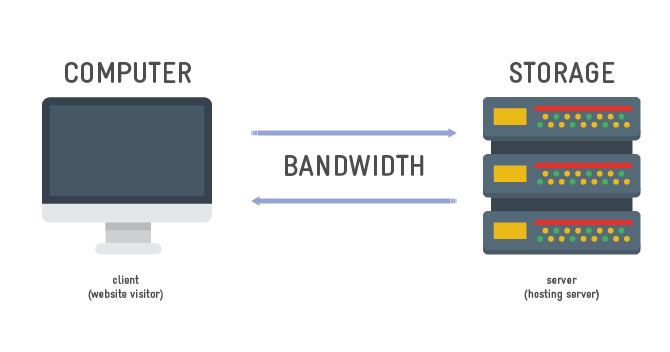
Storage is the space to save data on servers. Bandwidth is the data transfer rate between users and servers.
Conclusion
Understanding storage in web hosting is crucial for website success. It affects speed, performance, and accessibility. Choose a hosting plan with adequate storage. This ensures your website runs smoothly. Consider your website’s needs before deciding. High-quality content, images, and videos require more space.
Regular monitoring helps manage storage effectively. Keep your site optimized for better performance. Always back up your data to avoid loss. With the right storage, your website can thrive online. Make informed decisions to enhance user experience. Prioritize storage when choosing a web hosting plan.
Your website’s future depends on it.


