
Ever stumbled upon a website and wondered what web hosting service it’s using? You’re not alone.
Knowing the hosting provider behind a website can offer valuable insights, whether you’re looking to build your own site or simply curious about performance and reliability. But how do you uncover this hidden information without resorting to complex tech jargon or tools?
In this blog post, we’re going to guide you through simple, effective ways to identify a website’s hosting service. By the end, you’ll feel like a digital detective, equipped to unlock this mystery with ease. Imagine the confidence you’ll gain in making informed decisions for your online endeavors. Curious? Let’s dive in and discover how you can reveal the secrets behind any website’s hosting choice.
Credit: www.hostinger.com
Identifying Web Hosting Providers
There are many online tools to find web hosting providers. These tools are easy to use. Enter the website URL you want to check. The tool will show the hosting details. Some popular tools are WhoIsHostingThis and Hosting Checker. They are free and quick. These tools are perfect for beginners. Just type and click to get the info. Try different tools to compare results.
Website source code can reveal hosting details. Open the website. Right-click and choose “View Page Source”. Look for names of hosting companies. You might see server names or IP addresses. This method needs some basic coding knowledge. It might be tricky for some. But it’s useful and detailed. Explore the code carefully.
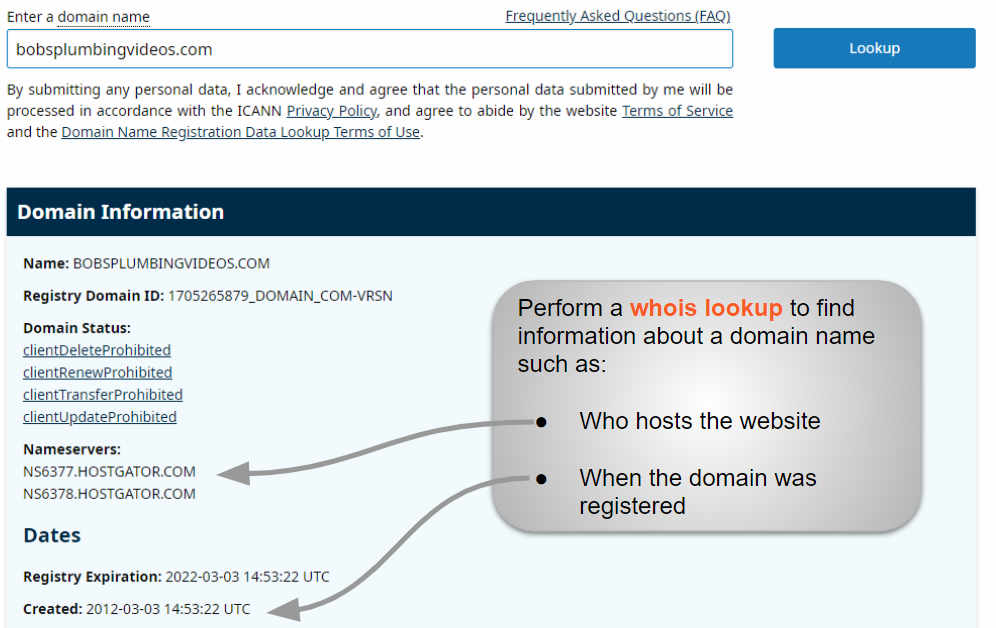
WHOIS gives public details about a website. Search for WHOIS online. Enter the website domain. WHOIS will show the registrar and hosting company. This info is very reliable. WHOIS data is mostly public. Some domains hide their details. But many still show their hosting info. It’s a valuable resource for anyone. Easy and informative.
Popular Web Hosting Tools
BuiltWith is a helpful tool to find web hosting details. It shows the technologies a site uses. Just enter the website URL. You get a list of tools and services. It’s simple and fast to use. Perfect for beginners!
HostingChecker is another great tool. It helps you find a site’s hosting provider. Enter the URL, and get instant results. It tells you about IP addresses and nameservers. Easy for anyone to understand. A go-to tool for many users!
Wappalyzer provides insights on web hosting. It also shows site technologies and platforms. Available as a browser extension. You can use it while browsing any site. Get details like web servers and content management systems. Very handy and informative!
Analyzing Server Details
IP Address is like a home’s address. It helps find where a site lives. Use tools online to check it. These tools show the hosting provider. Sometimes, they show other server info. They can tell you where the server is. Location matters for speed.
Headers are like labels on a box. They show what’s inside. Use a browser to inspect them. Right-click on a page. Choose “Inspect”. Find the “Network” tab. Look for “Headers”. They show server type. They show hosting details. Sometimes, they reveal tech used.
Exploring Whois Database
WHOIS records contain vital information. They show details about a website. Domain names, registrars, and hosting providers are included. Details can tell a lot. They reveal the owner’s name and contact info. It’s like a phone book for websites. Public databases store this data. They help identify web hosts.
WHOIS search tools are helpful. Type a website address in the tool. It will show all the details. Many tools are free to use. Some have extra features. They make finding a web host easy. Always check the data is up-to-date. This ensures the information is accurate.
Evaluating Content Delivery Networks
Finding out what CDN a website uses can be tricky. Checking the site’s DNS records often helps. Tools like Dig or NSLookup can show CDN details. Web browser extensions can also help. These tools check the network requests. Sometimes, a website’s code reveals the CDN. Look for CDN URLs in source code. Some sites have CDN logos in their footer. This may not always be the case. Online services like WhatCDN can help. Enter the site URL and see results. These methods can help identify the CDN used.
A CDN can speed up website loading. It stores content in different places. This reduces the load on the main server. Improved performance can help keep visitors. CDNs make websites more reliable. If one server fails, others take over. Security features are another benefit. They can protect against attacks. A CDN can also reduce bandwidth costs. Fewer requests go to the main server. Overall, CDNs offer many advantages. Hosting becomes more efficient. Websites serve content faster and safer.
Credit: www.boldgrid.com
Advanced Techniques For Hosting Detection
Use a traceroute tool to find the path to a website. This tool shows every step your data takes. Each step reveals a computer in the network. Check the names of these computers. They often show the hosting company name. This helps you know who hosts the site. Traceroute is easy and quick. It works on most computers. Use the command line for this tool. Type “traceroute” followed by the website name. This will start the trace.
DNS records hold key details about a website. Check the DNS records to find the host. Use a DNS lookup tool for this. Look for records like “NS” or “A”. These often point to the hosting provider. The data may show the host’s name or IP address. IP addresses can be cross-checked to find the host. There are many free DNS tools online. These tools make the process simple and fast.
Common Challenges In Identifying Hosting
Determining a website’s hosting provider can be tricky. Often, tools like WHOIS or BuiltWith help identify hosting services. Some sites may use privacy protection, making it harder to pinpoint their hosting details.
Obscured Hosting Details
Sometimes, hosting details are hidden. Websites use services to hide them. Owners may use privacy protection. This can make it hard to find the host. Some sites use third-party services. These services mask hosting information. Details might be unclear or missing.
Multiple Hosting Services
Many sites use more than one host. Each host may serve a different purpose. One host might handle files. Another might manage databases. This makes it tricky to pinpoint the exact host. Shared hosting is common. Many sites can share one server. It complicates finding the host. Large companies often use cloud hosting. They may use a mix of services. Identifying them can be complex.
Credit: www.hostinger.com
Frequently Asked Questions
How To Know Which Hosting A Website Is Using?
Use tools like BuiltWith or WhoIsHostingThis to identify a website’s hosting provider. Inspect the website’s DNS records for clues. Look for hosting-related details in the site’s source code. Access the hosting provider’s information through the domain’s WHOIS data.
How Do You Tell What Webserver A Website Is Using?
Use online tools like Netcraft or BuiltWith to identify a website’s webserver. Check HTTP headers for server information using browser developer tools. These methods reveal the server type used by the website, helping you understand its infrastructure.
How To Find Out What Platform A Website Is Hosted On?
Use online tools like BuiltWith or Wappalyzer to check hosting platforms. Inspect DNS records via Whois lookup. Examine website source code for clues on hosting services.
How To Find What Service Is Hosting A Website?
Use online tools like WHOIS or DNS lookup to identify the hosting provider. Check the website’s IP address and perform a reverse IP lookup to find hosting details. These methods help discover the service hosting a website easily.
Conclusion
Identifying a site’s web hosting is simpler now. Use online tools to check. Look for hosting details in WHOIS records. Examine DNS settings for clues. Browser extensions can also help. Knowing the host can improve your site’s performance. You can contact the same hosting provider if needed.
It’s useful for businesses to understand competitors’ choices. This knowledge aids in making informed decisions. So, use these tips to identify web hosts easily. Happy hosting!


