
Have you ever wondered what makes your favorite website accessible at the click of a button? The answer lies in web hosting.
If you’re new to the online world, terms like “web hosting” can sound a bit technical. But don’t worry, we’re here to break it down for you in simple terms. By the end of this article, you’ll understand how web hosting works and why it’s crucial for your website’s success.
So, if you’re ready to unlock the secrets behind the digital curtain and empower your online presence, keep reading. You’re just a few paragraphs away from becoming a web hosting pro!
Web Hosting Basics
Web hosting means storing your website files on a computer. This computer is called a server. The server keeps your website files safe. It lets people visit your website online. Without web hosting, your site can’t be seen on the internet. Think of it like renting a space for your website.
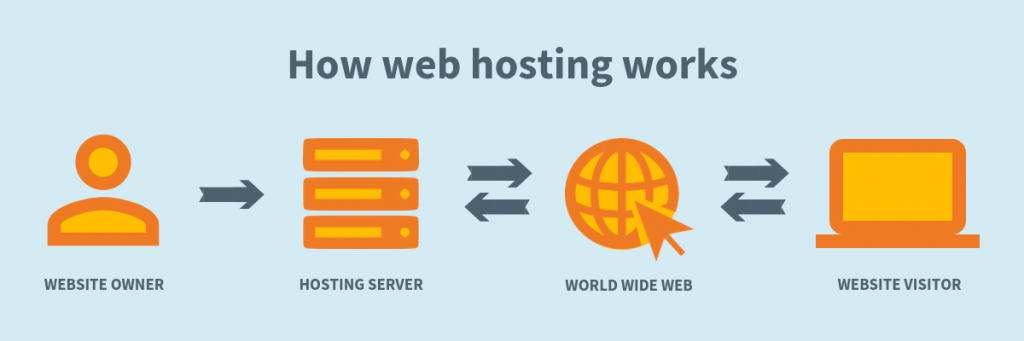
Web hosting starts with a server. A server is a big computer. It stores your website files. People use web browsers to see your site. Browsers talk to the server. The server sends your site to the browsers. This happens fast. That’s how people visit your site. Hosting makes your site always ready and online.

Credit: elementor.com
Types Of Web Hosting
Shared hosting is like a big apartment. Many websites share one server. It’s cheap and easy to use. New website owners often start here. But, if one site gets busy, others slow down. So, it’s not the best for big sites.
VPS stands for Virtual Private Server. Imagine living in a townhouse. You have more space and control. Fewer websites share the server. This means better performance. It’s a good choice for growing sites.
Dedicated hosting is like having a house. You get the whole server. This means full control and top performance. It’s great for big sites with lots of visitors. But it’s more expensive.
Cloud hosting is like living in many homes. Your site uses many servers. If one goes down, others keep it running. It’s flexible and good for busy sites. You pay for what you use.
Choosing The Right Web Hosting
Web hosting holds your website files online. First, think about your website’s size. Is it small with few pages? Or big with many pictures? Next, check your traffic. Do you expect many visitors? If yes, you need more bandwidth. Also, decide if you need special features. Some sites need databases or email accounts. Make a list of what you need. This helps in finding the right host.
There are many hosting plans. Shared hosting is cheap but slower. Good for small sites. VPS hosting is faster and safer. It costs more. Dedicated hosting is expensive but very fast. Best for big sites. Check the price of each plan. Some plans have extra features. Like free domain or backups. Compare these features. Choose what fits your needs best.
Features To Look For
Storage is where your website files live. Think of it like a closet. You need enough space for all your things. Bandwidth is like a road. It decides how much traffic your site can handle. More is better. Without enough, your site might slow down. Or even stop working. Always check these two before choosing a host.
Security keeps your site safe. Hackers are always around. A good host offers SSL certificates. This makes your site secure. Firewalls and backups are also important. They protect your data. If something bad happens, you can restore everything. Always choose hosts with strong security.
Customer support is like a helping hand. Things can go wrong anytime. You need help fast. Good hosts offer 24/7 support. This means help is always there. Look for support through chat, email, or phone. It’s important to get quick answers. It makes your web hosting experience better.
Cost Considerations
Choosing web hosting needs careful budgeting. Cheap plans might seem good. Yet, they have limitations. More features often mean higher costs. Choose what your site needs. Extra space or faster speeds can cost more. Always read the plan details.
Some web hosts have hidden fees. Setup fees may appear later. Renewal prices might be higher than expected. Check for extra charges for backups or security. Transparency is key. Always check the terms before signing up. Save yourself from surprise costs.
Setting Up Your Website
Web hosting means storing your website on a server, making it available online. It involves renting space on a server to keep your website files safe and accessible. This service ensures your site runs smoothly and loads quickly for visitors.
Domain Registration
A domain name is your website’s address on the internet. Pick a name that is easy to remember. You need to register this name with a domain registrar. This step is important. Without a domain, people cannot find your site. Prices for domains can vary. Some domains are cheap, others are not. Choose wisely. You will pay each year to keep your domain. Some registrars offer discounts for long-term registrations. Always read the terms before buying. Your domain is the first step to your online presence.
Installing Cms Platforms
A CMS helps you manage your website easily. Popular CMS platforms include WordPress, Joomla, and Drupal. WordPress is the most used. It is user-friendly and has many plugins. Install your CMS on the hosting server. Follow the setup instructions. They are usually simple. A CMS allows you to add text, images, and videos. You can customize your site to look unique. CMS platforms often have free themes. Paid themes offer more features. Choose a platform that suits your needs. Keep your CMS updated for security.
Common Web Hosting Challenges
Websites can go offline. This is called downtime. It happens for many reasons. Sometimes servers crash. Other times, maintenance is needed. Downtime means people can’t visit your site. This can upset visitors. It might even hurt business. No one likes a slow or unavailable site. Choosing a good host helps. They should offer high uptime. This means your site stays live. Ask about their uptime guarantee. It’s important for smooth running.
Websites can get slow. This is a performance bottleneck. It frustrates users. Slow sites can lose visitors. They might not come back. Hosting affects speed. A strong server is needed. Some hosts limit resources. This can slow your site. Look for hosts with better resources. More bandwidth and storage help. A Content Delivery Network (CDN) can also boost speed. It delivers content faster. Choosing the right host improves performance.

Credit: crocoblock.com
Future Of Web Hosting
Web hosting involves storing a website on servers, making it accessible online. The future promises faster, more secure, and eco-friendly hosting solutions. Expect innovations like cloud technology and enhanced data protection to lead the way.
Emerging Technologies
Web hosting is changing fast. New technologies are appearing every day. Cloud computing is becoming very popular. It makes hosting more flexible. Artificial Intelligence is also used in hosting. It helps in managing servers better. Security is another key area. Hosting services are focusing on stronger protection.
Trends In Hosting Services
Many trends are shaping hosting today. Green hosting is one trend. Companies aim to reduce energy use. This helps the environment. Managed hosting is also gaining attention. It offers easy server management. Customization is another trend. Hosts now offer more tailored options. This means users get what they need.
Credit: www.layerhost.com
Frequently Asked Questions
What Is Web Hosting In Simple Words?
Web hosting is a service that stores and manages websites on servers, making them accessible online. It provides the necessary technology for website visibility. Different hosting types exist, including shared, VPS, and dedicated hosting. A reliable web host ensures fast loading, security, and support for your site.
What Are The 3 Types Of Web Hosting?
The three types of web hosting are shared hosting, VPS hosting, and dedicated hosting. Shared hosting shares server resources among multiple users. VPS hosting provides a virtual private server with dedicated resources. Dedicated hosting offers an entire server exclusively for one user, ensuring maximum control and performance.
What Is A Web Host Example?
A web host example is Bluehost, a popular provider offering reliable hosting services for websites. They provide various hosting plans, including shared, VPS, and dedicated hosting, to suit different needs. With user-friendly features and 24/7 support, Bluehost is ideal for both beginners and experienced web developers.
Can I Run My Website Without Hosting?
Running a website without hosting isn’t possible. Hosting provides server space for your site’s files and data. Without it, your website cannot be accessible online. Choose a reliable hosting provider to ensure your site is live and performs well for users.
Conclusion
Web hosting is crucial for any website’s success. It stores your site’s data. Reliable web hosting ensures fast load times. It provides security and support. Choose a host that fits your needs. Consider factors like uptime and pricing. Research different providers before deciding.
Your website’s performance depends on this choice. A good host enhances user experience. It also affects your site’s SEO ranking. Hosting impacts how visitors interact with your site. Make an informed decision to ensure your website thrives. Understanding web hosting helps you make smart choices.


