
Are you feeling overwhelmed by all the technical jargon in web hosting? You’re not alone.
Understanding web hosting can feel like deciphering a foreign language. But there’s one term that you absolutely need to grasp: RAM. Why? Because it can significantly impact the performance of your website. Imagine your website running as smoothly as a well-oiled machine.
That’s what the right RAM can do for you. It’s the secret ingredient that can keep your site fast, responsive, and able to handle the traffic you dream of. We’ll break down what RAM is in the context of web hosting, why it’s crucial for your website’s success, and how to choose the right amount for your needs. By the end, you’ll be equipped with the knowledge to make informed decisions and optimize your site’s performance. Curious? Let’s dive in and unlock the potential of your website.
Role Of Ram In Web Hosting
RAM is like a fast helper for your computer. It helps your website run smoothly. When a visitor clicks on your site, RAM works hard. It loads pages quickly. This makes visitors happy.
More RAM means your site can handle more visitors. Imagine a busy store with many customers. RAM makes sure everyone gets what they need quickly. Without enough RAM, your website becomes slow. This can annoy visitors.
Websites with lots of pictures or videos need more RAM. Think of RAM as your website’s energy. More energy means better performance. So, having enough RAM is important. It keeps your website fast and friendly.
Types Of Ram Used In Servers
RAM in servers is very important. DDR3 is one type of RAM used. It is not very fast. DDR4 is another type. It is faster than DDR3. ECC RAM helps to fix errors. It keeps data safe. Buffered RAM is strong. It helps when many people use the server. Unbuffered RAM is simple. It works well for small tasks. SDRAM is an old type. It is not used much now. LRDIMM is used for large servers. It handles lots of data. Each type of RAM has its own uses. Choosing the right RAM is important. It helps servers run well.
Impact On Website Performance
RAM helps websites load fast. It stores data that your website uses often. This makes your site quick to open. Users like fast sites. Slow sites make them unhappy. RAM keeps sites running well. It helps with speed and how the site answers clicks. A site with good RAM works better. More RAM means a faster site. Fast sites mean happy visitors.
Websites get busy sometimes. Many people visit at once. This is a traffic spike. RAM handles these spikes. It keeps sites from crashing. Sites need more RAM during spikes. More people can visit without problems. Good RAM makes a site strong. It handles many visits. RAM keeps the site up and running smoothly. Visitors stay happy with quick pages.
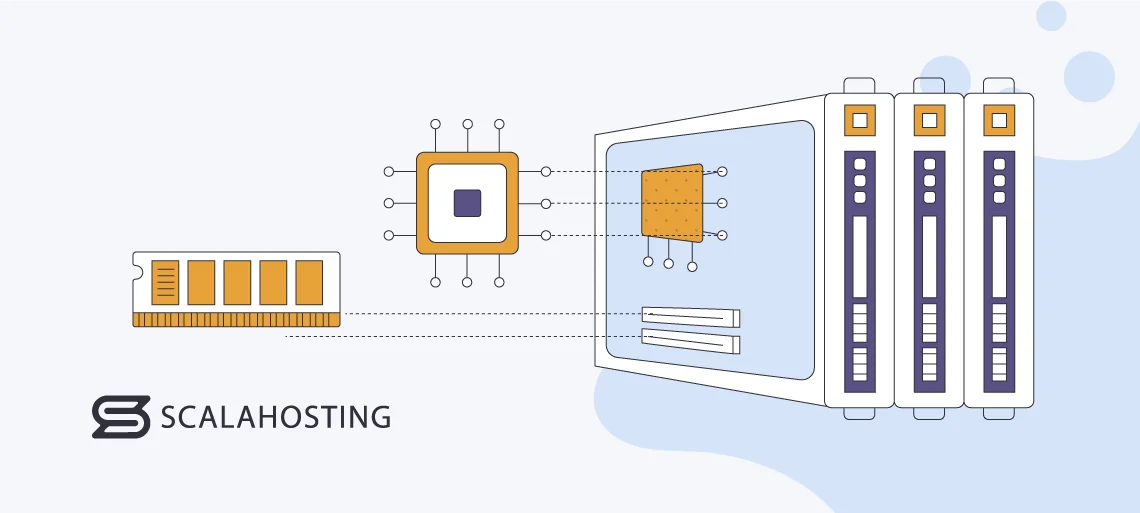
Credit: www.scalahosting.com
Ram Vs Other Resources
RAM helps in storing temporary data. This data is for fast access. The CPU is like a brain. It processes tasks and runs programs. Both are important for a website. RAM is like a desk. It holds things you need now. The CPU is like a worker. It does the jobs on the desk. More RAM can make things faster. But a strong CPU is also needed. Both work together to keep sites running.
RAM is fast and temporary. It helps while using apps. Storage is like a big closet. It keeps files safe for a long time. RAM is like a notepad. Quick notes go there. Storage is like a diary. It holds memories forever. You need both for your website. RAM for speed, storage for space. More RAM means faster work. More storage means more files saved.
Determining Ram Needs
Understanding RAM requirements is crucial for web hosting. Websites with many images and videos need more RAM. More visitors mean more RAM is needed. Complex sites with many functions also need more memory. Types of content affect RAM needs too. Dynamic content often requires extra resources. Large databases also influence RAM demands. Consider your site’s traffic and features. This helps in deciding RAM size.
Shared hosting often has less RAM. It suits small sites. VPS hosting offers more RAM. Good for medium-sized sites. Dedicated hosting provides the most RAM. Ideal for large sites. Compare hosting plans carefully. Look at RAM options. Choose a plan that fits your site needs. Check RAM limits in hosting packages. This ensures smooth site performance.

Credit: www.milesweb.com
Upgrading Ram In Web Hosting
Websites may load very slowly. Users might see error messages often. More visitors make the site act unpredictably. High bounce rates can be a clue. Frequent server crashes suggest issues. Heavy applications might lag or freeze. Site performance drops during traffic spikes. If these signs occur, consider more RAM.
Check your current RAM usage first. Host control panels show this info. Next, visit your hosting provider’s dashboard. Look for upgrade options there. Choose a plan with more RAM. Confirm the upgrade and pay. Your server will need a restart. This applies the changes. Afterward, monitor performance improvements.
Common Ram Misconceptions
Many believe more RAM always means better speed. This isn’t always true. RAM is like a desk. A bigger desk lets you work on more things at once. But, if you don’t use all the space, it doesn’t help. Some think RAM stores files forever. But, RAM is temporary. It holds things only while your computer is on. When you turn it off, RAM forgets everything.
Others think all RAM is the same. But, different types exist. Each type works best with certain computers. It’s important to match RAM to your system. Installing wrong RAM might slow down your computer. Always check compatibility before buying.
Some think upgrading RAM is hard. In truth, it’s often easy. Many guides are available online. Always follow instructions carefully. Safety is important.

Credit: www.scalahosting.com
Frequently Asked Questions
What Is Ram In Hosting?
RAM in hosting refers to the server’s memory, crucial for processing data efficiently. It affects website speed and performance. More RAM allows for better handling of traffic and complex applications, ensuring faster load times and improved user experience. Choose hosting with sufficient RAM for optimal site performance.
How Much Ram Do I Need For Web Hosting?
For basic web hosting, 1-2 GB RAM is sufficient. Hosting multiple sites or using resource-heavy applications might require 4-8 GB RAM. Consider your site’s traffic and software needs to determine the exact RAM requirements. Always choose a hosting plan that allows easy upgrades for future growth.
What Is Ram Used For?
RAM stores data temporarily for quick access. It enhances computer speed and performance by allowing multitasking. RAM helps run applications and processes smoothly, reducing load times. More RAM improves system efficiency, supporting larger programs and complex tasks effectively.
What Is Website Ram?
Website RAM refers to the server’s memory allocated for hosting a website. It ensures smooth performance and quick loading. More RAM allows better handling of traffic and complex applications. Optimal RAM improves user experience and SEO rankings. Ensure your hosting plan provides adequate RAM for your site’s needs.
Conclusion
Understanding RAM in web hosting is crucial for website performance. It helps your site handle traffic and run smoothly. More RAM means better multitasking capabilities. Consider your website needs when choosing RAM. More complex sites need more resources. Always ensure your hosting plan offers enough RAM.
This ensures fast loading times and a better user experience. Regularly review your hosting requirements as your site grows. This helps keep your website efficient and responsive. Proper RAM allocation can make a significant difference. Choose wisely to maintain optimal site performance.


