
Ever stumbled upon a website and wondered what web host it uses? Perhaps you’re considering switching to a new hosting provider and want to know more about the competition.
Or maybe you’re just curious about the web hosting landscape. Whatever your reason, knowing how to look up what web host a site is using can be incredibly useful. Imagine having the power to uncover this information with just a few clicks.
It’s like having a secret tool in your digital toolbox, giving you insights that can influence your own website decisions. This guide will walk you through the simple steps to unveil these hidden details, empowering you with knowledge that could enhance your online strategy. Ready to discover the secrets behind the websites you admire? Let’s dive in!
Identifying Web Hosting Providers
Finding out the web host of a site can be fun. Start by using online tools like WhoIs. These tools show details about the domain. You might see the host’s name there. Another way is to check the site’s DNS records. These records show the hosting provider too.
Sometimes, you can find the host in the page source. Right-click on the page and select “View Page Source”. Look for clues about the host. If that does not work, try asking the site owner. They might tell you who hosts their website.
Some websites use CDNs like Cloudflare. This can make it harder to find the host. But usually, these steps will help you find the right answer.
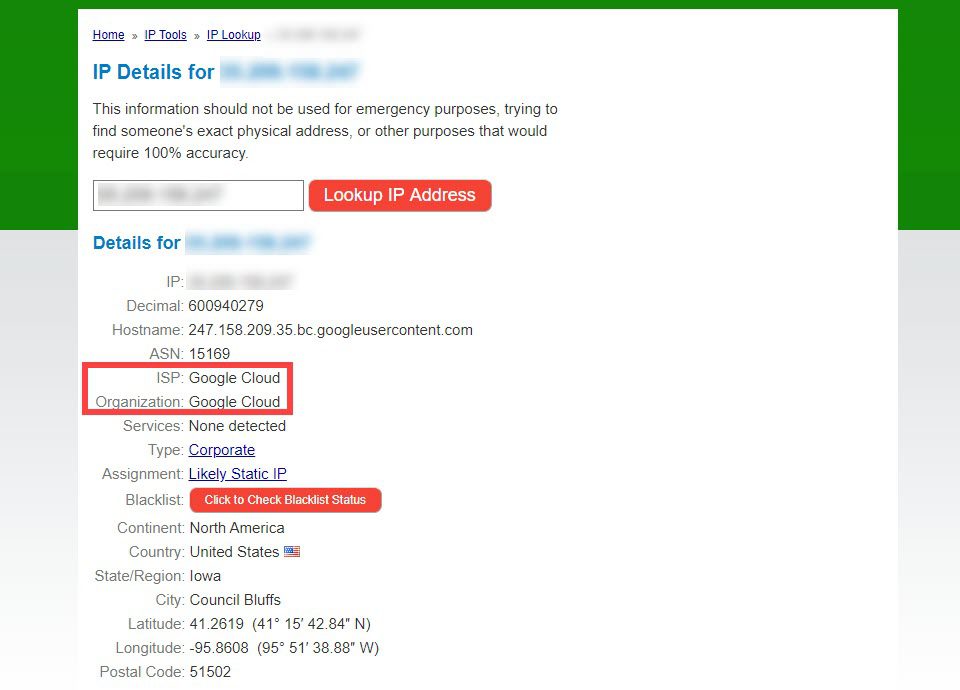
Credit: www.elegantthemes.com
Tools For Web Host Detection
Use online services to find a web host. These tools are easy and quick. Just enter the website URL. The service will show hosting details. Examples include WhoIsHostingThis and HostAdvice. Both offer simple results. They are free to use. Handy for beginners.
Browser extensions can help find hosting info. Add these tools to your browser. Click the extension icon while visiting a site. Hosting info will show instantly. Wappalyzer and BuiltWith are popular choices. They support many browsers. Easy to install and use.
Command line tools are for tech-savvy users. Type commands in a terminal. Tools like dig and nslookup can show host information. They are available on most computers. Results are detailed and precise. Useful for deeper insights.
Examining Whois Data
WHOIS is a tool to find web hosting details. Begin by visiting a WHOIS lookup website. Enter the website’s domain name in the search box. Click “search” to get the results. Most WHOIS sites are free to use. They provide useful data about a website.
The WHOIS results show many details. You can see the domain registrar. Also, the hosting provider might be listed. Look for nameservers and IP addresses. These can hint at the web host. Some details might be hidden for privacy. If so, check other sources too.

Credit: www.godaddy.com
Analyzing Dns Records
DNS records help find out the web host. They store data about a website’s domain. Understanding these records is key. There are different types of records.
| Type | Purpose |
|---|---|
| A Record | Maps domain to an IP address |
| CNAME Record | Aliases one domain name to another |
| MX Record | Directs email to servers |
| NS Record | Shows the authoritative name server |
Each DNS record tells something important. Look at A records for IP addresses. They show where a website is hosted. CNAME records can show if domains are linked. NS records reveal the name servers. These servers often belong to the web host. By checking these records, you can find the host.
Using Website Source Code
Open the website you are curious about. Right-click on the page. Select “Inspect” or “View Source”. The HTML and CSS will appear. Look for comments or code related to hosting. Sometimes, hosting info hides in code comments. Check for links to CDN services. Hosting often uses CDN for speed. Look at CSS files too. Host names might be there.
Examine the URL structure. Some hosts have unique URL patterns. Check the file names. Hosting services add their names sometimes. Look for custom error pages. Hosting clues hide in error pages. Review the JavaScript files. Hosting info can be here too. Search for meta tags. Hosts might add their info in meta tags. Finally, check the footer. Hosting companies often leave a mark there.
Consulting Online Communities
Forums are great for learning about web hosts. Many people share their knowledge here. You can find advice from experienced users. They often give tips on finding web hosts. Just ask your question. Someone will likely help you soon.
Experts know a lot about web hosting. They can guide you well. It’s helpful to connect with them online. Join groups where they chat. You can ask them direct questions. They often share valuable insights. This helps you learn quickly. Always be polite when asking for help.
Verifying Hosting Details
Many websites offer free tools to check hosting. Enter the website URL. Get the hosting provider name quickly. Whois lookup is a popular method. It reveals domain registration details. Sometimes, it shows hosting provider information too.
Use online forums for help. Ask about hosting details there. Experts may provide accurate answers. Try checking the website’s source code. Look for hosting clues. Some codes reveal hosting services used.
Verify hosting details from multiple sources. Compare data from different tools. Some tools may give incorrect information. Look for server location details. It confirms hosting provider’s identity. Double-check with hosting provider’s official website. They often list their clients.
Credit: www.greengeeks.com
Frequently Asked Questions
How Do I See What Server A Website Is Using?
Use online tools like “Whois” or “Netcraft” to find a website’s server. You can also check the website’s HTTP headers using browser developer tools. These methods reveal server information quickly and accurately.
How To Find Out What Platform A Website Is Hosted On?
Use online tools like BuiltWith or Wappalyzer to identify a website’s hosting platform. Check the website’s source code for hosting information. Look for hosting provider details in the WHOIS database. These methods help uncover the platform behind a website easily.
How To Find Out Who Manages A Website?
Check the website’s “Contact” or “About Us” page for management details. Use WHOIS lookup for domain owner information. Visit social media profiles linked to the website. Search for company name in business directories. Contact the hosting provider for more insights if needed.
How Can I Find My Host?
Check your hosting provider’s website or email for account details. Use domain lookup tools like WHOIS to identify your host. Contact your domain registrar if needed. Your website’s control panel or CMS dashboard may also show hosting information.
Conclusion
Finding your website’s host is simple with the right tools. Use online services to gather hosting information quickly. These tools provide details about the web host and server. Understanding your web host helps manage your site better. It aids in troubleshooting and improving site performance.
Always keep this information handy for future reference. Researching your web host is beneficial for both beginners and experts. This knowledge empowers you to make informed decisions. Check regularly to stay updated with any hosting changes. Happy hosting journey!


