

Imagine running your business with everything connected and updated instantly—no delays, no mistakes, just smooth operations. That’s exactly what happens when solutions integrate seamlessly with your Point-Of-Sale (POS) system for real-time updates.
You get accurate inventory counts, instant sales tracking, and up-to-the-minute financial data right at your fingertips. This means you can make smarter decisions faster, avoid stockouts, and keep your customers happier than ever. Curious how this integration works and how it can transform your daily business flow?
Keep reading to discover the simple steps and powerful benefits that come with syncing your solutions to your POS system in real time.
Pos Integration Basics
POS integration is essential for businesses to operate smoothly. It connects the point-of-sale system with other software. This connection helps share information instantly. Real-time updates keep data accurate and current. Understanding the basics of POS integration is the first step. It explains how different parts work together to make this happen.
Core Components
POS integration involves several key components. The POS hardware includes terminals, scanners, and printers. Software manages sales, inventory, and customer data. Middleware acts as a bridge between the POS and other systems. APIs (Application Programming Interfaces) allow communication between software. These components work as a team to ensure data flows correctly.
Data Flow Mechanisms
Data flow in POS integration happens through various methods. One common method is real-time syncing, where data updates instantly. Batch processing sends data in groups at set times. Webhooks notify systems immediately when an event occurs. These mechanisms keep information consistent across all platforms. They reduce errors and improve decision-making speed.
Credit: www.databricks.com
Types Of Integrations
Integrating solutions with a point-of-sale (POS) system allows businesses to update data instantly. Different types of integrations serve various business needs. Each integration links the POS system to another software or platform. This connection helps automate tasks and improves accuracy. Real-time updates keep all systems aligned and reduce manual errors.
Accounting Systems
Accounting integration automates financial data entry. Sales and returns update the accounting software instantly. This integration saves time and lowers the chance of mistakes. Businesses can generate accurate reports faster. It helps track cash flow and taxes without manual input.
Inventory Management
Inventory integration syncs stock levels with sales data. When a product sells, the inventory count updates immediately. This helps avoid stock shortages or overstocking. It also improves order planning and supplier management. Real-time stock data supports better decision-making.
Customer Relationship Management
CRM integration connects sales data to customer profiles. It tracks buying habits and preferences in real time. Businesses can personalize marketing and improve customer service. The integration helps build stronger customer relationships. It also supports loyalty programs and targeted promotions.
Ecommerce Platforms
Ecommerce integration links online stores with physical sales. Orders from the website update the POS system instantly. This keeps product availability and pricing consistent everywhere. It provides customers with a smooth shopping experience. Real-time sync helps manage sales across channels efficiently.
Payment Processing
Payment integration connects the POS with payment gateways. Transactions process quickly and securely at checkout. It supports multiple payment methods like cards and mobile wallets. This integration ensures accurate recording of payments. It also reduces checkout time and improves customer satisfaction.
Real-time Data Sync
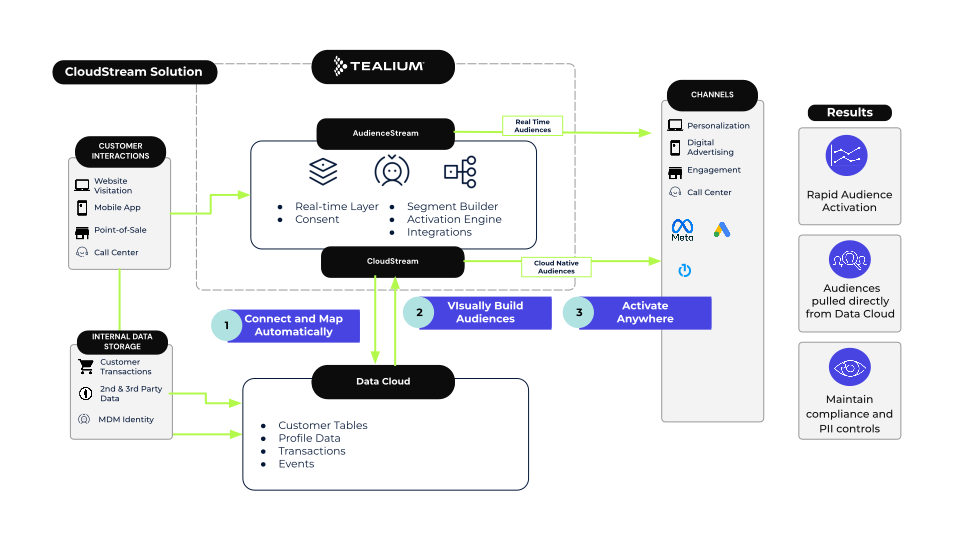
Real-time data sync means that information updates instantly across all connected systems. When a sale happens at the point-of-sale (POS), the data flows immediately to inventory, accounting, and customer management tools. This instant update keeps all parts of a business aligned without delays.
Such syncing prevents data gaps and helps teams respond quickly. It supports smooth operations by giving accurate, up-to-date information at every step. Real-time data sync is key for businesses aiming to improve efficiency and service quality.
Benefits For Operations
Operations benefit greatly from real-time data sync. Inventory levels update instantly, so stock counts stay accurate. Staff can avoid selling items that are out of stock. This reduces customer disappointment and lost sales.
Financial records also update automatically. This saves time on manual data entry and lowers the risk of mistakes. Managers get clear reports faster, aiding in better decision-making.
Reducing Errors And Delays
Real-time sync minimizes errors caused by manual updates. It removes the need to enter the same data multiple times across systems. This lowers human error and keeps information consistent.
Delays in communication disappear as data moves instantly. Teams across departments see the latest details without waiting. This quick access speeds up processes like restocking and billing.
Credit: tealium.com
Boosting Efficiency
Integrating solutions with Point-Of-Sale (POS) systems brings real-time updates that boost business efficiency. It reduces manual work and speeds up daily tasks. Businesses can react faster to changes and keep operations smooth. This integration helps staff focus on important tasks instead of routine checks.
Automated Reporting
POS integration creates automatic reports on sales and performance. These reports update in real time with every transaction. Managers get accurate data without waiting or manual entry. Quick access to reports helps make faster decisions. It saves time and reduces errors in tracking business results.
Stock Level Accuracy
Real-time updates keep stock levels precise across all locations. The system adjusts inventory instantly after each sale or restock. This prevents overselling and stock shortages. Accurate stock data helps plan purchases and avoid lost sales. It also reduces waste from overstocking items.
Streamlined Order Processing
Integrated POS speeds up order handling from start to finish. Orders flow directly into the system without delays or manual input. This reduces mistakes in order details and delivery. Faster processing improves customer satisfaction and turnover. Staff spend less time fixing errors and more on customer service.
Integration Methods
Integration methods connect point-of-sale (POS) systems with other software to deliver real-time updates. These methods ensure sales data syncs instantly, helping businesses stay accurate and efficient. Choosing the right integration approach depends on system needs and technical capabilities.
Api Connections
API connections allow software to communicate directly with the POS system. APIs send and receive data instantly, enabling real-time updates. This method offers flexibility and control over data flow. It requires some technical knowledge to set up but provides seamless integration.
Middleware Solutions
Middleware acts as a bridge between the POS and other software. It translates data formats and manages communication smoothly. Middleware reduces complexity and helps different systems work together easily. This method is useful for businesses with multiple software platforms.
Direct Software Plugins
Direct software plugins are add-ons built specifically for certain POS systems. They install easily and connect directly to the POS without extra tools. Plugins offer quick setup and reliable performance. This method works best for common software combinations and small businesses.
Implementation Steps
Implementing a solution that integrates with your Point-Of-Sale (POS) system for real-time updates requires careful planning. This process ensures smooth data flow and accurate information across your business operations. Following clear steps helps avoid common pitfalls and maximizes efficiency.
Assessing Business Needs
Start by reviewing your current business operations. Identify key areas where real-time data will improve decision-making. List the specific functions your POS system must support. Consider inventory management, sales tracking, and customer data. This step helps focus the integration on what matters most.
Choosing The Right Tools
Select software and hardware that match your business size and needs. Look for solutions that easily connect with your existing POS system. Check compatibility with accounting, inventory, and CRM platforms. Choose tools that offer reliable real-time data updates. Avoid complex systems that might slow down your operations.
Staff Training
Train your team on the new integrated system. Provide clear instructions and hands-on practice. Explain how real-time updates affect daily tasks. Encourage questions to ensure everyone understands. Well-trained staff reduce errors and speed up the adoption process.
Testing And Monitoring
Test the integration before full deployment. Run simulations to check data accuracy and flow. Monitor the system closely during the initial phase. Fix any issues quickly to prevent disruptions. Regular monitoring ensures the system continues to perform well over time.
Common Challenges
Integrating solutions with point-of-sale (POS) systems for real-time updates offers many benefits. Yet, several challenges arise during integration. These challenges can slow down the process or affect system performance. Understanding these common issues helps businesses prepare and address them efficiently.
Data Compatibility Issues
Different systems use various data formats and structures. This mismatch causes errors or lost information during data transfer. Ensuring both systems speak the same “language” requires extra work. Data mapping and conversion tools often become necessary. Without proper compatibility, real-time updates may fail or delay.
Security Concerns
POS systems handle sensitive customer and payment data. Integrating with other solutions increases the risk of data breaches. Secure data transmission and storage are critical. Businesses must use encryption and strict access controls. Regular security audits help identify vulnerabilities early. Protecting customer data builds trust and compliance.
Scalability Limits
As sales grow, the integration must handle more data and transactions. Some systems struggle to scale efficiently. Performance may degrade or updates slow down. Choosing scalable solutions ensures smooth operation during growth. Planning for future needs avoids costly system upgrades. Scalability supports long-term business success.
Future Trends
The future of point-of-sale (POS) integration is bright with many advanced technologies emerging. Businesses will gain faster, smarter, and more connected solutions. Real-time updates will become more accurate and insightful. This will help stores operate efficiently and serve customers better.
Ai-driven Insights
Artificial intelligence will analyze sales data instantly. It will spot patterns and trends that humans might miss. This helps managers make smart decisions quickly. AI can suggest the best products to stock or the right prices to set. It also predicts customer behavior to improve marketing and sales strategies.
Cloud-based Integrations
Cloud technology allows POS systems to connect with many apps and services. Data syncs automatically across devices and locations. This means updates happen in real time, no matter where the business is. Cloud-based solutions are easy to scale and update. They reduce the need for expensive hardware and complex setups.
Omnichannel Connectivity
Omnichannel means linking sales from all channels like stores, websites, and mobile apps. POS integration will unify these channels into one system. This offers a seamless experience for customers shopping online or offline. Businesses will track inventory and sales across all platforms instantly. It improves customer satisfaction and boosts sales.

Credit: www.demandfarm.com
Frequently Asked Questions
How Does Pos Integration Work?
POS integration connects your sales system with other software like inventory and accounting. It enables automatic, real-time data sharing to streamline operations and reduce manual tasks. This unified data flow improves accuracy, speeds up processes, and provides a clear business overview instantly.
How To Integrate Pos?
Integrate POS by connecting it with business software like accounting, inventory, or CRM. Sync data for real-time updates and automate workflows. Choose compatible tools, configure settings, test connections, and train staff for smooth operation.
What Is An Integrated Point-of-sale System?
An integrated point-of-sale system links POS hardware and software with business tools. It automates data flow for real-time updates across sales, inventory, and accounting. This creates a unified platform that streamlines operations, improves accuracy, and enhances customer experience.
How To Integrate Pos With Crm?
Integrate POS with CRM by selecting compatible software, syncing customer and sales data, testing functionality, training staff, and monitoring performance regularly.
Conclusion
Integrating solutions with POS ensures updates happen instantly. This connection keeps inventory and sales data accurate. Businesses save time by automating tasks between systems. Staff can make better decisions with real-time information. Overall, integration creates a smoother workflow and fewer errors.
It supports growth by linking all parts of the business. Simple, fast updates help businesses stay competitive today.


