
Unlocking the mysteries of web hosting can sometimes feel like deciphering a complex code. One term you might encounter is SSH access.
But what exactly does it mean for you and your website? Imagine having a secret key that lets you securely and efficiently manage your website from anywhere in the world. Sounds intriguing, right? SSH access is that key, giving you powerful control over your web environment with just a few clicks.
In this guide, we’ll break down SSH access in simple terms, showing you how it can enhance your web hosting experience and why it’s a tool you might not want to live without. Dive in and discover how SSH access can transform the way you handle your online presence.
Ssh Basics
SSH stands for Secure Shell. It’s a way to connect safely to another computer. People use SSH for managing web servers. It keeps information safe from hackers. SSH uses special keys for protection. These keys are like secret passwords. Only the right keys can open the lock. This makes SSH very secure.
SSH uses a client-server model. The client is your computer. The server is the computer you want to reach. You send a request to the server. The server checks your key. If the key matches, you get access. This process keeps your data safe. SSH is like a locked door. Only the right key can open it.

Credit: www.interserver.net
Importance Of Ssh In Web Hosting
SSH means Secure Shell. It keeps data safe. Hackers can’t see data. This is important for web hosting. Passwords are not shared. SSH uses keys. Keys are better than passwords. Encryption makes data unreadable. Only the right key can open it. Files stay safe. Visitors are safe too. Businesses trust SSH. It’s strong and reliable.
SSH helps you control your website from far away. You don’t need to be at your computer. You can manage files easily. Update programs fast. Fix problems without delay. Commands are simple. Team members can work together. Even if they are far apart. This saves time and effort. Web hosts use SSH a lot. It makes work easy and quick.
Setting Up Ssh Access
Secure Shell (SSH) access in web hosting allows safe communication with servers remotely. It encrypts data, ensuring privacy and security. Users can execute commands, transfer files, and manage server resources efficiently.
Requirements For Ssh Access
To start with SSH, you need a few things. First, a computer with internet. Next, a web hosting account. Then, you must have a terminal application. For Windows, use PuTTY. Mac and Linux have built-in terminals. Finally, ensure your hosting plan allows SSH access.
Steps To Enable Ssh
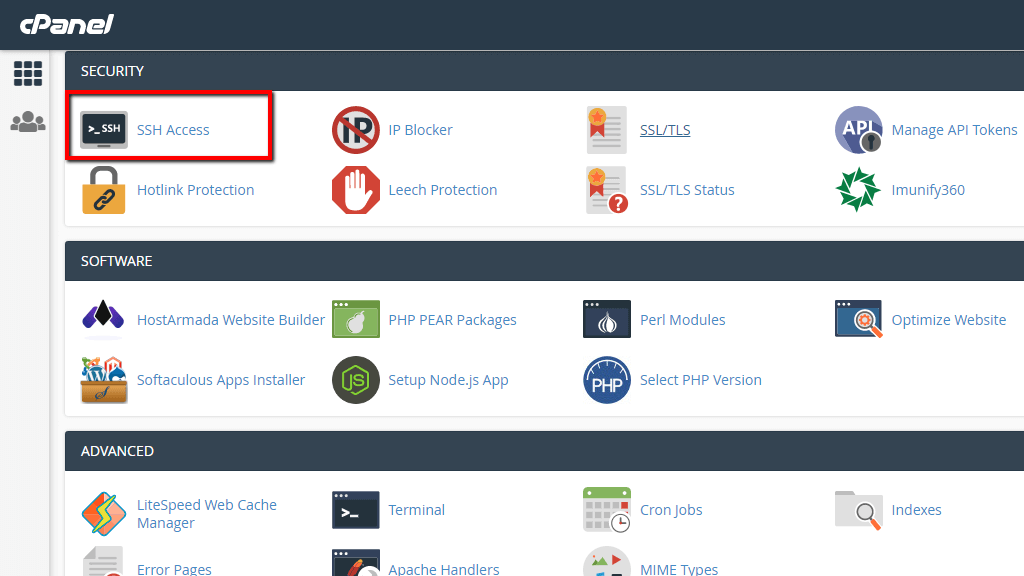
Log in to your hosting account. Find the SSH Access or Secure Shell section. Click to enable it. If needed, create a new SSH key. This key is like a password. Use your terminal to connect. Type the right command to start. Follow the instructions shown.
Now, you can safely connect. Remember, always keep your keys safe. This keeps your site secure.

Credit: www.nexcess.net
Common Ssh Commands
SSH access in web hosting provides a secure way to manage servers remotely. Common SSH commands like ‘ls’, ‘cd’, and ‘cp’ allow easy file navigation and management. This tool ensures safe and efficient server control for web administrators.
File Management Commands
SSH helps you manage files easily. Use ls to list files in a folder. Check details of files with ls -l. Want to change folders? Use cd followed by the folder name. To move files, type mv with the file name and the new place. For deleting, use rm and the file name. Always be careful with rm. It deletes files forever.
System Monitoring Commands
Keep an eye on your system. Use top to see running processes. It shows which programs use the most power. Want to know disk use? Type df -h. This command shows free space. For checking memory, use free -m. It tells you how much memory is left. Stay informed about your system. It keeps everything running well.
Troubleshooting Ssh Issues
SSH access in web hosting allows secure remote management of servers. Troubleshooting SSH issues involves checking configurations and network settings. Proper understanding ensures smooth server operations.
Common Problems
SSH can be tricky sometimes. Some users face connection refusals. Check if your server is running. Ensure the correct port is used. Some servers use a different port for SSH. Another issue is wrong credentials. Verify your username and password. Make sure they match.
Solutions And Fixes
Try restarting the SSH service. This often solves many issues. If the problem persists, check your firewall settings. Sometimes, firewalls block SSH connections. Open the required ports. Update your SSH software. Old versions can have bugs. Keeping it updated helps. If all else fails, consult your web host support.
Best Practices For Ssh
SSH is a tool for safe server access. Always use strong passwords. Never share them with others. Use key-based authentication. It is safer than passwords. Disable root login. It adds an extra layer of security. Keep your SSH software updated. Updates fix security holes. Use firewalls to limit access. Only allow trusted IP addresses. Enable two-factor authentication. It provides an extra security step.
SSH can speed up tasks. Use aliases for common commands. It saves typing time. Learn shortcuts. They help you work faster. Use screen or tmux. These tools keep your session active. Even if you disconnect. Scripting common tasks saves time. Automate where possible. Use compression to speed up data transfer. It reduces file size. Keep connections alive with the `ServerAliveInterval` setting. It prevents timeouts.
Credit: onehost.kz
Frequently Asked Questions
What Is Ssh Access In Web Hosting?
SSH access in web hosting allows secure, encrypted connections to the server. It enables remote management of files and applications. Users can execute commands, transfer files, and perform administrative tasks. SSH ensures data protection by preventing unauthorized access. It’s essential for developers and system administrators.
What Is Ssh Access Used For?
SSH access is used to securely connect to remote servers. It encrypts data, ensuring safe communication. Developers and system administrators use it for managing servers, transferring files, and executing commands remotely. SSH access enhances security and efficiency in server management tasks.
What Does Ssh Mean In Website?
SSH stands for Secure Shell. It is a protocol used to securely access and manage servers remotely. SSH encrypts data, ensuring safe communication over networks. It is essential for web developers and administrators to securely transfer files, execute commands, and manage server configurations.
How To Access A Website Through Ssh?
Use SSH client software like PuTTY or Terminal. Enter the website’s server IP and SSH port. Authenticate with your username and password or SSH key. Once connected, you can navigate and manage files securely through command-line interface. Ensure SSH access is enabled on the server.
Conclusion
SSH access in web hosting offers enhanced security and control. It allows users to manage servers directly. This feature is crucial for technical tasks. Users can perform updates, install software, and troubleshoot efficiently. SSH ensures encrypted connections, safeguarding data from threats.
It’s an essential tool for developers and IT professionals. Learning SSH can greatly benefit your web hosting experience. It simplifies complex operations. Beginners may find it challenging, but practice helps. Choose a host offering SSH for better management. Embrace SSH access for a more secure and efficient hosting environment.


