
Imagine your website suddenly starts getting more traffic than ever before. This should be great news, right?
But instead, your site slows down, or worse, crashes. This is where understanding load balancer web hosting becomes crucial. You don’t want to lose potential customers or frustrate loyal visitors just because your site couldn’t handle the traffic. By learning how load balancers work, you can ensure your website remains fast and reliable, no matter how many visitors come knocking.
This technology not only distributes traffic efficiently but also enhances your site’s performance and security. Curious about how you can leverage this powerful tool for your own site? Stick around, and you’ll discover exactly how load balancer web hosting can transform your online presence.
Load Balancer Basics
A load balancer helps manage web traffic. It splits incoming requests. This makes sure each server gets equal work. It keeps sites fast and smooth.
It prevents overload on one server. This keeps websites from crashing. It also improves website reliability. Users get a better experience.
Load balancers check server health. They send requests to healthy servers only. This is called health monitoring. If one server fails, another takes over.
- Improves website performance
- Increases reliability
- Balances server load
- Offers scalability

Credit: www.geeksforgeeks.org
Types Of Load Balancers
Hardware load balancers are physical devices. They manage traffic between servers. These devices are reliable and fast. They handle large amounts of data. Businesses use them for heavy-duty tasks. Hardware load balancers are expensive. They need maintenance and space. But they offer strong performance. They are good for big companies.
Software load balancers are programs. They run on standard servers. They are flexible and easy to update. Users can install them quickly. They are cost-effective. Software load balancers are scalable. They are perfect for small businesses. They need less hardware. But they might be slower than hardware ones.
Cloud-based solutions are virtual. They work on the internet. Users can access them from anywhere. They are efficient and adaptive. These solutions are ideal for growing businesses. They offer pay-as-you-go options. No need for physical devices. Cloud-based solutions are easy to set up. They save time and money. They provide global reach.
Key Features
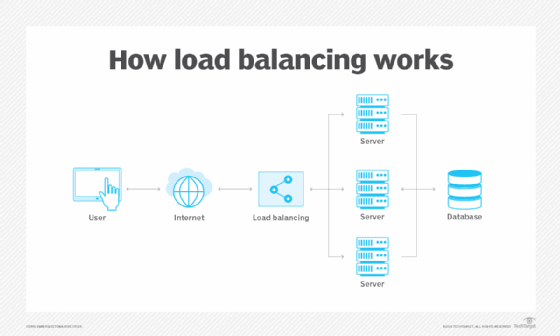
Load balancers help in managing traffic. They send user requests to different servers. This makes sure no server gets too busy. It helps websites run smoothly. Users get a better experience. No long waits.
Load balancers check the health of servers. They make sure each server works well. If a server has issues, it stops sending requests there. This keeps the website running without problems. Users have access all the time.
Load balancers allow easy scaling of resources. When a website grows, more servers can be added. This handles extra traffic. Websites stay fast. Users remain happy.
Credit: www.techtarget.com
Operational Mechanism
Load balancer web hosting distributes incoming traffic across multiple servers, ensuring websites run smoothly without overload. It enhances performance, reliability, and resource utilization by directing requests to the least busy server. This mechanism helps maintain constant website availability, even during high traffic.
Request Routing
A load balancer helps direct internet traffic. It sends user requests to different servers. This makes sure no server gets too busy. It also helps websites run smoothly. The load balancer checks which server is free. Then, it sends the request to that server. This helps spread the work evenly.
Session Persistence
Session persistence keeps users connected to the same server. This helps keep their data safe. It remembers who you are when you browse. This makes sure you do not lose your shopping cart items. Or your game progress. This is important for a good user experience.
Failover Strategies
Failover strategies keep websites running. Even if a server fails. The load balancer switches users to a working server. This means no downtime for users. Websites stay up even when there are problems. This keeps users happy and makes sure they can use the site anytime.
Benefits For Web Hosting
Load balancers help websites run better. They split the work between servers. This means each server does less work. Websites load faster. Users are happier. Speed is important for websites. Faster websites keep users.
Websites need to be up all the time. Load balancers make sure they stay online. If one server fails, others take over. This prevents downtime. Users can access the site always. Reliable access builds trust with users.
Using load balancers saves money. No need for many servers. Balance the load instead. Spend less on hardware. Save on maintenance too. Cost savings mean more funds for other needs. Smaller budgets can manage well.
Challenges And Considerations
Load balancer web hosting faces challenges like server overload and traffic spikes. Proper configuration ensures efficient resource distribution. Understanding these aspects is crucial for optimal performance.
Configuration Complexity
Setting up a load balancer can be tricky. It involves many steps. You need to match the right settings. This ensures servers work well together. Each server must be in sync. If not, problems can occur. Some tools can help. Yet, understanding them takes time. Patience is key.
Security Concerns
Keeping data safe is very important. Load balancers can be a target. Hackers might try to get in. Strong security measures are needed. Firewalls can help a lot. Regular updates are crucial. This keeps the system protected. Always check for weak spots. Fix them quickly.
Resource Allocation
Sharing resources fairly is vital. Each server needs a fair share. Too much load on one server is bad. Others might sit idle. Balancing helps prevent this. Tools can assist in fair distribution. Regular monitoring is essential. It ensures everything runs smoothly.
Future Trends
Load balancer web hosting distributes traffic evenly across servers, ensuring website efficiency and reliability. This technology optimizes server performance, preventing overload and downtime. It enhances user experience by maintaining fast and stable access to web resources.
Ai And Machine Learning Integration
AI and Machine Learning help in smart data processing. They make load balancing faster and smarter. These technologies predict traffic patterns. They adapt quickly to changes. This saves time and resources. It keeps websites running smoothly.
Edge Computing
Edge Computing brings computing closer to users. It reduces delays and speeds up data delivery. This is very helpful for global sites. Users get data faster, no matter where they are. Load balancers use edge computing to improve performance.
Automation And Orchestration
Automation makes tasks easy and quick. Orchestration organizes these tasks. Together, they reduce human errors. They improve system efficiency. This makes managing multiple servers simple. Businesses benefit from less downtime and better service.

Credit: www.appviewx.com
Frequently Asked Questions
How Does A Load Balancer Work In A Web Server?
A load balancer distributes incoming network traffic across multiple servers. It ensures optimal resource use and prevents overload. By managing requests, it enhances performance and reliability. It detects server health and redirects traffic to available servers, maintaining service continuity. Load balancing improves scalability and user experience.
What Is Host-based Load Balancing?
Host-based load balancing distributes network traffic across multiple servers. It optimizes resource use and enhances performance. This method ensures high availability and reliability by preventing server overloads. Load balancers monitor server health and automatically redirect traffic to healthy servers, ensuring seamless user experiences and efficient operations.
What Is The Main Purpose Of A Load Balancer In A Web Application Deployment?
A load balancer distributes incoming network traffic across multiple servers. It ensures high availability and reliability. By preventing server overload, it improves application performance. Load balancing enhances user experience by minimizing downtime. It also boosts scalability, allowing web applications to handle increased demand efficiently.
What Is The Main Purpose Of A Load Balancer In Cloud Computing?
A load balancer distributes incoming network traffic across multiple servers. It optimizes resource use, maximizes throughput, and prevents overload. This ensures high availability and reliability in cloud computing environments, enhancing user experience and operational efficiency. Load balancing also facilitates scalability and fault tolerance.
Conclusion
Load balancer web hosting is vital for website efficiency. It distributes traffic evenly, ensuring no server overload. This results in faster load times for users. Reliability improves, minimizing downtime and disruptions. Businesses benefit from better performance and user satisfaction. Load balancing adapts to traffic changes, enhancing website resilience.
It’s a crucial component for online growth and stability. Investing in this technology supports a seamless user experience. Ultimately, load balancers are key to a smooth, responsive website. They ensure your site runs optimally, even under heavy traffic. Explore options to enhance your web hosting solution today.


