
Have you ever wondered how typing a web address into your browser magically takes you to a specific website? The answer lies in something called DNS, or Domain Name System.
Imagine trying to remember the IP addresses of all your favorite websites instead of their names. Sounds complicated, right? DNS acts as your helpful translator, converting those complex numerical addresses into easy-to-remember names. In the world of web hosting, understanding DNS is crucial.
It’s the backbone that keeps the internet running smoothly, yet it often remains a mystery to many. By the end of this article, you’ll not only grasp what DNS is but also how it impacts your online experience, ensuring your website functions seamlessly. Dive in to uncover the secrets of DNS and elevate your web hosting knowledge to new heights!
Dns Basics
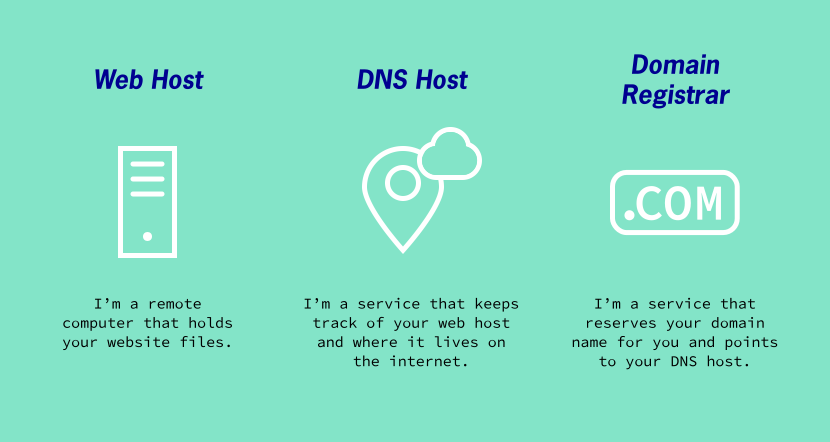
DNS stands for Domain Name System. It is like the phone book for the internet. It helps find website addresses. When you type a website name, DNS finds the IP address. This way, your computer knows where to go. Without DNS, surfing the web would be hard. You would need to remember long numbers for websites.
Web hosting needs DNS to work. DNS connects domain names to hosting servers. This makes websites live on the internet. Good DNS ensures quick website loading. It helps visitors find sites easily. If DNS fails, websites become invisible. Proper DNS setup is vital for site reliability.
How Dns Works
DNS stands for Domain Name System. It helps computers understand web addresses. When you type a website name, DNS converts it into a number. This number is called an IP address. Computers use IP addresses to find websites. DNS is like a phonebook for the internet. It makes browsing easy and fast.
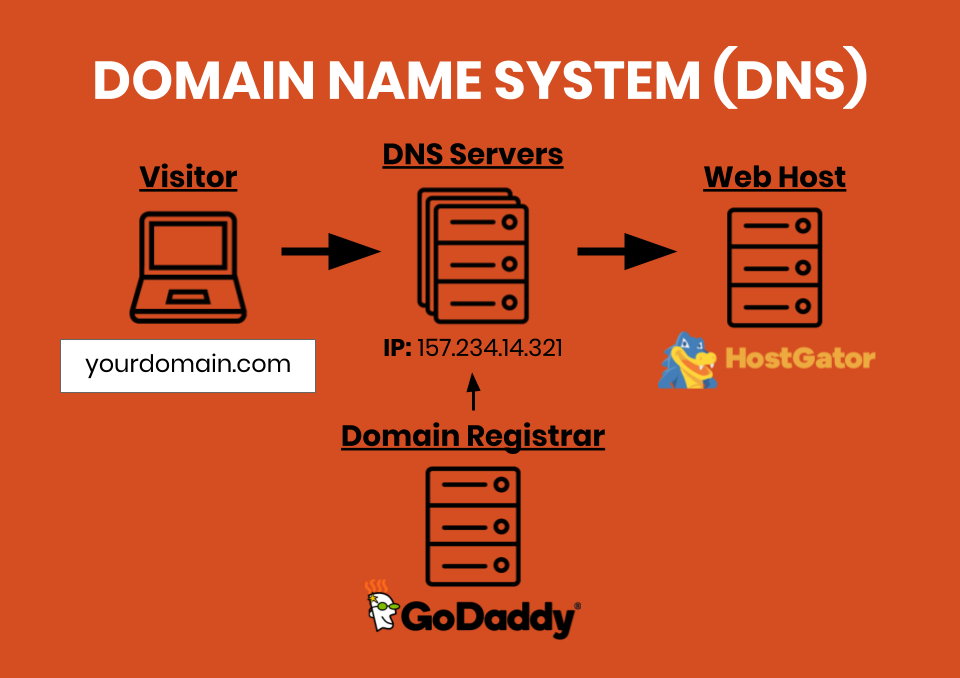
The DNS lookup process begins when you enter a website name. Your computer asks a DNS server for the IP address. The DNS server checks its records. If it has the IP address, it sends it back. If not, it asks another DNS server. This continues until the IP address is found. This process is quick. It happens in seconds.
| Type of DNS Server | Function |
|---|---|
| Recursive Resolver | Finds IP addresses for users |
| Root Name Server | Directs queries to correct server |
| TLD Name Server | Manages top-level domains like .com |
| Authoritative Name Server | Has the final answer for a domain |
Dns Records
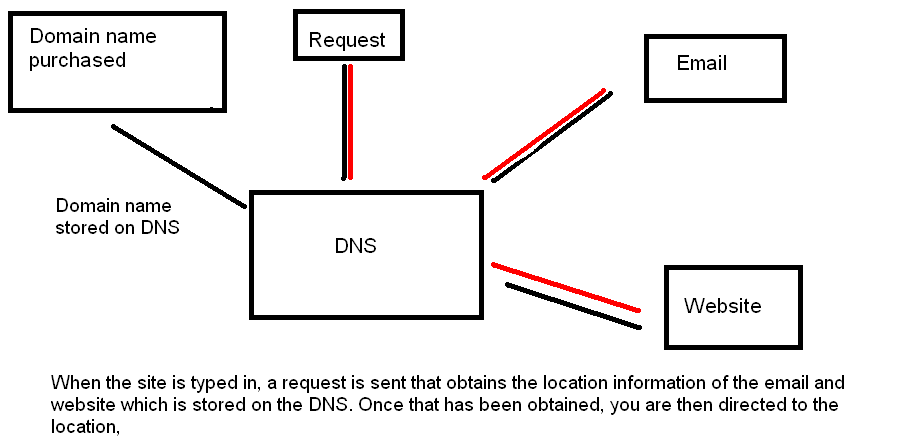
DNS records are like address books for the internet. Each record helps your computer find websites. The A Record maps a domain to an IP address. This tells computers where to find your website. The CNAME Record is a nickname for your domain. It points one domain to another. The MX Record is for email delivery. It directs emails to the right server. The TXT Record holds text notes. Often used for security checks.
A Record gives the website location. CNAME makes domain management easier. MX Record ensures your emails are delivered. TXT Record adds a layer of security. Each record type has a special role. They all work together. They make sure your website runs smoothly.
Credit: fullwindsor.co
Dns And Website Performance
DNS, or Domain Name System, translates domain names into IP addresses. It plays a crucial role in web hosting. Faster DNS lookup speeds can improve website performance, ensuring quick access for users.
Impact On Page Load Speed
DNS plays a big role in how fast a website loads. It matches a web address to the server’s IP address. This process can slow down if the DNS is not optimized. Slow DNS means pages take longer to show up. People might leave the site if it is too slow. So, speed is very important for keeping visitors.
Optimization Techniques
There are ways to make DNS faster. Use a reliable DNS provider. This can make the site load quicker. Another way is to set a longer TTL (Time to Live). It helps store DNS info longer. This reduces lookup time. Caching DNS data is also helpful. It saves time by not repeating DNS lookups. These steps can improve website speed.
Dns Security
DNS faces many threats. Hackers can change DNS records. This leads users to fake websites. Phishing attacks are common. These steal personal data. DNS spoofing is another danger. It tricks users by redirecting them. This can cause serious harm.
Strong measures help protect DNS. Use firewalls to block attacks. Encrypt DNS data for safety. Regularly update your DNS settings. This prevents weaknesses. Monitor your DNS traffic closely. Detecting threats early is key.
Credit: websiteprofitcourse.com
Dns In Modern Web Hosting
DNS helps connect domain names to web hosting. It acts like a phone book for websites. Web hosts manage DNS settings for their customers. This makes it easier for users. They don’t need to handle technical details. DNS settings include records like A, CNAME, and MX. These records point domains to the right servers. Proper setup ensures sites are always reachable. Hosting services often provide tools to manage DNS. This makes changes quick and simple. Users can update records with a few clicks. Good integration means less downtime for sites. This is important for keeping visitors happy.
DNS technology is always improving. Security is a big focus now. New methods help keep data safe. Faster DNS lookup times are also important. This means websites load quicker. Cloud-based DNS is becoming popular. It offers better reliability. More people use smart devices now. DNS must adapt to handle the traffic. The internet is growing fast. DNS systems need to scale up too. Future changes will make DNS smarter. This will help websites run better.
Credit: www.aspedia.net
Frequently Asked Questions
What Is Dns Web Hosting?
DNS web hosting translates domain names into IP addresses, directing users to websites. It manages domain name records and ensures efficient website access. Hosting providers offer DNS services, enhancing website performance and reliability. This service is crucial for seamless internet navigation and connectivity.
What Is Dns And Its Purpose?
DNS stands for Domain Name System. It translates domain names into IP addresses, enabling browsers to load internet resources. DNS simplifies navigating the web by allowing users to enter easy-to-remember domain names instead of numerical IP addresses. It plays a crucial role in the internet’s functionality.
How Do I Fix My Dns Problem?
Restart your router and computer to refresh connections. Update DNS settings to Google’s (8. 8. 8. 8, 8. 8. 4. 4). Clear DNS cache using the command prompt with “ipconfig /flushdns”. Disable firewall temporarily to check if it’s blocking DNS.
Contact your Internet Service Provider for further assistance.
Do I Need Dns For My Domain?
Yes, DNS is essential for your domain. It translates domain names into IP addresses, enabling users to access websites. Without DNS, your domain won’t connect properly. Ensure you have DNS settings configured for smooth website operation and improved user experience.
DNS is crucial for website functionality and accessibility.
Conclusion
Understanding DNS is crucial in web hosting. It helps translate domain names into IP addresses. This process makes websites accessible to users worldwide. DNS acts like a directory for the internet. Without it, browsing would be confusing and slow. A reliable DNS ensures your website runs smoothly.
It enhances user experience by reducing load times. Choosing a dependable web hosting service with strong DNS support is vital. This ensures your website remains accessible and efficient. In web hosting, DNS plays a pivotal role. It connects users to your site seamlessly.
Remember, a good DNS means a better website experience.


