
Imagine waking up to find your website vanished overnight. No more blog posts, no more product pages, just an empty space where your online presence used to be.
This nightmare scenario is exactly what happens when your web hosting expires. You might think it’s just a minor lapse, but in reality, it can have a significant impact on your brand, business, and reputation. Ever wondered how this could affect your hard-earned SEO rankings or your loyal customer base?
Keep reading to discover the hidden consequences of expired web hosting and learn how to prevent your website from disappearing into the digital abyss. Your online success depends on it.

Credit: www.boldgrid.com
Impacts Of Expired Web Hosting
When web hosting expires, your website becomes inaccessible. Visitors see an error page. They can’t view your content. This can confuse your audience. They may leave and not return. It’s important to renew hosting on time.
Data may be lost if hosting expires. Backup services may stop. Important files could disappear. You might lose customer details. Always back up your site regularly. This prevents data loss.
Your site’s SEO ranking can drop. Search engines favor active sites. An expired site can lose its place. It affects visibility on search results. This can reduce site traffic. Keep hosting current to maintain rankings.
Signs Your Web Hosting Is Expiring
Email notifications are important. They tell you when hosting is ending. Check your inbox often. Look for emails from your host provider. They usually send reminders. These help you keep track. Don’t miss these emails.
Billing alerts show up when payments are due. Hosts send them for expiring services. Watch for these alerts. They can come as text messages or emails. Always take them seriously. They keep your site online.
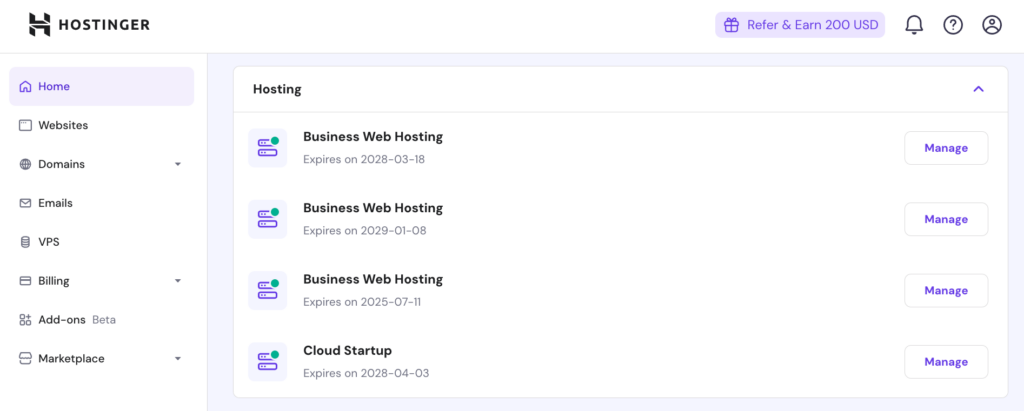
Dashboard warnings appear on your hosting panel. Log in to see them. They often show as red flags. These warnings mean your hosting is ending. Act quickly if you see them. Renew your hosting soon.
Preventive Measures For Hosting Expiry
Perform regular checks on your hosting. These checks ensure your website’s safety. Look for emails about your hosting account. This way, you’ll know if there are issues. Regular checks help you stay updated. Always know your hosting status.
Enable automatic renewal for your hosting plan. This ensures your site stays online. Check if your hosting provider offers this option. If enabled, you’ll avoid service interruptions. This option saves time and effort.
Keep backups of your website data. Use a backup strategy to protect your content. Store backups in different places. This helps if something goes wrong. Backups can save your site from data loss. Always have a recent backup available.

Credit: blog.resellerspanel.com
Choosing Reliable Web Hosting Providers
Evaluating Customer Support is crucial. Good support helps solve problems fast. Check if support is available 24/7. Look for live chat, phone, or email support. Read reviews from other users. This shows how helpful the support is. Good support makes hosting easier.
Assessing Uptime Guarantees is vital. Uptime means your site stays online. Reliable hosts promise high uptime, usually 99.9%. This means your website stays accessible. Compare guarantees from different hosts. Lower uptime can hurt your site. Choose hosts with strong uptime records.
Reviewing Pricing Plans helps you manage costs. Check the plans offered by hosting providers. Some plans have hidden fees. Read terms carefully. Look for discounts on long-term plans. Compare prices with the features offered. Affordable plans should still offer good service.
Steps To Restore Website Access
Website access can vanish when your hosting plan expires. It results in site downtime. Restore access by renewing your hosting plan quickly. Consider backing up your site data regularly to prevent data loss.
Contacting Your Hosting Provider
First, call or email your hosting provider. Explain your issue in simple words. Ask them to help restore access. They might need some information. Keep your account details ready. They will tell you the next steps. Follow their instructions carefully.
Restoring Backups
Use your backups to bring your site back. Backups keep your data safe. If you saved your backups, find them now. Your hosting provider can help with this. Upload the backup files to your server. This can bring your website online again.
Updating Dns Settings
Check if your DNS settings need changes. DNS links your website to its address. Go to your domain provider’s site. Look for DNS settings there. Update them as needed. This makes sure visitors find your site easily.
Credit: www.hostinger.com
Frequently Asked Questions
What Happens If Web Hosting Expires?
Your website goes offline if web hosting expires. Files and data might be lost without renewal. Reactivate by renewing the hosting plan to restore access and functionality.
What Happens If You Don’t Renew Hosting?
Failing to renew hosting leads to website downtime. Your site becomes inaccessible to visitors. Data and files may be lost if not backed up. Hosting providers typically delete expired accounts. Renew promptly to maintain online presence and avoid losing important data.
What Happens To My Website When The Domain Expires?
Your website becomes inaccessible when the domain expires. Visitors see an error page instead. Renew quickly to avoid losing ownership. Expired domains may be purchased by others, affecting your brand. Search engine rankings can drop significantly. Regularly check domain expiration dates to maintain seamless website operation.
What Happens If Your Web Host Goes Out Of Business?
Choose a new host quickly to minimize downtime. Backup your data regularly to ensure safety. Transfer files to your new provider efficiently. Notify users about changes to maintain trust. Check contract for any financial implications or refunds.
Conclusion
Web hosting expiration can disrupt your online presence. Emails might stop working. Website visitors may face errors. Renew your hosting on time. Avoid unexpected downtime. Regularly check renewal dates. Keep backups of your website data. This ensures smooth recovery if needed.
Understand your hosting provider’s policies. This helps in preventing surprises. Stay proactive in managing your web hosting. A little attention goes a long way. Keep your website running smoothly and efficiently.


