
When you’re building a website on WordPress, the right tools can make all the difference in creating a seamless user experience. One such tool is the radio button.
You might have come across radio buttons on various forms or surveys, but do you really know what they are and how they can enhance your WordPress site? Imagine giving your users the power to make clear, distinct choices with just a simple click.
Sounds intriguing, right? This is where radio buttons come into play. By the end of this article, you’ll understand what radio buttons are, why they’re essential for user interaction, and how you can effortlessly integrate them into your WordPress site. Ready to unlock the potential of your website? Let’s dive in.
Radio Button Basics
A radio button lets users choose one option. Only one choice is allowed at a time. It’s like picking a favorite color or food. Once picked, others can’t be selected unless the first choice is changed. Radio buttons are simple circles. When clicked, they get filled. They’re often used in forms or surveys. Easy to understand and use. Perfect for clear choices.
On WordPress, adding a radio button is easy. Just use the form builder. It helps create neat forms. Users interact smoothly. Radio buttons make decisions clear. They guide users through options well. Make your WordPress site user-friendly with them.

Credit: ninjaforms.com
Role In WordPress Forms
Radio buttons are small circles on forms. Users choose only one option. They are easy to use and understand. Each button stands for a choice. Only one choice is allowed at a time.
Radio buttons make forms clear and simple. Users can pick their favorite color or food. They are great for surveys and quizzes. Many websites use radio buttons. They help gather user preferences.
WordPress forms can have many radio buttons. They help in collecting specific data. Radio buttons save time. Users can finish forms quickly. They don’t need to type long answers. Just a click is needed.
Creating Radio Buttons In WordPress
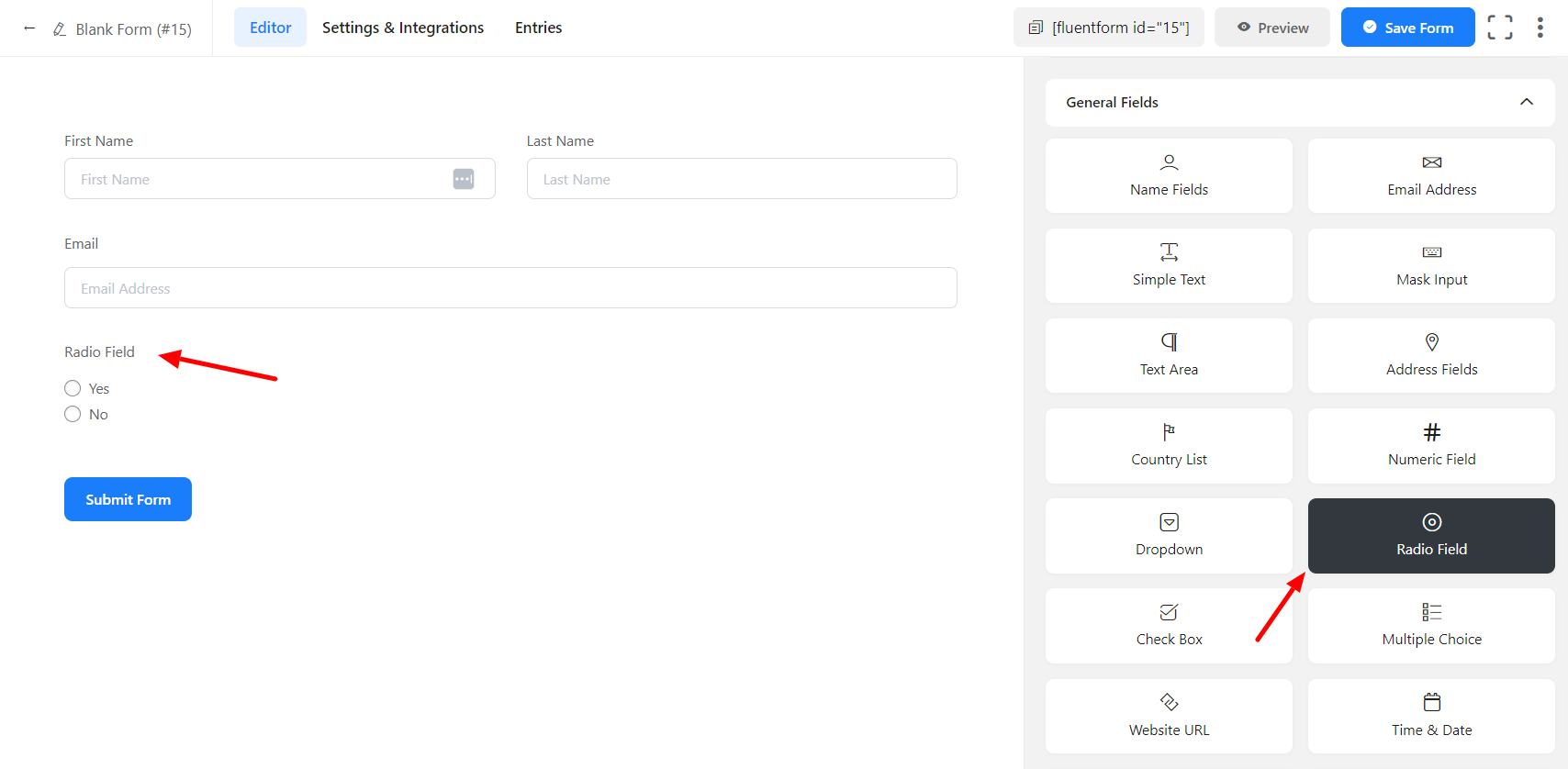
You can add radio buttons using the WordPress editor. First, open your post or page. Then, click on the plus sign to add a block. Choose the ‘Shortcode’ block. Now, you can type a simple code. The code looks like this: [radio choice1 “Yes”] [radio choice2 “No”]. This will create two options. Visitors can pick one option.
Plugins make adding radio buttons easier. Install a form plugin like WPForms. After installing, open the plugin. Create a new form. Look for the ‘Multiple Choice’ field. Drag it to your form. Rename the field to what you want. Add choices for users. Save your form. Now, your form has radio buttons.

Credit: registrationmagic.com
Styling Radio Buttons
Radio buttons can look cool with CSS styles. Change their color and shape. Make them larger or smaller. Add borders or shadows. CSS helps to make radio buttons fit your website theme. Use different styles for selected and unselected buttons. This makes it clear which option is picked.
Radio buttons must match the website design. Use theme colors and fonts. It helps them blend in better. Good styling makes buttons easy to see and use. Many themes have default styles for radio buttons. You can change them with CSS. Make sure the buttons look good on all devices. Check them on phones, tablets, and computers.
Common Uses In WordPress
Radio buttons are perfect for polls and surveys. They let users pick one answer. This makes answers clear and easy to count. Polls help gather opinions quickly. Surveys can show what users like. For example, “Do you like cats or dogs?” Users pick one option. This way, you know their favorite.
Setting user preferences is easy with radio buttons. Users can choose options like light or dark mode. They can also pick a language. This helps tailor the site to their needs. For instance, a site might ask, “Which language do you prefer?” Users select English or Spanish. The site changes based on their choice. This makes browsing easier and more personal.
Credit: wpmanageninja.com
Best Practices For Implementation
Radio buttons should be easy to see and use. Use clear labels for each choice. Screen readers help users with disabilities. Ensure radio buttons can be navigated using keyboard. Color alone should not be the only way to show selection. This helps people with color blindness. Text should explain the purpose of the button.
Fast loading improves user experience. Use simple code for radio buttons. Minimize external scripts for better speed. Optimize images and icons related to buttons. Test the page on different browsers. Remove unnecessary plugins for better performance. Clean code ensures quick load times. Cache helps in reducing load time.
Troubleshooting Common Issues
Radio buttons might not show up correctly. Common causes include theme conflicts or missing files. Check your theme settings. Ensure all necessary files are present. Themes can sometimes hide radio buttons. Adjust your theme’s CSS if needed.
Radio buttons may not work as expected. JavaScript errors can block their function. Inspect your browser console for errors. Review your code. Make sure JavaScript files are linked correctly. Plugins might interfere with radio buttons. Disable plugins one by one to find the culprit.
Frequently Asked Questions
What Is A Radio Button In WordPress?
A radio button in WordPress is a user interface element. It allows users to select one option from a set. Radio buttons are ideal for exclusive choices. They are often used in forms and surveys. Radio buttons enhance user interaction and decision-making.
How Do Radio Buttons Work In WordPress?
Radio buttons in WordPress work by grouping options. Users can select only one option at a time. When one button is selected, others become deselected automatically. This ensures a clear and exclusive choice. WordPress themes and plugins support radio button implementation.
Why Use Radio Buttons In WordPress Forms?
Radio buttons are used for exclusive choices in forms. They simplify decision-making by offering limited options. Users find it easy to use, enhancing user experience. Radio buttons ensure clear data collection. They are visually distinct, making forms more intuitive.
Can I Customize Radio Buttons In WordPress?
Yes, radio buttons in WordPress can be customized. You can change their appearance using CSS. Many themes and plugins offer customization options. Customization helps match the buttons to your site’s design. This enhances the overall aesthetics and user experience.
Conclusion
Radio buttons in WordPress offer simple user interactions. They help users make single choices quickly. Easy to set up, they enhance website functionality. Radio buttons guide users efficiently through forms. Clear options lead to better user experience. They reduce confusion and improve site navigation.
Understanding radio buttons empowers you in web design. They are essential for creating effective forms. Try adding them to your site today. Enjoy the benefits of streamlined user input.


