
Imagine you’ve just started your WordPress blog, and you’re excited to share your ideas with the world. You start crafting your first post, but then you notice something strange—your URL looks like a confusing string of numbers and symbols.
You might wonder, “What happened to the clean and simple web addresses I was promised? ” This is where permalinks come into play, and understanding them can make a world of difference for your site. Without permalinks, WordPress URLs can be a jumble, making it hard for both your readers and search engines to understand and remember them.
But don’t worry, we’ll unravel the mystery of WordPress URLs and show you why permalinks are essential for your blog’s success. Stick around to discover how to make your URLs work for you, not against you.
WordPress Url Basics
WordPress URLs are important for accessing your site. Each page or post has its own unique URL. URLs help users find content easily. Without permalinks, URLs can be long and confusing. They may include numbers and random characters. This makes them hard to remember. Permalinks make URLs look better. They use words instead of numbers. This improves the user experience. It also helps with search engine optimization. Good URLs tell search engines what the page is about. They help your site rank higher. Clear URLs are easy for visitors to understand. They help users navigate your site smoothly.
Credit: www.wpexplorer.com
Role Of Permalinks
Permalinks are the web addresses used to access pages. They make URLs readable and easy to remember. Without permalinks, URLs can be long and confusing. They often have numbers and symbols. Permalinks help organize content. They make navigation simple.
Search engines like Google understand permalinks better. They improve website ranking. Clear URLs attract more visitors. They make your site look professional. More visitors mean more chances to be seen. They are important for every site.
Users prefer clean URLs. They trust sites with simple links. Easy links make sharing simple. They improve user experience. Visitors stay longer on sites they trust. Happy users return often. Permalinks help build this trust.
Default Url Structure
WordPress has a simple URL structure by default. It uses numbers and symbols. These URLs have a pattern. They start with your site’s domain. Then they use question marks and numbers. For example, example.com/?p=123. This means the page ID is 123. This structure is not very user-friendly. It can be confusing for visitors. It is not good for search engines either. They prefer meaningful words in URLs. Having words helps with SEO. It makes your site easier to find. People can understand the content better. Changing this default structure is possible. WordPress allows customization. This helps improve both user experience and SEO.
Impact On Seo
Permalinks help search engines find content easily. Without them, URLs look messy. Clean URLs improve visibility. People trust neat links more. They click them. Neat URLs help search engines understand your site. They know what your pages are about. This helps your site rank better.
Users like simple, clear URLs. They can remember them. Permalinks make URLs easy. Messy URLs confuse users. They may leave your site. This hurts your user experience. A good experience keeps users on your site longer. They explore more pages. Simple URLs guide them easily. They find what they need fast. Happy users come back. They tell friends about your site. This grows your audience.
Changing Url Settings
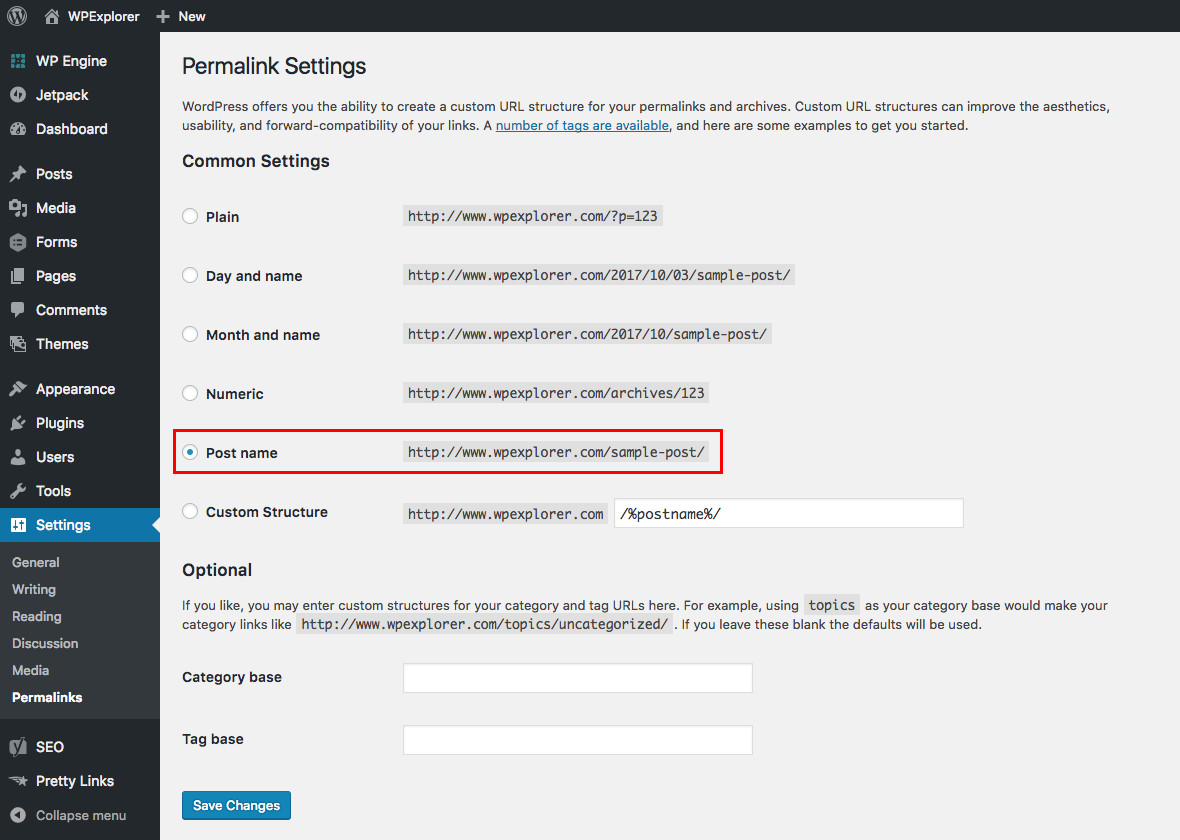
First, go to your WordPress dashboard. Find the Settings menu. Click on it. Then, select Permalinks. Here, you can see different URL structures. Choose the one you like. Click Save Changes to apply it.
You can make URLs look nice. Use words, not numbers. This helps people understand your links. It also helps with search engines. Make URLs short and clear. Use dashes to separate words. For example, example.com/your-post is good. Avoid long, confusing URLs.
Common Issues
Many websites have broken links. These links lead nowhere. Users get confused. It hurts your website. Search engines do not like broken links. They lower your rank. Fixing broken links is important. Always check for broken links. Use tools to find them. A healthy website has working links. Users will stay longer. Your site will look professional. Fixing broken links helps SEO. It makes your site better. Keep your links updated. Users will thank you. A good website needs good links. Avoid problems with broken links. Fix them quickly. Your site will improve.
Redirection is tricky. Websites change URLs often. Old URLs need redirection. New URLs must work. Users get lost with bad redirection. Your site needs proper redirection. Use tools for help. Search engines like good redirection. They rank your site better. Users find pages easily. Your site looks organized. Good redirection helps SEO. It keeps traffic steady. Avoid problems with redirection. Make it simple. Users will appreciate it. A smooth website needs smooth redirection. Fix redirection issues fast. Keep your site easy to use. Proper redirection is key. Your site will succeed.
Best Practices
Picking the best URL structure helps users and search engines. A simple format like /post-name is easy to read. It also makes your site look clean. Avoid long and confusing URLs. Users should know what the page is about just by looking. This builds trust and helps with SEO.
Keep URLs the same once you set them. Changing URLs can break links. It might confuse users. Always use lowercase letters. Avoid using spaces or special characters. Stick to dashes to separate words. This makes URLs neat and easy to understand. Consistency in URLs helps in building a strong online presence.
Credit: www.wpexplorer.com

Credit: www.malcare.com
Frequently Asked Questions
What Is A WordPress Url Without Permalink?
A WordPress URL without a permalink typically uses a default structure. It includes query strings like `? p=123` to identify posts or pages. This structure is not user-friendly or SEO optimized. Permalinks enhance readability and improve search engine rankings by using descriptive URLs.
How To Identify A Default WordPress Url?
A default WordPress URL often includes query parameters. These might look like `http://example. com/? p=123`. Such URLs lack descriptive keywords. This makes them less appealing for users and search engines. Switching to permalinks enhances the URL structure for better readability and SEO.
Why Are Permalinks Important For Seo?
Permalinks are crucial for SEO because they enhance URL structure. Descriptive URLs improve user experience and search engine rankings. They make links more readable and memorable. This leads to higher click-through rates and better indexing by search engines, ultimately boosting website visibility.
Can I Change WordPress Urls To Permalinks?
Yes, you can change WordPress URLs to permalinks. Navigate to the WordPress dashboard, select “Settings,” then “Permalinks. ” Choose a structure that best suits your website’s needs. This change will enhance readability, SEO, and user experience by providing more descriptive and memorable URLs.
Conclusion
Permalinks simplify WordPress URLs, making them user-friendly and memorable. They help search engines understand your content better. Without them, URLs can look complex and confusing. A clean URL structure improves site navigation. It enhances the user experience. Search engines favor sites with clear URLs.
This boosts your site’s visibility. Consider using permalinks for effective site management. They benefit both users and search engines. Customizing permalinks in WordPress is simple. It enhances your site’s performance. Remember, a well-structured URL makes a big difference. Keep your URLs clean and concise for better results.


