
Are you curious about how to boost your website’s visibility on search engines? If you’re using WordPress, you might have stumbled upon the term “Google Sitemaps.”
But what exactly does it create, and why is it essential for your site? Imagine having a roadmap that guides search engines straight to your content, ensuring none of your hard work goes unnoticed. You’ll discover the specific file that WordPress generates for Google Sitemaps and learn why it’s a game-changer for your site’s SEO performance.
Stick with us to unlock the secrets of maximizing your online presence effortlessly.
Google Sitemaps In WordPress
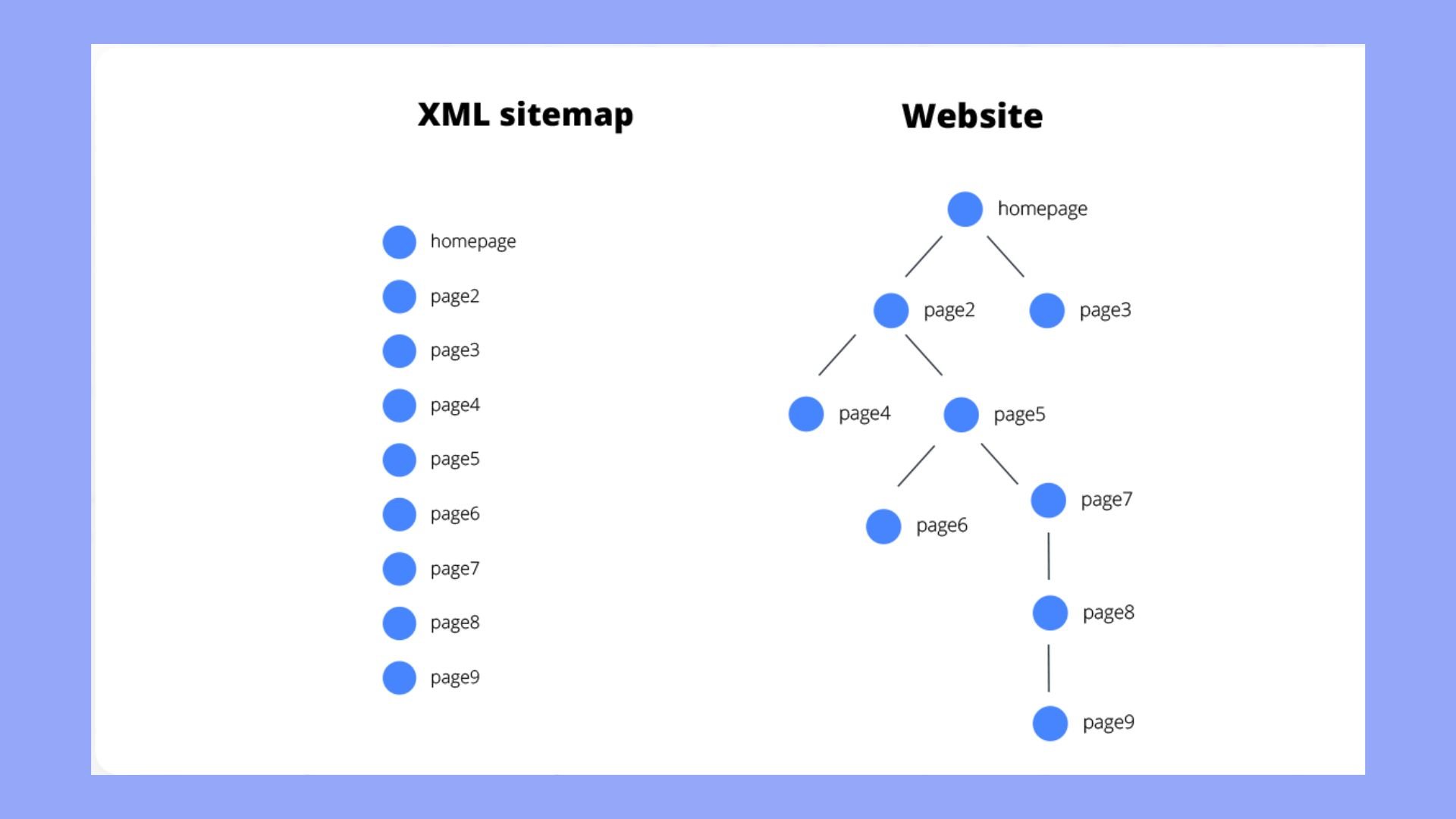
Google Sitemaps are like maps for your website. They help search engines find your pages. WordPress can make these sitemaps easily. They are called XML files. XML files tell Google about all your website pages. They show how often pages change. They also show the importance of each page. This helps Google know which pages to show first. It’s like giving Google directions to your website.
Some plugins make creating sitemaps easy. They do the work for you. You just need to install and set them up. This makes it simple for anyone using WordPress. You don’t need to be a tech expert. Just follow the steps, and your sitemap is ready. This helps your site appear in Google search. More people can find your website this way. Google Sitemaps are important for your site.
Credit: 10web.io
Importance Of Sitemaps
Sitemaps help search engines find your web pages. They show the structure of your site. Google can then understand it better. This improves visibility in search results. More people will see your site. This can lead to more visitors. Sitemaps are like a map for search engines. They guide them to all your pages.
A good sitemap helps with website indexing. Search engines visit your site often. They need to know about new or updated pages. A sitemap tells them what is new. This helps your pages get indexed faster. Faster indexing means your pages appear in search results sooner. It’s important for keeping your site up-to-date.
File Types For Google Sitemaps
XML Sitemap Files are like maps for search engines. They help Google find website pages. These files use a special format. It is called XML. XML stands for Extensible Markup Language. This format is easy for computers to read. It lists all the important pages on a site. Each page has a link in this file. Google uses these links to find and index pages. This helps your site show up in search results. XML sitemaps are very important for SEO.
HTML vs. XML Sitemaps are different but both are useful. HTML sitemaps are for people. They help users find information easily. XML sitemaps are for computers. They tell search engines about your site’s pages. Both types of sitemaps are needed. They help improve your website’s visibility. This makes your site easier to find online. Ensuring both types are up-to-date is key for success.

Credit: make.wordpress.org
Creating Sitemaps In WordPress
WordPress has many plugins to help create sitemaps. Yoast SEO and Google XML Sitemaps are popular. These plugins generate the XML file needed for search engines. You don’t have to code anything. Just install the plugin and follow the steps. The sitemap updates itself. This keeps search engines aware of new content.
Creating a sitemap manually takes more work. Open a text editor and write the links. Save the file as sitemap.xml. Upload this file to your website’s root directory. This method gives you full control. But it can be hard to update often. It’s best for small sites with few pages.
Popular WordPress Sitemap Plugins
WordPress sitemap plugins simplify creating XML files for Google sitemaps, enhancing website indexing. These plugins generate structured XML files, guiding search engines through site content efficiently. Suitable for non-native users, they offer straightforward solutions to improve visibility and accessibility in search results.
Yoast Seo
Yoast SEO is a popular plugin for WordPress users. It helps create sitemaps for better website visibility. Yoast SEO is easy to use. It provides tools for optimizing your website. Users can generate XML sitemaps quickly. This helps search engines index your site efficiently. Yoast SEO also offers content analysis features. These features improve on-page SEO. Many users trust Yoast SEO for their SEO needs. It is frequently updated for best performance.
Google Xml Sitemaps
Google XML Sitemaps plugin is widely used for creating sitemaps. It supports all types of WordPress pages. This plugin helps search engines find your content. It automatically updates sitemaps when new content is added. Google XML Sitemaps is easy to configure. Users can customize settings based on their needs. This plugin is a reliable choice for many WordPress users. It ensures faster indexing by search engines.
All In One Seo Pack
All in One SEO Pack is another popular option for WordPress users. It offers sitemap features to enhance website visibility. The plugin is user-friendly and supports beginners. Users can create XML sitemaps easily. It provides tools for optimizing website content. Many users appreciate its simplicity and efficiency. All in One SEO Pack is a trusted plugin for better SEO results. Updates are regular for improved performance.
Configuring Sitemap Settings
Google sitemaps help websites get found. Setting frequency tells Google how often a page changes. Priority shows which pages are more important. These settings help Google know when to check your website. It’s like setting a reminder for Google.
Setting Frequency And Priority
Pages that change daily should have a high frequency. Others might need weekly or monthly checks. Use numbers from 0.1 to 1 to set priority. Higher numbers mean the page is more important. Important pages could be your homepage or main products.
Excluding Pages And Posts
Some pages don’t need to be in the sitemap. Exclude pages that are not important. This helps keep the sitemap clean. Exclude old posts or pages that are private. This makes the sitemap more useful for Google.
Submitting Sitemaps To Google Search Console
First, you need to show Google that you own the site. Sign in to the Google Search Console. Then, add your website. You might be asked to verify ownership. There are many ways to do this. You can use a HTML tag in your site’s code. Another way is to upload a file. Choose a method that’s easy for you. After this, Google knows you own the site.
Creating an XML Sitemap is important. It helps Google find your pages. Use a plugin like Yoast SEO to make one. Go to the plugin settings. Find the sitemap option. Enable it. Now, copy the sitemap link. Go back to Google Search Console. Find the Sitemaps section. Paste your sitemap link there. Submit it. This helps Google see all your pages.

Credit: wordpress.org
Troubleshooting Sitemap Issues
WordPress Google Sitemaps often create XML files. These files help search engines understand website structure. Troubleshooting involves ensuring correct XML creation and submission to Google Search Console.
Common Errors And Fixes
Sitemaps can have errors that block search engines. A common error is a 404 not found. This means a page is missing. To fix it, check the URL. Update links if needed. Another error is blocked by robots.txt. This file tells search engines what to ignore. Ensure your sitemap is not blocked. Syntax errors can occur. These are mistakes in the code. Use tools to validate your sitemap. Fix any code errors found. Server issues can also cause problems. If the server is down, the sitemap won’t load. Contact your hosting provider for help.
Monitoring Sitemap Performance
Regular checks of your sitemap are important. Use Google Search Console. It shows how well your sitemap works. Look for crawl errors. These are problems that stop search engines from reading your site. Check for indexing issues. If pages are not indexed, they won’t appear in searches. Monitor traffic changes to see if sitemaps help. Compare visitor numbers before and after sitemap updates. Use analytics tools for detailed reports. These tools help track performance over time.
Frequently Asked Questions
What File Does WordPress Google Sitemap Create?
WordPress Google Sitemap typically creates an XML file. This file helps search engines understand the structure of your website. It lists all your website’s pages and posts. The XML sitemap enhances your website’s visibility in search engine results. This improves the indexing process for search engines like Google.
How Does A Google Sitemap Benefit My Website?
A Google Sitemap improves search engine indexing for your website. It ensures search engines find and crawl all your pages. This leads to better visibility in search results. Consequently, it can increase organic traffic. A sitemap is essential for websites with complex structures.
Is An Xml Sitemap Necessary For Seo?
Yes, an XML Sitemap is crucial for SEO. It helps search engines efficiently crawl and index your site. This is especially important for large websites. Without a sitemap, some pages might not be discovered. It also provides metadata about your site’s content, enhancing search engine understanding.
How Can I Create A Google Sitemap In WordPress?
You can create a Google Sitemap using plugins like Yoast SEO or Google XML Sitemaps. These plugins automatically generate and update your sitemap. They ensure all your content is included. Simply install and activate the plugin, and it handles sitemap creation for you.
Conclusion
Creating Google sitemaps in WordPress is crucial for SEO. It helps search engines understand your site. The file generated is usually XML. This file lists all your site’s pages. Search engines find and index them easily. This improves your site’s visibility.
A well-structured sitemap ensures better ranking. It’s a simple yet effective tool. Regular updates to your sitemap are important. This keeps your site relevant. Always ensure your sitemap is active. It helps in maintaining your site’s health. Start today. Boost your site’s performance with a proper sitemap.


