
Are you struggling to optimize your WordPress site for search engines? One crucial component of effective SEO is having a well-structured sitemap.
But here’s the big question: what’s the page name for the sitemap in WordPress? This seemingly minor detail can have a significant impact on how easily search engines can crawl and index your site. Imagine unlocking the secret to making your website more visible and accessible to potential visitors.
Intrigued? Stick with us as we unravel the mysteries of sitemaps and guide you through the steps to ensure your site is set up for success. Get ready to boost your site’s performance and attract more traffic with just a few simple tweaks.

Credit: wordpress.com
Importance Of Sitemaps In WordPress
Sitemaps are essential for better SEO. They help search engines find all pages. Every page on your site becomes visible. Search engines index these pages easily. Quick indexing improves your site’s ranking. With a sitemap, your content is more accessible. This helps in reaching a wider audience. Sitemaps are important for new and updated content. They notify search engines quickly.
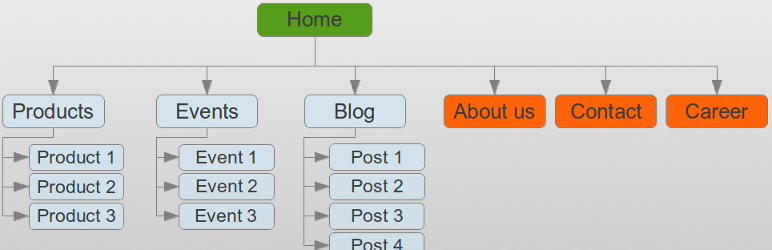
Sitemaps act like a map for your site. They guide users and search engines. Visitors find pages easily through a sitemap. It improves user experience. A good user experience leads to more visits. Well-structured sitemaps help in organizing content. This makes it easier for users to find what they need.
Choosing The Right Page Name
The name of the sitemap page must be clear and simple. It should describe the page’s purpose. Keep it relevant to your site’s content. This helps visitors understand its role. Search engines also find it more useful. Avoid using long or complex words. Consistency with other page names is key. This creates a uniform look. It also helps with site navigation.
Many sites use “Sitemap” as the page name. This is easy to recognize. Another option is “Site Map”. Some choose “HTML Sitemap” for clarity. Stick to simple and short names. This makes it easier for everyone to follow. Avoid tricky or technical terms. They might confuse users. Simple names are best.
Creating A Sitemap Page
Begin by logging into your WordPress dashboard. Navigate to Pages and click Add New. Enter a title like “Sitemap” for clarity. Next, use the HTML block to add your sitemap code. This code helps search engines find your pages.
Plugins make creating sitemaps easy. Install a plugin like Yoast SEO. Activate it through the plugin settings. Once activated, go to the plugin’s settings page. Find the sitemap option and enable it. The plugin generates the sitemap for you. This saves time and effort.
Optimizing Sitemap Page
Keywords are very important. They help Google find your site. Use specific keywords for each page. Choose words your visitors might search. Add them to your sitemap page. This helps with search rankings. Use simple words. Avoid complex terms. Make it easy to understand. This attracts more readers.
Structure your sitemap well. List pages clearly. Use short sentences. Make it easy to read. Break text into paragraphs. Use bullets for lists. Visitors need information fast. Keep it simple. Bold important words. This makes them stand out. Clear structure helps visitors. They find what they need quickly.
Monitoring Sitemap Efficiency
Sitemaps help Google find your pages. They show how your site is organized. You can check their efficiency with different tools. Google Search Console is a popular choice. It shows which pages are indexed. It also highlights any errors. This tool is easy to use. Another tool is Screaming Frog. It analyzes your sitemap deeply. You can spot problems and fix them quickly. Keeping your sitemap efficient is key. This ensures search engines can read your site.
Performance metrics tell how well your sitemap works. Look at indexing rates. Are all your pages indexed? Check the crawl errors. Fix them fast to improve efficiency. Use analytics tools to gather data. These metrics help you understand sitemap success. Regular checks keep your site healthy. Keep an eye on these metrics for a smoother experience.
Credit: wordpress.org
Common Mistakes To Avoid
Overloading with Information can confuse visitors. A sitemap should be simple. Too much data overwhelms users. Keep the information clear. Only include necessary pages. Simple sitemaps are easy to navigate.
Ignoring Updates and Maintenance is risky. Websites change often. Sitemaps must stay current. Regular updates are crucial. Outdated sitemaps mislead users. They might miss important pages. Maintenance ensures accuracy. It helps search engines find your site.
Benefits Of An Effective Sitemap
A sitemap helps search engines find pages on a website. Search engines can index these pages faster. This means more pages appear in search results. An effective sitemap helps improve website visibility. More visibility can lead to more visitors. A sitemap is an important tool for SEO. Every website should have one.
Sitemaps make websites easy to navigate. Users find pages quickly without hassle. A good sitemap ensures all parts of a site are accessible. This improves the user experience significantly. Happy users are more likely to return to a website. It’s crucial for any site to be easy to navigate.

Credit: wordpress.com
Frequently Asked Questions
What Is A Sitemap In WordPress?
A sitemap is a file that lists all your website’s pages. It helps search engines like Google index your site more efficiently. In WordPress, sitemaps are often generated automatically by SEO plugins such as Yoast or Rank Math.
How Do I Create A Sitemap In WordPress?
To create a sitemap in WordPress, you can use an SEO plugin. Plugins like Yoast SEO or Rank Math automatically generate sitemaps. Simply install and activate the plugin, and your sitemap will be created.
Where Can I Find My WordPress Sitemap?
Your WordPress sitemap is usually found at “yourwebsite. com/sitemap. xml”. You can also access it through your SEO plugin. Check the plugin’s settings for the exact location.
Why Is A Sitemap Important For Seo?
A sitemap improves your site’s SEO by helping search engines discover your pages. It ensures that all important pages are indexed. This can lead to better visibility and higher search rankings.
Conclusion
Choosing the right sitemap page name in WordPress is crucial. It helps search engines find your content easily. Use clear and descriptive names. Avoid complex words. This makes navigation simple for visitors. With a well-chosen name, you boost your site’s visibility.
SEO becomes more effective. Your content reaches more people. A small step, but important. It improves user experience. Keep it straightforward. Your website gains value in the digital world. Remember, clarity is key. Maintain simplicity for better results. Your site grows with thoughtful planning.
This strengthens your online presence.


