
Ever stumbled across a WordPress site and wondered, “What version of WordPress is that?” You’re not alone.
Whether you’re a budding developer, an experienced designer, or someone exploring the vast world of WordPress, knowing the version of a website can be a game-changer. It can provide insights into security, features, and compatibility with themes and plugins. Imagine being able to assess the potential of a site or troubleshoot issues with ease, simply by knowing its WordPress version.
You’ll discover simple yet effective ways to identify a site’s WordPress version, empowering you to make informed decisions and enhance your web projects. Let’s dive in and uncover the mystery behind WordPress versions together!
Identifying WordPress Versions
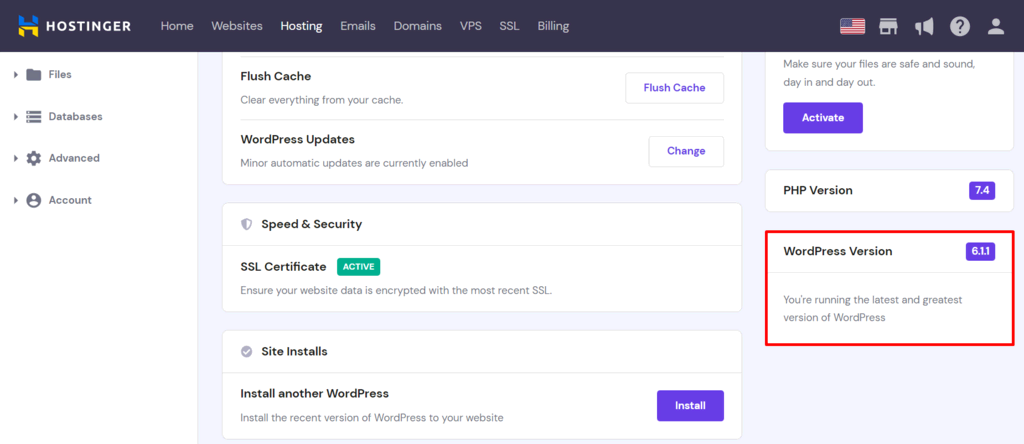
The WordPress version can be found in the admin dashboard. Log in to your WordPress site. Look at the bottom right corner of the dashboard. You will see the version number there. This is a quick way to find the version. Sometimes the version number is next to the WordPress logo. Check both places to be sure. This method is easy and fast for everyone.
You can inspect the source code to find the WordPress version. Right-click on the page and choose “View Page Source.” Look for the meta tag in the code. It usually has the version number. This method helps you know the version without logging in. Be careful with the code. It might look confusing at first. But with practice, it becomes easier.
Credit: www.hostinger.com
Tools For Version Detection
Discovering what version of WordPress a site uses is crucial for security and compatibility. Tools like WPScan and BuiltWith help identify the version efficiently. This information aids in maintaining and updating WordPress sites effectively.
Online Version Checkers
Online tools help find out the WordPress version fast. They scan websites and tell the version. These tools are easy to use. Just enter the website URL. They give results in seconds. Some popular tools are WPThemeDetector and WPSniffer. They are free and reliable. They provide other information too. Like themes and plugins used. This helps in website analysis.
Browser Extensions
Browser extensions are handy for detecting versions. They work directly in web browsers. After installing, they show version details quickly. Extensions like WordPress Version Check are popular. They help web developers and bloggers. They are easy to use and time-saving. These extensions often provide extra features. Like security checks and theme details. They make version checking simple and efficient.
Why Knowing The Version Matters
Older versions of WordPress can be unsafe. Hackers find holes in old software. They use these to steal data. New versions fix these holes. They keep sites safe. Knowing the version helps. It tells if the site is secure. Staying up to date is important. It helps protect users and site owners. This prevents many problems. Regular updates are key to safety.
Plugins and themes need the right version. Old versions may not work well. Some features can break. This makes the site look bad. It can confuse visitors. Updating helps avoid these issues. It ensures everything works smoothly. Developers design new plugins for current versions. Knowing your version helps choose the right plugins. This improves site performance. Keep checking your version to stay compatible.
Common Challenges In Version Detection
Hidden version information can make finding the WordPress version tricky. Developers may remove version details to boost security. This makes it hard to identify the version. Some users change the default setup. They hide the version for privacy reasons. This leads to difficulty in detection.
Modified WordPress Installations also pose a challenge. Users often tweak their WordPress settings. They add custom codes or plugins. These modifications mask the original version. Identifying such versions needs extra effort. Experts use special tools to find these hidden details. This process is not always simple.
WordPress Version History
WordPress has had many updates over the years. Each update brings important changes. Version 1.0 was simple but powerful. Then came Version 2.0, adding new features. Users loved the new dashboard. Version 3.0 was a big change. It added new themes and menus. This made sites look better.
Version 4.0 improved the editor. Writing posts became easier. Version 5.0 introduced Gutenberg. This was a new way to build pages. Many people liked it. Others found it hard to use. Updates help WordPress stay fresh. They add exciting features. They make it easier for users.
Each update changes how WordPress works. Features get better and more useful. Security improves with updates. This keeps sites safe. Speed is important too. Updates make WordPress faster. Users can do more with less effort. Plugins get better with updates. This helps sites do more things.
Credit: kinsta.com
Staying Updated With WordPress
Updating WordPress is very important. It keeps your site safe from hackers. New updates fix bugs and add new features. Regular updates help your site run smoothly. Your site will be faster and more reliable. Updates keep your website compatible with new tools. Always check for updates to keep your site secure.
Make a backup of your site before updating. Use trusted plugins and themes. Check plugin compatibility with new updates. Test updates on a staging site first. Schedule regular updates to avoid issues. Keep your database clean and optimized. These steps help maintain a healthy WordPress site.

Credit: www.interserver.net
Frequently Asked Questions
How Can I Identify My WordPress Version?
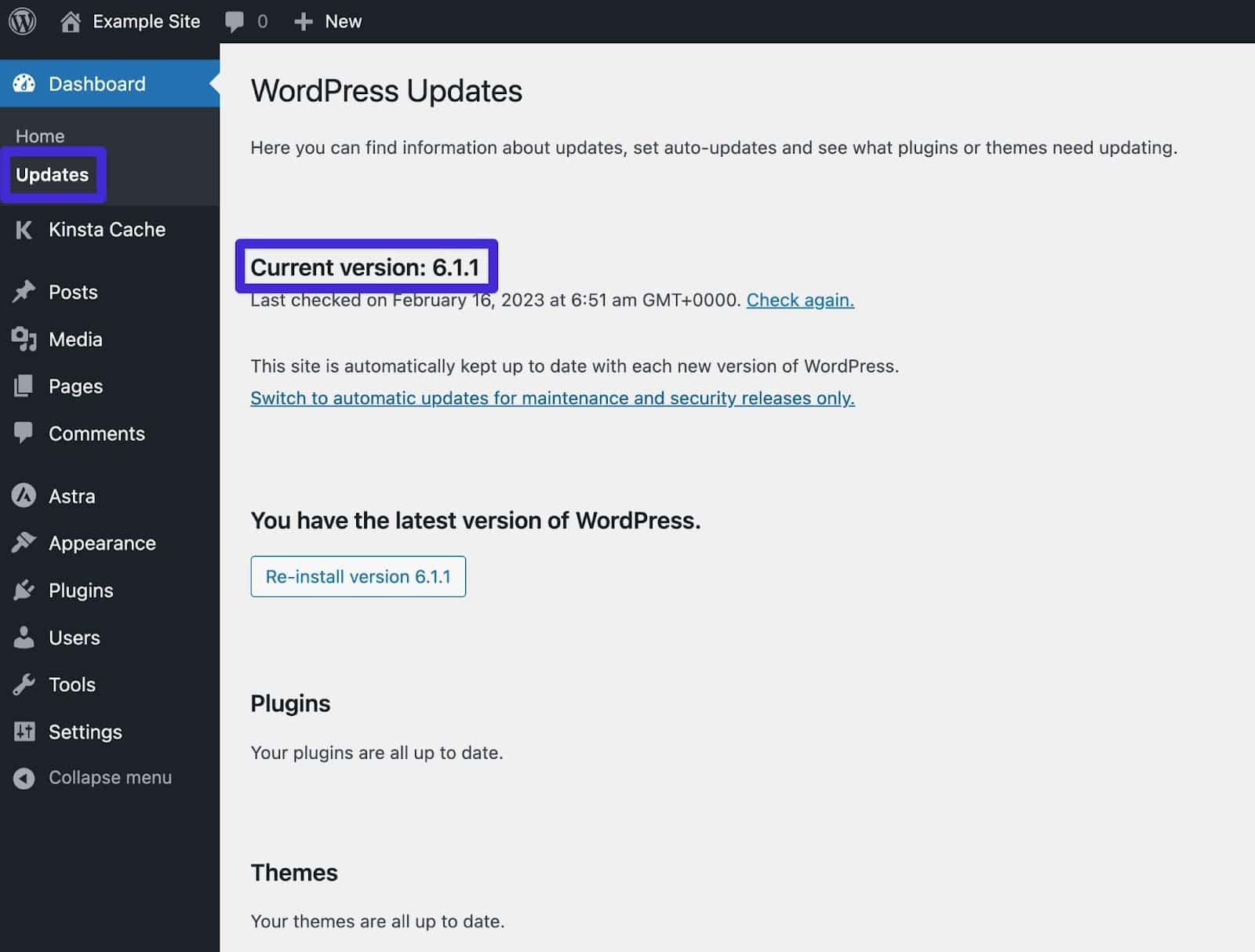
To identify your WordPress version, log into your admin dashboard. Check the bottom right corner of the dashboard homepage. Alternatively, navigate to “Updates” under the “Dashboard” menu. Your WordPress version will be displayed there.
Why Should I Know My WordPress Version?
Knowing your WordPress version helps ensure compatibility with themes and plugins. It also helps you maintain security by identifying if you need updates. Regular updates often include security patches to protect your website from vulnerabilities.
Is It Important To Update WordPress Regularly?
Yes, updating WordPress regularly is crucial. Updates provide security patches, bug fixes, and new features. Regular updates help protect your site from vulnerabilities. They ensure compatibility with the latest plugins and themes, maintaining your site’s functionality.
Can I Check WordPress Version Without Logging In?
Yes, you can check without logging in. View your site’s source code and search for “generator” meta tag. This tag usually reveals the WordPress version. However, some websites hide this information for security reasons.
Conclusion
Understanding your WordPress version helps maintain a secure website. It ensures compatibility with plugins and themes. Knowing the version aids in troubleshooting issues. Always update to the latest version for best performance. Regular updates keep your site secure from threats.
They also bring new features and improvements. Stay informed about updates and changes. This way, your site remains efficient and safe. Keep your WordPress version in check. It’s crucial for a smooth online experience. Remember, a well-maintained site attracts more visitors and builds trust.
Happy blogging!


